JotDrop
 Diexar Labs1k downloads
A private, open-source Google Keep alternative: a Google Keep-style quick-capture card grid with a companion Android app and Chrome web clipper. Offline, no account, plain Markdown.
- Overview
- Scorecard
- Updates58
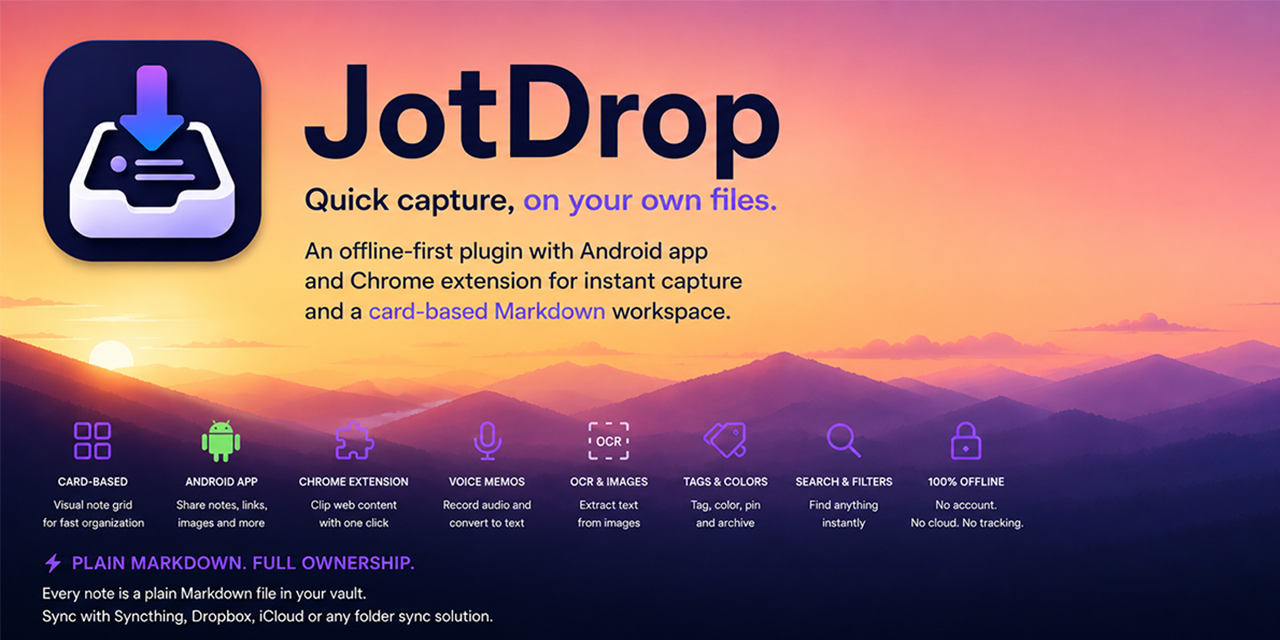
JotDrop
Google Keep, on your own files.
JotDrop is a free, open-source Google Keep alternative for Obsidian. It's a trio: the plugin (the card grid in your vault), a companion Android app (share-sheet capture, OCR, voice memos), and a Chrome web clipper. Sync them with Syncthing and you have Google Keep, fully offline, fully yours.
For the full Google Keep experience, install all three. Install the plugin from Obsidian Community plugins, download the Android APK or join the Google Play test, and install the Web Clipper from the Chrome Web Store - one click, automatic updates, works without any configuration.
Help test JotDrop on Google Play
The Google Play test is live! We need at least 12 Android testers. Keep using JotDrop normally, remain opted in for 14 consecutive days, and share any bugs or confusing behavior. No scripted checklist or daily chores. Joining is voluntary, and the GitHub APK remains available.
The GitHub APK works without any registration; the Play test is an optional invitation. Use your existing Google account from Play: no new account or signup form is needed, and you do not have to join a Google Group. Sending the request email does not grant access automatically; wait for our confirmation.
- Email your Play account to request access: send the exact Google account address you use in Play. Diexar adds you to the closed-test allowlist and replies with the Play link. This only requests access; it does not yet register you as a Play tester.
- After confirmation, join and download in Google Play: choose Become a tester, then follow the download link. Stay opted in as a Play tester for at least 14 days. If Play says unavailable, check that both pages use the same Google account and allow time for access to update.
Already have Play access? Skip the email and go straight to step 2.
Existing group-based testers: keep your current Play opt-in. While Google processes the access-method change, do not leave the old group or opt out. We have copied the existing group accounts into the email list; no new access request is needed. The group can remain an optional discussion channel after migration.
Already using the GitHub APK? Read this before uninstalling: Play uses a different signing key and cannot update that APK in place. First confirm that Play offers the test to your account/device. Back up your vault and record its folder, note/attachment folder settings and other app preferences. Only then uninstall the GitHub JotDrop app, install from Play and select the same vault and folder settings. App preferences reset; external Markdown files are separate from the app, but keep a verified backup before switching. If Play says the test is unavailable, do not uninstall: check the Google account, allow time for access to propagate, then retry or ask for help.
Feedback/help: issue #10. Please share this invitation with another interested Android user. GitHub/Obtainium installs and extra phones using the same account do not count as additional Play testers.
Manual access handling: verify the requested Google account address, then edit JotDrop Play testers in the existing Alpha track's Testers tab. Add the address without replacing existing entries. Before sending a confirmation, verify that the email-list configuration is published and the account is included. No automated inbox processing or reply service is configured.
Reply only after access is available:
Your Google Play account has been added to the JotDrop test. Open https://play.google.com/apps/testing/com.diexar.keepcapture with that account, choose Become a tester, then install from Play. No Google Group is needed. Please stay opted in for 14 consecutive days. If you use the GitHub APK, confirm Play access and back up your vault before switching: https://github.com/Diexar-Labs/jotdrop/issues/10.
Why JotDrop?
JotDrop is a private, open-source Google Keep alternative. Google Keep is great - until you remember Google reads everything you put in there. JotDrop gives you the same fast, friction-free "dump a thought" experience, but every note is a plain Markdown file in your own Obsidian vault. No JotDrop cloud account, no ads, no lock-in. Sync between phone and laptop with Syncthing (free) or any folder-sync you already use. Android OCR processes your images locally; its ML Kit SDK sends technical diagnostics to Google, as explained in the Android privacy policy.
- Quick capture, anywhere. Share a link from any Android app → JotDrop turns it into a note with a preview card. Open the app, tap once, type, done.
- Card grid in Obsidian. A dedicated view shows your notes as Keep-style cards: titles, colors, tags, archived, pinned-on-top. Filter, sort, search.
- Plain Markdown, always. Notes are
.mdfiles with YAML frontmatter. They live in your vault. You can edit them anywhere - Obsidian, VS Code, Vim, mobile. - Offline by default. No server. No account. Works on a plane.
- Open source, free, no premium tier. MIT-licensed.
Screenshots
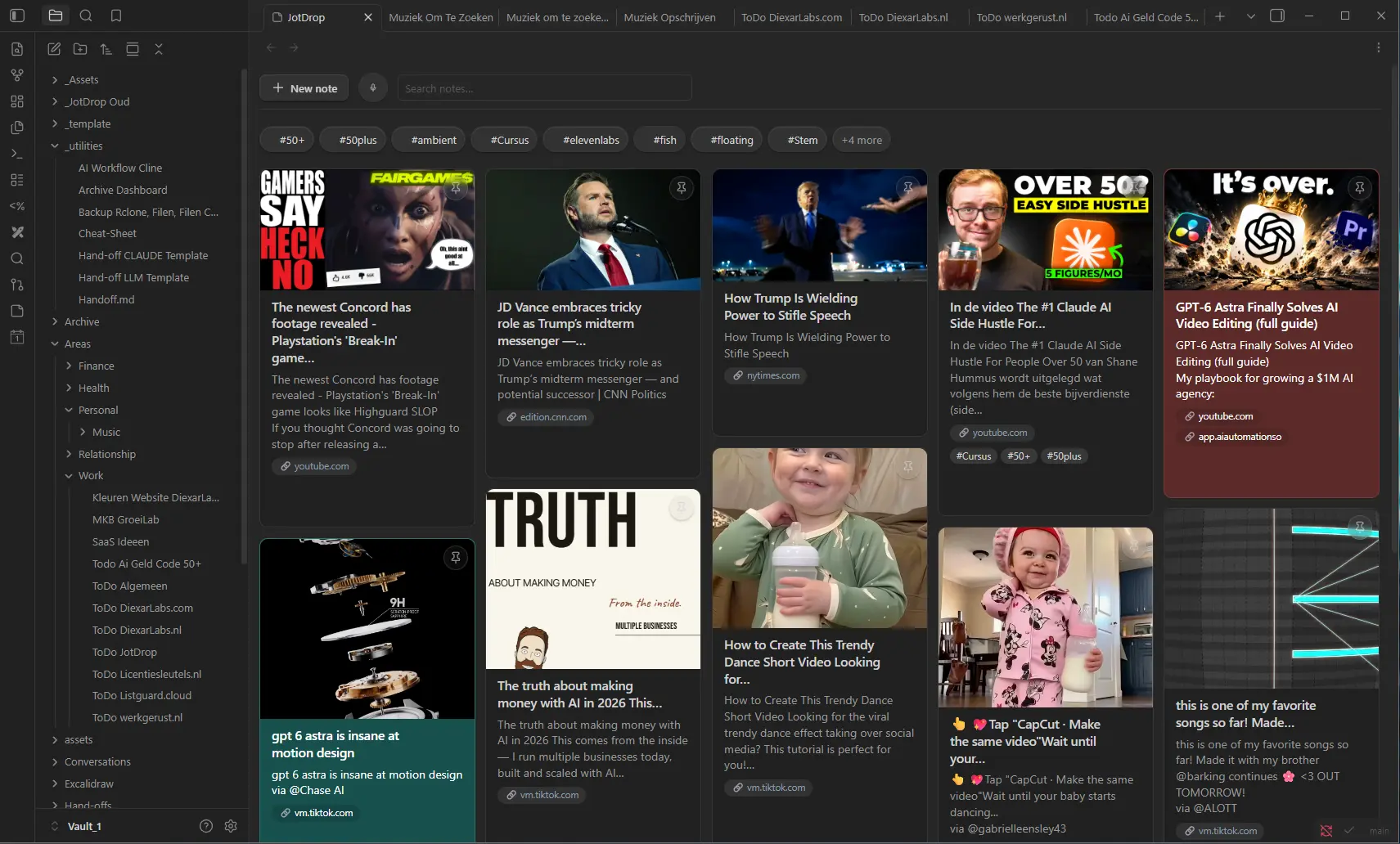
Obsidian desktop - Keep-style card grid
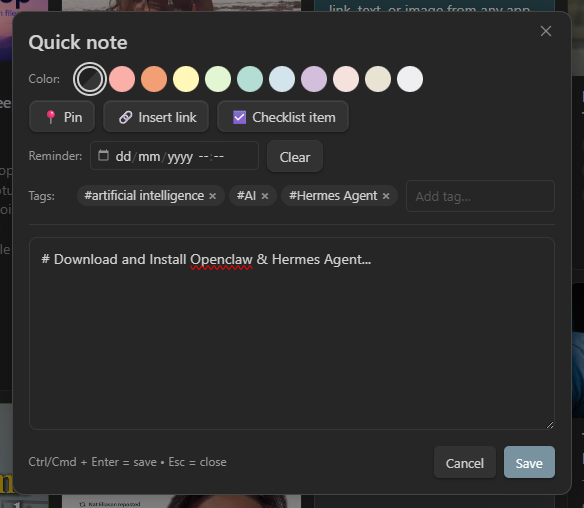
Quick-note editor - colors, tags, checklist, pin |
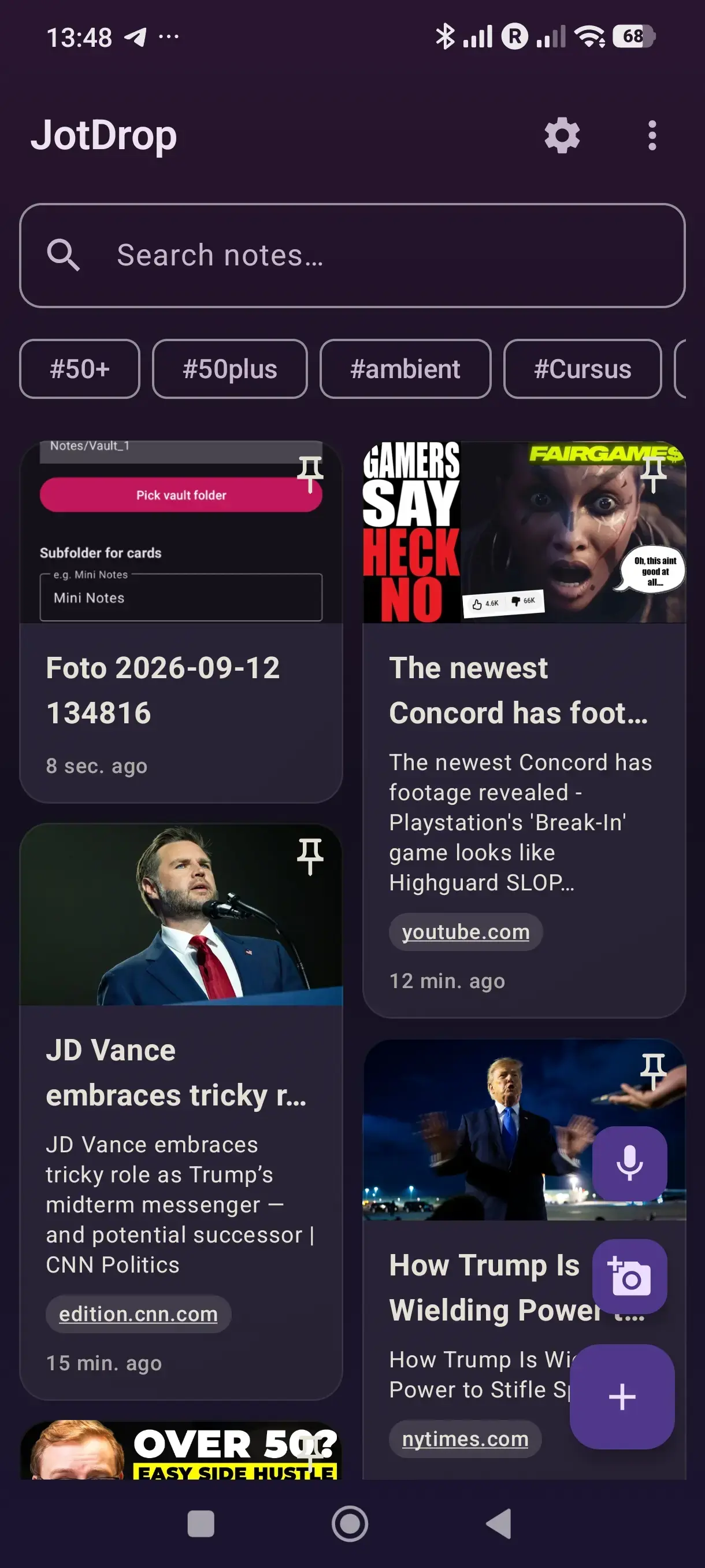
Android - home screen |
Features
Capture
- Android share-target - share any link, text, or image from any app
- Standalone Android app for typing/dictating notes directly
- Voice memos - one-tap recording on the dashboard, on both Android (
.m4a) and the Obsidian plugin (.webm/opus); a confirmation dialog asks before saving, audio lands as a card with an equalizer-banner thumbnail - Voice-to-text on Android (uses system speech recognizer)
- OCR on photos via ML Kit (text-recognition v2, bundled in APK - no Google Play Services needed)
- Link previews (Open Graph) - paste a URL, get a card with title, image, and source
Organize
- Colors (11 swatches, colorblind-friendly labels)
- Tags - typed inline or picked from existing; filter-chip strip under the search bar (top-N by frequency, "+N more" sheet for the long tail)
- Bulk-select - long-press a card to enter multi-select; bulk archive or delete with confirmation
- Archive with one tap, restore anytime
- Pinned notes float to the top
- Drag to reorder on Android. Tap the sort icon in the top bar, choose Drag cards, then touch and hold a card to move it. Pinned and other cards can each be reordered within their own section; choose Newest first to switch back to automatic sorting.
- Search & filter across body, title, tags
- Reminders - per-note due-date with Android notifications; "Due" / "Overdue" badges on the card; survives reboot
Edit
- Inline
- [ ]checklists with smart toolbar toggle - Image embeds (
![[image.jpg]]) shown as thumbnails on the card - Audio embeds (
![[memo.m4a]]): inline player in both the Android editor and the Obsidian edit modal; tap a voice-memo card to play it back - Lightbox - tap a thumbnail to view full-screen, with "Open externally" fallback
- Auto-saves as you type (and on back-button)
- Live preview of pasted links
- Refcount-aware delete: when you remove a card, its embedded image/audio is moved to the OS recycle bin too, but only if no other card (incl. Archive) still references it (so shared OG-thumbnails stay safe)
Clip the web
- Chrome extension companion - one-click clip of the current page into your vault as a Markdown note, tags, color, pin and selection included
- Zero-config by default - saving opens Obsidian via the local
obsidian://protocol and creates the card; no token or port setup needed - Optional background connection - pair once with the plugin's localhost server (127.0.0.1, token-authenticated) for silent background clipping; on any failure the clipper falls back to the direct URI, so a clip is never lost
Sync
- Files written as
<date>-<slug>.mdwith YAML frontmatter (color, tags, archived, pinned) - Designed to coexist peacefully with Syncthing - placeholder + finalize handshake avoids edit-conflicts
- Works with the official Obsidian Sync, iCloud, Dropbox, or any folder sync
Install
TL;DR: install the plugin from Obsidian, use the versioned Android APK link below, and load the Chrome extension from this repository. No build tools needed.
JotDrop is a trio. Each part works on its own, but you only get the full Google Keep experience when all three are installed:
- Obsidian plugin - the Keep-style card grid: view, organise, edit.
- Android app - capture from anywhere: share-sheet, OCR, voice memos.
- Chrome extension - clip web pages straight into your vault.
Web clipper (recommended route)
Install JotDrop Web Clipper from the Chrome Web Store. That's the recommended route: one-click install from the store, automatic updates, and your existing item/users are preserved.
Obsidian plugin (desktop + mobile)
Easiest (via Community plugins, recommended):
- Open Obsidian → Settings → Community plugins → Browse.
- Search for JotDrop and click Install, then Enable.
- Click the sticky-note icon in the left ribbon (or run command "JotDrop: Open Keep view").
Manual install (for offline / pre-release versions):
- Go to the current plugin release.
- Download
manifest.json,main.js, andstyles.css. - Put them in
<your-vault>/.obsidian/plugins/jotdrop/(create the folder if it doesn't exist). - Open Obsidian → Settings → Community plugins → enable JotDrop.
Android app
- Download
jotdrop.apkfor Android 0.28.12. - Open the file on your phone → Android will ask permission to install from unknown sources → grant it.
- Open JotDrop → first screen lets you pick the vault folder (the same one you sync to your laptop).
- From now on, the share-sheet in any app includes JotDrop.
Signing note: GitHub APKs currently use the repository's published compatibility key so they can update existing sideloaded installations. Because that key is public, it is not proof of authenticity. Download APKs only from the versioned
Diexar-Labs/jotdroprelease URL above and verify the linked Actions build.
Syncing the two
Install Syncthing on phone + laptop, point both at your vault folder. Within 30 seconds of capturing on your phone, the note shows up in Obsidian. That's the entire setup.
Recommended Syncthing setting: enable File Versioning on the shared folder (Simple Versioning is fine), on both devices. Deleted and overwritten files are kept in
.stversions/so an accidental delete (or a sync race, see Known issues) is recoverable instead of permanent.
Chrome extension (web clipper)
Part three of the trio - this is what replaces Keep's browser extension.
Recommended: install from the Chrome Web Store. One click, automatic updates, no configuration needed.
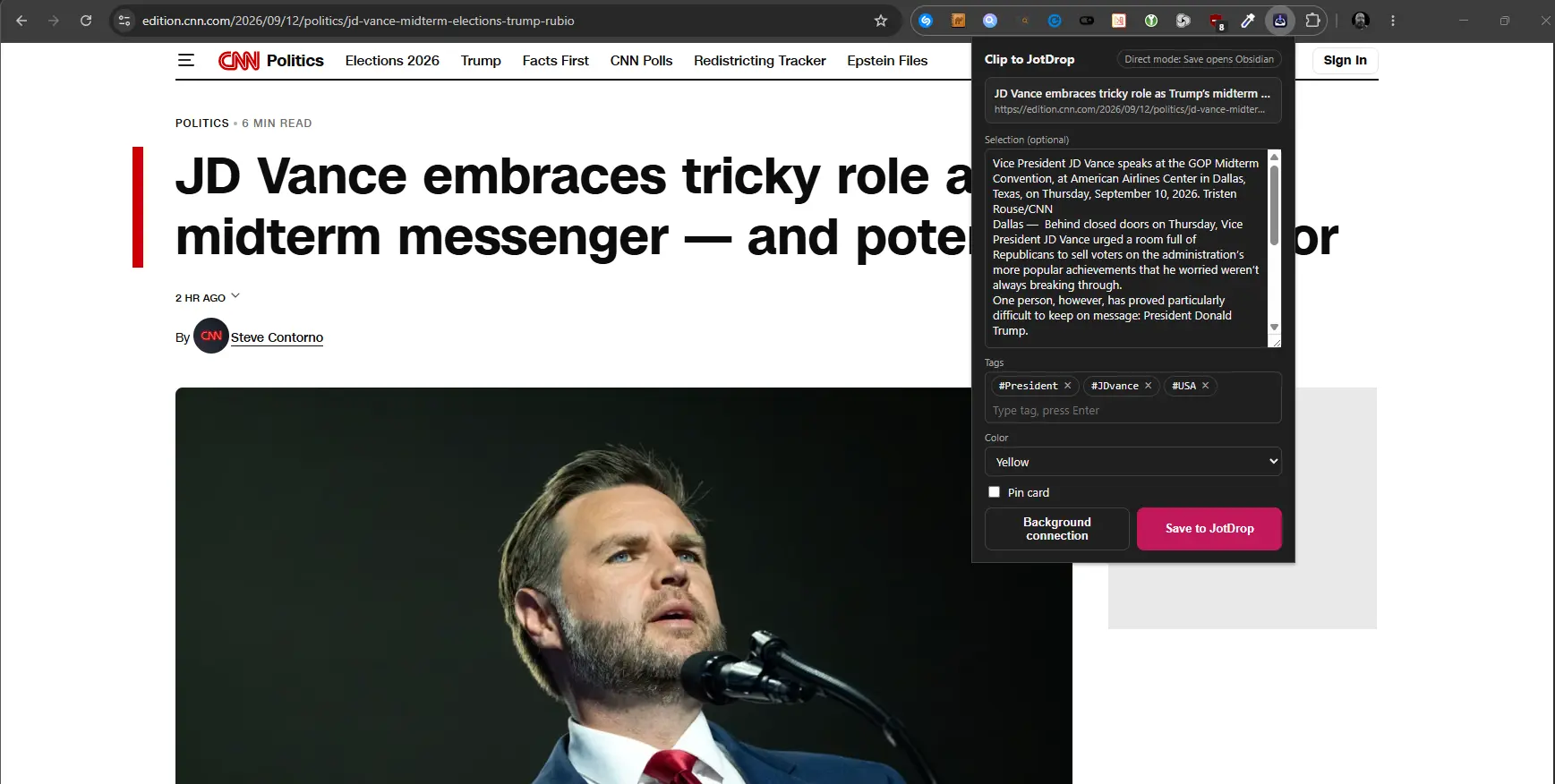
Web Clipper popup - title, selection, tags, color, pin, one-click save
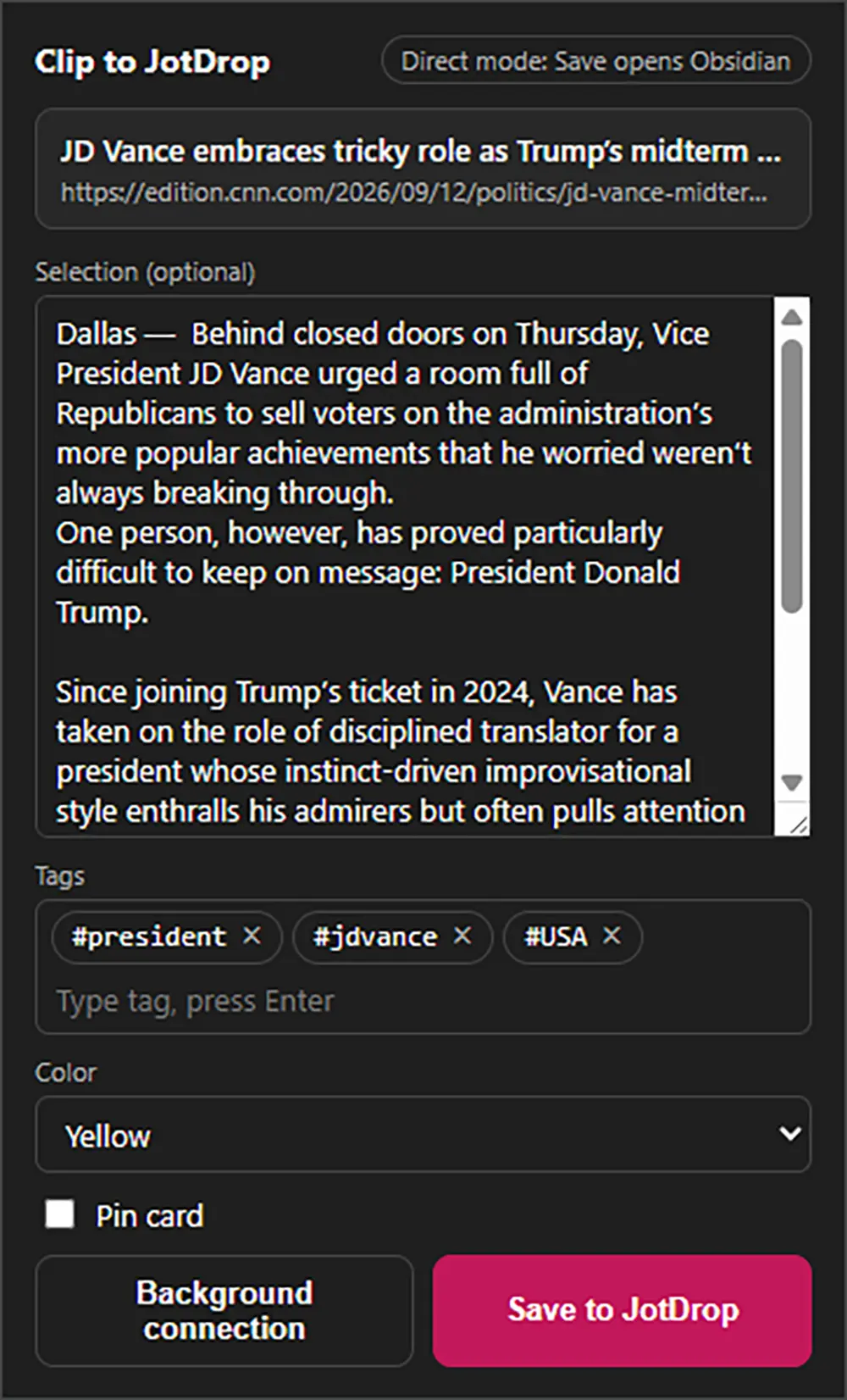
The popup up close |
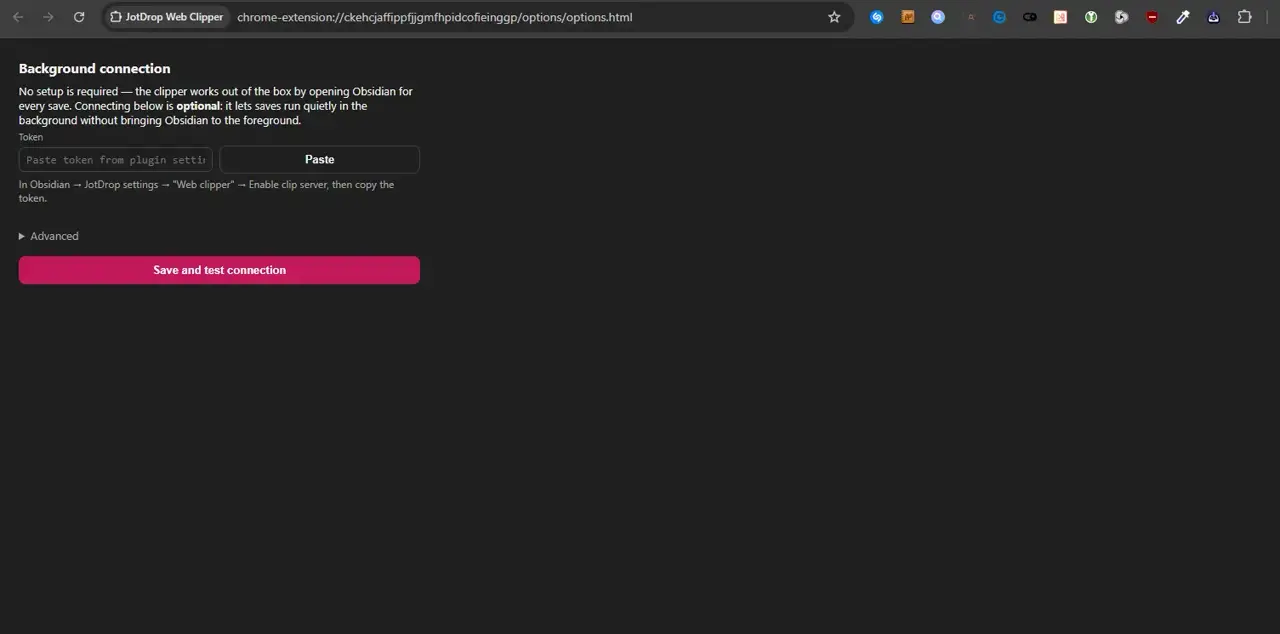
Optional Background connection - saving runs silently |
Zero-config quick start:
- Install the JotDrop plugin in Obsidian.
- Install the Web Clipper from the Chrome Web Store.
- Click the JotDrop icon on any page and press Save - Obsidian opens and creates the card.
That's the whole setup. Saving works through the local obsidian:// protocol, so no token or port is required.
Optional: Background connection (after the default path works): pair the clipper with the plugin's clip server once and saves run silently in the background without bringing Obsidian to the foreground. In Obsidian: Settings → JotDrop → Web clipper → enable the clip server and copy the token; in the extension: right-click the icon → Background connection → paste the token → Save and test connection. The server binds only to 127.0.0.1 and never exposes itself on the network. If the connection fails, the clipper automatically falls back to the direct URI - a clip is never lost.
Manual ZIP installation (fallback):
- Download the ZIP from the latest clipper release and extract it into a permanent folder.
- Open
chrome://extensionsin Chrome / Edge / Brave. - Toggle Developer mode on.
- Click Load unpacked and select the extracted folder containing
manifest.json.
Manual updates: replace the files in the same permanent folder with a newer ZIP's contents and click Reload on the extension card in chrome://extensions. Store installations update automatically.
Troubleshooting:
| Problem | Fix |
|---|---|
| Obsidian does not open on Save | Open Obsidian desktop at least once so the obsidian:// protocol is registered, then save again. |
| Background connection test fails | Obsidian desktop, the JotDrop plugin, and its clip server must be running; re-copy the token from the plugin settings. |
| Wrong port or token | Open Background connection → Advanced, correct the port (default 27124), and paste the token again. |
| "Selection too long for direct mode" | Shorten the selected text, or enable the Background connection (it supports much larger quotes). |
Staying up to date
Manual installs don't auto-update, so here's how to get notified of new releases:
- Obsidian plugin (via Community plugins): once installed from Browse, Obsidian checks daily and shows an "Update available" badge in Settings → Community plugins. One click updates it.
- Obsidian plugin (manual / pre-release): use BRAT ("Obsidian42 - BRAT"). Add
Diexar-Labs/jotdropas a beta plugin; BRAT watches this repo's releases and updates the plugin for you. - Android app: the sideloaded APK won't update itself. With Obtainium, add
https://github.com/Diexar-Labs/jotdrop, select only releases taggedv*, and select thejotdrop.apkasset. - Anyone: on this repository, click Watch → Custom → Releases to get a notification on every new release.
How it works
JotDrop is intentionally simple plumbing:
- Each note is a plain Markdown file in
<vault>/Mini Notes/(folder configurable). - Attachments (photos, voice memos, link-preview thumbnails) are stored in a configurable vault-relative folder. By default that is
.attachmentsinside the notes folder; set an explicit folder (e.g.assets) in the plugin settings and the Android app. Set the same value on both devices. Changing the folder only affects new captures; existing files are not moved, and JotDrop still finds them via the legacy location. - Metadata lives in YAML frontmatter at the top:
--- color: amber tags: [idea, work] archived: false pinned: false --- - The Android app writes the file. The Obsidian plugin reads it. They never talk to each other - they meet in the vault.
- Link-preview cards are written as a "pending" placeholder by Android, then the plugin (or Android) fetches the Open Graph data and rewrites the note. A race-safe marker check prevents either side from overwriting user edits.
This is why JotDrop needs no server, no account, no API key - and why anything that can write to the same folder (e.g. a curl script, a Shortcuts automation) can capture into it.
Known issues
Bulk delete while a sync peer is offline
If you bulk-delete many notes in the plugin while another device (phone or laptop) running Syncthing is offline, the deletes may be "resurrected" when that peer reconnects: the offline peer still has those files with valid version metadata, and on reconnect Syncthing can side with the peer and push the files back to the device that deleted them.
This is Syncthing reconciliation behavior, not specific to JotDrop; single deletes you do while everything is online propagate fine. It's the combination of bulk delete and an offline peer that triggers it. Mitigations:
- Make sure Syncthing is running on every device before bulk-deleting, and stays running for ~30s after so the deletes propagate.
- Enable File Versioning in Syncthing (see Syncing the two). Even if files do come back, you have copies in
.stversions/to delete from properly. - The bulk-delete confirmation dialog reminds you of this: it's not paranoia, it's avoiding this exact failure mode.
Languages
UI in English (default) and Dutch. Skeletons exist for Spanish, German, French, Italian - empty files are present in src/i18n.ts and android/app/src/main/res/values-*/. PRs with translations very welcome - see Contributing.
Roadmap
- Card grid in Obsidian
- Android share-target
- OCR + voice-to-text on Android
- Link previews (Open Graph)
- Checklists
- Multi-language (EN/NL + skeletons)
- Reminders / due-dates
- Web clipper (Chrome extension)
- Tag-filter chips + bulk-select (multi-archive / multi-delete)
- Lightbox for image embeds
- Voice memos (record + playback, both platforms)
- Submit to official Obsidian community-plugins register
- iOS share-target (share-extension)
- Firefox / Edge clipper (the Chrome extension is MV3, should port cleanly)
Contributing
This is a hobby project I share publicly. PRs welcome for:
- Translations - drop strings into
src/i18n.tsand the matchingandroid/.../values-*/strings.xml - Bug fixes
- Small features that fit the "minimal" philosophy
For larger ideas, open an issue first to chat about it. No CLA, no commit-message gatekeeping; just keep it tidy.
Support
Open source, MIT-licensed, no premium tiers. If JotDrop saves you time and you feel like saying thanks:
No subscriptions, no obligations, no DMs. Totally optional.
Build from source
If you build from source, always use the optimized release APK. Debug APK generation and installation are disabled because Compose debug builds have unusable scroll performance.
Plugin:
npm install
npm run build
# main.js + manifest.json + styles.css end up in repo root
Android:
npm run android:release
# APK at android/app/build/outputs/apk/release/app-release.apk
npm run android:verify -- android/app/build/outputs/apk/release/app-release.apk
npm run android:install -- android/app/build/outputs/apk/release/app-release.apk
Before merging a port, use npm run android:test-release for the same R8
optimized release variant with the feature-branch base check. It is for local
testing only; production release builds still require npm run android:release.
The release command requires a clean checkout at live origin/main, JDK 17,
and Android SDK 34. The committed Gradle wrapper pins Gradle 8.7.
compileDebugKotlin is available for CI compile validation, but it does not
produce an installable APK.
Credits
Built by Diexar Labs. Uses Obsidian's plugin API, Jetpack Compose, and Google's ML Kit Text Recognition.
Inspired by Google Keep (the good parts) and by the Obsidian community's belief that your notes belong to you.
License
MIT - do whatever you want with it.