Search...Search plugins and themes...
⌘K
Sign in
  • Get started
  • Download
  • Pricing
  • Enterprise
  • Account
  • Obsidian
  • Overview
  • Sync
  • Publish
  • Canvas
  • Mobile
  • Web Clipper
  • CLI
  • Learn
  • Help
  • Developers
  • Changelog
  • About
  • Roadmap
  • Blog
  • Resources
  • System status
  • License overview
  • Terms of service
  • Privacy policy
  • Security
  • Community
  • Plugins
  • Themes
  • Discord
  • Forum / 中文论坛
  • Merch store
  • Brand guidelines
Follow us
DiscordTwitterBlueskyThreadsMastodonYouTubeGitHub
© 2026 Obsidian

Jot Import

yesokcoolyesokcool38 downloads

Import Jot exports into your notes, with their photos and files. You choose the note and heading for each Jot category.

Add to Obsidian
  • Overview
  • Scorecard
  • Updates7

Jot is a private capture app for iPhone. Jot Import brings Jot exports into your Obsidian vault. Each Jot category goes into the Obsidian note you choose.
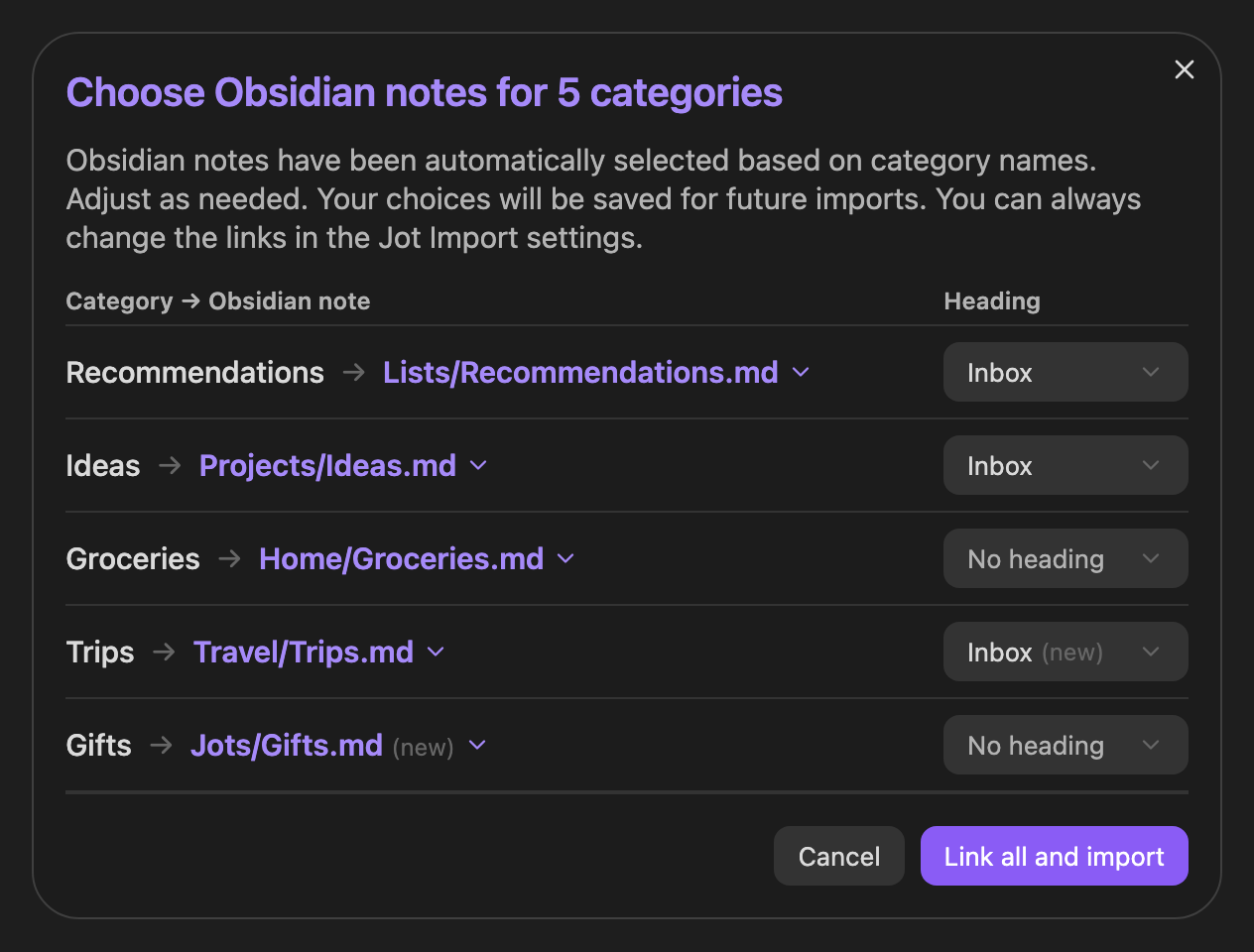
The window where you choose an Obsidian note for each Jot category.

How to use

  1. In Jot, go to Export ▸ Format and turn on Obsidian Format. Then export your jots.
  2. In Obsidian, run Import a Jot export… from the command palette and choose the file.
  3. Choose an Obsidian note and heading for each category. Then import.

Jot Import remembers your choices for the next import. It always shows you where the jots will go before it writes anything. Photos and files come along when the export is a .zip.

On a phone it can be easier to save exports into your vault's Jots folder. Turn on Offer to import new Jot exports in Jot Import's settings and it offers to import each new one.

If you use Obsidian Sync, import on one device at a time. After you reinstall Obsidian or a device has been offline, wait for Sync to finish before you import. Otherwise Sync can merge two copies of an Obsidian note and repeat its jots or properties.

Install

Search for Jot Import in Settings ▸ Community plugins ▸ Browse.

Needs Obsidian 1.13 or later, on desktop or mobile.

Privacy

Jot Import makes no network requests and collects no data. It reads only the Jot export you pick with Choose a file, which can be outside your vault. If you turn on Offer to import new Jot exports, it also checks new files in your Jots folder to see if they're Jot exports. To find the notes linked to Jot categories, it looks through your notes' properties. It writes only to the Obsidian notes you choose and saves the export's photos and files. After an import it moves a Jot export in your vault to the trash. You can turn that off in settings.

License

MIT. Jot Import is not affiliated with Obsidian.

HealthExcellent
ReviewPassed
About
Import Jot iPhone exports into your vault and map each category to a chosen note and heading. Preview changes before writing, include photos from .zip exports, remember mappings, and watch a Jots folder to prompt imports with no network requests.
ImportAttachments
Details
Current version
1.0.6
Last updated
2 weeks ago
Created
3 weeks ago
Updates
7 releases
Downloads
38
Compatible with
Obsidian 1.13.0+
Platforms
Desktop, Mobile
License
MIT
Report bugRequest featureReport plugin
Sponsor
Buy Me a Coffee
Author
yesokcoolyesokcool
yesokcool.com/
GitHubyesokcool
  1. Community
  2. Plugins
  3. Import
  4. Jot Import

Related plugins

Nexus AI Chat Importer

Import AI chats from ChatGPT, Claude, Mistral Vibe, Perplexity, and Grok into Obsidian as clean Markdown notes.

Epub Importer

Import EPUB files as Markdown.

ima.copilot Sync

Sync ima notes & knowledge-base to Obsidian

Supernote (Unofficial)

Sync and view Supernote notes and Atelier drawings in your vault

Importer

Convert your data to Markdown files you can use in Obsidian. Works with Apple Notes, OneNote, Evernote, Notion, Google Keep, and many other formats.

Share Note

Instantly share/publish a note, with the full theme and content exactly like you see in Obsidian. Data is shared encrypted by default, and only you and the person you send it to have the key.

YAOS

Simple real-time sync powered by your own Cloudflare Worker.

Consistent Attachments and Links

Move note attachments and update links automatically.

YTranscript

Easily fetch transcription for any YouTube video.

Custom Attachment Location

Customize attachment location with variables($filename, $data, etc) like Typora.