Inline RSS

Show the latest posts from RSS and Atom feeds as a table inside any note, using a code block. Nothing is written to your vault.
- Overview
- Scorecard
- Updates1
Show the latest posts from RSS and Atom feeds as a table inside any note: a home page, a daily note, a project dashboard, anywhere.
Installation
From Obsidian:
- Open Settings → Community plugins and turn off Restricted mode if it is on.
- Select Browse, search for Inline RSS, then select Install.
- Select Enable.
Manually:
- Download
main.js,manifest.jsonandstyles.cssfrom the latest release. - Put them in
<your vault>/.obsidian/plugins/inline-rss/. - Reload Obsidian, then enable Inline RSS under Settings → Community plugins.
Usage
Add an inline-rss code block to any note, with one feed per line. Options are optional.
```inline-rss
max: 15
per-feed: 3
refresh: 30
Hacker News | https://hnrss.org/frontpage
Obsidian | https://obsidian.md/feed.xml
The Onion | https://theonion.com/feed/
```
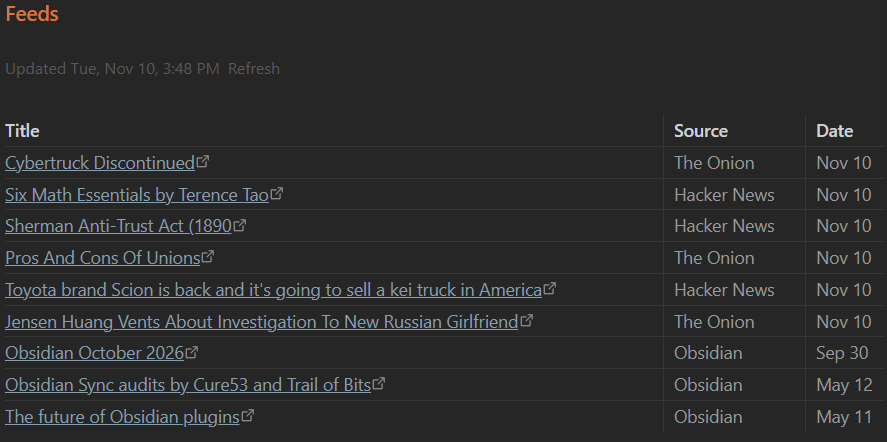
Renders as a table of Title / Source / Date, newest first, with an "Updated …" line and a Refresh link.
Options
| Line | Default | Meaning |
|---|---|---|
max: N |
15 | Total rows in the table |
per-feed: N |
3 | Most rows taken from any one feed |
refresh: N |
30 | Minutes before a feed is fetched again |
Name | URL |
A feed. The name shows in the Source column. A bare URL also works. | |
// text |
Comment, ignored |
Notes
- Supports RSS 2.0, RSS 1.0 (RDF) and Atom.
- Feeds refresh while Obsidian is open, on the Refresh link, or with the Inline RSS: Refresh feeds command.
- Results are cached in the plugin's own
data.jsonso the table shows instantly on startup. Nothing is written to your notes. - Network use: the plugin requests only the feed URLs you list in your notes. No other requests, no telemetry.
Support
This plugin is provided as-is and is intentionally minimal. Issues and PRs may not get a response. Fork freely.
License
MIT
HealthExcellent
ReviewSatisfactory
About
Display the latest RSS and Atom posts as a table inside any note, listing Title, Source and Date with newest first and an Updated line plus a Refresh link. Refresh on demand or while Obsidian is open, cache results locally for instant load, and only fetch the feed URLs you list without writing to notes or sending telemetry.Details
Current version
1.0.0
Last updated
9 hours ago
Created
9 hours ago
Updates
1 release
Compatible with
Obsidian 1.4.0+
Platforms
Desktop, Mobile
License
MIT