In the Open
 Jorrit van der Heide85 downloads
Publish a note to your website over Micropub, with its links turned into real citations.
- Overview
- Scorecard
- Updates18
Publish a note to your website over Micropub, with its links turned into real citations.
Works well with Paper Trail, which turns your Zotero library into a reading queue, with a note for each paper, and Due Credit, which exports a note to Word, PDF, Markdown or LaTeX with its links turned into real citations. See Works well with.
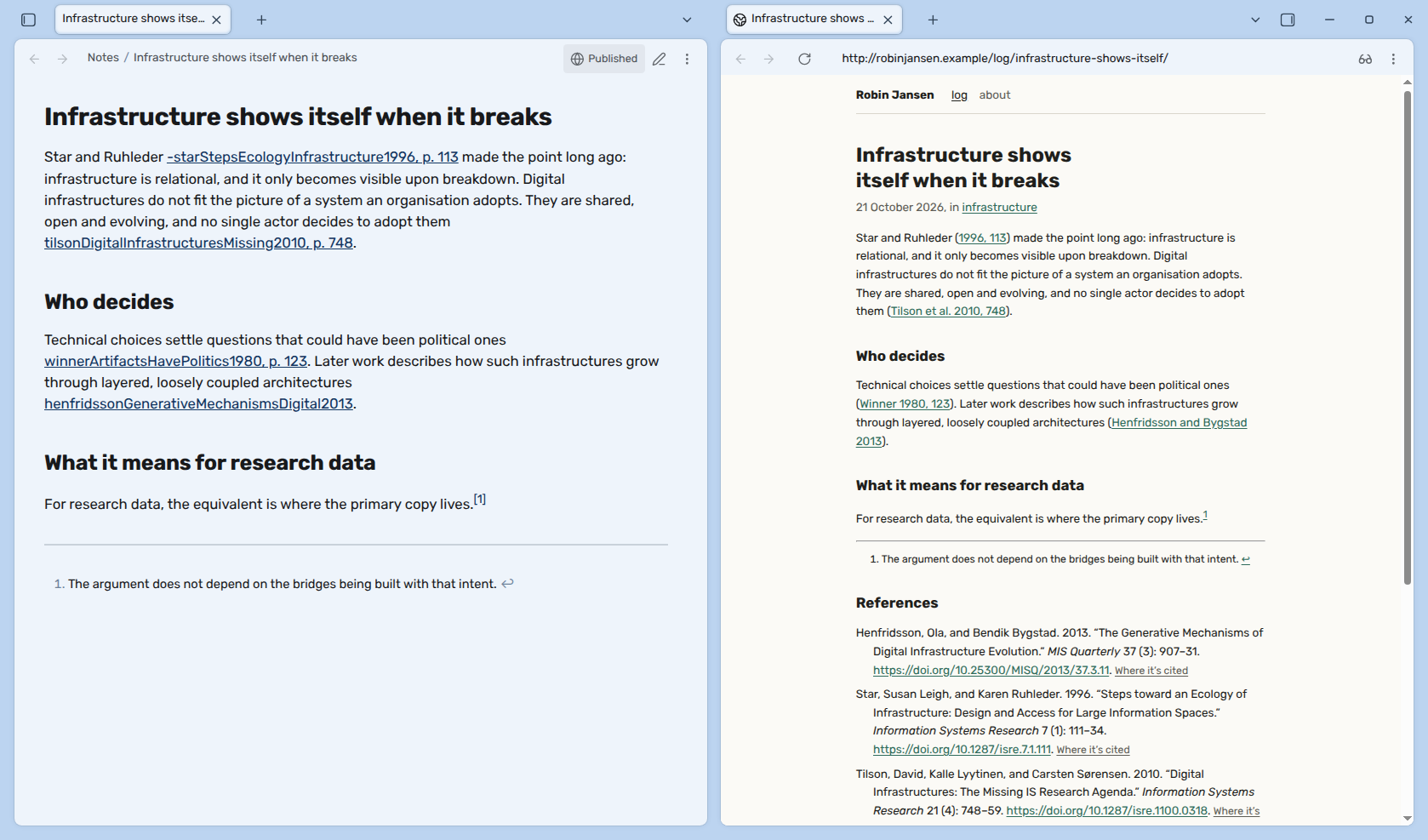
You write in Obsidian, and your citations are links. [[marsh2024]] opens the
paper, and the paper's backlinks show everywhere you cited it. Then you want to
put the piece on your blog. Copy it over, and [[marsh2024]] is just a word in
brackets. Your links to other posts lead nowhere, and the comments you left for
yourself are there for anyone to read.
In the Open publishes the note for you. Your citations come out in the style you choose, with a reference list, and a link to a note you've already published points to its post. Everything that only makes sense in Obsidian stays behind. It sends the post with Micropub, an open standard for posting to a website. Any site that supports it can take your posts.
1 Installation
- Pandoc. It's the program that turns a note into a post. If you have it installed, In the Open uses yours. It needs pandoc 3.6.4 or later, and it's tested with 3.13. If you don't have it, or can't install programs (say, on a computer your work manages), In the Open offers to download pandoc's own built-in version the first time you publish. That's 17 MB, once. What it sends says where it comes from.
- For citations, export a
.bibfile from Zotero with Better BibTeX's auto-export turned on, so it stays up to date as you add papers. Pin your citation keys in Better BibTeX as well. A published post cites each work by its key, and the key should stay the same after that. - Have a site that takes Micropub. Any Micropub site gets your post with its citations and a reference list. A site that also takes the references extension gets every work on its own as well, and can show the references its own way. What your site gets has the details.
- Install In the Open. In Obsidian, go to Settings → Community plugins → Browse, search for "In the Open", and install and enable it. You can also find it on its page in the plugin directory.
In the Open needs Obsidian 1.13 or later, on desktop.
2 Getting started
- Connect your site. In Settings → In the Open, set Site to your site's address, and Token to the token your site gave you.
- Point In the Open at your bibliography. Set Bibliography to your
.bibfile. The default isLiterature/library.bibin your vault. - Start a post. Run New post and give it a title. You get a note from
the post template, with a
summaryproperty where you write one sentence about the post. Any note with apost-statusproperty counts as a post, so your own template works too, as long as it haspost-status: unpublished. To pick the post's categories from the ones your site has, run Set categories. - Publish it as a draft. Press the upload button in the note's title
bar. If the note has no summary yet, In the Open asks for one. It sends the
note, saves the post's address in the note's
published-urlproperty, and tells you when the draft is up. A draft stays out of your site's lists and feed, so only people with its address can find it. You can read it on your site before anyone else does. - Publish it. Press the button again. Beside it, the title bar says where the post stands. Click that word to update, open or withdraw the post.
3 Safety and quality
In the Open sends the note you publish to the site you set. What you wrote for yourself stays in your vault. Comments are left out, and of the note's properties only the title, summary, categories and slug go along. The slug is the last part of the post's address.
In your vault, In the Open changes only what publishing needs. In the note you publish, that's the post's address and status, and a summary or categories when you add them through In the Open. New post also makes a note, and the template it starts from. When you have no pandoc installed, In the Open offers to download pandoc's built-in version, once, from pandoc's release on GitHub. It only does that if you agree. Section 11 lists exactly what it reads, sends and writes.
Your token is kept in Obsidian's keychain. It isn't in the plugin's settings file, so it stays behind when you sync or commit your vault.
The health report in Obsidian's plugin directory warns about two things. Both are part of how publishing works. Shell Execution means running pandoc. In the Open starts an installed pandoc directly, without a shell in between, and starts nothing else. Direct Filesystem Access is for the files the Obsidian API can't reach. In the Open uses it to read your bibliography, your citation style and the images you publish, wherever you keep them, and to check that the files in your settings exist. It also puts pandoc's filters and the note's properties in a temporary folder, and keeps the built-in pandoc in your cache folder.
Every change is tested. Every release is built in public on GitHub, and you can check that the file you installed is the one GitHub built. Section 11.6 shows how.
Table of contents
- 4 Documentation
- 5 Features
- 6 How it works
- 7 Citations
- 8 Commands
- 9 Settings
- 10 Works well with
- 11 Network and file disclosure
- 12 Questions or issues?
- 13 Support
- 14 License
4 Documentation
If you want to work on the plugin, or make your site take its posts:
- Architecture - How the code is layered, and what it shares with Due Credit.
- Micropub - What In the Open sends, and what your site has to do to take it, the references extension included.
- Pipeline - Every step from a note to pandoc's input, in order.
- Development - Setup, tests and releases.
- Compatibility - What a release may and may not change, so your settings, hotkeys, notes and site keep working.
5 Features
5.1 Publishing
New post - A note from your post template, with the properties a post needs. The template is yours to edit.
In the title bar - A word says whether the post is a draft, published or withdrawn, and a button beside it offers the next step.

Categories from your site - Set categories offers the categories your site already has. You can add a new one too, and a site that takes new categories makes it when you publish.
One command - Publish the note you have open, or any note from its right-click menu.
Updates in place - Publishing a note again updates its post, at the same address, and tells you first what changed. If nothing did, it sends nothing. If the post was changed on your site, it asks before replacing that change.
Links that catch up - A link to a note you haven't published yet goes out as plain words. When you publish that note, In the Open offers to update the posts that link to it, so their links go to its post.
Says what won't show - The first time you send a note, In the Open lists what in it your site won't show as Obsidian does, like a callout's kind or an embedded note, and what it shows instead.
Drafts first - See a post on your site before anyone else does. A draft has its own address, but it stays out of your site's lists and feed until you publish it. Your site has to take drafts for this.
Knows when it's live - On a site that builds before it shows a post, In the Open waits and tells you when it's up, or that it isn't yet.
Withdraw, and bring back - Take a post off your site's lists without breaking the links to it, say why, and restore it later.
Images included - PNG and JPEG images in the note are uploaded with it. Each one needs alt text, so a reader who can't see the image still knows what it shows.
Works with any Micropub site - A site that knows nothing of citations still gets a finished post, as HTML, with its reference list.
5.2 Citations
- Links become citations -
[[marsh2024]]becomes "(Marsh 2024)", linked to its entry in the reference list. - References travel with the post - Each work goes to your site formatted once, in your citation style, with its DOI.
- The same forms as Due Credit - A note reads the same on your site as in a Word export.
5.3 Private stays private
- Comments stay behind -
%%…%%and<!-- … -->never leave the vault. - Only the properties that matter - Tags and the rest of your properties stay in Obsidian.
- No Obsidian leftovers - Block IDs, tags, embedded notes and plugin blocks are left out.
6 How it works
6.1 What happens to your note
Before anything is sent, In the Open removes or rewrites everything that only makes sense inside Obsidian. The first time you send a note, it lists what in it your site won't show as Obsidian does, before it sends. Where the two kinds of site in 6.2 differ, the table says so:
| In your note | On your site |
|---|---|
%%comment%%, <!-- comment --> |
Left out. They're for you. |
^abc123 block IDs |
Left out. |
| An H1 on the first line | The post's title. Without one, the title property, then the file name. |
| Properties | Only summary, categories and slug go along. |
![[figure.png|alt text]] or  |
The image, uploaded to your site, with its alt text. An image from the web stays where it is, and your post shows it from there. A width after the alt text, ![[figure.png|alt text|300]], goes along to a site that takes HTML. A site that takes Markdown shows the image as wide as it shows every image. |
An image with *A raised bed in March.* on the line right under it |
A figure, with "A raised bed in March." as its caption. An image on its own gets no caption: its alt text is for readers who can't see it. |
| An embedded note, or a part of one, a PDF or a canvas | Left out. |
dataview, dataviewjs, tasks, query and base blocks |
Left out. Published, they'd only be their query. |
A line of #tags |
Left out. A tag in a sentence stays as its word. |
| A link to a note you've published | A link to its post. |
| A link to a note you haven't published, or only sent as a draft | Its words, as Obsidian shows them: the alias after the |, or the note's name. In the Open lists these links before it sends. When you publish that note later, it offers to update the posts that link to it. |
A link to a heading or a block in the note itself, [[#Method]] |
Its words, without a link. |
> [!note] Title |
A quote with the title in bold. Its kind, like tip or warning, and its folding, - or +, stay in Obsidian. A callout without a title is a plain quote. |
==highlight== |
Highlighted on a site that takes HTML. Plain text on one that takes Markdown, which has no highlight. |
- [ ] and - [x] tasks |
A task list, each box ticked or not. |
$E=mc^2$ and $$ math |
As you wrote it, as code. A site draws no math. |
A mermaid diagram |
Its code. A site draws no diagrams. |
A backslash, like C:\path\x |
As written, as Obsidian shows it. Before a space, pandoc reads one as a space that doesn't break, so write \\ for a backslash there. |
[Smith](smith-2017.md) or [Smith](smith-2017), a Markdown link to a note |
The same as [[smith-2017|Smith]]: a citation, a link to a post, or its words. |
[^1] and ^[inline] footnotes |
Footnotes. |
| Your headings | A level down, under the post's title, which the site shows as the page's heading. |
6.2 What your site gets
Your site gets a Micropub post with the title, the summary, the text, the categories and the slug, the last part of the post's address. If your site lists its categories, In the Open checks the post's against them first. It asks before sending one your site doesn't have yet, because a new category is often a typo.
A site that takes the references extension gets the text as Markdown, with each citation as a link to its work, and every work the post cites, already formatted. Any other site gets the text as HTML, ready to show, with the citations as plain text and the reference list at the end.
What a site has to do to take these posts, the extension included, is in Micropub.
7 Citations
In the Open reads citations exactly as Due Credit does, through the same code:
[[marsh2024]], [[marsh2024|marsh2024, p. 12]], pandoc's
[@marsh2024, p. 12], and the rest. Every form is in Due Credit's
Citations.
Before it sends anything, In the Open lists every link to a paper whose key isn't in your bibliography, since that link would go out as its plain name. Due Credit does the same before an export. You can publish anyway, or fix the key first.
8 Commands
None of the commands come with a hotkey, so they won't clash with the ones you already use. You can set your own in Settings → Hotkeys.
In the Open: New post- Makes a note from your post template, marked as a post, so its title bar offers to publish it.In the Open: Publish note- Sends the note to your site, or updates its post if it's published already. A draft is published, dated today.In the Open: Publish note as a draft- Sends the note as a draft, or updates the draft it has. Until you publish it, only people with its address can find it.In the Open: Withdraw note- Takes the post off your site's lists, and asks why, so its page can say. Its address keeps working. A draft is discarded instead, and its address is removed from the note.In the Open: Restore note- Brings a withdrawn post back.In the Open: Set categories- Asks your site which categories it has, and lets you switch on the ones the note is in, or add a new one.
Every command except New post is also on a note's right-click menu, in the file explorer or on its tab.
9 Settings
Your site
| Setting | Default | |
|---|---|---|
| Site | None | Your site's address, such as https://example.org. In the Open looks on its home page for where to send posts. |
| Token | None | The token your site gave you. Obsidian keeps it in its keychain, apart from this plugin's settings, so it stays behind when you sync or commit your vault. |
Posts
| Setting | Default | |
|---|---|---|
| Template folder | Templates/In the Open |
Where Post.md is, the template New post makes a note from. In the Open puts it there the first time, and after that it's yours to edit. |
Pandoc
| Setting | Default | |
|---|---|---|
| Pandoc | pandoc |
Leave it as pandoc to use an installed pandoc, which In the Open finds by itself, or set the full path to one. If there's none, In the Open offers to download pandoc's built-in version, once. |
Citations
| Setting | Default | |
|---|---|---|
| Bibliography | Literature/library.bib |
The .bib file Better BibTeX keeps up to date. It can be in your vault, or anywhere else with a path that starts with / or ~. A link to one of its citation keys, like [[marsh2024]], is published as a citation. Leave it empty to publish without citations. |
| Papers folder | Literature |
Where your paper notes are. Before you publish, In the Open lists any link to a paper that isn't in your bibliography, so a changed key can't quietly turn a citation into plain text. |
| Citation key property | citekey |
The property that holds a paper note's citation key. A link to a paper note cites its key, whatever the note is called. Paper Trail writes citekey. |
| Citation style | Chicago author-date | The name of a style Zotero has installed, such as apa or ieee, or the path to a .csl file. Leave it empty for Chicago author-date. |
A setting that has to agree with your vault or your computer says so right under it, in the settings: a site that isn't https, a bibliography or style that isn't there, a papers folder with no notes in it, or a citation key property no note has.
10 Works well with
I made these too. Each one does one thing and works on its own, but they fit together nicely.
10.1 Paper Trail
Paper Trail turns your
Zotero library into a reading queue, with a note for each paper. With Better
BibTeX, each paper note gets a citekey property, which keeps your citations
working even when Better BibTeX changes a key. Without it, the notes have no
key, so a link to one is published as plain text. Its Insert annotation
quotes a passage from a paper, with a citation that In the Open publishes.
10.2 Due Credit
Due Credit exports a note to Word, PDF, Markdown or LaTeX with pandoc, and turns your links into real citations. Its Insert citation picks a paper from your bibliography and writes the link that In the Open publishes as a citation. Both plugins read a note with the same code, so a note reads the same on your site as in the file you send your supervisor.
10.3 Take the Floor
Take the Floor presents a note as slides, with your speaker notes on your own screen. It reads a note the same way In the Open does, with the same code. Give both plugins the same Bibliography and Citation style, and a post and a talk cite the same way.
11 Network and file disclosure
In the Open runs on your computer. It connects to one site, the one you set in Site. If you agree, it also downloads the built-in pandoc once, from pandoc's release on GitHub.
11.1 What it sends
To your site, and only when you run a command, or agree to update the posts that link to a note you just published:
- The post: The note's text after the steps in
What happens to your note, its title, and
its
summary,categoriesandslugproperties. - References: Every work the note cites, from your bibliography. A site with the references extension gets them on their own. Any other site gets them as the reference list at the end of the post.
- Images: The images in the note, uploaded before the post is sent. If sending the post fails after that, they stay on your site, and the next publish uploads them again: Micropub has no way to take an image back.
- Whether it's a draft: A draft is sent with
post-statusset todraft, and publishing it sendspublished. - Why it's withdrawn: What you type when you withdraw a post, if anything.
- Replacing a change: When your site says the post was changed there and
you choose Replace it, the update says so (
mp-overwrite). - Questions: Your site's home page, to find its Micropub endpoint, the
address it takes posts at. Then what the site takes (
q=config), which categories it has (q=category), and, before an update or a withdrawal, the post as the site has it (q=source). - Your token: With every request to your site's Micropub and media endpoints, the addresses it takes posts and images at, so your site knows it's you. The home page, the new post while In the Open waits for it to go live, and a post's page when you give its address, are asked for without it.
To GitHub, only if you agree to download the built-in pandoc: one request for
pandoc's own release file, pandoc-3.13-wasm.zip, with nothing of yours in
it. Before In the Open keeps what comes back, it checks it against the hash it
ships with, a fingerprint of the file pandoc released.
11.2 What it reads
- Notes: The note you publish, and the citation keys,
published-urlandpost-statusof the notes it links to. The first time a note is public, which of your notes link to it, and theirpost-status. Thepublished-urlandpost-statusof the notes you have open, for their title bar. - Images: The images in the note you publish, to upload them, from the vault or from wherever on your disk their path points.
- Template:
Post.mdin the template folder, when you make a new post. - Bibliography: The
.bibfile you set in Bibliography. - Citation style: From Zotero's styles folder (
~/Zotero/styles), or the.cslfile you set. - Obsidian's settings: Whether strict line breaks are on, from the vault's
app.json. - The settings tab: The path and properties of every note, while it's open, to say when your Papers folder has no notes or no note has your Citation key property.
- Your PATH: The folders your computer looks in for programs, to find an installed pandoc.
- The built-in pandoc:
pandoc-3.13.wasmin your cache folder, when there's no pandoc installed, checked against its hash once a session. A file that doesn't match is deleted, and downloaded again if you agree.
11.3 What it writes
- The post's address and status: The
published-urlandpost-statusproperties, in the note you publish, withdraw or restore. The address is removed when you discard its draft. - A summary: The
summaryproperty, when you publish a note without one and type one in when In the Open asks. - Categories: The
categoriesproperty, when you choose them with Set categories. Nothing else in your notes. - New posts: The note New post makes, where Obsidian puts new notes.
- Template:
Post.mdin the template folder, when you make a new post and there's no file with that name, and the template folder if it isn't there yet. If the file is already there, In the Open never overwrites it, edited or not. - The built-in pandoc: When you agree to download it,
pandoc-3.13.wasm(62 MB) in your user cache folder, outside the vault:~/.cache/obsidian-citation-coreon Linux (or in$XDG_CACHE_HOME),~/Library/Caches/obsidian-citation-coreon macOS, andobsidian-citation-core\Cachein%LOCALAPPDATA%on Windows. Due Credit uses the same file. You can delete it. If you do, In the Open offers to download it again the next time it's needed. - Temporary files: For each publish, pandoc's filters, its template and font, the note's properties and the post pandoc makes go in a temporary folder. With the built-in pandoc, the note's text goes in a second one. Both are removed afterwards.
11.4 What it stores
- Settings: Its own
data.jsonin the plugin folder. - Posts it didn't hear back about: When a new post is sent, the note's path and the time, in Obsidian's local storage for this vault, on this device. It's removed once the note has the post's address. If it's still there at the next publish, In the Open asks whether the post is on your site already.
- Your token: In Obsidian's keychain, never in
data.json.
11.5 What it runs
- Pandoc: The pandoc you set in Pandoc. If none is installed, the
built-in one, which runs inside Obsidian. In the Open only gives the
built-in pandoc your vault, the folders your bibliography and citation
style are in, and its temporary folders. Node, which runs it inside
Obsidian, doesn't guarantee that a program can't get past those folders,
for example through a link in your vault to a folder outside it. So don't
rely on those folders to keep a file private from it. Before each publish,
In the Open asks an installed pandoc its version (
pandoc --version). An installed pandoc can read and write anything you can.
In the Open runs nothing besides pandoc.
11.6 How releases are built
Every change I push is built, checked with ESLint and the official Obsidian ESLint plugin, and tested with Vitest. Nix builds it a second time, on its own.
Releases are built by GitHub Actions from the tagged code, after the same
checks. A release only goes out when its tag matches the version in
manifest.json, and every action it uses is pinned to an exact version. Each
release comes with a signed attestation from GitHub, which records what it
was built from. To check that the main.js you installed is the one GitHub
built:
gh attestation verify main.js --repo jorritvanderheide/obsidian-in-the-open
The citation tests run through a real pandoc, always the same version, in obsidian-citation-core, which holds the citation code. A release only uses a version of it that passed them, so a change in pandoc's output shows up as a failing test before it reaches you.
12 Questions or issues?
Have a look at the FAQ first. It covers the things people run into most, like a token your site doesn't take. If something still doesn't work, or you have an idea, please open an issue. Found a security problem? Please report it privately, the way the security policy explains.
The code lives on Codeberg, with a copy on GitHub.
13 Support
In the Open is free. If it's useful to you and you'd like to give something back, you can do that on Liberapay:
14 License
Copyright © 2026 Jorrit van der Heide. Licensed under the EUPL-1.2.