BibLib
 callumalpass7k downloads
Create literature notes and manage bibliographic references
- Overview
- Scorecard
- Updates43
BibLib is an Obsidian plugin for managing bibliographic references. Each reference is stored as a Markdown note with metadata in YAML frontmatter using the CSL-JSON format. There is no database — references are plain text files in your vault, editable with any text editor and compatible with Git.
Looking for a command-line workflow? See biblib-cli.
[!NOTE] For detailed documentation, see the docs site
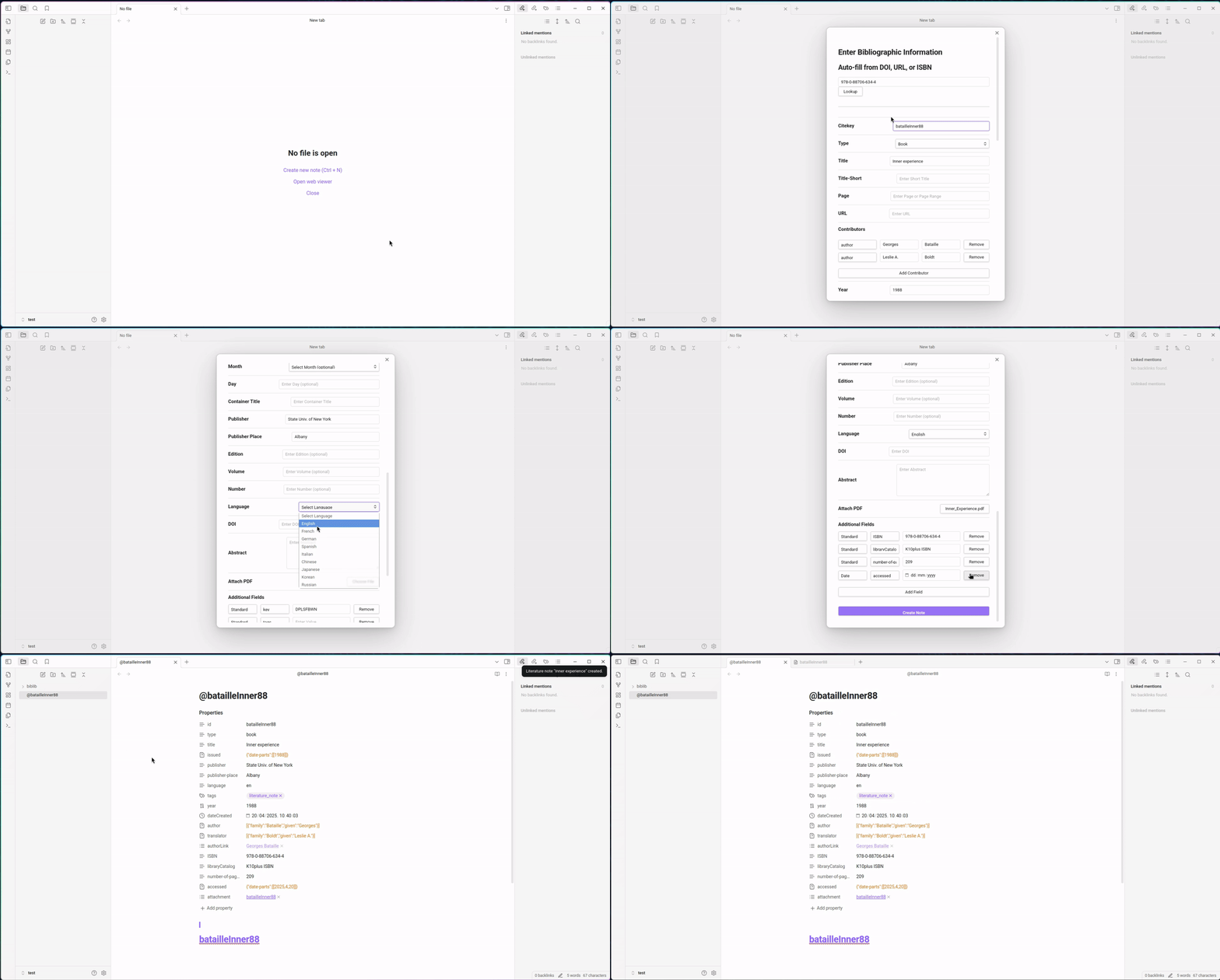
Overview
References are stored as Markdown files with CSL-JSON metadata in YAML frontmatter. Because they are ordinary Obsidian notes, they can be linked, tagged, searched, and organized like any other note in your vault.
Metadata can be fetched automatically via DOI, ISBN, PubMed ID, arXiv ID, or URL. The Zotero browser connector can send references directly to Obsidian (desktop only). Bibliography files can be exported in CSL-JSON or BibTeX format for use with Pandoc.
Installation
- Open Obsidian Settings > Community Plugins
- Search for "BibLib"
- Install and enable the plugin
Basic Usage
Creating a Reference
- Open command palette (
Ctrl/Cmd + P) - Run "BibLib: Create Literature Note"
- Either fill in fields manually or use "Lookup" with a DOI/ISBN/URL
- Click "Create Note"
Importing from Browser
- Enable the Zotero Connector in settings (requires closing Zotero desktop app)
- Click the Zotero browser extension on any webpage
- BibLib opens a modal with the reference data pre-filled
Generating Bibliography Files
Run "BibLib: Build bibliography" to create bibliography.json (CSL-JSON) or "BibLib: Export bibliography as BibTeX" to create bibliography.bib. These files can be used with Pandoc for citation formatting.
Data Format
BibLib stores reference metadata in YAML frontmatter using CSL-JSON structure:
---
id: smith2023
type: article-journal
title: Example Article Title
author:
  - family: Smith
    given: Alice
  - family: Jones
    given: Bob
container-title: Journal of Examples
issued:
  date-parts:
    - [2023, 6, 15]
DOI: 10.1234/example
tags:
  - literature_note
---
[!NOTE] Obsidian's Properties panel may show warnings for nested YAML fields like
authorarrays. This is a display limitation in Obsidian's metadata parser — the data is stored correctly and works with external tools.
Settings
File Organization
- Attachment folder: Where PDFs are stored
- Literature note location: Where reference notes are created
- Filename template: Pattern for filenames (e.g.,
@{{citekey}})
Templates
- Note content template: Structure for new notes
- Custom frontmatter fields: Additional YAML fields with templated values
- Citekey template: Pattern for generating citekeys (e.g.,
{{authors_family.0|lowercase}}{{year}})
Zotero Connector (Desktop Only)
- Port: Default 23119 (same as Zotero)
- Requires Zotero desktop app to be closed
Bibliography Export
- bibliography.json path: Location for CSL-JSON output
- bibliography.bib path: Location for BibTeX output
Template Syntax
BibLib uses Handlebars-style templates:
- Variables:
{{title}},{{year}},{{DOI}} - Nested access:
{{author.0.family}} - Formatters:
{{title|lowercase}},{{authors_family.0|abbr3}} - Conditionals:
{{#DOI}}Has DOI{{/DOI}}
Citekey Rules
Generated citekeys follow Pandoc conventions:
- Must start with letter, digit, or underscore
- Can contain alphanumerics and
:.#$%&-+?<>~/
License
MIT