iCloud Contacts
 trulsaa5k downloads
Imports contacts from iCloud and manages a note for each contact.
- Overview
- Scorecard
- Updates36
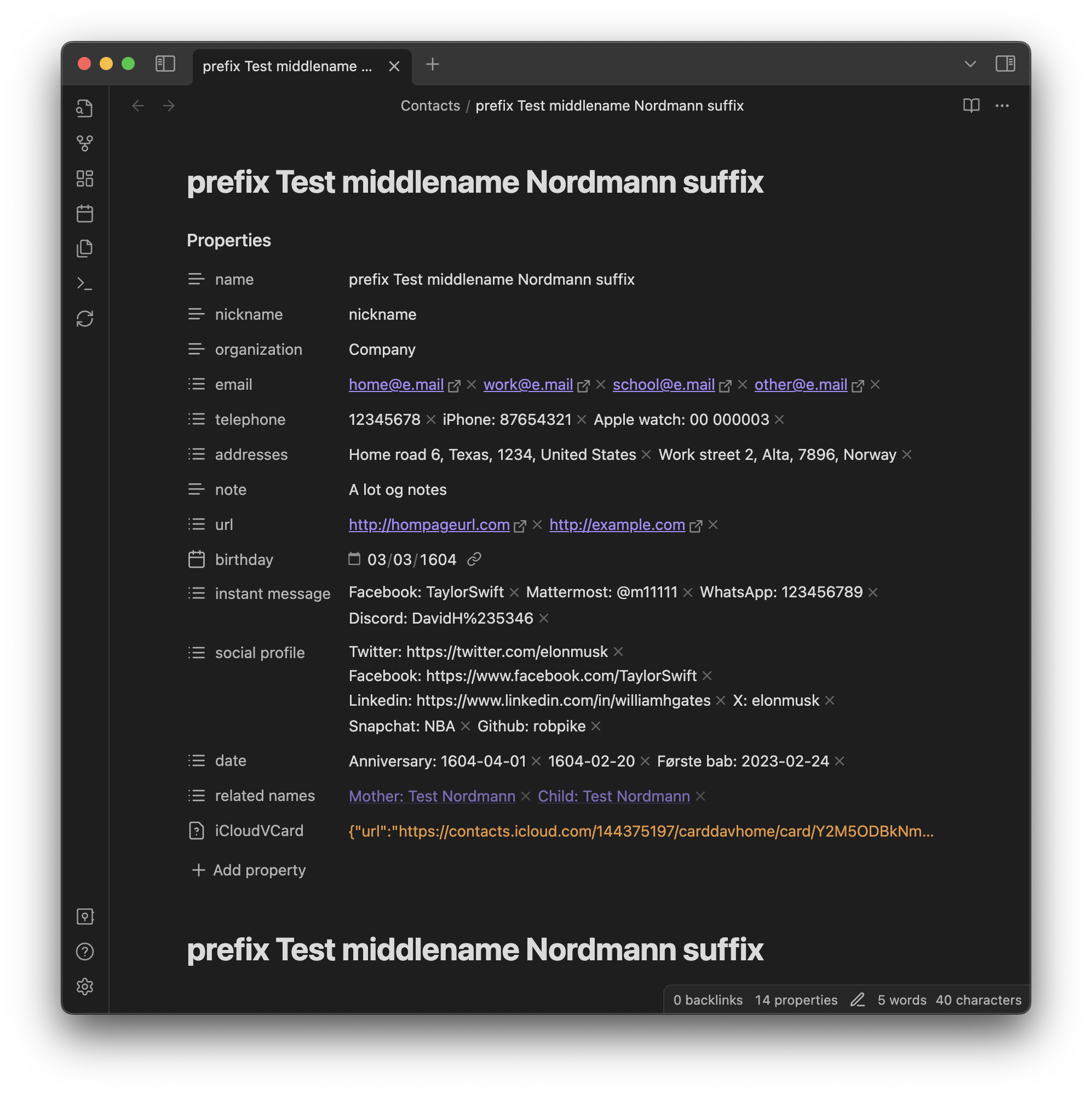
This plugin provides functions to sync contacts from your iCloud account to a folder in your vault. A contact file will look something like this.
Features
- Sync contacts from your iCloud to Obsidian
- Creates a file for each contact with properties corresponding to contact details.
- Optionally sync only contacts in selected groups.
- This plugin only updates the properties, the title and the top H1 header (the name). Any further info written in the files will not be touched when updating the contact.
- You can add your own properties to the frontmatter. The plugin will only manage the following property keys: name, organization, departement, telephone, email, url, related names, instant message, social profile, date, birthday pluss any of the kays you remove from the excluded keys setting.
How to use
- Install this plugin
- Add username and app specific password to the plugin settings.
- If using Nextcloud instead iCloud, copy-paste the address book's share URL into "iCloud server URL" field in plugin settings.
- Run the command
iCloud contacts: Update contactsto sync your contacts - After syncing is complete, you will see a notification stating how many Contacts have been synced.
Now that you have a folder with all your contacts you can link all your projects to their participants. All your vacation plans to your travel partners. All your meeting notes to the participants.
In addition, you can for example use the dataview plugin to display a table with email and phone number for all the contacts you have referenced in the current file like this.
```dataview
TABLE email, telephone
FROM outgoing([[#]])
WHERE iCloudVCard
```
And you can add this to you daily notes template. Given that the title of your daily notes are formatted like YYYY-MM-DD. Then this will create a list of all your contacts who has a birthday on that day.
```dataview
LIST
FROM "Contacts"
WHERE birthday.day = number(split(this.file.name, "-")[2]) AND birthday.month = number(split(this.file.name, "-")[1])
```
Commands
This plugin provides two commands. Use the command pallet to search for iCloud contacts and use one of the two commands to update your contacts folder.
- Update Contacts: Downloads all contacts from iCloud and updates the contacts files in you vault that based what contacts have been updated in iCloud.
- Update all Contacts: - Downloads all contacts form iCloud and rewrites all contacts files in your vault based on the contacts from iCloud. Usefull for when you have changed the Excluded keys setting.
Notes
- The iCloudVCard property is used to update contacts that have been changed. I also like it as a backup of my contacts in my vault.
- Only one address book from Nextcloud can be tracked.
- If encryption is enabled on Nextcloud, sync may fail.
- This plugin is not affiliated with Apple in any way.
Thanks
The IcloudClient in this codebase is copied and adapted from tsdav.
Support
If you want to support me and my work, you can buy me a coffee.