Hotkey Cleaner
 Michael Naumov22 downloads
Finds hotkeys whose command no longer exists, and lets you remove, remap or keep each one.
- Overview
- Scorecard
- Updates2
Finds hotkeys whose command no longer exists, and lets you remove, remap or keep each one.
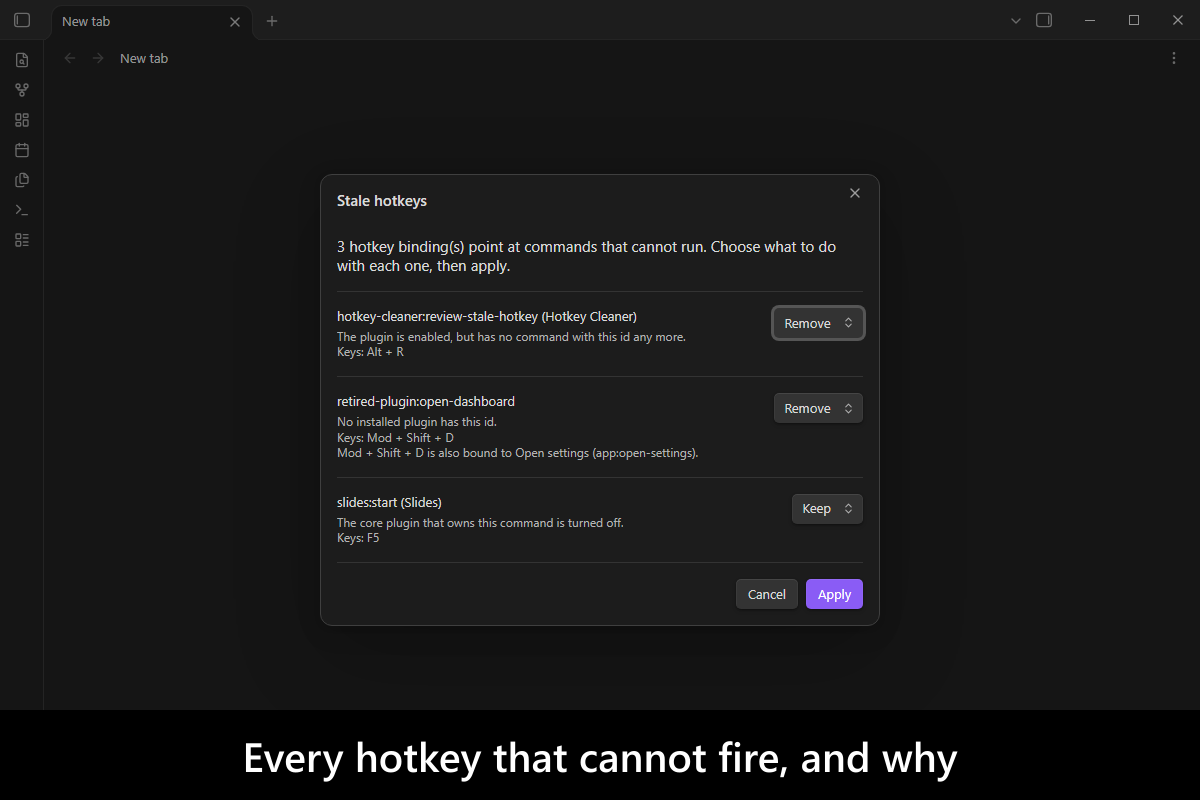
Obsidian keeps every hotkey you assign in hotkeys.json, keyed by command id. When a plugin is uninstalled, or renames a command, its bindings stay behind, and the Hotkeys tab cannot show them because it lists only commands that exist. A stale binding can still hold a key another command wants.
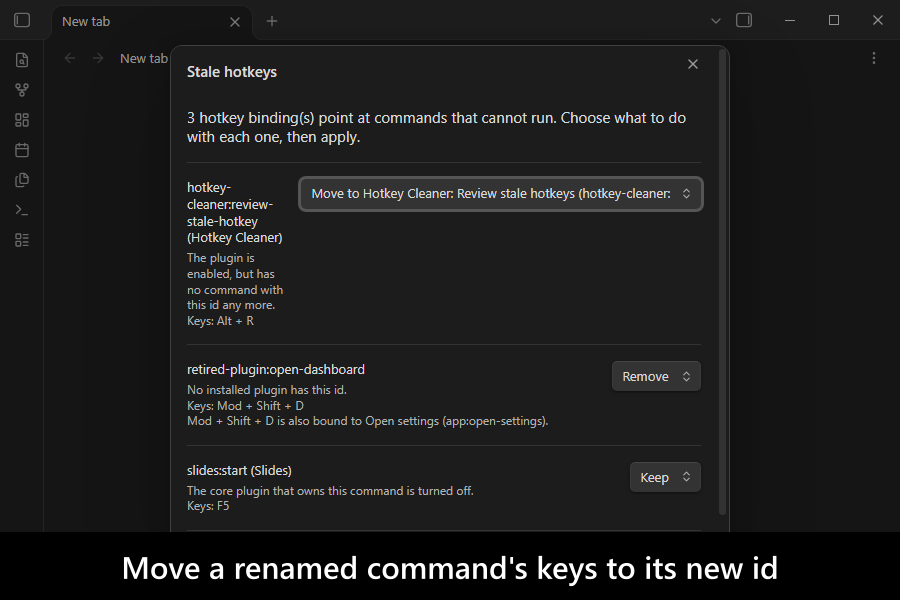
Run Hotkey Cleaner: Review stale hotkeys. It checks every binding against the commands Obsidian has actually registered, and lists the ones that cannot fire: a plugin that is not installed, a command an enabled plugin no longer has, and a plugin or core plugin that is turned off. For each one you choose Remove, Keep, or Move its keys to the command it was most likely renamed to. Nothing is written until you press Apply. With Check on startup on, a notice tells you when there is something to review.
Demo vault
The documentation is a demo vault. Every feature has a note that explains what it does and why you would want it, with a button you can press to watch it happen.
Start reading here — it is plain markdown, so it works on GitHub with nothing installed.
A copy of the vault ships with every release. You can access it via any of the following:
- Running the
Hotkey Cleaner: Open demo vault command. - Downloading
hotkey-cleaner-demo-vault.zipfrom the Releases. It unzips into a singlehotkey-cleaner-demo-vault-<version>folder. - Browsing its source in
demo-vault/in this repository.
See also
| Plugin | Features | How Hotkey Cleaner differs |
|---|---|---|
Advanced Hotkeys |
Custom hotkeys for any command; override default hotkeys; export and import hotkey configurations | Complements it; removes or moves bindings whose command is gone instead of adding new ones; no export or import |
Hotkey Helper |
Hotkey and settings buttons on plugin tabs; counts of assigned and conflicting hotkeys | Complements it; sees bindings to commands that no longer exist, which Hotkey Helper never counts |
Hotkeys Cheatsheet |
Searchable cheatsheet of assigned hotkeys; conflict and modified-from-default filters; export as a note or HTML | Complements it; lists only the bindings that cannot fire, and removes or moves them |
Keyboard Analyzer |
Visual keyboard; duplicate detection; hotkey editor | Complements it; works on bindings whose command is gone, which its command index cannot see |
Last searched for similar plugins on 2026-11-24.
Installation
The plugin is available in the official Community Plugins repository.
Beta versions
To install the latest beta release of this plugin (regardless if it is available in the official Community Plugins repository or not), follow these steps:
- Ensure you have the BRAT plugin installed and enabled.
- Click Install via BRAT.
- An Obsidian pop-up window should appear. In the window, click the
Add pluginbutton once and wait a few seconds for the plugin to install.
Development checks
Run npm run check to run release checks and reproduce the Community directory scanner's findings locally with check-plugin --scanner. See CONTRIBUTING for setup. The scanner needs network access and installs its linters on each run, which can take a few minutes.
Debugging
By default, debug messages for this plugin (id: hotkey-cleaner) are hidden.
If you need to enable them refer to the documentation.
Changelog
All notable changes to this project will be documented in the CHANGELOG.
Contributing
Contributions are welcome — see CONTRIBUTING to get set up.
Support
Filing an issue (for AI agents and humans)
Open issues through the issue forms, not as blank issues.
To report a bug from inside Obsidian, run the Hotkey Cleaner: Report a bug command. It opens the bug form with the plugin version, the Obsidian version and your operating system already filled in.
Filing from the CLI or the API (gh issue create --body, or an AI agent filing for you) skips the form, and gh issue create --template cannot load an issue form. In that case, open the matching form in .github/ISSUE_TEMPLATE/, copy every field as a ### <label> heading in the form's order, and fill in each one. Always state the plugin version, the Obsidian version and your operating system.
License
© mnaoumov