Search...Search plugins and themes...
⌘K
Sign in
  • Get started
  • Download
  • Pricing
  • Enterprise
  • Account
  • Obsidian
  • Overview
  • Sync
  • Publish
  • Canvas
  • Mobile
  • Web Clipper
  • CLI
  • Learn
  • Help
  • Developers
  • Changelog
  • About
  • Roadmap
  • Blog
  • Resources
  • System status
  • License overview
  • Terms of service
  • Privacy policy
  • Security
  • Community
  • Plugins
  • Join the community
  • Discord
  • Forum / 中文论坛
  • Merch store
  • Brand guidelines
Follow us
DiscordTwitterBlueskyThreadsMastodonYouTubeGitHub
© 2026 Obsidian

Hotkeys for templates

vinzent03vinzent0330k downloads

Add commands to insert specific templates with a hotkey.

Add to Obsidian
  • Overview
  • Scorecard
  • Updates15

Plugin for Obsidian

How to use

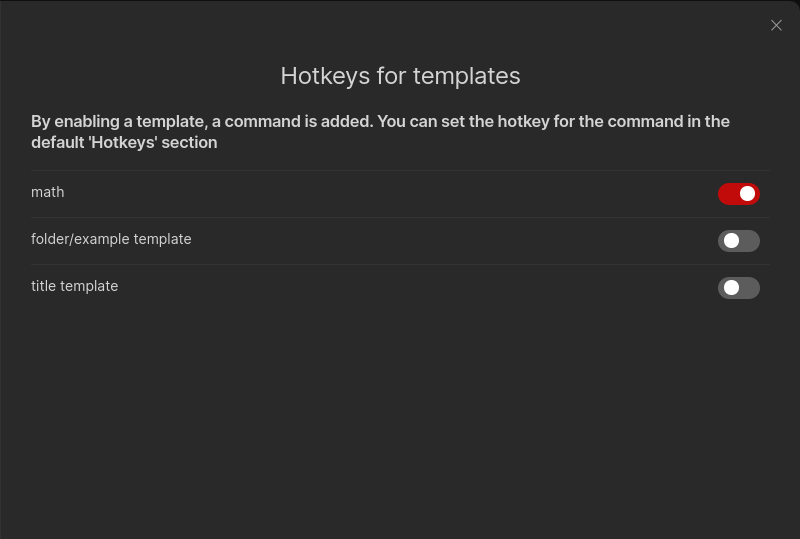
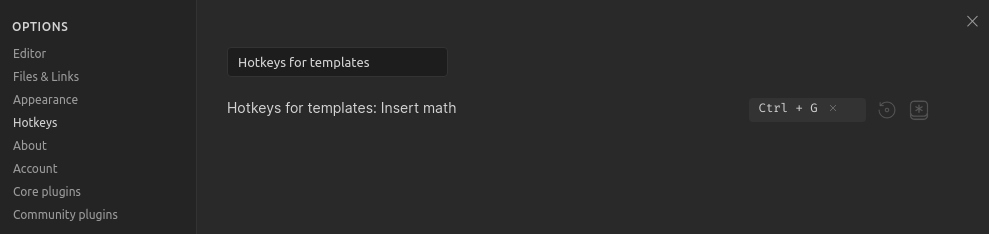
This plugin lists all of your template files in its settings pane. You have to enable the template files, which you want a command for. Then you can set a hotkey for the command through the default "Hotkeys" section in the settings. Just search for "Hotkeys for templates".

Important: You have to enable and set a template folder in the core template plugin settings. Search for it in the help vault if you don't know the core plugin.

Supported templates:

  • Templates from the core templates plugin
  • Templates from the Templater plugin

Settings Hotkeys section

Compatibility

Custom plugins are only available for Obsidian v0.9.7+.

Installing

From Obsidian

  1. Open settings -> Third party plugin
  2. Disable Safe mode
  3. Click Browse community plugins
  4. Search for "Hotkeys for templates"
  5. Install it
  6. Activate it under Installed plugins

From GitHub

  1. Download the latest release
  2. Move manifest.json and main.js to <vault>/.obsidian/plugins/obsidian-hotkeys-for-templates
  3. Go to settings and disable safe mode
  4. Enable Hotkeys for templates

If you find this plugin useful and would like to support its development, you can support me on Ko-fi.

59%
HealthFair
ReviewCaution
About
Assign hotkeys to individual note templates, supporting both core Templates and Templater templates. List templates in the plugin settings, enable the ones you want to turn into commands, and bind them in Obsidian's Hotkeys to insert templates quickly.
TemplatingHotkeysCommands
Details
Current version
1.4.3
Last updated
5 years ago
Created
5 years ago
Updates
15 releases
Downloads
30k
Report bugRequest featureReport plugin
Sponsor
Ko-fi
Author
vinzent03vinzent03
github.com/Vinzent03
GitHubvinzent03
  1. Community
  2. Plugins
  3. Templating
  4. Hotkeys for templates

Related plugins

Tray

Run Obsidian from the system tray for customisable window management and global quick notes.

Note Toolbar

Add customizable toolbars to your notes.

Code Editor Shortcuts

Add keyboard shortcuts (hotkeys) commonly found in code editors such as Visual Studio Code (VS Code) or Sublime Text.

Doubleshift

Open the command palette by pressing Shift (or any other key) twice like in IntelliJ and create your own shortcuts.

Buttons

Create Buttons in your notes to run commands, open links, and insert templates.

Tab Switcher

Switch your tabs with Ctrl + Tab in recently used order like in a browser.

Templater

Create and use dynamic templates.

Commander

Customize your workspace by adding commands everywhere, create macros and supercharge your mobile toolbar.

Fantasy Statblocks

Create, manage and view a Fantasy Bestiary with Dungeons and Dragons style statblocks.

Periodic Notes

Manage your daily, weekly, and monthly notes.