Homewire
 Jason P.211 downloads
Turn a note into a homepage with live news, markets, weather, today's tasks, bills and a calendar.
- Overview
- Scorecard
- Updates10
A Glance-style homepage for Obsidian: a date and weather banner, one-click buttons, live news, markets and weather, a Today box fed by your daily notes, a simple bill tracker, and a month calendar, all in one note.
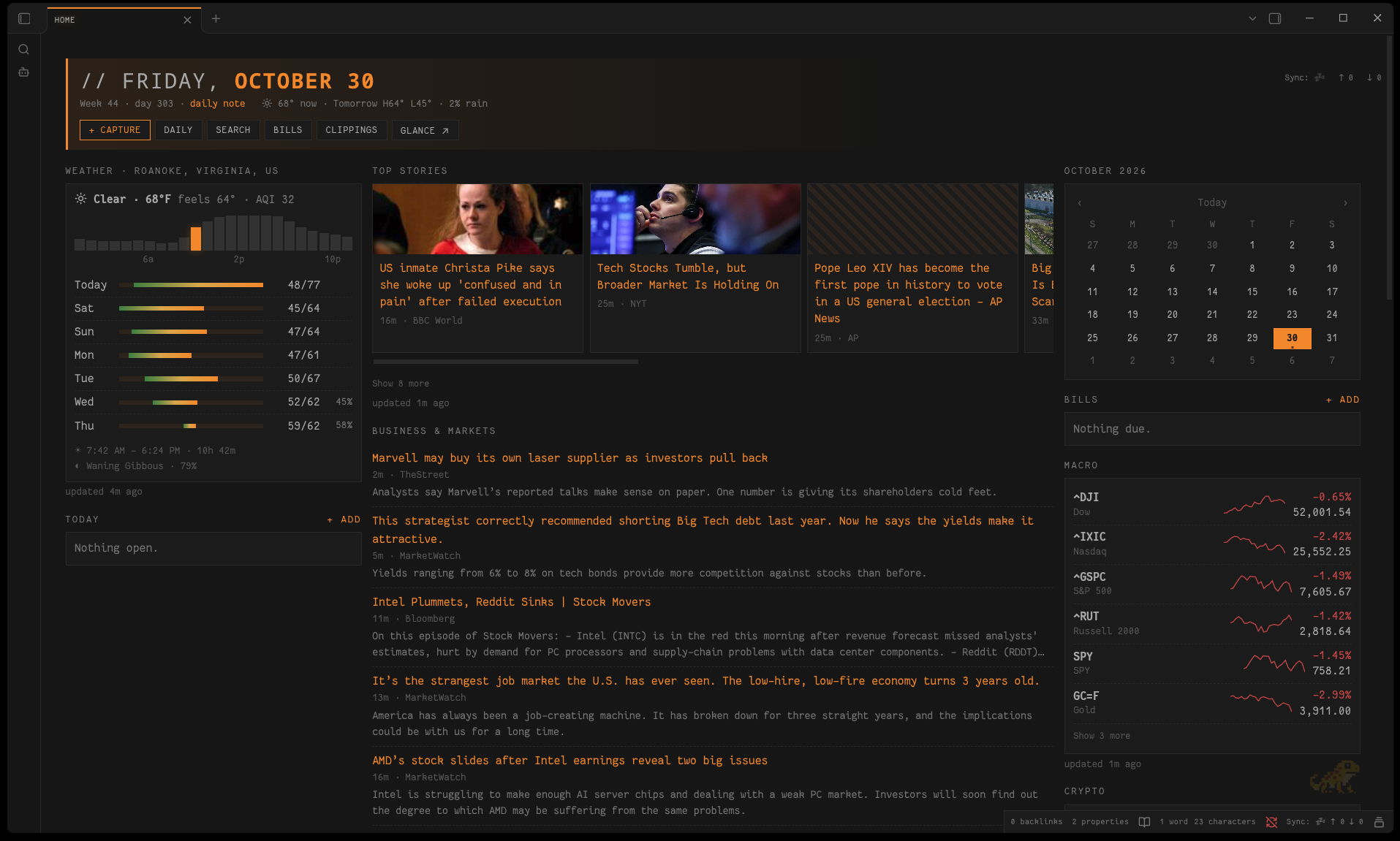
It looks best with the Salamander theme and follows its palette presets, but it works with any theme.
Getting started
- Install and enable Homewire.
- Run the command Homewire: Create homepage. It creates three notes (it never overwrites existing ones):
Home.md: the page itself (just ahomewirecode block)Home Config.md: feeds, tickers, weather location and buttonsBills.md: your bills
- Set your location in
Home Config.md(weather.place, orlatandlon). - Optional: to open the page on startup, install the Homepage plugin, point it at
Home.md, and choose Reading view.
The three note paths can be changed in the plugin settings.
Customizing your feeds
👉 The setup guide covers everything step by step, in plain English: finding a site's RSS feed, the Google News trick for sites without one, market symbol formats (indexes, futures, crypto, currencies, foreign exchanges), weather by place or coordinates, button actions and command IDs, ready-made setups (world news, tech, finance, sports), and troubleshooting. Every example in it was tested.
Config reference
Home Config.md holds one ```yaml block. The page updates when you save it. If the YAML is invalid, the last good config stays in use and the error appears at the top of the page.
banner:
  clock: true                # large clock (default true)
  marketSession: true        # US market pre-market / open / after hours / closed, NYSE holidays included (default true)
  wire: true                 # rotating headline from all your news groups; hover to pause (default true)
  summary: true              # one faint line: open tasks · next bill · sunset (default true)
  fearGreed: true            # CNN Fear & Greed index in the banner (default false)

clippings:                   # newest notes from Obsidian Web Clipper (default shown)
  folder: Clippings          # Web Clipper's default folder
  limit: 5
# clippings: false           # hides the panel

radio:                       # internet radio player (off unless set)
  name: Kobold.FM
  server: https://kobold.messy.quest   # an AzuraCast server…
  station: kobold.fm                    # …and its station short name: shows art, track, up next, listeners
  # stream: https://example.com/live.mp3   # or any plain stream address (play button only)

weather:
  units: imperial            # imperial | metric (default imperial)
  place: Paris, France       # looked up once via Open-Meteo geocoding
  # lat: 48.85               # or exact coordinates (both required)
  # lon: 2.35

buttons:                     # each needs a label and exactly one action
  - label: "+ Capture"
    primary: true            # optional: accent styling
    icon: plus               # optional: any Lucide icon id
    action: { builtin: add-today }   # add-today | add-bill | open-daily
  - label: Search
    action: { command: "global-search:open" }   # any command id
  - label: Inbox
    action: { file: "Inbox.md" }                # open a note
  - label: Glance
    action: { url: "https://example.com" }      # open a web page (http/https only)

news:
  - title: Top Stories
    style: cards             # cards | list (default list)
    limit: 12                # items shown in the group (default 14)
    collapseAfter: 6         # rest hidden behind "Show more" (default 6)
    cacheMinutes: 15         # refresh interval (default 15)
    feeds:
      - { title: BBC World, url: "https://feeds.bbci.co.uk/news/world/rss.xml", limit: 6 }

markets:
  - title: Macro
    collapseAfter: 6         # default 6
    markets:
      - { symbol: "^GSPC", name: S&P 500 }   # Yahoo Finance symbols
      - { symbol: BTC-USD, name: Bitcoin }
Bills
One bill per line in Bills.md. The amount is optional:
- [ ] Electric · $142.18 · due 2026-11-03
- [ ] Rent · due 2026-11-01
The Bills panel lists unpaid bills by due date: red when late, highlighted when due within 3 days. Tick a bill (on the page or in the note) to mark it paid. It leaves the panel but stays in the note as a record. The Add bill command and button write the line for you.
Recent clippings
Lists the newest notes in your clippings folder (Obsidian Web Clipper saves to Clippings by default), newest first by the clip's created date. Click a title to open the note, or ↗ to open the original page.
Today
The Today box shows unchecked - [ ] items from today's daily note, plus any still open from the previous 7 days (dimmed, with their date). Ticking one checks it off in its note. + add (or the Add task to today command) appends a task to today's note, creating it if needed. This uses the core Daily notes plugin's folder, date format and template.
Network use
Homewire fetches data over the network. It contacts only:
- The RSS/Atom feeds you list in your config, and the image hosts those feeds point to (for card thumbnails).
query1.finance.yahoo.com: market prices for the symbols you list.api.open-meteo.comandair-quality-api.open-meteo.com: forecast and air quality for your location.geocoding-api.open-meteo.com: once, to turnweather.placeinto coordinates.- The radio server or stream you configure, only if you set up
radio: its now-playing API every 15 seconds while the page is open, and the audio stream only while you're listening. production.dataviz.cnn.io: only if you turn onbanner.fearGreed. This is CNN's unofficial Fear & Greed endpoint. It only answers browser-like requests, so Homewire sends a browser User-Agent and a CNN referer for this one request. It may change or stop working without notice; the gauge then shows "unavailable".
No account, API key or telemetry is involved, and nothing about you or your vault is sent. Results are cached on each device (not in synced files) and refreshed only while the homepage is open.
Feed content is treated as untrusted: it is shown as plain text only, and links and images are used only when they are ordinary http(s) URLs.
Development
npm install
npm run dev     # watch build
npm test        # unit tests (vitest)
npm run lint    # eslint-plugin-obsidianmd
npm run build   # production build → main.js