Search...Search plugins and themes...
⌘K
Sign in
  • Get started
  • Download
  • Pricing
  • Enterprise
  • Account
  • Obsidian
  • Overview
  • Sync
  • Publish
  • Canvas
  • Mobile
  • Web Clipper
  • CLI
  • Learn
  • Help
  • Developers
  • Changelog
  • About
  • Roadmap
  • Blog
  • Resources
  • System status
  • License overview
  • Terms of service
  • Privacy policy
  • Security
  • Community
  • Plugins
  • Themes
  • Discord
  • Forum / 中文论坛
  • Merch store
  • Brand guidelines
Follow us
DiscordTwitterBlueskyThreadsMastodonYouTubeGitHub
© 2026 Obsidian

Graph Squeeze

renwujunrenwujun31 downloads

Squeeze the native graph into a wide band using fixed top and bottom directional force areas.

Add to Obsidian
  • Overview
  • Scorecard
  • Updates2

Give your Obsidian graph more room to spread sideways. Two invisible horizontal force areas gently push nodes inward from above and below.
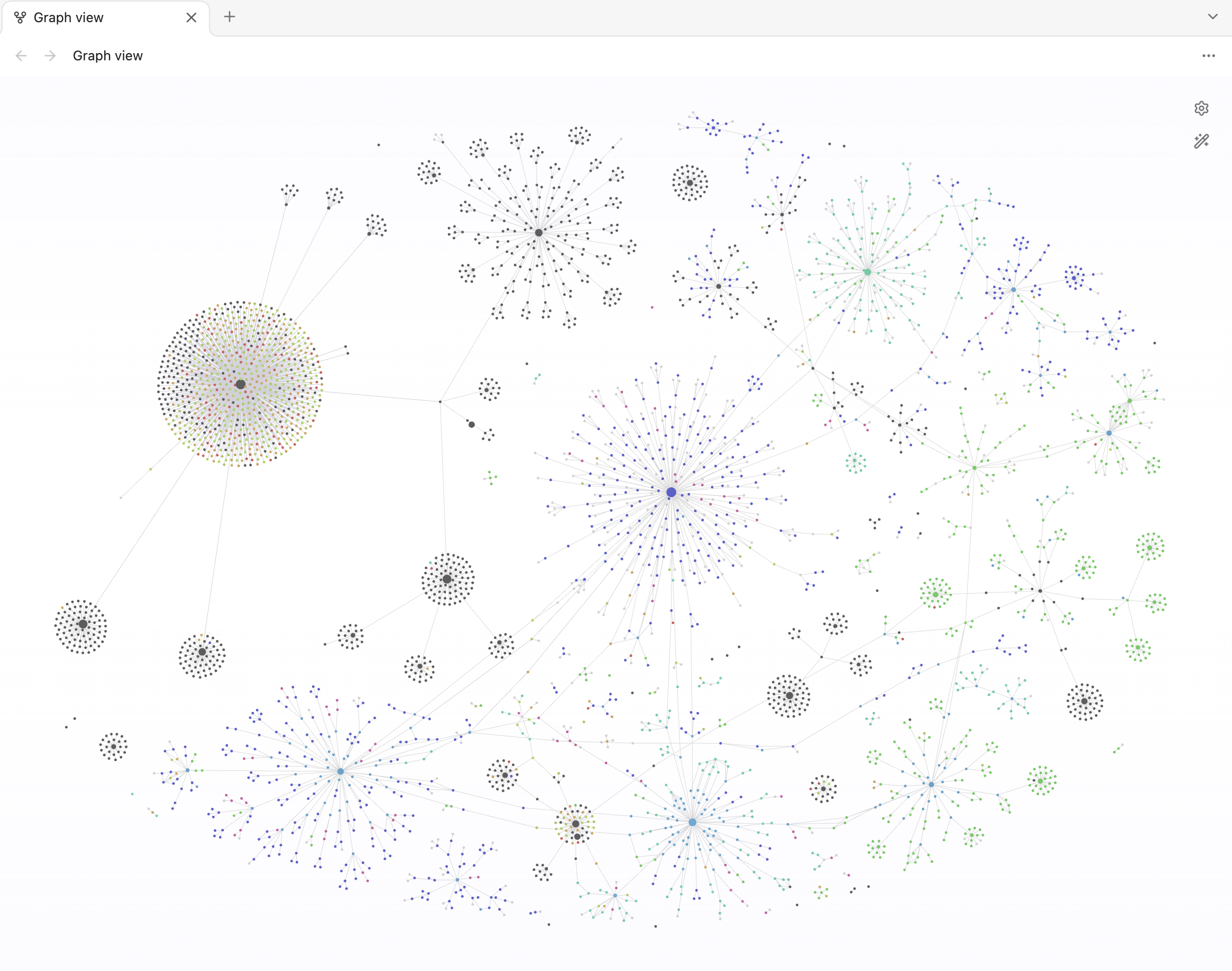
Obsidian graph with Graph Squeeze enabled

Install

Desktop only.

Community plugins

Open the Community Directory listing and select Add to Obsidian. If it is not available in your app yet, use manual installation below.

Manual installation

  1. Download main.js and manifest.json from the latest release and place them in your vault’s .obsidian/plugins/graph-squeeze/ folder.
  2. Reload Obsidian and enable Graph Squeeze in Settings → Community plugins.
  3. Open a global or local graph. Adjust the squeeze in Settings → Graph Squeeze.

Settings

Setting Default Range / behavior
Barrier distance 80,000 Gap between barriers; 0–80,000 graph units
Edge softness 10,000 Distance from zero to full force; 0–40,000 graph units, limited to half the gap
Maximum barrier force 10 Push strength; 0–1,000. Zero disables the push
Barrier force visualizer Off Shows force areas; weaker force is more transparent

Reduce the barrier distance for a narrower band. Increase softness for a gentler transition. Nodes can move beyond the soft boundaries.

Compatibility

Uses private Obsidian graph internals, so Obsidian updates may require a plugin update. Patches an in-memory copy of the local graph worker; no application files are modified.

Privacy

The plugin reads Obsidian’s bundled sim.js outside your vault through the local app:// protocol to add the barrier forces. The scanner counts this fetch call as a network request, but it contacts no remote service and sends no notes or other data over the internet. No telemetry is collected.

Build

npm ci
npm run lint
npm run package

Output: dist/graph-squeeze/.

MIT License

HealthExcellent
ReviewSatisfactory
About
Compress the graph vertically to free horizontal space by adding two invisible horizontal force bands that push nodes inward from above and below. Tune barrier distance, softness, and force to control the squeeze while allowing nodes to move beyond soft boundaries.
VisualizationInterface
Details
Current version
1.0.1
Last updated
Last week
Created
Last week
Updates
2 releases
Downloads
31
Compatible with
Obsidian 1.7.7+
Platforms
Desktop only
License
MIT
Report bugRequest featureReport plugin
Author
renwujunrenwujun
GitHubrenwujun
  1. Community
  2. Plugins
  3. Visualization
  4. Graph Squeeze

Related plugins

Hearth

A beautiful, heavily customizable home screen — dashboard, launchpad, mission control, homescreen, search - all in one. As simple or complex as you need.

Graph Banner

Display a local graph view to the note header

Excalidraw

Visual PKM powerhouse. Create and edit Excalidraw drawings.

Advanced Canvas

Supercharge your canvas experience. Create presentations, flowcharts and more.

Hider

Hide interface elements such as tooltips, status bar, titlebar, and more.

ExcaliBrain

An interactive, structured mind-map of your Obsidian vault.

Breadcrumbs

Visualise the hierarchy of your vault using a breadcrumb trail or matrix view.

Meta Bind

Make your notes interactive with inline input fields, metadata displays, and buttons.

Mermaid Tools

Improved Mermaid.js experience: visual toolbar with common elements and more.

Note Toolbar

Add customizable toolbars to your notes.