GoodBases
 UmbertoFrancesco6k downloads
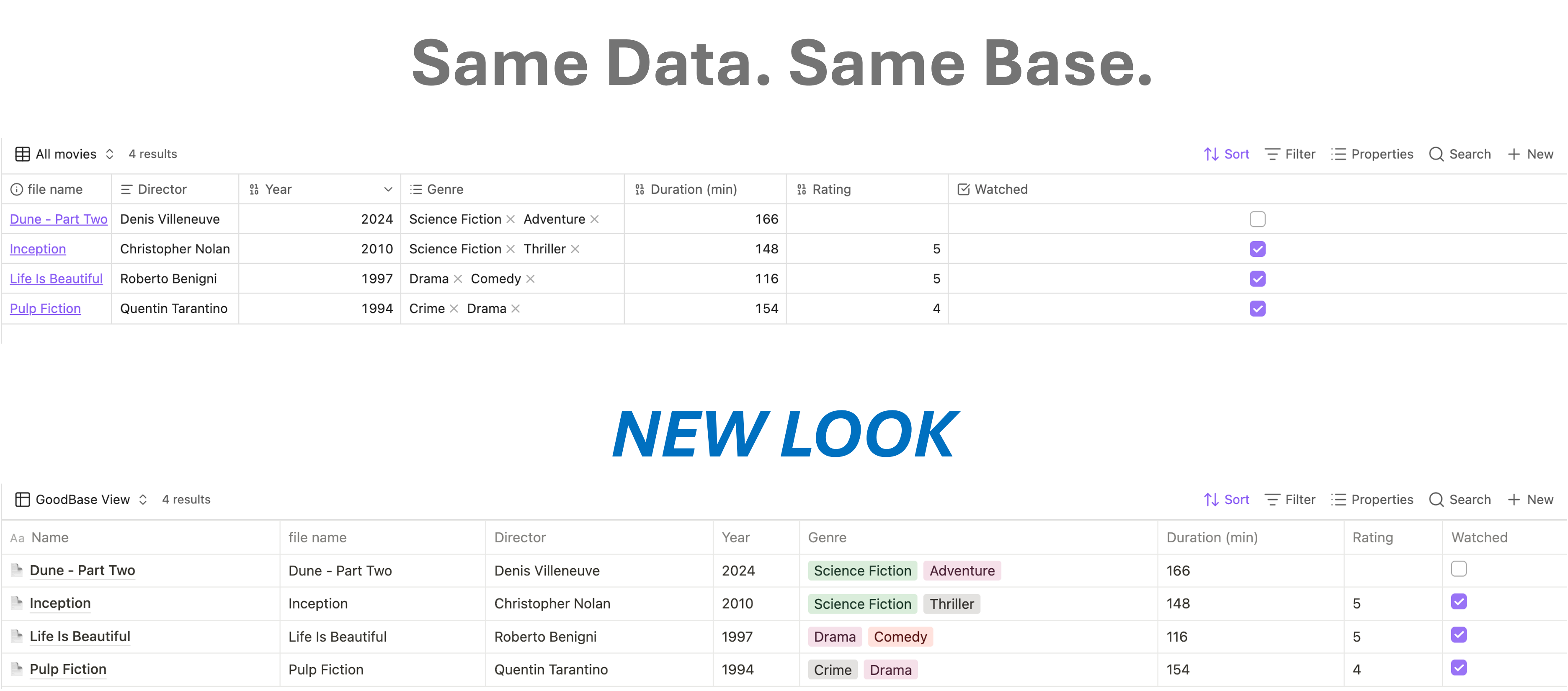
A Bases table view styled to match Notion databases: hover UI, OPEN buttons, and colored tag pills.
- Overview
- Scorecard
- Updates20
A custom Bases view for Obsidian that renders your databases as a Notion-style table: clean chrome, hover-reveal OPEN buttons, colored value pills, and inline cell editing.
Requires Obsidian 1.10.2+ with the Bases core plugin enabled.
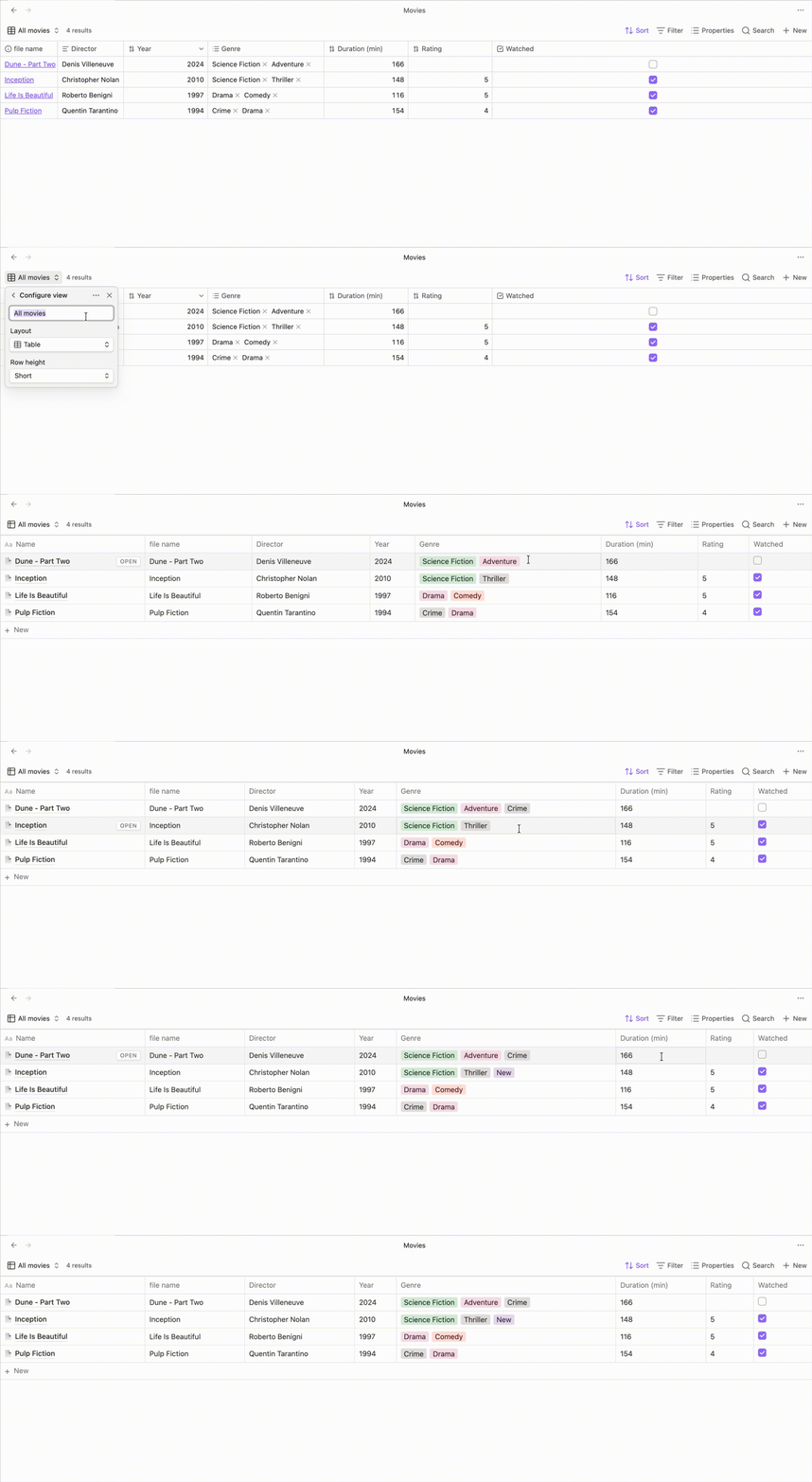
Demo
The page panel
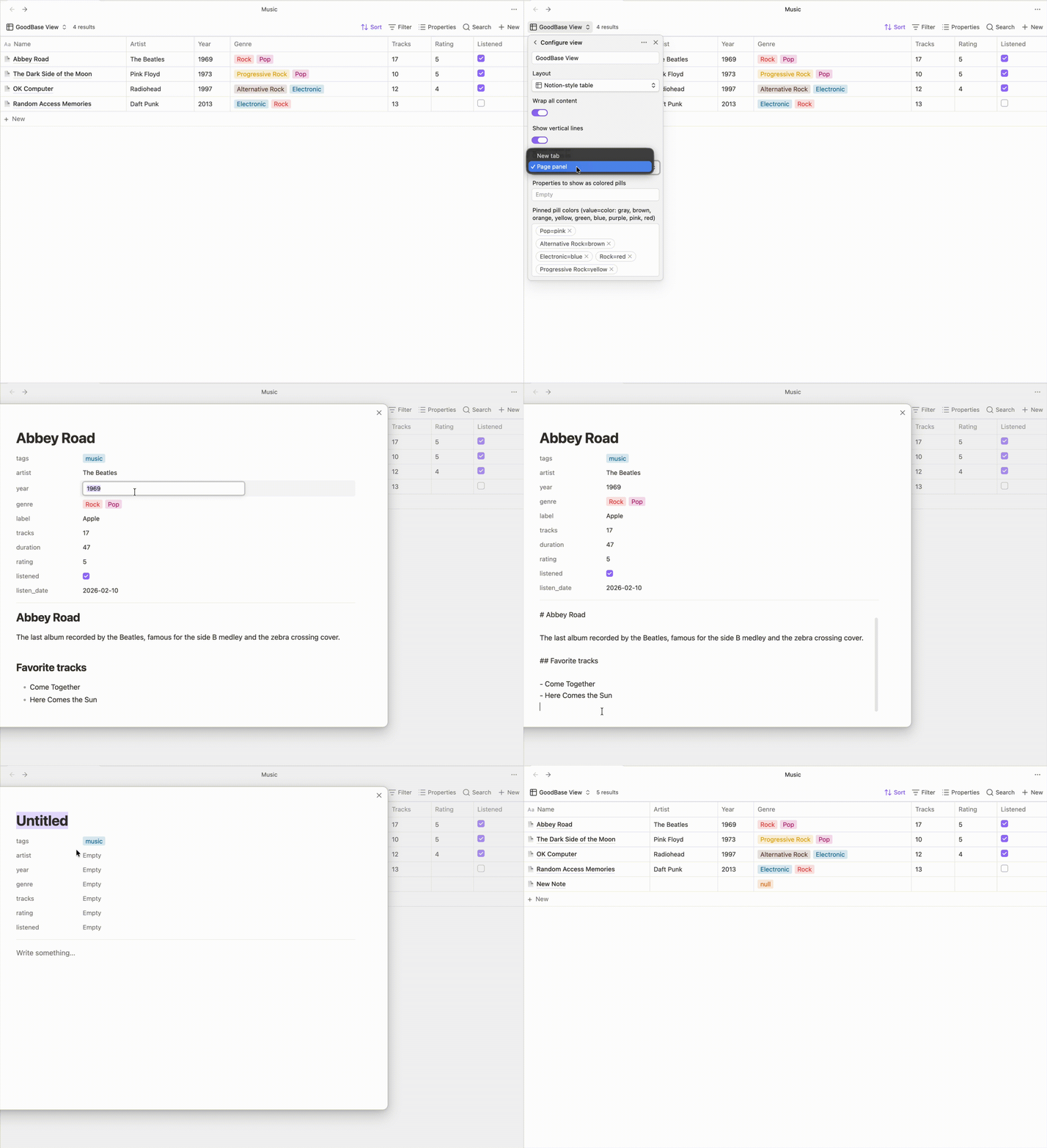
Click + New (or set Open notes in to Page panel and use the hover OPEN button) to work on a note without leaving the table, in a centered Notion-style panel:
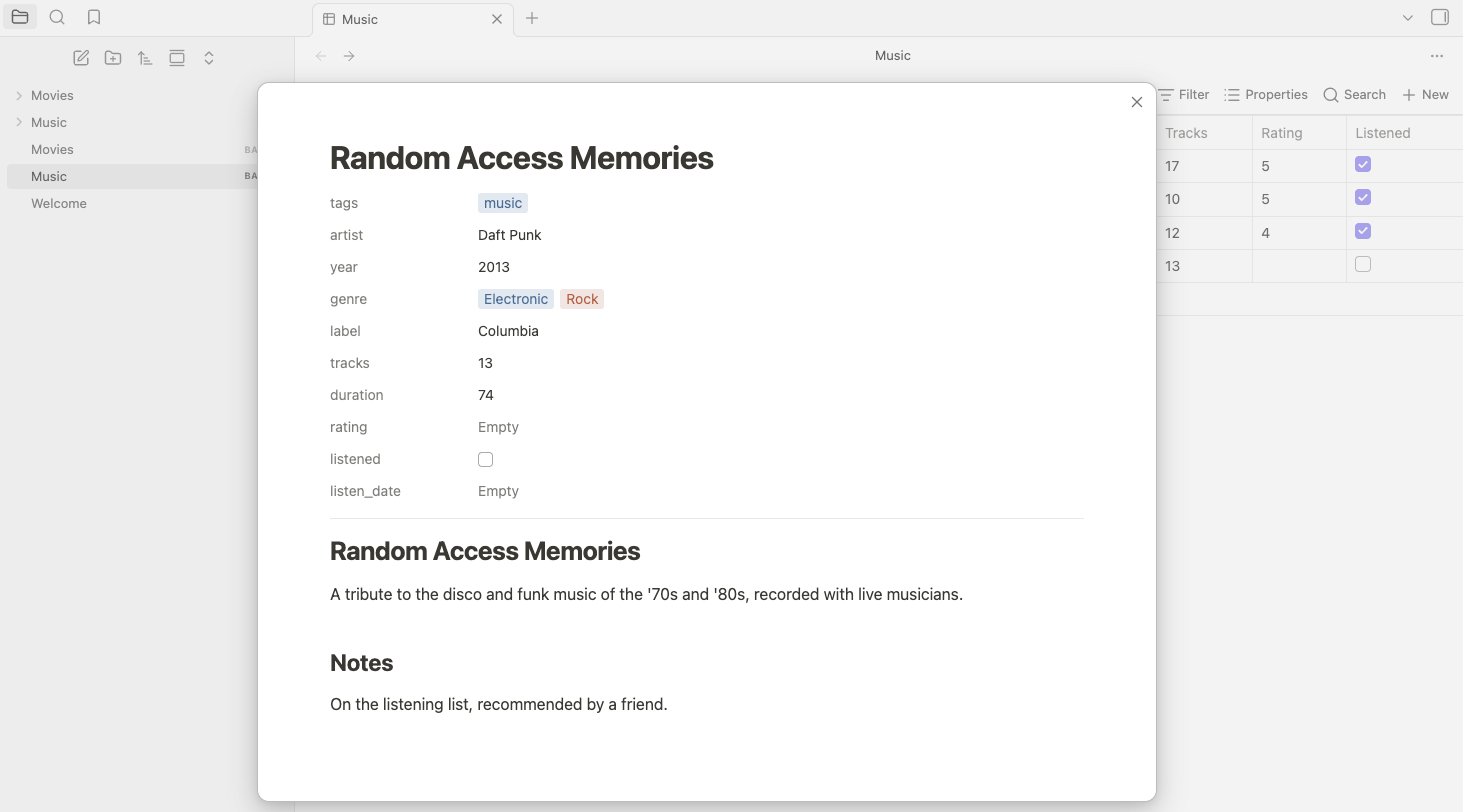
- Title — a real heading; type to rename the note, Enter jumps to the body.
- Properties — the note's frontmatter, editable exactly like the table: pill values open the select editor (with the color picker), checkboxes toggle in place, text and numbers edit inline.
- Body — Obsidian's own Live Preview editor: headings, lists, links and formatting render in place while you type, just like a note tab, and your editor hotkeys work. Changes save automatically as you type.
Features
- Notion-style table — system font stack, hairline borders, hover wash, and a horizontal scroll container so columns never crush, even in embeds and reading mode.
- OPEN button — hover a row to reveal a button that opens the note, just like Notion's database rows.
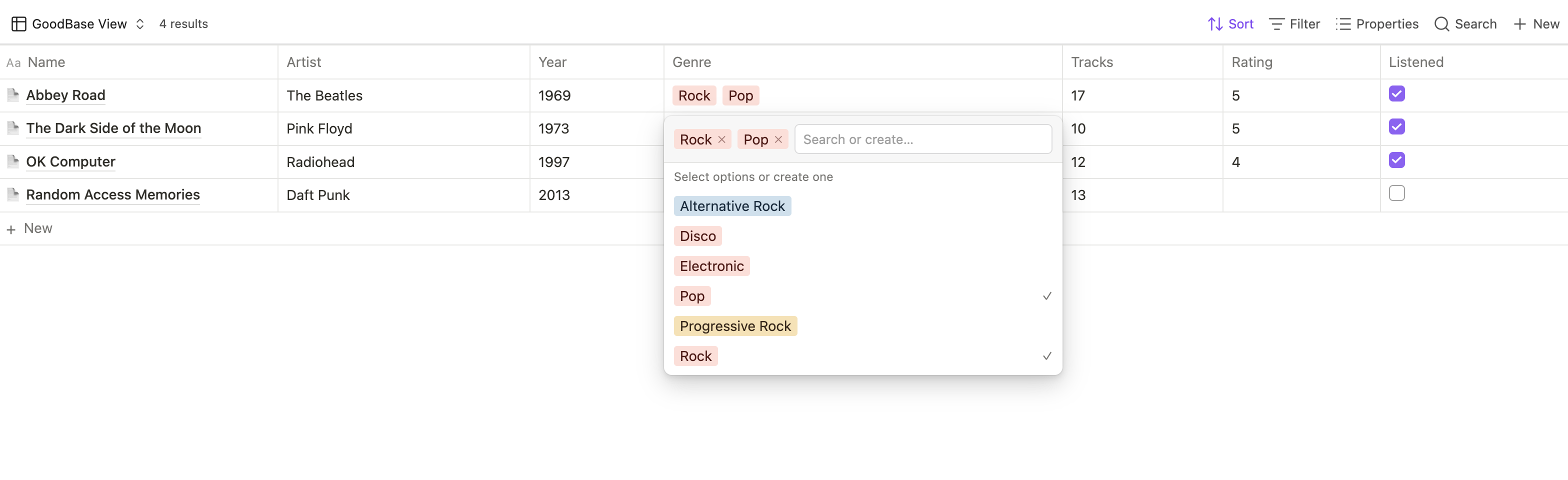
- Colored pills — list properties (tags, multitext) render as pills using Notion's 9-color palette (accurate light- and dark-mode values). Colors are assigned by a deterministic hash, so a value keeps its color forever — unless you choose your own.
- Per-value color picker — click the colored square next to any value
in the pill select menu and pick one of Notion's colors, or any color
you like: the Custom row at the top of the picker opens your
system's color dialog and takes a typed hex (
#0088ff). Custom colors are used as-is in both light and dark mode; the pill's text color is chosen automatically so it stays readable. Your choice is saved and applies everywhere that value appears. (You can also set colors in bulk with the Pinned pill colors view option —value=color, e.g.Done=greenorDone=#0088ff.) - Clickable tags — a pill that is a real tag (the
tagsproperty,file.tags, or any tag-typed value) opens the search pane for that tag when clicked, exactly like tags in the built-in table and in your notes. It works in group headers and in the page panel too. - Inline editing — click a cell to edit text and numbers in a
floating input; checkboxes toggle in place. Pill cells —
tagsincluded — open a select-style menu listing every value already used for that property, with search and create-on-Enter. - Date editor — date cells open a Notion-style calendar: pick a day, or type an ISO date in the field on top. Date & time properties add a time selector next to it. Today and Clear sit at the bottom.
- Page panel — + New opens the freshly created note centered in a Notion-style panel: an editable title, the note's properties (editable just like the table), and the body rendered as formatted Markdown. See The page panel.
- Resizable columns — drag the border in a column header to set its
width; double-click that border to size the column back to its
content. Widths are saved per view in the
.basefile. - Sort from the column header — click a column header for Notion's
menu: Sort ascending, Sort descending, and Remove sort. The sorted
column shows a direction arrow next to its name, and the choice is the
view's regular Bases sort, so it shows up in the toolbar's Sort menu
(and vice versa) and is saved in the
.basefile. Sorting a second column makes it the primary sort and keeps the earlier one as a tie-breaker. - Calculate row — hover the row under the table and click Calculate in any column for Notion's calculations: Count all, Count unique values, Count empty, Count not empty, Percent empty, Percent not empty, plus Sum, Average, Median, Min, Max, Range and Standard deviation for numbers, Earliest date, Latest date and Date range for dates, and Checked, Unchecked, Percent checked, Percent unchecked for checkboxes. Any custom summary formulas defined in the base are offered too. The result shows as a small label and a value, computed over the filtered rows; picking None clears it.
- Choose what OPEN does — the Open notes in view option points the hover OPEN button at a new tab (default) or at the page panel.
- Grouping support — respects the Bases
group byconfiguration. - Choose the Name column icon — keep Notion's page emoji, switch to Obsidian's own file icon so it takes your theme's color, name any emoji or Lucide icon you like, or hide it entirely.
- View options — wrap cell content (on by default), toggle vertical lines, choose how OPEN opens notes, pick the Name column icon, force specific properties to render as pills, and pin pill colors.
Usage
- Enable the Bases core plugin and create a base.
- In the base toolbar, open the view selector and choose Notion-style table.
- Configure columns, filters, sorting, and grouping with the normal Bases controls — or sort straight from a column header and pick a per-column calculation in the row under the table. This view adds its own options (wrapping, vertical lines, open mode, Name column icon, pill properties, pinned colors) in the view settings.
Notes on editing:
- Only note frontmatter properties (
note.*) are editable;file.*andformula.*columns are read-only by nature. tagsedit like any other pill property: click the empty part of the cell (or of the panel's property row) to open the select editor — clicking a tag pill itself still searches for that tag.- Date properties open a calendar: pick a day, or type any ISO date
(
2026-09-20,2026-09-20T14:30) in the field on top and press Enter. Today and Clear sit at the bottom. Date & time properties add a time selector next to the date field — picking a day keeps the calendar open so you can set the clock too.
Installation
From the community plugin browser
Once accepted: Settings → Community plugins → Browse, search for GoodBases, install, and enable. Then, open the view selector and pick Notion-style table.
Manual
- Download
main.js,manifest.json, andstyles.cssfrom the latest release. - Put them in
VaultRoot/.obsidian/plugins/good-bases/. - Reload Obsidian and enable the plugin in Settings → Community plugins.
Optional: Notion-style toolbar
The blue Notion-style New button and icon-only Sort / Filter / Properties / Search are an optional CSS snippet (the toolbar is core Obsidian UI, outside the plugin's view, so it isn't styled by the plugin itself):
- Copy
snippets/goodbases-notion-toolbar.cssintoVaultRoot/.obsidian/snippets/. - Enable it under Settings → Appearance → CSS snippets.
The snippet only affects a Base's toolbar while a GoodBases view is open; every other base keeps its native toolbar.
Support
GoodBases is free and open source, built and maintained in my spare time. If it makes your vault a little nicer to work in, you can buy me a coffee ☕ — it goes toward new features and keeping up with Obsidian's API changes.
Roadmap
Where GoodBases is heading. These are directions, not dated promises — want to nudge one up the list? Open an issue.
- ✅ First public release (0.3) — Notion-style table view: colored pills, inline cell editing, the pill select editor, pinned colors, hover-reveal OPEN button, grouping, and view options.
- ✅ Per-value color picker (0.4) — recolor any value from Notion's palette; your choice persists everywhere it appears. Cells wrap by default.
- ✅ Page panel (0.5) — create and open notes in a centered Notion-style panel: editable title and properties, body rendered as formatted Markdown, and an Open notes in option for the OPEN button.
- ✅ Custom pill colors (0.6) — pick any color for a value, not just Notion's nine: the system color dialog or a typed hex, saved per value.
- ✅ Column resizing (0.7) — drag handles on column borders, double-click to reset, widths persisted per view. Plus a choosable Name column icon and tag pills that open the search pane.
- ✅ Sorting & calculations (0.8) — Notion's column-header sort menu, and a per-column Calculate row: counts, percentages, sum, average, median, min, max, range, date range, and more.
- ✅ Editable tags & date editor (0.9) —
tagsedit through the select editor like any other pill property, and date cells open a Notion-style calendar, with a time selector for date & time properties. - ✅ Live Preview in the page panel (1.0) — the panel's body is a real Live Preview editor, so notes stay formatted while you edit them.
- 🔵 Per-group calculations (next) — a Calculate row under each group when the base is grouped, the way Notion does it.
- ⚪️ Board & gallery views (exploring) — Kanban boards and card galleries; deprioritized for now while table fidelity comes first.
Changelog
The full history and downloadable builds are on the Releases page.
1.0.0
🎉 GoodBases 1.0. The table, the page panel, pills, sorting, calculations and the date editor are all in place — this release marks the plugin as stable.
✍️ New — Live Preview in the page panel. The body of a note opened in the page panel is now Obsidian's own Live Preview editor. Headings, lists, links and formatting stay rendered while you type, instead of switching to raw Markdown the moment you start editing.
- Added: editor hotkeys (bold, italic, toggle checklist…) work in the panel's body.
- Added: Enter on the title moves the caret straight into the body, and clicking below the text places it at the end.
- Changed: following a link from the body opens the note in the workspace and closes the panel so you can see it.
- Changed: the body always uses Live Preview, even if your vault's default editing mode is Source.
0.9.0
🏷️ New — editable tags. tags now edits like any other pill
property: click the empty part of a tags cell, or of the tags row in
the page panel, to open the select editor and add, remove or create
tags. Clicking a tag pill itself still searches for that tag.
📅 New — date editor. Click a date cell (in the table or the page panel) for a Notion-style calendar: pick a day, or type any ISO date in the field on top and press Enter. Today and Clear sit at the bottom. Date & time properties add a time selector next to the date field — picking a day keeps the calendar open so you can set the clock too.
- Added: tags are written the way Obsidian's own property editor
stores them — a plain list without
#— so nothing changes in how they render or search. - Added: an empty cell of a property typed Date or Date & time in the vault opens the calendar too, so the first date can be picked rather than typed.
- Added: dates are written as
YYYY-MM-DD, and dates with a time asYYYY-MM-DDTHH:mm, matching Obsidian's date properties. A value that already has a time keeps it when you pick a new day. - Fixed: clicking a date cell in the table reliably opens the editor (the native date widget Bases renders there used to swallow the click).
0.8.0
New: sort from the column header. Click any column header and pick Sort ascending or Sort descending, the way Notion's column menu works. A sorted column shows a direction arrow after its name, and Remove sort appears in the menu while it's sorted.
New: Calculate row. A Notion-style footer under the table: hover it and click Calculate in a column to pick a calculation for it — counts and percentages for every column, sums/averages/median/min/max/ range/standard deviation for numbers, earliest/latest/date range for dates, checked/unchecked (and their percentages) for checkboxes. The result shows as a small label and value; None clears it.
- Added: calculations that Bases has a built-in summary for are
stored as the view's regular summaries, so they also appear in the
built-in table's summary row (and anything set there shows here).
Notion's Count all and the percentages, which Bases has no function
for, are computed by GoodBases and stored in the view under
calculations. - Added: custom summary formulas defined in the base's
summaries:section are offered at the end of the Calculate menu. - Added: the header menu writes the view's regular Bases sort, so
what you pick here appears in the toolbar's Sort menu (and anything
set there shows as a header arrow). It's saved in the
.basefile like the rest of the view. - Added: sorting a second column makes it the primary sort and keeps the earlier one as a tie-breaker, matching the built-in table.
- Changed: column headers now take a hover wash and a pointer cursor, since they open a menu.
0.7.2
🔖 New — tag pills are clickable. Click a tag anywhere GoodBases draws it — a table cell, a group header, or a page panel property — and Obsidian's search pane opens on that tag, the same as clicking a tag in the built-in Bases table or in a note.
- Added: tag pills open
tag:searches; only real tags react, so ordinary select and multitext pills still open the value menu as before. Clicking the empty part of the cell keeps opening that menu. - Added: tags in the page panel's body now search too, and the panel steps aside so you can see the results.
- Changed: group headers drop the leading
#when you group by tags, matching how tags render in cells.
Thanks to the community for the suggestion.
0.7.1
🎨 New — choose the Name column icon. The page icon is no longer a fixed glyph. The new Name column icon view option keeps it as the default, switches to Obsidian's own file icon so it takes your theme's color, accepts any emoji or Lucide icon name you type, or hides it entirely.
- Added: a Name column icon dropdown — page icon (default), Obsidian's file icon, custom, or hidden — with a companion text field for the custom emoji or Lucide icon name.
- Changed: Hidden also removes the
Aaglyph from the column header, leaving the Name column completely clean. - Changed: an emoji you choose keeps its own colors; the default page icon stays desaturated as before.
Thanks to the community for reporting that the fixed icon could clash with custom themes.
0.7.0
📏 New — resizable columns. Drag the border in a column header to set
its width, and double-click that border to size the column back to its
content. Widths are saved per view in the .base file, so they survive
reloads and travel with the base.
- Added: drag-to-resize handles on every column header, including the Name column; double-click a handle to reset that column to auto width.
- Changed: a narrowed column wraps taller when Wrap all content is on and truncates when it is off, so resizing and wrapping compose. Widening a column past the pane pushes the table into its horizontal scroll rather than squeezing the other columns.
- Fixed: editing a cell no longer widens its column (and heightens its row) for as long as the editor is open.
- Fixed: the cell editor now closes as soon as you press Enter, instead of staying on screen until the property finished saving.
0.6.0
🎨 New — custom pill colors. The color picker is no longer limited to
Notion's nine colors. Click the colored square next to any value in the
pill select menu and use the new Custom row at the top: open your
system's color dialog, or type a hex (#0088ff). Your pick is saved to
that value and applies everywhere it appears, exactly like a palette
color.
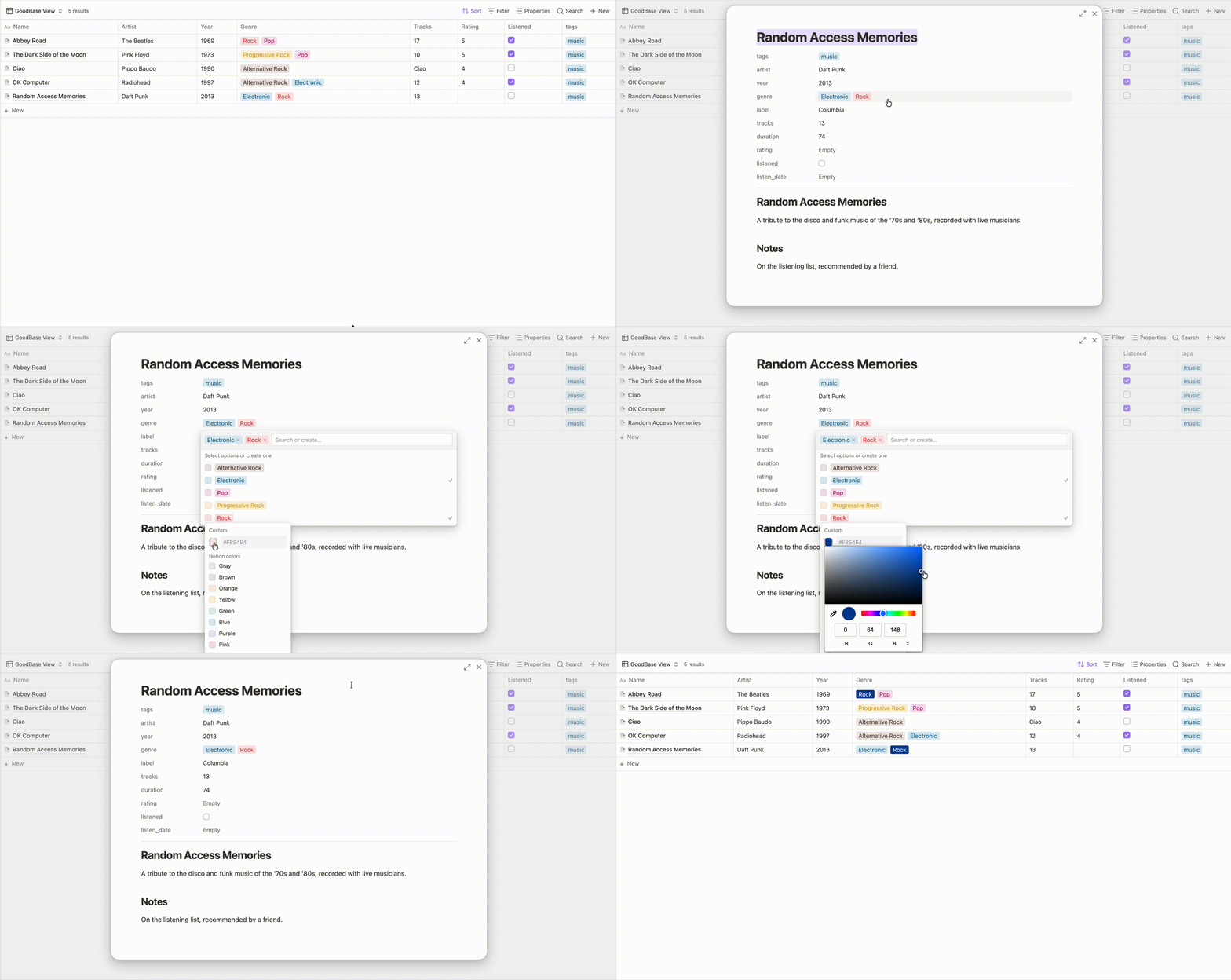
- Added: a custom color row in the pill color picker — the native
color dialog plus a hex field (
#rgband#rrggbb, with or without the#). - Added: the Pinned pill colors view option now takes hex values
too, so you can set them in bulk —
Done=#0088ffalongsideDone=green. - Changed: a custom color is used exactly as you picked it in both light and dark mode; the pill's text color is derived automatically (contrast-checked) so the label always stays readable. Notion's nine palette colors keep their separate light/dark values.
0.5.4
- Fixed: in the page panel, editing a pill property was impossible — opening the select menu bounced the cursor back to the page title, so you couldn't search for or type a new value. The menu now opens inside the panel, where Obsidian's modal focus handling leaves it alone.
- Fixed: clicking the same property row again now reliably closes its select menu, even after a change re-renders the table behind the panel.
0.5.3
- Changed: addressed the community plugin review feedback — inline
styles now go through Obsidian's
setCssStyles/setCssPropsAPIs, modal lifecycle methods match Obsidian's types, andstyles.cssno longer uses!important(overrides win by selector specificity instead). No functional changes.
0.5.2
- Fixed: in the page panel, editing the body of a note with many properties could squeeze the editor to nothing, hiding the content — the editor now grows with its content and the panel scrolls.
0.5.1
- Added: the base's native toolbar New button now opens the page panel too, while a GoodBases view is active (other Bases views keep the core popover).
- Added: an open-in-new-tab button next to the page panel's close button — it saves pending edits, closes the panel, and opens the note in a new tab.
0.5.0
📄 New — Notion-style page panel. + New now opens the freshly created note centered in a panel, like Notion's page peek: an editable title, the note's properties — pills open the same select editor as the table, checkboxes toggle, text and numbers edit inline — and the body rendered as formatted Markdown (click to edit the source, click away to render it again; changes autosave as you type).
Also in this release:
- Added: an Open notes in view option — point the hover OPEN button at a new tab (default) or at the page panel.
0.4.5
- Fixed: in dark mode the table header no longer shows a light background — it now follows the page background like the rest of the table.
- Fixed: column headers now align consistently between editing and reading mode (header text is vertically centered in both).
0.4.4
- Fixed: long, multi-line text cells now edit in a textarea, so the full wrapped text stays visible while you type — previously a single-line input scrolled the text sideways. Shift+Enter inserts a newline; Enter saves.
0.4.3
- Fixed: clicking a pill cell again now closes its tag selector (previously only an outside click or Esc would).
- Fixed: the inline text/number edit box now matches the size of the cell you click, instead of a fixed size.
0.4.2
- Changed: the optional Notion-style toolbar snippet no longer uses
the
:has()selector, avoiding the performance cost of broad selector invalidation. Once enabled, the snippet now restyles every Bases toolbar (not just GoodBases views).
0.4.1
- Changed: the Notion-style toolbar restyle (blue "New" button +
icon-only Sort / Filter / Properties / Search) is now an optional CSS
snippet (
snippets/goodbases-notion-toolbar.css) rather than shipping in the plugin, so GoodBases no longer restyles Obsidian's core UI. See Installation → Optional: Notion-style toolbar.
0.4.0
🎨 New — per-value color picker. Click the colored square next to any value in the pill select menu and pick a color from Notion's palette. Your choice is saved (persisted to the Pinned pill colors option) and applies everywhere that value appears.
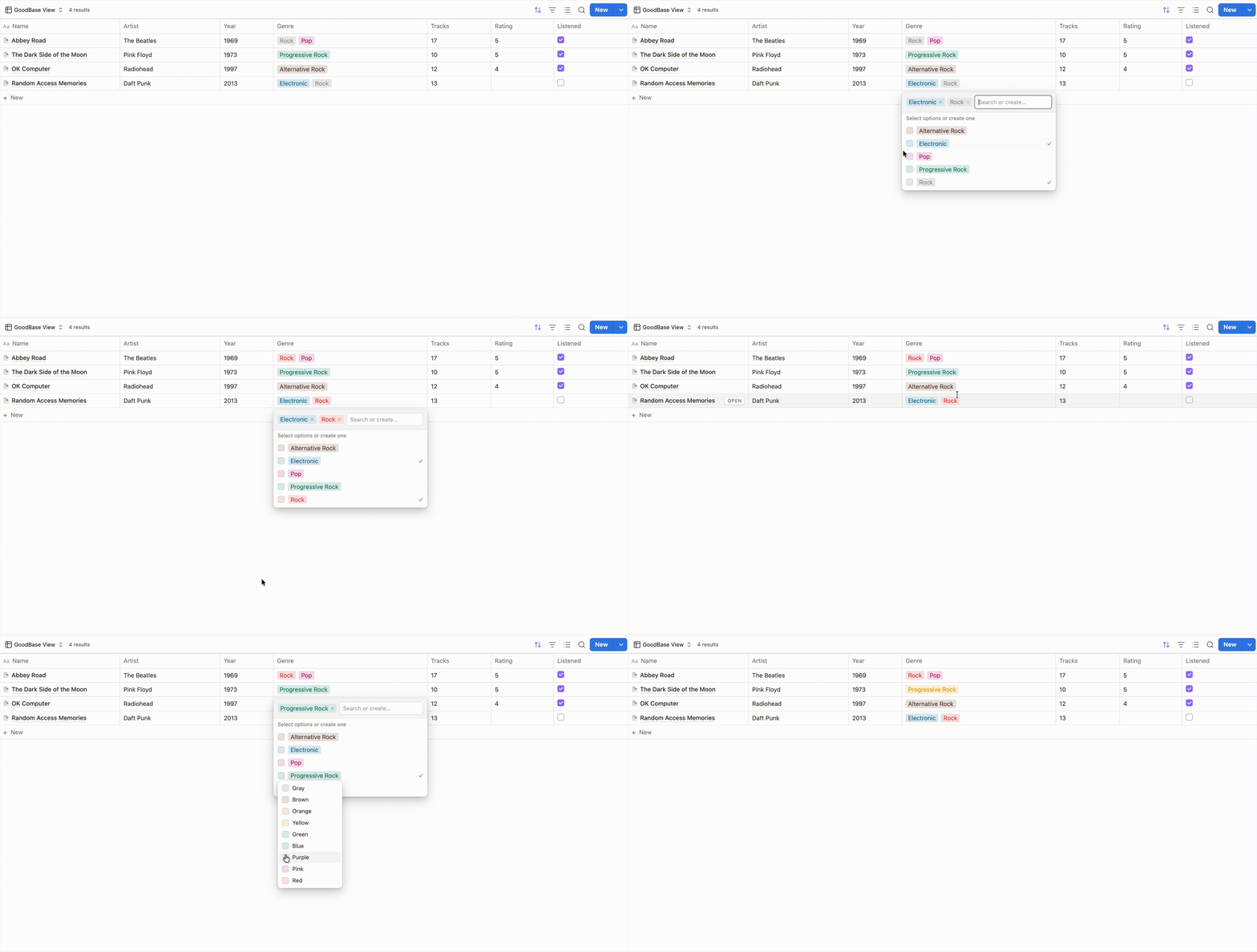

Also in this release:
- Changed: cell content now wraps by default.
- Changed: colored pills use Notion's exact light- and dark-mode palette values.
- Changed: restyled the Bases toolbar for the Notion-style view — a Notion-like blue "New" button and icon-only Sort / Filter / Properties / Search, scoped so it only affects this plugin's views.
- Fixed: the inline edit box no longer lingers after you click away from a cell without changing it.
0.3.2
- Added: the project landing page, demo GIF, and a Buy Me a Coffee funding link.
0.3.1
- Initial release: Notion-style table view — colored pills, inline cell editing, the pill select editor, pinned pill colors, hover-reveal OPEN button, grouping support, and view options.
Disclaimer
This plugin is not affiliated with, endorsed by, or sponsored by Notion Labs, Inc. "Notion" is a trademark of Notion Labs, Inc.; it is used here only to describe the visual style the view emulates.