CSV Lite
 liubinfighter11k downloads
Just open and edit a CSV file in workspace view, no more. Keep it simple.
- Overview
- Scorecard
- Updates20
Simple enough for csv, no more fancy function you need to learn and think!

Introduction
Keep your mind on track! Don't waste time creating fancy tables.
A plugin designed to view and edit CSV files directly within Obsidian.
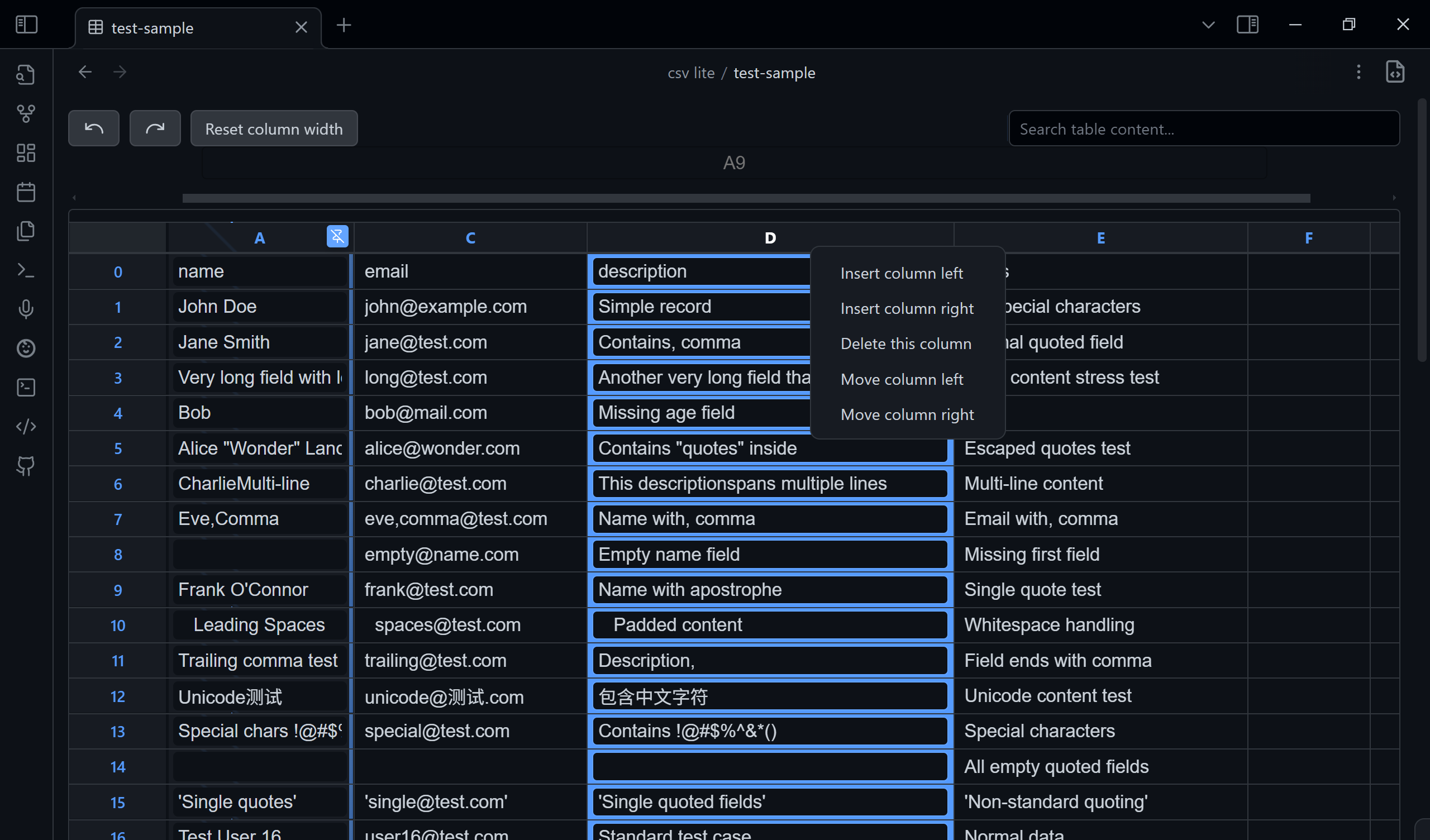
- View CSV files in a clean, readable table.
- Search the entire file to quickly find data (
escto clean). - Navigate easily with numbered rows and columns.
- Pin the selected column so it's always visible.
- Toggle between the table view and raw source-mode.
- Edit cells directly by clicking and typing.
- Manage rows and columns (add, delete, move) with a simple right-click on the header.
- Create new CSV files: use the command palette or right-click in the File Explorer to quickly create a new
.csvfile. A unique name likenew.csvornew-1.csvwill be generated automatically. - Switch Delimiter Non‑Destructively: Auto‑detects the file delimiter (comma, semicolon, tab, etc.). Changing the delimiter in the toolbar only re-parses the view; it does NOT rewrite your file. Your original delimiter is preserved when saving edits.
- Clickable URLs: Plain-text URLs and Markdown-style links (
[text](url)) in cells are automatically detected and rendered as clickable links. Click a link to open it in your browser, or click the edit button (✎) to edit the cell content. - First Row as Header: Toggle "Header Row" in the toolbar to show the first row as column headers (like Sheets). The choice is remembered per file, only affects the view, and never rewrites your file. Double-click a header to rename it in place.
I have a plan to design my own database using json and csv only. If you have fancy idea about tables or csv, please feel free to issue (I will consider it in csv-lite or my new plugin) or search it in community.
Why Another CSV Plugin?
There are so many CSV plugins. Why choose this one?
Because it is designed to be simple and straightforward. It also keeps up with the latest Obsidian API and typings. No fancy features—just open and edit.
Philosophy
- No fancy UI, SAY NO TO - modals - sidebar - settingTab - other online docs & tutorials
- All functions of the ui components above will be covered in a single File view.
- All in TextFileView/workspace.
- No more pollution to your vault, all metadata store in
./.obsidian/plugins/csvin json format. (Currently nodata.json) - Every function must be completed within 3 steps:
- Locate it visually
- Click/Hotkey
- Input (if needed)
- Confirm/Leave
- The interface should remain minimal yet functional.
- Users shouldn't need to leave their workflow environment.
- CSV manipulation should be as natural as text editing.
Purpose
This plugin enhances Obsidian's functionality by allowing users to work with CSV (Comma-Separated Values) files seamlessly within their vault, eliminating the need to switch between different applications for CSV handling.
Delimiter Handling Philosophy
Team repositories or shared datasets often mix delimiter styles (, ; \t). For safety:
- The plugin auto-detects the delimiter when opening a file.
- The dropdown ("Auto, , ;") lets you temporarily re-interpret the file without changing it on disk.
- Saving edits (cell changes, row/column operations) writes the file back using the ORIGINAL detected delimiter, not the one you temporarily selected—unless the file already used that delimiter.
- This prevents accidental mass diffs in version control or breaking pipelines that assume a specific separator.
If you ever need an explicit “convert delimiter” feature, open an issue—we’ll gate it behind a confirmation instead of doing it silently.
Getting Started
Install the plugin through Obsidian's community plugins section and start viewing your CSV files directly in your notes.
Trouble Shooting
You can issue here.
if you encounter any problems exactly with csv, download
test/test-sample.csvto see what's different from the test csv file. Issue with an screenshot will help us fix it faster.