GIFs.md
 Krish313 downloads
An extension for obsidian to add GIFs in your notes and make it more exciting.
- Overview
- Scorecard
- Updates10
Introduce GIFs to your notes in Obsidian with this plugin now!

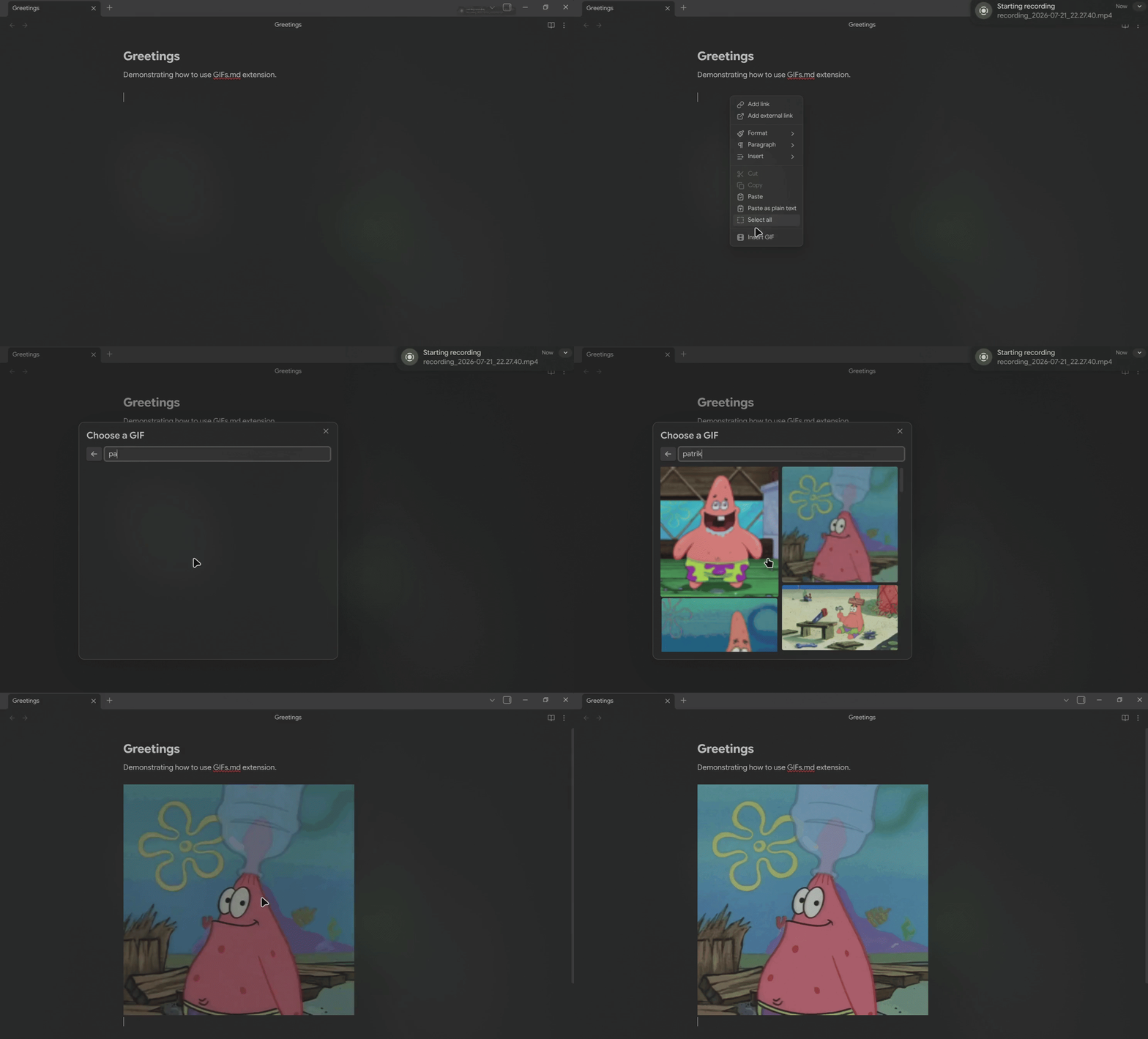
Features
- Search for GIFs by keyword using the Klipy API.
- Browse trending GIFs and explore curated categories.
- Insert any GIF as a standard Markdown image at your cursor position.
- Access the GIF picker via the command palette or the right-click editor menu.
How to use
Open the GIF picker in any editor using one of these methods:
- Command palette — Open the Command Palette (
Cmd/Ctrl + P) and runGIFs.md: Insert GIF. - Right-click menu — Right-click anywhere in an active note and select Insert GIF.
- Ribbon Icon — Click on the film icon the ribbon to activate the GIF search menu.
- Custom hotkey — Assign a shortcut under Settings -> Hotkeys by searching for
GIFs.md.
The modal displays trending categories by default. Click a category to view matching GIFs, or type a query into the search bar. Click any GIF to instantly insert it into your note.
Installation
Community Plugin (Recommended)
- Open Settings and go to Community Plugins.
- Search for GIFs.md and click Install.
- Restart obsidian and enable the plugin.
Or go to GIFs.md and click Install.
Using BRAT
- Go to BRAT settings and search for Add Beta Plugins or via the command palette.
- Paste the URL of this repository in the field (
https://github.com/ikrishagarwal/GIFs.md/) - Click on Add Plugin
- Reload obsidian
Manual installation
You can install the plugin automatically via terminal scripts or by downloading the release files manually. Run these commands from the root directory of your Obsidian vault.
Option 1: macOS / Linux (Bash)
Download and run the installation script directly via terminal:
bash <(curl -sL https://raw.githubusercontent.com/ikrishagarwal/GIFs.md/main/install.sh)
- Restart obsidian
- Open Settings and go to Community Plugins
- Search for GIFs.md and enable it.
Option 2: Windows (PowerShell)
Download and run the installation script directly via PowerShell:
irm https://raw.githubusercontent.com/ikrishagarwal/GIFs.md/main/install.ps1 | iex
- Restart obsidian
- Open Settings and go to Community Plugins
- Search for GIFs.md and enable it.
Option 3: File download
- Download
gifs-md-plugin.zipfrom the latest GitHub Release. - Unzip it inside your vault's plugin directory (
.obsidian/plugins/gifs-md/). - Move the downloaded files into that folder and reload Obsidian.
- Open Settings and go to Community Plugins.
- Search for GIFs.md and enable it.
Settings
| Setting | Description |
|---|---|
| Per page | Number of GIF results shown per search (8 to 50). |
| Locale | Language code for API search requests (e.g., en_US, fr_FR). |
| User ID | Auto-generated unique ID used to personalize search results, store favorite GIFs, and filter hidden GIFs. |
Network & Privacy Disclosure
This plugin connects to the Klipy API (api.klipy.com) to retrieve search results, trending categories, and media preview URLs.
- Data sent: Search queries typed into the GIF picker, locale settings, and an auto-generated User ID.
- Purpose of User ID: The User ID is passed to Klipy to deliver personalized GIF recommendations, remember favorited media, and exclude blocked GIFs from showing up in future search results.
- Privacy: No vault content, note data, file names, or personal hardware identifiers are collected or transmitted.
License
MIT © Krish