Search...Search plugins and themes...
⌘K
Sign in
  • Get started
  • Download
  • Pricing
  • Enterprise
  • Account
  • Obsidian
  • Overview
  • Sync
  • Publish
  • Canvas
  • Mobile
  • Web Clipper
  • CLI
  • Learn
  • Help
  • Developers
  • Changelog
  • About
  • Roadmap
  • Blog
  • Resources
  • System status
  • License overview
  • Terms of service
  • Privacy policy
  • Security
  • Community
  • Plugins
  • Themes
  • Discord
  • Forum / 中文论坛
  • Merch store
  • Brand guidelines
Follow us
DiscordTwitterBlueskyThreadsMastodonYouTubeGitHub
© 2026 Obsidian

Gemoji

FrankieFrankie16 downloads

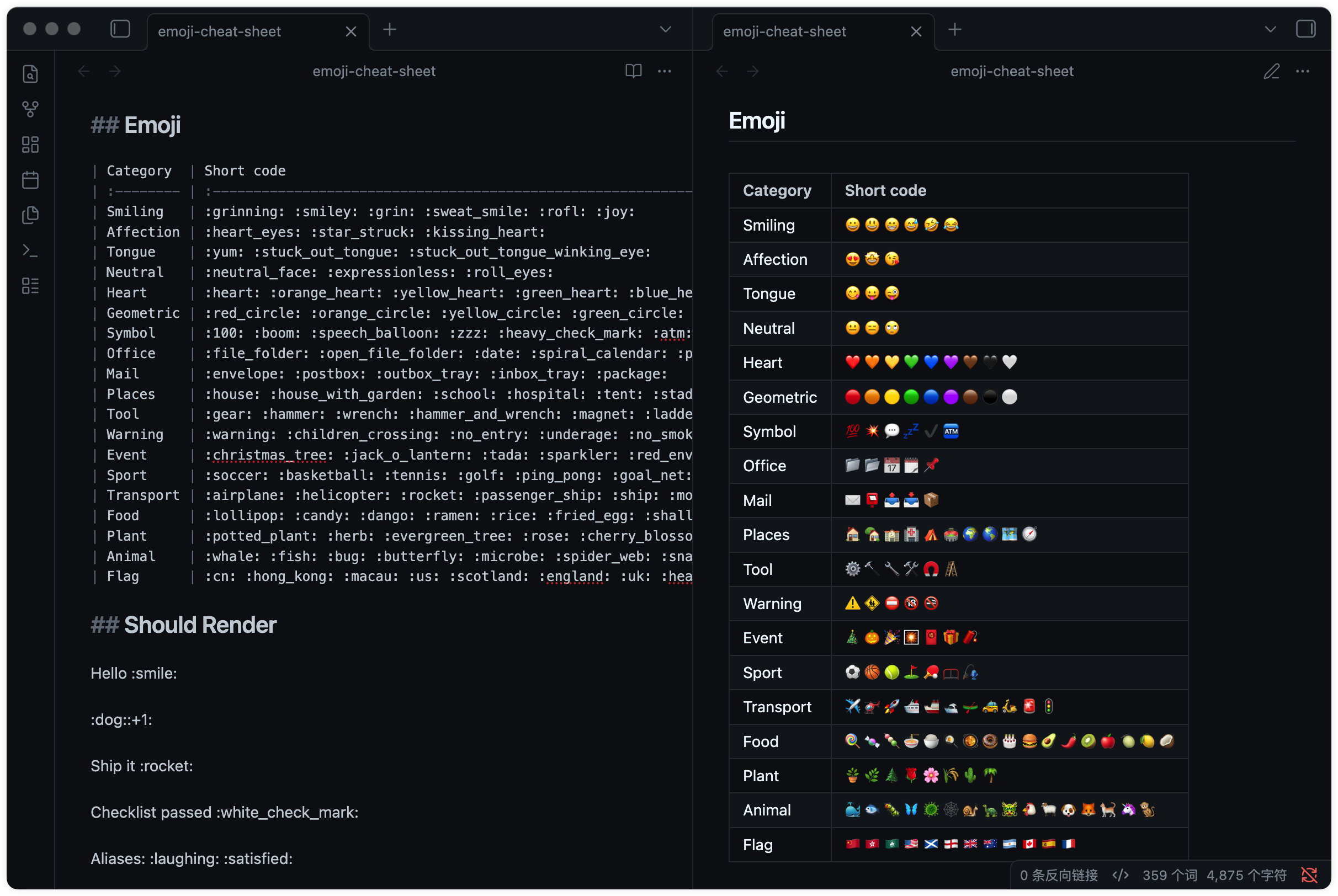
Render emoji shortcodes in reading mode.

Add to Obsidian
Gemoji screenshot
Gemoji screenshot
  • Overview
  • Scorecard
  • Updates3

English | 简体中文

Gemoji (GitHub Emoji) renders emoji shortcodes in Obsidian Reading mode.

Features

  • Render supported shortcodes such as :smile: 😄, :rocket: 🚀, :+1: 👍, and :white_check_mark: ✅ as Unicode emoji.
  • Preserve markdown source content.

Preview

Screenshots
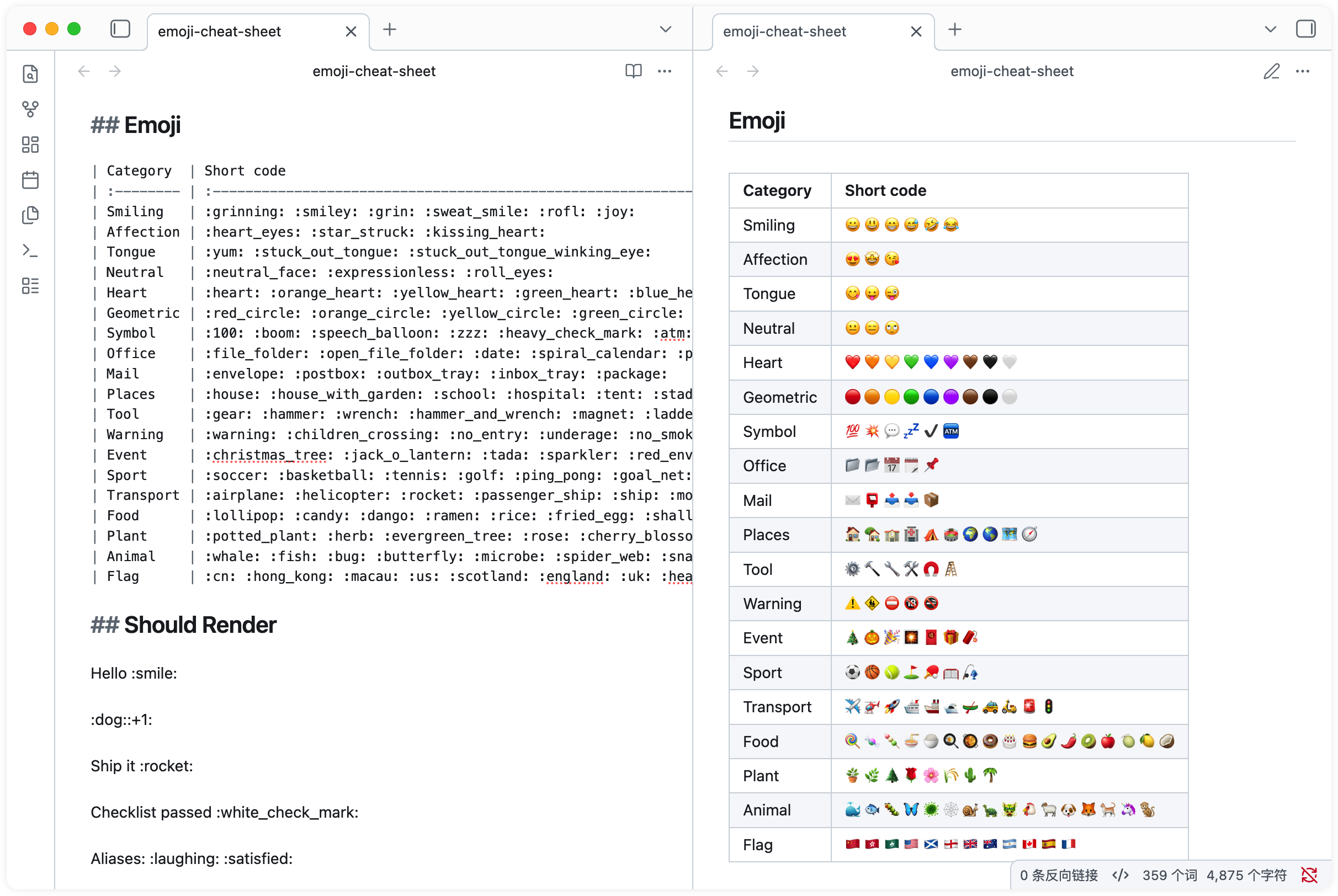
Scope

This plugin targets Obsidian Reading mode and markdown rendering contexts supported by Obsidian markdown post processors. It does not currently render emoji shortcodes in Live Preview or Source mode.

How to Install

This plugin is available in the Obsidian Community Plugins store.

Manually
  1. Download main.js and manifest.json from the latest GitHub release.
  2. Create /your_vault/.obsidian/plugins/gemoji/.
  3. Place the downloaded files in that folder.
  4. In Obsidian, go to Settings -> Community plugins -> Installed plugins -> Gemoji -> Enable, then restart Obsidian.

Related

If you like GitHub's Markdown rendering style, you may also enjoy the GitHub Flavored Markdown Theme for Obsidian.

Credits ❤️

  • gemoji for emoji shortcode data.
  • emoji-cheat-sheet for the GitHub emoji cheat sheet.

License

MIT License © Frankie

90%
HealthExcellent
ReviewSatisfactory
About
Render emoji shortcodes like :smile:, :rocket:, :+1: and :white_check_mark: as Unicode emoji in Obsidian Reading mode.
EmojiMarkdownAppearance
Details
Current version
1.1.1
Last updated
9 hours ago
Created
3 days ago
Updates
3 releases
Downloads
16
Compatible with
Obsidian 1.0.0+
Platforms
Desktop, Mobile
License
MIT
Report bugRequest featureReport plugin
Sponsor
PayPal
Author
FrankieFrankiefrankie
GitHubtofrankie
  1. Community
  2. Plugins
  3. Emoji
  4. Gemoji

Related plugins

Importer

Import data from Notion, Evernote, Apple Notes, Microsoft OneNote, Google Keep, Bear, Roam, and HTML files.

Minimal Theme Settings

Control the colors and fonts in Minimal Theme.

Hider

Hide interface elements such as tooltips, status bar, titlebar, and more.

Outliner

Work with your lists like in Workflowy or Roam Research.

Various Complements

Complete words similar to auto-completion in an IDE.

Style Settings

Adjust theme, plugin, and snippet CSS variables.

Linter

Format and style your notes. Linter can be used to format YAML tags, aliases, arrays, and metadata; footnotes; headings; spacing; math blocks; regular Markdown contents like list, italics, and bold styles; and more with the use of custom rule options.

Note Toolbar

Add customizable toolbars to your notes.

Link Favicons

See the favicon for a linked website.

Iconic

Customize your icons and their colors directly from the UI, including tabs, files & folders, bookmarks, tags, properties, and ribbon commands.