Search...Search plugins and themes...
⌘K
Sign in
  • Get started
  • Download
  • Pricing
  • Enterprise
  • Account
  • Obsidian
  • Overview
  • Sync
  • Publish
  • Canvas
  • Mobile
  • Web Clipper
  • CLI
  • Learn
  • Help
  • Developers
  • Changelog
  • About
  • Roadmap
  • Blog
  • Resources
  • System status
  • License overview
  • Terms of service
  • Privacy policy
  • Security
  • Community
  • Plugins
  • Themes
  • Discord
  • Forum / 中文论坛
  • Merch store
  • Brand guidelines
Follow us
DiscordTwitterBlueskyThreadsMastodonYouTubeGitHub
© 2026 Obsidian

Float Search Window

AiurArtanisAiurArtanisBoninallBoninall26 downloads

Open native search in a floating window, preview matches, and use Quick Search with a Chinese input method.

Add to Obsidian
Float Search Window screenshot
  • Overview
  • Scorecard
  • Updates5
Float Search Window 标志

Float Search Window

在当前笔记上方打开 Obsidian 原生搜索。用 path: 或 tag: 缩小范围,选中结果就能在一旁预览原文。想按文件名、标题或正文快速跳转时,双击 Shift 打开快速搜索;用中文输入法时,快速搜索会等到选词上屏后再更新结果。

English · 安装 · 命令与快捷键

下载最新发布版。 1.3.0 适配 Obsidian 1.15.1 的相关性排序,并改进原生文件打开、正则搜索和预览。1.3.0 版本说明
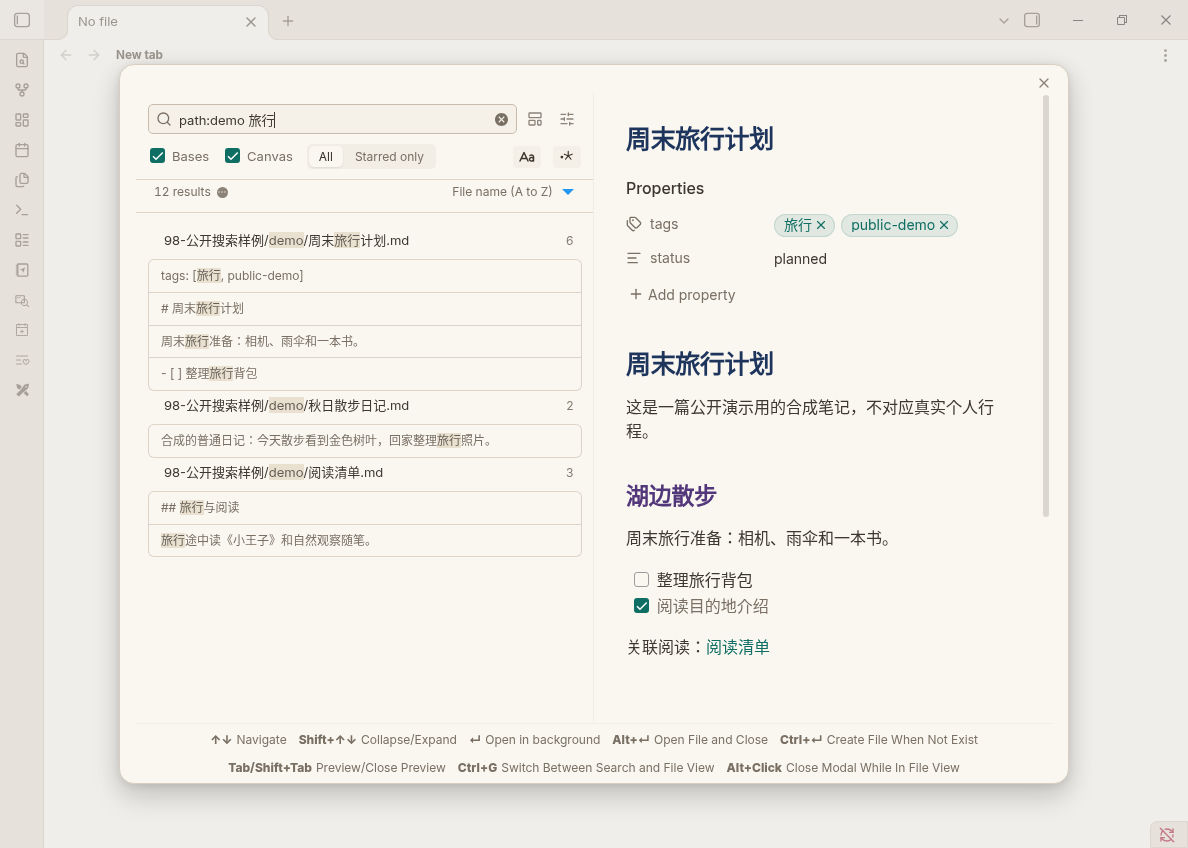
左侧是“旅行”的搜索结果,右侧预览《周末旅行计划》

Obsidian 1.14.4 · Float Search Window 1.2.0 · 公开演示库中的合成笔记。

安装

本插件使用独立 ID float-search-window,目前通过 GitHub Release 或 BRAT 安装。若此前启用了原版 Floating Search(float-search),请先将其停用,避免两个插件同时响应搜索操作。

手动安装

  1. 从最新 Release 的 Assets 下载 main.js、manifest.json、styles.css。
  2. 将三个文件放入库内的 .obsidian/plugins/float-search-window/。如果自定义过配置目录,请将 .obsidian 换成该目录名。
  3. 重新加载 Obsidian,在 设置 → 第三方插件 中启用 Float Search Window。

通过 BRAT 安装 安装并启用 BRAT,在其设置中添加仓库 AiurArtanis/Obsidian-Float-Search-Window,选择已发布的版本,然后启用 Float Search Window。

搜索与筛选

入口 怎么用
原生浮动搜索 在命令面板运行 Float Search Window: 全局搜索。可用 Obsidian 的查询语法,例如 path:demo 旅行。按方向键选择命中,按 Tab 预览原文。也可在编辑器中选中文字,右键发起搜索。
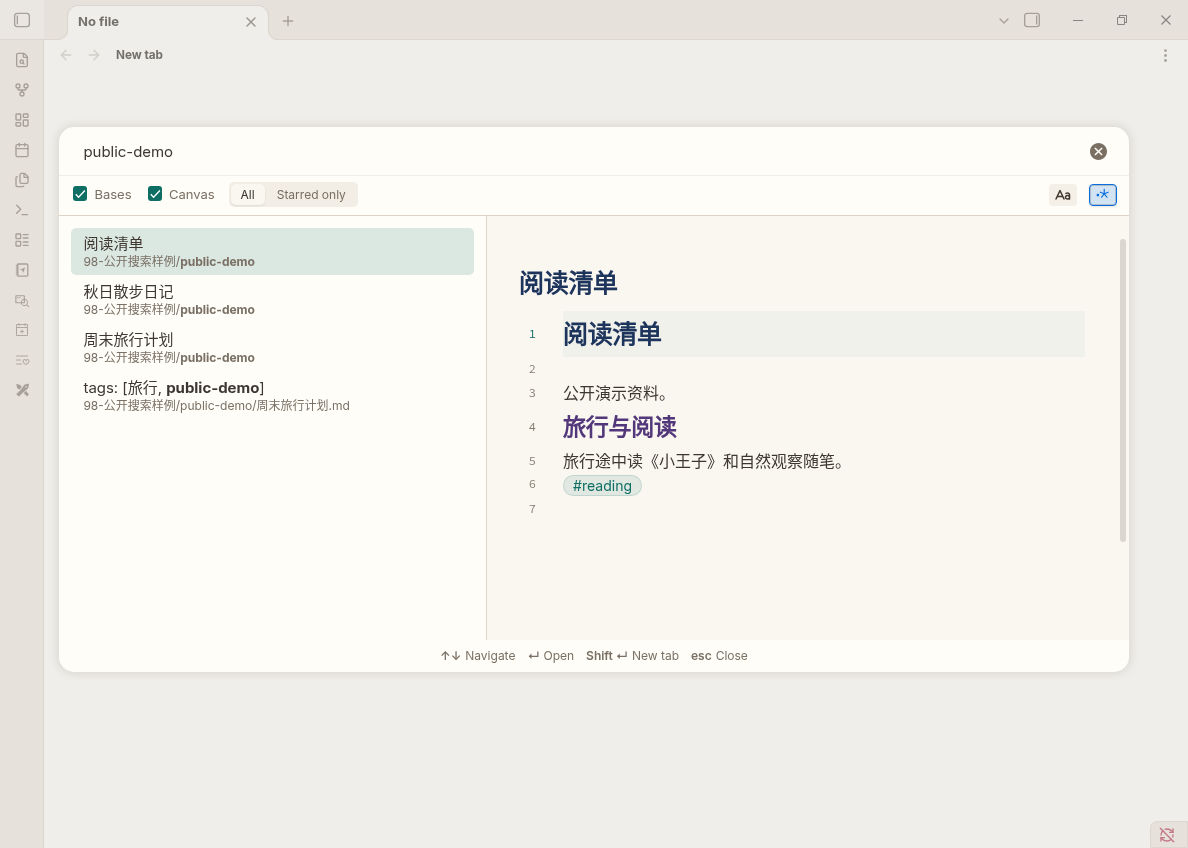
快速搜索(CMDK) 双击 Shift,输入文件名、标题或正文片段。用 ↑、↓ 选择结果,Enter 打开;选择标题或正文命中会跳到对应位置。按 Esc 关闭。

两个入口的筛选栏都可以勾选是否包含数据库(Bases)和白板(Canvas),在全部与只看收藏的文件间切换,并用 Aa 区分大小写、用 .* 切换正则。启用 Obsidian 的书签核心插件后,可以按已加书签的文件筛选。

查看原生搜索与快速搜索的筛选栏

原生搜索 · 按路径限定搜索后,左侧显示正文匹配。
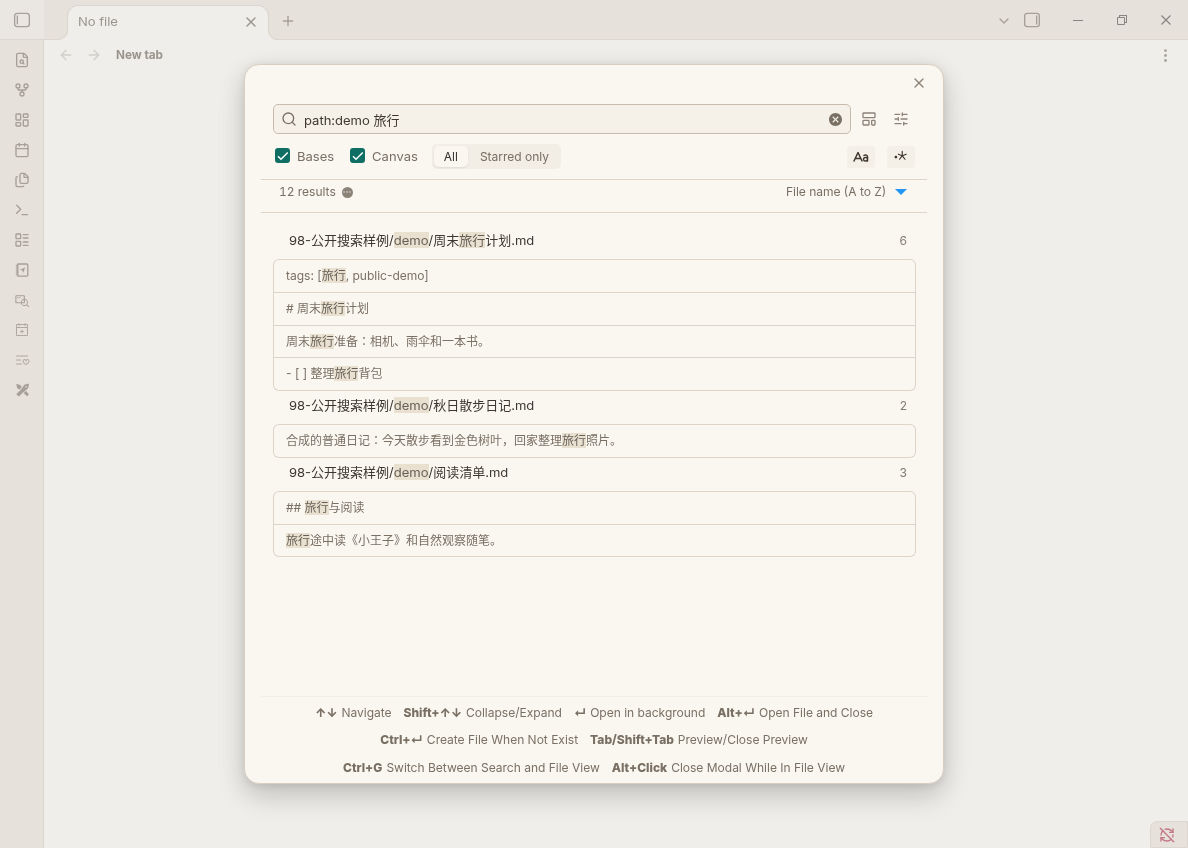
原生搜索包含数据库、白板、收藏、大小写和正则开关

快速搜索 · 选择《阅读清单》后,右侧显示对应笔记。

快速搜索左侧列出合成笔记,右侧预览《阅读清单》的正文

命令与快捷键

在命令面板或 设置 → 快捷键 中搜索 Float Search。命令默认不绑定热键,快速搜索的双击触发键可单独设置。

命令 用途
全局搜索 从空查询开始。
全局搜索(保留上次关键字) 恢复最近的搜索词,约 30 秒后清空。
在当前文件中搜索 / 搜索当前文件的反向链接 将搜索范围限定到当前文件,或查找指向它的链接。
打开搜索视图(分栏 / 标签页 / 窗口) 在指定位置打开原生搜索。
显示/隐藏文件路径 切换结果列表中的路径。
搜索运算符命令 插入文件名、路径、标签、行、块、段落、任务或属性等查询条件。
查看原生浮窗的 Windows 键位与鼠标操作
搜索框内的操作 效果
↑ / ↓ 选择上一条 / 下一条结果。
Shift+↑ / Shift+↓ 折叠 / 展开匹配项。
Enter / Ctrl+Enter 后台打开 / 在新的后台标签页打开。
Alt+Enter / Ctrl+Shift+Alt+Enter 打开并关闭浮窗 / 在新窗口打开并关闭浮窗。
Tab / Shift+Tab 打开 / 关闭右侧预览。
Ctrl+Shift+C 复制选中结果的文字。
Ctrl+E / Ctrl+G 切换预览的阅读模式 / 在搜索框与预览之间切换焦点。

预览打开时,点击结果会切换预览,按住 Alt 点击会打开文件并关闭浮窗。预览关闭时,点击结果会打开文件并关闭浮窗。

设置与 URI

设置页跟随 Obsidian 的界面语言,支持中文和英文。

  • 常规 选择默认打开位置(弹窗、侧边栏、分栏、标签页或窗口),并设置是否显示文件路径和按键提示。
  • 快速搜索 将双击触发键设为 Shift、Ctrl、Alt、Meta 或关闭。两次按键的默认最大间隔为 300 毫秒。
  • 快速新建 开启后,若快速搜索没有精确匹配,可以用查询文字作为正文新建笔记。目录和时间戳文件名格式均可设置。

用 URI 从其他应用发起搜索。例如,第一条打开浮窗,第二条打开标签页。

obsidian://fs?query=hello
obsidian://fs?query=world&viewType=tab

viewType 支持 modal(默认)、sidebar、split、tab、window。包含空格或其他特殊字符时,请对 query 的值进行 URL 编码。

原作者与许可

Float Search Window 是 Boninall(Quorafind) 创作的 Floating Search 的独立续作,由 AiurArtanis 自上游 4.3.0 起维护。原作者已书面同意将本 fork(float-search-window)提交到社区目录,并要求保留原作者署名。上游仓库 · 原作者许可

嵌入式预览的工作区视图实现借鉴了 Hover Editor。本仓库以 GPL-3.0 发布,版权与上游关系见 NOTICE。

HealthGood
ReviewSatisfactory
About
Open Obsidian's native search over your current note and preview matching passages beside the results. Narrow results with path:, tag:, and other native queries. Double-tap Shift to find files, headings, and passages with Quick Search. Filter by bookmarked files and file type, including Bases and Canvas. Use regex or case-sensitive matching in either search mode. Quick Search waits for Chinese IME composition to finish before updating suggestions. Boninall (Quorafind) is the original author of Floating Search. AiurArtanis maintains Float Search Window.
SearchInterfaceHotkeys
Details
Current version
1.3.0
Last updated
3 hours ago
Created
6 months ago
Updates
5 releases
Downloads
26
Compatible with
Obsidian 1.2.0+
Platforms
Desktop, Mobile
License
GPL-3.0
Report bugRequest featureReport plugin
Sponsor
Buy Me a Coffee
Support
Authors
AiurArtanisAiurArtanisaiurartanis
GitHubaiurartanis
BoninallBoninallquorafind
github.com/Quorafind/
GitHubquorafind
  1. Community
  2. Plugins
  3. Search
  4. Float Search Window

Related plugins

Floating Search

Search text by using Obsidian default search view.

Hotkey Helper

Easily see and access any plugin's settings or hotkey assignments (and conflicts) from the Community Plugins tab.

Tray

Run Obsidian from the system tray for customisable window management and global quick notes.

Mousewheel Image zoom

Increase or decrease the size of an image by scrolling.

Hider

Hide interface elements such as tooltips, status bar, titlebar, and more.

Smart Connections

Find related notes and excerpts while writing. Your AI link building copilot displays relevant content in graph + list view. A local embedding model powers semantic search. Zero setup. No API key.

Meta Bind

Make your notes interactive with inline input fields, metadata displays, and buttons.

Quick Switcher++

Enhanced Quick Switcher, search open panels, and symbols.

Tag Wrangler

Rename, merge, toggle, and search tags from the tag pane.

Note Toolbar

Add customizable toolbars to your notes.