FileName Styler
 marc-f3k downloads
Customize and style file names in the file explorer using patterns, prefixes, suffixes, colors, and icons.
- Overview
- Scorecard
- Updates8
FileName Styler is a plugin for Obsidian that allows you to hide, modify, and decorate parts of file names in the sidebar based on patterns or folder locations.
Originally created as simple “Zettelkasten ID Hider,” this plugin has evolved into a flexible tool for styling file names based on regex or timestamp-based IDs.
✨ Special thanks to Simon for the original idea and inspiration behind this plugin.
Features
- Hide timestamp-based IDs (8-, 12-, or 14-digit) from file names
- Support for custom regular expressions with 3 capture groups
- Add custom prefixes and suffixes to matching file names
- Apply custom colors and custom file icons (e.g. 🧠 or 📖)
- Restrict styling to specific folders only
- Combine multiple styling profiles – different styles for different folders or file types
- Automatically restore original file names and styles when unloading
Preview
Here’s a quick before/after look at how file names appear with and without styling enabled:
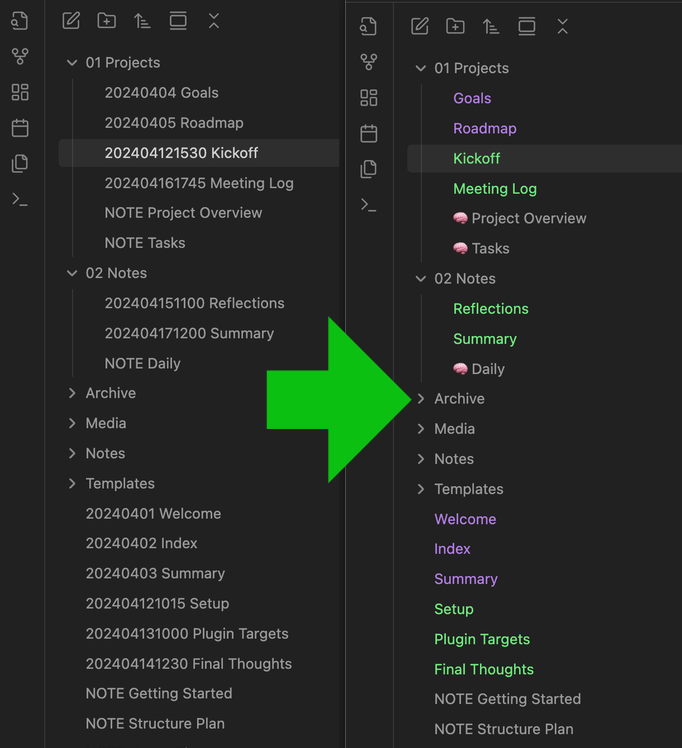
How it works
This plugin searches for matching file names based on selected ID formats:
yyyyMMddHHmmss→ 14-digityyMMddHHmmss→ 12-digityyyyMMdd→ 8-digitor a custom regular expression, such as:
^(\d{6})([-_ ]?)(.+)$
It then applies the configured styling to each match within the File Explorer (without changing the actual file name on disk).
Settings
You can configure and combine multiple profiles. Each profile supports:
- ID format – Choose from predefined timestamp formats or define your own regex
- Move ID to end – Display the ID at the end of the file name instead of the start
- Custom prefix – Text to prepend to the displayed name
- Custom suffix – Text to append to the displayed name
- Custom text color – Optional color override
- Custom icon – Emoji or Unicode (e.g.
🧠,📖) - Folder filter – Apply profile only in certain folders
All profiles can be toggled independently and are applied in order.
Installation
Download or clone this repository.
Copy the following files into your Obsidian vault under:
.obsidian/plugins/filename-styler/Required files:
main.jsmanifest.json- (optional)
styles.css
Enable the plugin in Obsidian under
Settings → Community Plugins.
Compatibility
Compatible with Obsidian v1.8.9 and higher. Earlier versions might also work, but have not been tested.
License
MIT License.
Created with ❤️ by and for the Obsidian community.