Fighting Game Notation
 Jeremy Farmer20 downloads
Render fighting game combo notation in your notes.
- Overview
- Scorecard
- Updates2
Render fighting game combo notation directly in your Obsidian notes. Write inputs in plain text using standard numpad notation, and the plugin turns them into styled blocks with directional arrows, button icons and badges.
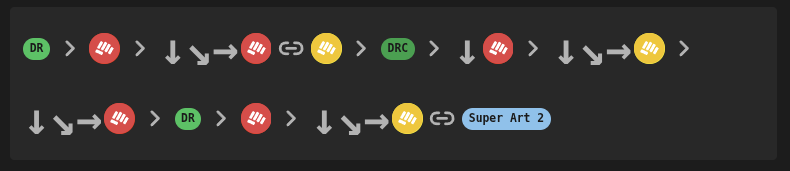
Supported games
| Code block | Game |
|---|---|
```fg or ```fg-sf6 |
Street Fighter 6 |
Usage
Wrap your notation in a fenced code block with the game's tag:
```fg-sf6
2MK > 236HP
j.HP , 2MP > DRC 5HP > [4]6HP > SA3
```
Each line in the block renders as its own combo. Anything the plugin doesn't recognize is shown as plain text, so a typo never breaks the rest of the line.
Notation
Directions
Directions use numpad notation, where 5 is neutral:
| Input | Direction |
|---|---|
7 8 9 |
↖ ↑ ↗ |
4 5 6 |
← neutral → |
1 2 3 |
↙ ↓ ↘ |
Motions
| Input | Motion |
|---|---|
236 |
Quarter-circle forward |
214 |
Quarter-circle back |
623 |
Dragon punch |
421 |
Reverse dragon punch |
41236 |
Half-circle forward |
63214 |
Half-circle back |
236236 |
Double quarter-circle forward |
214214 |
Double quarter-circle back |
360 |
Full circle |
720 |
Double full circle |
646 |
Charge super (forward, back, forward) |
22 |
Down, down |
A . between the motion and the button is optional, so 236LP and 236.LP are the same.
Buttons
| Input | Button |
|---|---|
LP MP HP |
Light, medium, heavy punch |
LK MK HK |
Light, medium, heavy kick |
PP KK |
Two punches or two kicks (e.g. OD moves) |
PPP KKK |
All three punches or kicks |
THROW |
Throw |
Prefixes
| Prefix | Meaning | Example |
|---|---|---|
j. |
Jumping | j.HP |
c. |
Close | c.HP |
f. |
Far | f.HP |
d. |
Delayed | d.2MK |
tk. |
Tiger knee | tk.236LK |
Separators
| Symbol | Meaning |
|---|---|
> |
Cancel |
, |
Link |
~ |
Chain |
+ |
Pressed together |
/ |
Or (alternative route) |
Charge inputs
Put the held direction in brackets, followed by the release direction:
[4]6HP > [2]8KK
This means hold back, then press forward + HP; then hold down, then press up + KK.

Charge inputs aren't checked against any game's rules, so whatever you write is shown as written.
Tiger knee
A tiger knee motion ends in an upward direction, usually to do a special move just off the ground. Write it either with the tk. prefix or by adding the up direction to the motion yourself. Both of these render the same:
tk.236LK
2369LK
Grapplers
Full-circle motions work like any other motion, including on the ground, in the air and as a tiger knee:
5LP > 5MP > 360PP
j.360KK
720PPP
tk.360LP
Dashes and microwalk
66 and 44 on their own render as a forward or back dash. j.66 is an air dash. microwalk (any capitalization) renders as a badge:
66 > 5HP
microwalk 2MK > 236HP
Badges
These render as labeled badges and can appear anywhere in a line:
| Input | Badge |
|---|---|
DR |
Drive Rush |
DRC |
Drive Rush cancel |
DI |
Drive Impact |
SA1 SA2 SA3 (or [SA1] [SA2] [SA3]) |
Super Art 1–3 |
[CH] |
Counter hit |
[PC] |
Punish counter |
WALLSPLAT |
Wall splat |
microwalk |
Microwalk |
Examples
For a full reference, download the example note and copy it into your vault. It covers every kind of notation, showing what to type next to how it renders.
```fg-sf6
[PC] 2MK > DRC 5HP > 236HP
DI , WALLSPLAT 5HP > 623PP
2LP , 2LP / 2LP , 5LP > 214PP
c.HP > SA2
```
Installation
Once the plugin is listed in Obsidian's community plugins:
- Open Settings → Community plugins and turn off restricted mode if it's on.
- Select Browse, search for "Fighting Game Notation", then select Install and Enable.
To install manually, download main.js, manifest.json and styles.css from the latest release into <vault>/.obsidian/plugins/fighting-game-notation/, then enable the plugin under Settings → Community plugins.
Compatibility
Works on Obsidian desktop and mobile. The plugin runs entirely offline: it makes no network requests and collects no data.
Feedback and issues
Found a bug or want to request a game? Open an issue on the GitHub repository.
License
Credits
The punch and kick button icons are based on Punch blast and Footprint by Lorc from game-icons.net, licensed under CC BY 3.0. They were changed to show only the fist and placed on colored circles.
The separator icons are from Lucide (chevron-right, link-2, plus and waves), licensed under the ISC License, copyright Lucide Icons and Contributors.