
- Overview
- Scorecard
- Updates27
Easily Shift and Change markdown headings.
Why use this plugin
Obsidian links numerous markdown files to form knowledge. Daily rearrangement of links is important to create a good knowledge base.
The following situations often occur in this process.
- Cut out A part of File 1 to an independent File 2 and linked.
- Heading3 in file 1 is changed to Heading1 in file 2
- Incorporated the content of File 3 into a part of File 4
- Heading2 in file 3 is changed to Heading4 in file 4
With this plugin, you can change the Heading size (the number of #) in a batch instead of changing it manually.
How to install
From within Obsidian
You can activate this plugin within Obsidian by doing the following:
- Open Settings > Community plugin
- Make sure
Restricted modeis off - Click Browse
community plugins - Search for
Heading Shifter - Click
Install->Enable
Manual installation
Download directory(includes main.js, manifest.json, styles.css) from the latest release and put them into <vault>/.obsidian/plugins/ folder.
Features
Apply Headings

Commands
| Command | Description | Hotkey |
|---|---|---|
| Apply heading 0 | Change Current line to no heading. | - |
| Apply heading 1~6 | Change Current line to heading 1~6. | - |
It is useful to assign a hotkey such as
Ctrl + 0 ~ 6
Shift Headings
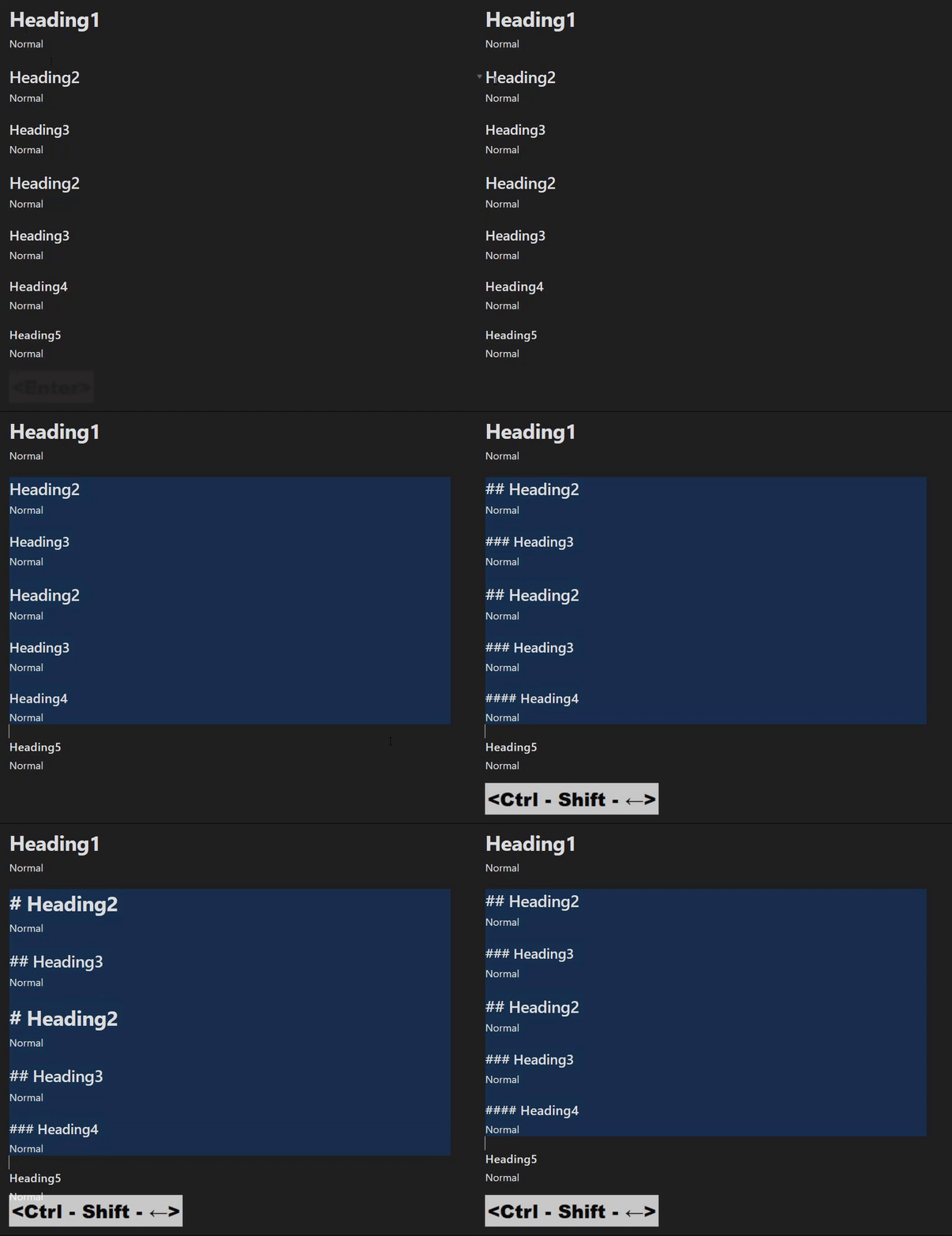
Settings
| Setting | Description | Value(Default) |
|---|---|---|
| Lower limit of heading | The lower heading size that will be decreased by the heading shift | 0~6(1) |
| Enable override tab behavior | If true, Tab execute "Increase headings" and Shift-Tab execute "Decrease headings" [^2] | boolean(false) |
[^2]: May conflict with other plugin behavior
Commands
| Command | Description | Hotkey |
|---|---|---|
| Increase headings | Increase heading of selected lines(with heading) | |
| Increase headings(forced) | Increase heading of selected lines(Even if there is no heading) | |
| Decrease headings | Decrease heading of selected lines(with heading) |
It is useful to assign a hotkey such as
Ctrl + Shift + Left/Right
Increase headingsandIncrease headings(forced)is ineffective if selected lines contains less thanLower limit of heading.Decrease headingsis ineffective if selected lines contains more than heading 6.
Insert Headings
Commands
| Command | Description | Hotkey |
|---|---|---|
| Insert heading at current level | Change current line headings to current level | |
| Insert heading at one level deeper | Change current line headings to current level + 1 | |
| Insert heading at one level higher | Change current line headings to current level - 1 |
Common Settings
Style to remove
This is the toggle between removing or retaining specific style when applying Heading in a "single" row.
Beginning
- or 1.,2.,n. or user defined string(RegExp)
| Before | After(True) | After(False) | |
|---|---|---|---|
- (ul) |
- line |
## line |
## - line |
1. (ol) |
1. line |
## line |
## 1. line |
🤔(user defined) |
🤔line |
## line |
## 🤔line |
Surrounding
**, _ , etc... or user defined string(RegExp)
| Before | After(True) | After(False) | |
|---|---|---|---|
**(bold) |
**line** |
## line |
## **line** |
_(italic) |
_line_ |
## line |
## _line_ |
🤔(user defined) |
🤔line🤔 |
## line |
## 🤔line🤔 |
List behavior
- heading target
    - listA
        - listB
If you call 'Apply heading 2',
Nothing
## heading target
    - listA
        - listB
Subsequent listings will remain in depth and will not have the correct markdown structure.
Outdent to zero
## heading target

- listA
    - listB
Sync with headings
\t\t- ## heading target
\t\t\t- listA
\t\t\t\t- listB
Use Case
Operate headings like an outliner like the following,
## The Festival Myster -> hit "Apply 1"

This is a great document.

### Chapter One -> hit "Insert deeper"

#### Prologue -> hit "Insert deeper"

The sun was setting over the horizon...

#### The Summer Festival -> hit "Insert current"

As the townspeople gathered in the town square...

### Chapter Two -> hit "Insert higher"

#### The Mystery of the Missing Prize -> hit "Insert deeper"

As the summer festival came to a close...
If you want to make headings deeper or higher than 2, use "shift" or "apply".
LoadMap
Nothing specific at this time.
Contribute
Feel free to report issues or request features.