Search...Search plugins and themes...
⌘K
Sign in
  • Get started
  • Download
  • Pricing
  • Enterprise
  • Account
  • Obsidian
  • Overview
  • Sync
  • Publish
  • Canvas
  • Mobile
  • Web Clipper
  • CLI
  • Learn
  • Help
  • Developers
  • Changelog
  • About
  • Roadmap
  • Blog
  • Resources
  • System status
  • License overview
  • Terms of service
  • Privacy policy
  • Security
  • Community
  • Plugins
  • Themes
  • Discord
  • Forum / 中文论坛
  • Merch store
  • Brand guidelines
Follow us
DiscordTwitterBlueskyThreadsMastodonYouTubeGitHub
© 2026 Obsidian

Explorer Colors

vaguelyelectricvaguelyelectric4k downloads

Allows for files and folders to be configured with custom colors and other settings.

Add to Obsidian
  • Overview
  • Scorecard
  • Updates4

Obsidian Plugin that allows for Files and Folders to be configured with custom colors and other settings.
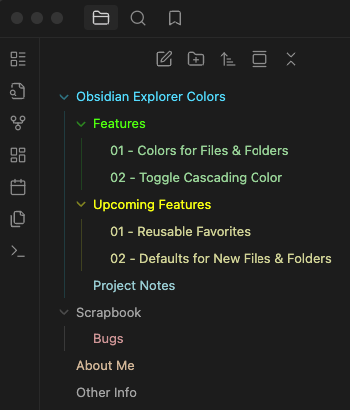
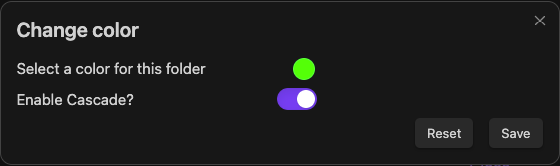
Explorer Preview Image Modal Preview Image

About

For a while I have been using CSS snippets to customise the colors of files and folders in the Obsidian Explorer. While this worked in principle, it came with several limitations such as not being able to set colors for individual files and folders without indexing them as nth-child elements or by referencing the name of the file or folder. Adding new files and folders would also require updating the CSS snippet otherwise existing colors broke down, additionally, Obsidian could unload the explorer items if many paths were expanded and the items went out of view meaning that nth-child elements would not be applied to the correct items.

I wanted to make my experience easier to manage and more reliable so I decided to create a plugin and share it with the community.

Main Features

The plugin is straightforward to use and provides the following features:

  • An option to set a color for any file or folder by right-clicking on in item in the Obsidian Explorer and selecting Set X Color from the context menu.
  • Ability to toggle cascading colors on/off for each item tree.
    • Regardless of this choice, a child item with its own color set will always render that color.
  • Ability to set the default color for the picker when setting to new files or folders.

Upcoming

These are a few features that I would like to add in the future:

  • Option to add/remove colors from a list of favorites for quick access.

If you have any feature requests or suggestions, please feel free to open an issue or preferably, a pull request.

Credits

The plugin is inspired by the work of other great creators in the community, namely I would like to thank FlorianWoelki and the rest of the Obsidian Iconize developers, as well as CyanVoxel's Obsidian-Colored-Sidebar. Please check out their work I wouldn't be here without them!

Support

Finally, If you would like to show your support, consider buying me a coffee. It would be greatly appreciated!

76%
HealthGood
ReviewSatisfactory
About
Set custom colors for files and folders in the Explorer to visually organize notes and directories. Toggle cascading colors per folder tree while preserving child items' own color settings. Set a default picker color to apply to new files and folders.
AppearanceSidebarFiles
Details
Current version
1.1.1
Last updated
5 months ago
Created
Last year
Updates
4 releases
Downloads
4k
Compatible with
Obsidian 1.10.0+
Platforms
Desktop only
License
MIT
Report bugRequest featureReport plugin
Sponsor
Buy Me a Coffee
Author
vaguelyelectricvaguelyelectric
github.com/VaguelyElectric
GitHubvaguelyelectric
  1. Community
  2. Plugins
  3. Appearance
  4. Explorer Colors

Related plugins

Notebook Navigator

A better file browser and calendar inspired by Apple Notes, Bear, Evernote and Day One.

Recent Files

Display a list of recently opened files.

Flexplorer

Enhance the file explorer with custom sorting, pinning, and hiding.

Custom File Explorer sorting

Manual or automatic config-driven reordering and sorting of files and folders in File Explorer.

Novel word count

Display a word count, page count, creation date, or other statistics for each file, folder and vault in the File Explorer pane.

Reveal Active File Button

Add a button to the top of the File Explorer, to reveal the active file.

File Explorer Note Count

See the number of notes in each folder within the file explorer.

File Tree Alternative

An alternative file tree view with separate folder and file panes.

Rainbow-Colored Sidebar

Automatically color your sidebar like a rainbow. No configuration needed.

Local REST API & MCP Server

Unlock your automation needs by interacting with your notes over a secure REST API.