Search...Search plugins and themes...
⌘K
Sign in
  • Get started
  • Download
  • Pricing
  • Enterprise
  • Account
  • Obsidian
  • Overview
  • Sync
  • Publish
  • Canvas
  • Mobile
  • Web Clipper
  • CLI
  • Learn
  • Help
  • Developers
  • Changelog
  • About
  • Roadmap
  • Blog
  • Resources
  • System status
  • License overview
  • Terms of service
  • Privacy policy
  • Security
  • Community
  • Plugins
  • Themes
  • Discord
  • Forum / 中文论坛
  • Merch store
  • Brand guidelines
Follow us
DiscordTwitterBlueskyThreadsMastodonYouTubeGitHub
© 2026 Obsidian

Evoldown

SleeplessJiangSleeplessJiang54 downloads

为 Obsidian 添加 Evoldown 语法支持。支持 #d、#e、#t、#v、#c 五种自定义标签。
Add to Obsidian
  • Overview
  • Scorecard
  • Updates2

简体中文 | English

为 Obsidian 添加 Evoldown 语法支持。支持 #d、#e、#t、#v、#c 五种自定义标签。

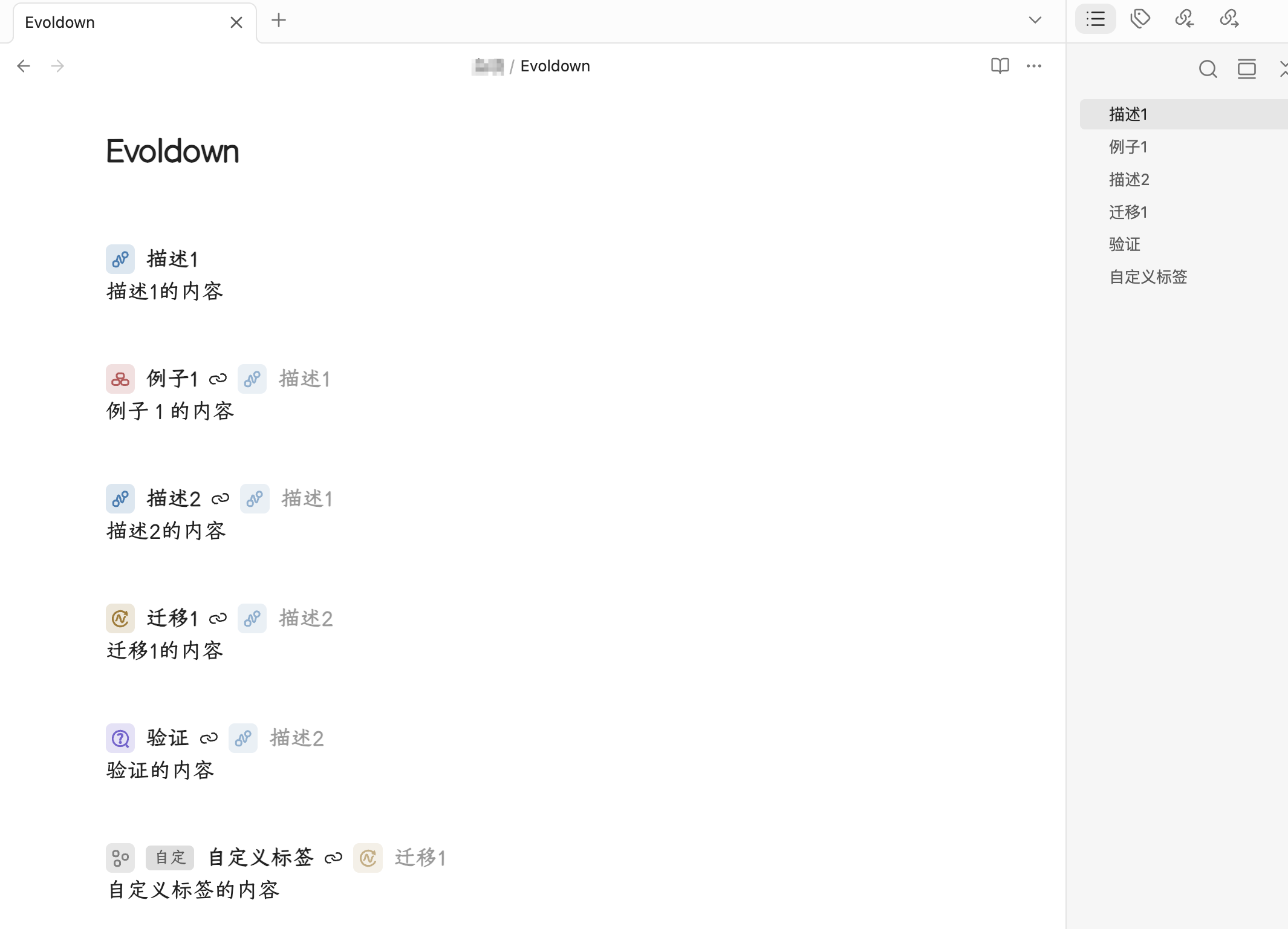
Evoldown 效果预览

安装

要求 Obsidian 1.5.7 或以上。

  1. 现在插件已上架 obsidian 社区插件市场,在设置-第三方插件-社区插件市场,搜索“evoldown”即可安装。
  2. 在 Releases 中下载 evoldown.zip并解压, 放入笔记库的 .obsidian/plugins文件夹下,在「设置 → 第三方插件」中启用 Evoldown。

升级时覆盖该文件夹,再重新启用插件。

语法

  • #d 描述、#e 例子、#t 迁移、#v 验证:#字母 标题 [引用标题]
  • #c 自定义标签:#c 标签名称 标题 [引用标题]

引用标题可省略;字段含空格时用英文引号包住。正文延续到下一个标题或文件末尾。

#d 描述1
描述1的内容

#e 例子1 描述1
例子1的内容

#d 描述2 描述1
描述2的内容

#t 迁移1 描述2
迁移1的内容

#v 验证 描述2
验证的内容

#c 自定义标签 标题 迁移1
自定义标签的内容

使用

  • 支持阅读视图和实时预览。在实时预览中,单击标题、类型图标或自定义标签即可编辑。
  • 单击引用标题跳转到当前笔记的对应标题;同名时取第一个。
  • 在「设置 → Evoldown」选择标题级别 H1–H6,默认 H6。
  • 开启「大纲」后,自定义标题会按所选级别显示,支持点击定位。
  • 导出 PDF 时,使用 Obsidian 原生「导出为 PDF」即可保留 Evoldown 标题、图标、自定义标签和引用样式。PDF 中的引用仅展示,不提供插件内的点击跳转。

开发

需要 Node.js 18 或以上,无需安装依赖。

npm test
npm run build

构建产物位于 dist/evoldown/。

HealthExcellent
ReviewSatisfactory
About
Add Evoldown syntax with five tags (#d #e #t #v #c) and quoted reference headers for descriptions, examples, migrations and validations. Render in reading view and live preview with clickable headers, type icons and custom tags for editing and jump-to-reference, and retain tags/icons in PDF exports.
FormatsMarkdownExport
Details
Current version
1.2.2
Last updated
4 weeks ago
Created
4 weeks ago
Updates
2 releases
Downloads
54
Compatible with
Obsidian 1.5.7+
Platforms
Desktop, Mobile
License
MIT
Report bugRequest featureReport plugin
Author
SleeplessJiangSleeplessJiangchasonjiang
GitHubchasonjiang
  1. Community
  2. Plugins
  3. Formats
  4. Evoldown

Related plugins

Chat View

Chat View lets you quickly and easily create elegant Chat UIs in your Markdown Files.

Pandoc Plugin

Commands to export to Pandoc-supported formats like DOCX, ePub and PDF.

Docxer

Import Word files easily. Adds a preview mode for .docx files and the ability to convert them to markdown (.md) files.

qmd as md

Edit, preview, and render Quarto (.qmd) files with executable code cells via Quarto to PDF, DOCX, HTML, or reveal.js.

Marp Slides

Create Marp presentations.

Importer

Convert your data to Markdown files you can use in Obsidian. Works with Apple Notes, OneNote, Evernote, Notion, Google Keep, and many other formats.

Linter

Format and style your notes. Linter can be used to format YAML tags, aliases, arrays, and metadata; footnotes; headings; spacing; math blocks; regular Markdown contents like list, italics, and bold styles; and more with the use of custom rule options.

Custom Frames

Turn web apps into panes using iframes with custom styling. Also comes with presets for Google Keep, Todoist and more.

Consistent Attachments and Links

Move note attachments and update links automatically.

Outliner

Work with your lists like in Workflowy or Roam Research.