Search...Search plugins and themes...
⌘K
Sign in
  • Get started
  • Download
  • Pricing
  • Enterprise
  • Account
  • Obsidian
  • Overview
  • Sync
  • Publish
  • Canvas
  • Mobile
  • Web Clipper
  • CLI
  • Learn
  • Help
  • Developers
  • Changelog
  • About
  • Roadmap
  • Blog
  • Resources
  • System status
  • License overview
  • Terms of service
  • Privacy policy
  • Security
  • Community
  • Plugins
  • Themes
  • Discord
  • Forum / 中文论坛
  • Merch store
  • Brand guidelines
Follow us
DiscordTwitterBlueskyThreadsMastodonYouTubeGitHub
© 2026 Obsidian

Day One Importer

marcdonaldmarcdonald2k downloads

Import Day One journals.

Add to Obsidian
  • Overview
  • Scorecard
  • Updates17

Easily convert your Day One journals into Obsidian markdown.

How to import

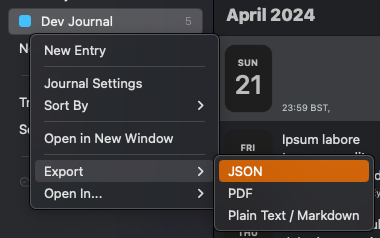
  1. Export your Day One journal as JSON

    day-one-export.png

  2. Extract the .zip file you are given into a folder in your Obsidian vault. The default folder is a top level folder called day-one-in, but this is customizable in the settings
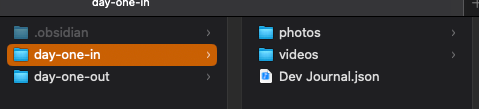
    unzipped-in-obsidian.png

    [!NOTE] You may not see the .json file in Obsidian, this is fine as long as it is there in your system file explorer

  3. Adjust the settings to match what your setup
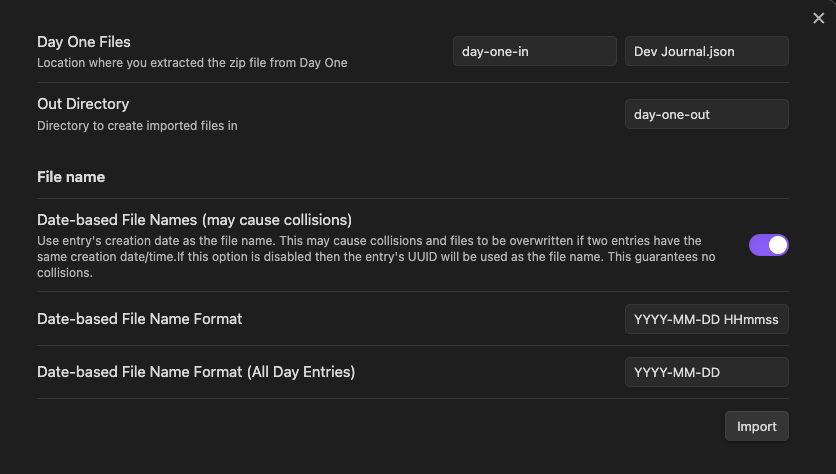
    example-settings.png

  4. Click import and verify all your entries have been created in the folder you designated
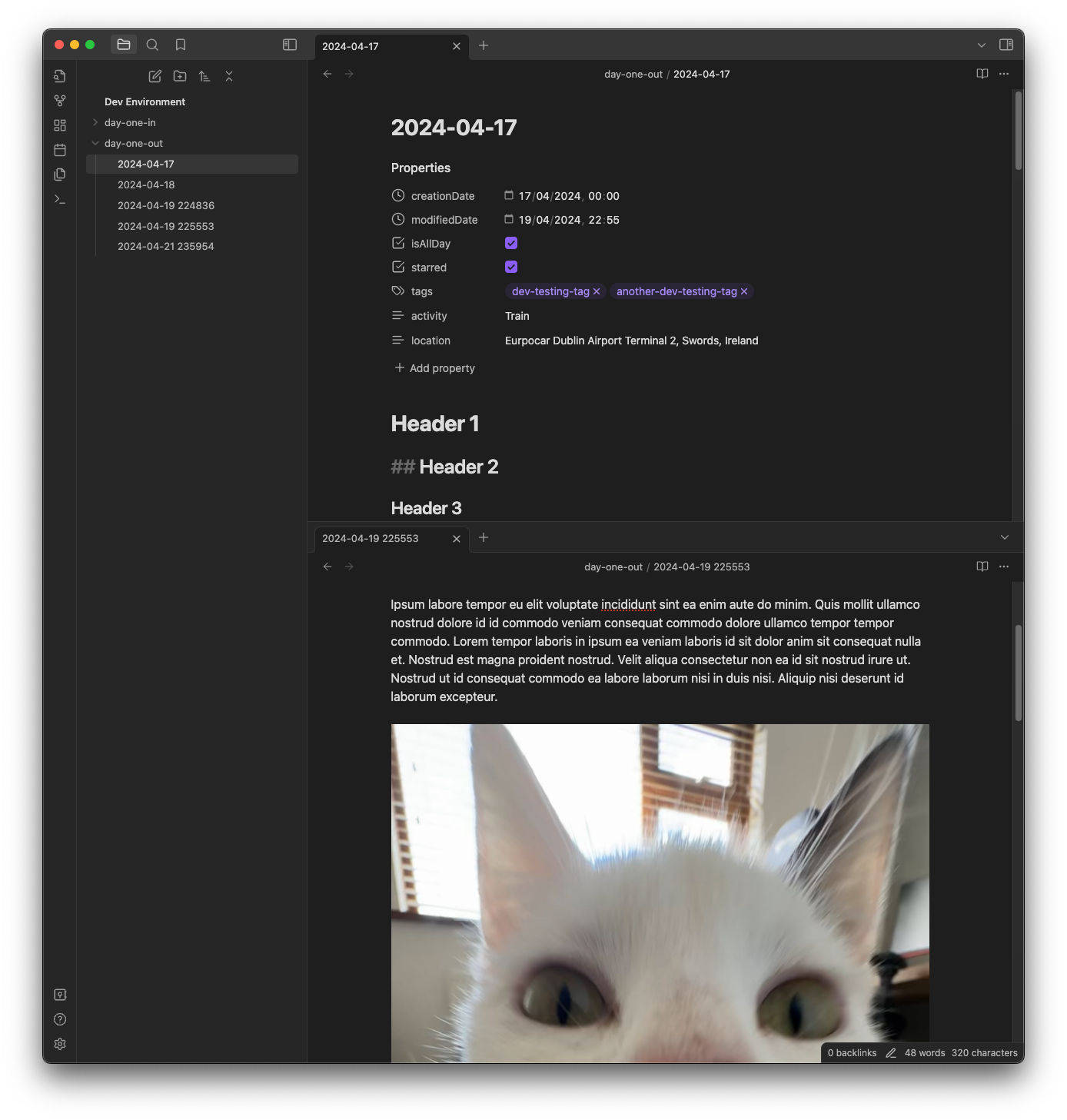
    img.png

  5. If there were any errors when importing, a file called Failed Imports.md will be created in that directory with the reason that the import failed. This may be caused by a conflicting file name (e.g. if you used date-based file names with the format YYYY-MM-DD and had two files on the same date).

  6. Once you are happy with your import, you can delete the journal JSON file and move the photos/videos to wherever you prefer

If something doesn't seem right please file an issue on this repository.

Features

Supported

  • Text entries
  • Rich text
  • Date-based file names or UUID file names
  • Inline images and videos

Added to frontmatter

  • Tags
  • If entry is starred
  • If entry is pinned
  • If entry is "all day"
  • Location (name & coordinates)
  • Activity (e.g. walking, cycling, train, flying, etc)

Not Currently Planned

  • Customizable metadata formats (i.e not in frontmatter)
  • Weather

OSS

  • Zod: MIT License
78%
HealthExcellent
ReviewSatisfactory
About
Convert Day One journals exported as JSON into Obsidian Markdown with inline images and videos and frontmatter metadata. Preserve tags, starred/pinned/all-day flags, location and activity, create date- or UUID-named files, and log any failed imports to Failed Imports.md.
ImportAttachmentsProperties
Details
Current version
1.3.2
Last updated
2 months ago
Created
2 years ago
Updates
17 releases
Downloads
2k
Compatible with
Obsidian 1.5.0+
Platforms
Desktop only
License
MIT
Report bugRequest featureReport plugin
Sponsor
GitHub Sponsors
Buy Me a Coffee
Ko-fi
Author
marcdonaldmarcdonald
marcdonald.com
GitHubmarcdonald
  1. Community
  2. Plugins
  3. Import
  4. Day One Importer

Related plugins

Local Images Plus

A reincarnation of Local Images to download images in Markdown notes to local storage.

Nexus AI Chat Importer

Import AI chat conversations from ChatGPT, Claude, and Le Chat exports into Obsidian as clean, readable Markdown files.

Social Archiver

Archive social media posts from various platforms.

Media DB

Query multiple APIs for movies, series, anime, games, music releases and wiki articles, and import them into your vault.

Epub Importer

Import EPUB files as Markdown.

Slurp

Slurps webpages and saves them as clean, uncluttered Markdown.

Unofficial Supernote by Ratta Integration

View Supernote notes, generate markdown from note and capture screen mirror.

Advanced Canvas

Supercharge your canvas experience. Create presentations, flowcharts and more.

Importer

Import data from Notion, Evernote, Apple Notes, Microsoft OneNote, Google Keep, Bear, Roam, and HTML files.

Meta Bind

Make your notes interactive with inline input fields, metadata displays, and buttons.