Dashboard Hub
 TAKESHI MORITA4k downloads
Shared dashboards, timelines, calendars, kanban boards, memos, bases, and secrets.
- Overview
- Scorecard
- Updates20
Dashboard Hub puts Obsidian Bases, files, Kanban boards, Calendars, Timelines, web pages, reading memos, and encrypted secrets in one responsive dashboard. Supported actions such as moving a Kanban card or saving a memo can also be recorded in a dated Markdown Timeline.
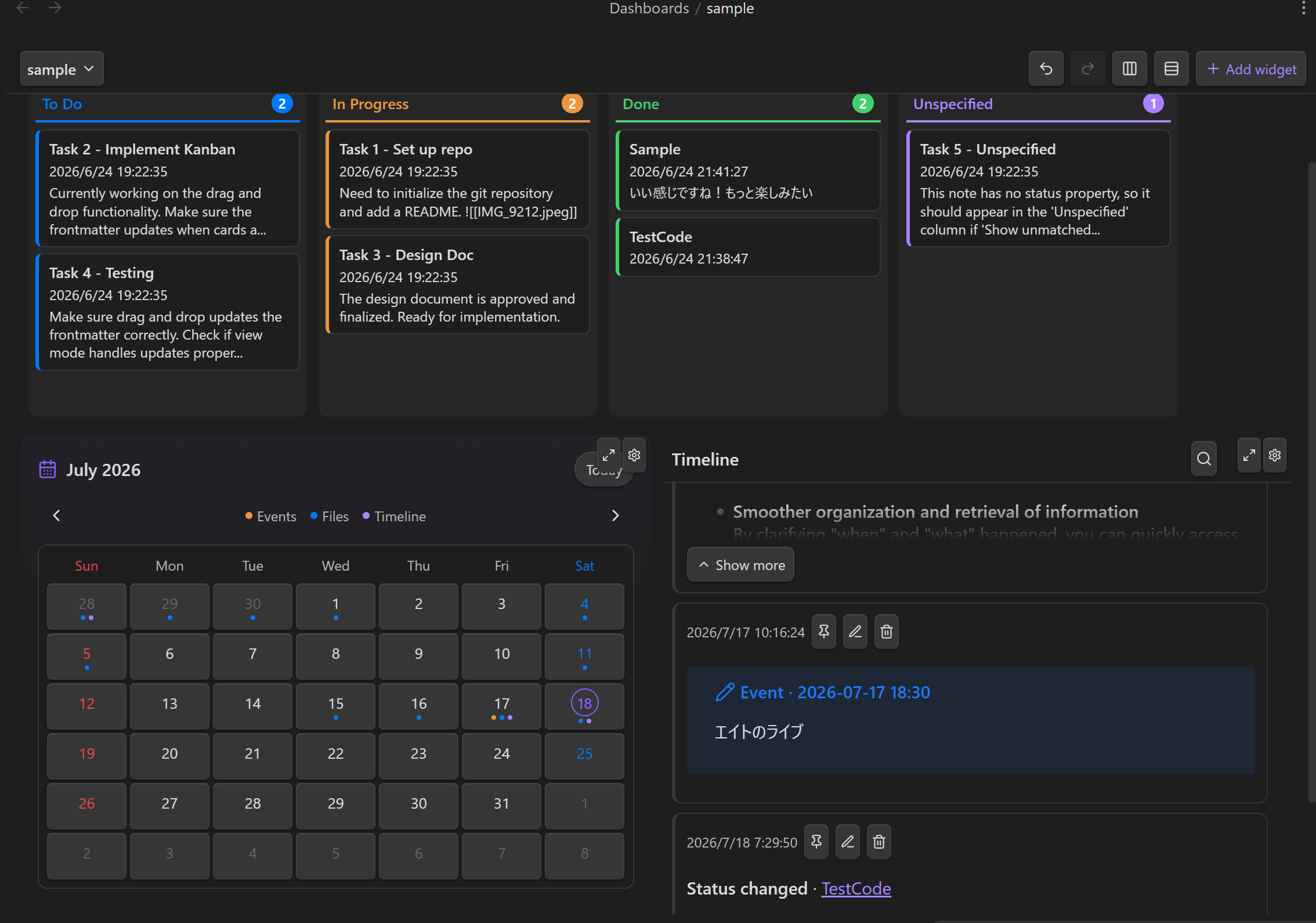
It works without an AI account, API key, or external database.
Activity Timeline
Use Reply on a post to start a thread. Replies stay together across days and can be collapsed.
With a compatible AI Hub connected, post or reply with @ai your question to receive an AI answer in the thread.
Answers are saved as Markdown. Failed requests keep your question; use Ask AI / retry to try again.
The connected Hub's default text model receives the thread's text, without reading the rest of your Vault.
You can post directly to a Timeline with tags, wikilinks, pinned posts, filters, and image attachments. Dashboard Hub can also add entries for these actions:
| When you… | The Timeline records |
|---|---|
| Drag a Kanban card to a new column | The board, a link to the note, and old status → new status |
| Reschedule a Calendar event | The event summary and old date → new date |
| Create, edit, or delete a reading memo | The action, a link to the source document, and the memo with its quote |
| Write a post yourself | Whatever you wrote — a note to self, what you're working on, why you changed your mind |
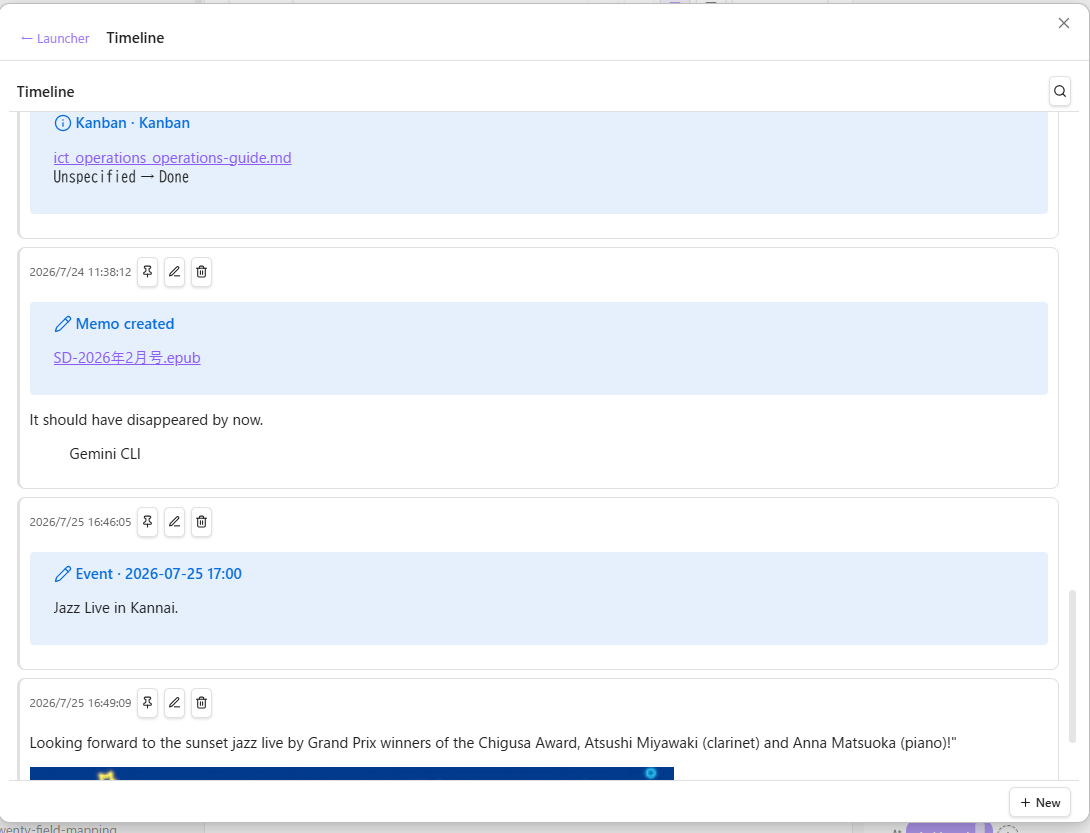
Entries are stored as Obsidian callouts in
<Base directory>/Timeline/<name>/YYYY-MM-DD.md, one file per day. Calendar
shows events and posts from a selected Timeline in a monthly view. Automatic
memo, Kanban, and Calendar activity uses the global Activity Timeline name,
which defaults to Timeline.
Post to Bluesky
Use Bluesky on a Timeline post to publish that thread to Bluesky. Select the posts to publish; each one is shown as it will be posted, and reply order, text splitting, and image attachments are handled automatically. Posts with code, tables, callouts or math can be published as images of the rendered Markdown instead (choose Image for the post); only its links stay in the text. Turn on Bluesky in the plugin settings and enter your handle and an app password created on the Bluesky app password page, then press Check connection; the button appears once the check succeeds. The password is kept in Obsidian's secret storage (Obsidian 1.11.4 or later) and can be revoked in Bluesky anytime.
Secret Manager
Secret Manager stores API keys, tokens, and other values as .encrypted files
under Secrets/ by default. Secrets can be searched by name and public metadata,
copied, and edited in place. The password is cached in memory for the session.
It uses hybrid encryption: the public key can encrypt a value without a password, but the password-protected private key is required to decrypt it. Secret Manager is intended for convenient access inside a vault, not as a replacement for a dedicated password manager.
Reading memos
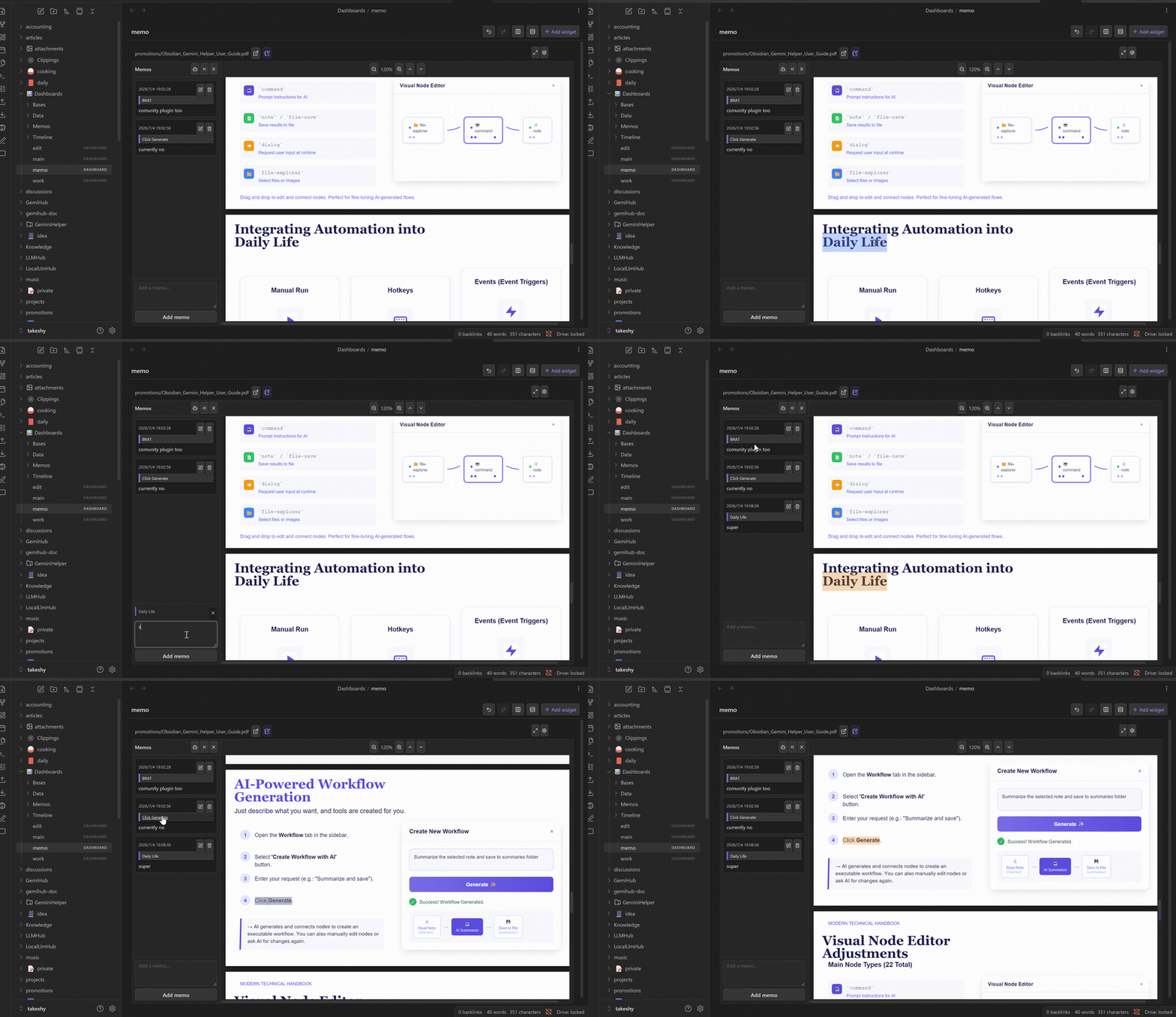
Open a PDF, EPUB, or Markdown note in the File widget, select text, and save a memo with its quote context. Saved ranges are highlighted while the memo panel is open, and selecting a memo jumps back to the source. MemoList provides a searchable index, and memo changes are recorded in the activity Timeline.
Dashboards and layout
Widgets can be moved, resized, maximized, and configured. Layout changes support undo and redo, and widgets can be arranged into equal rows or columns. A small-screen layout is generated automatically. Changes are saved as you edit.
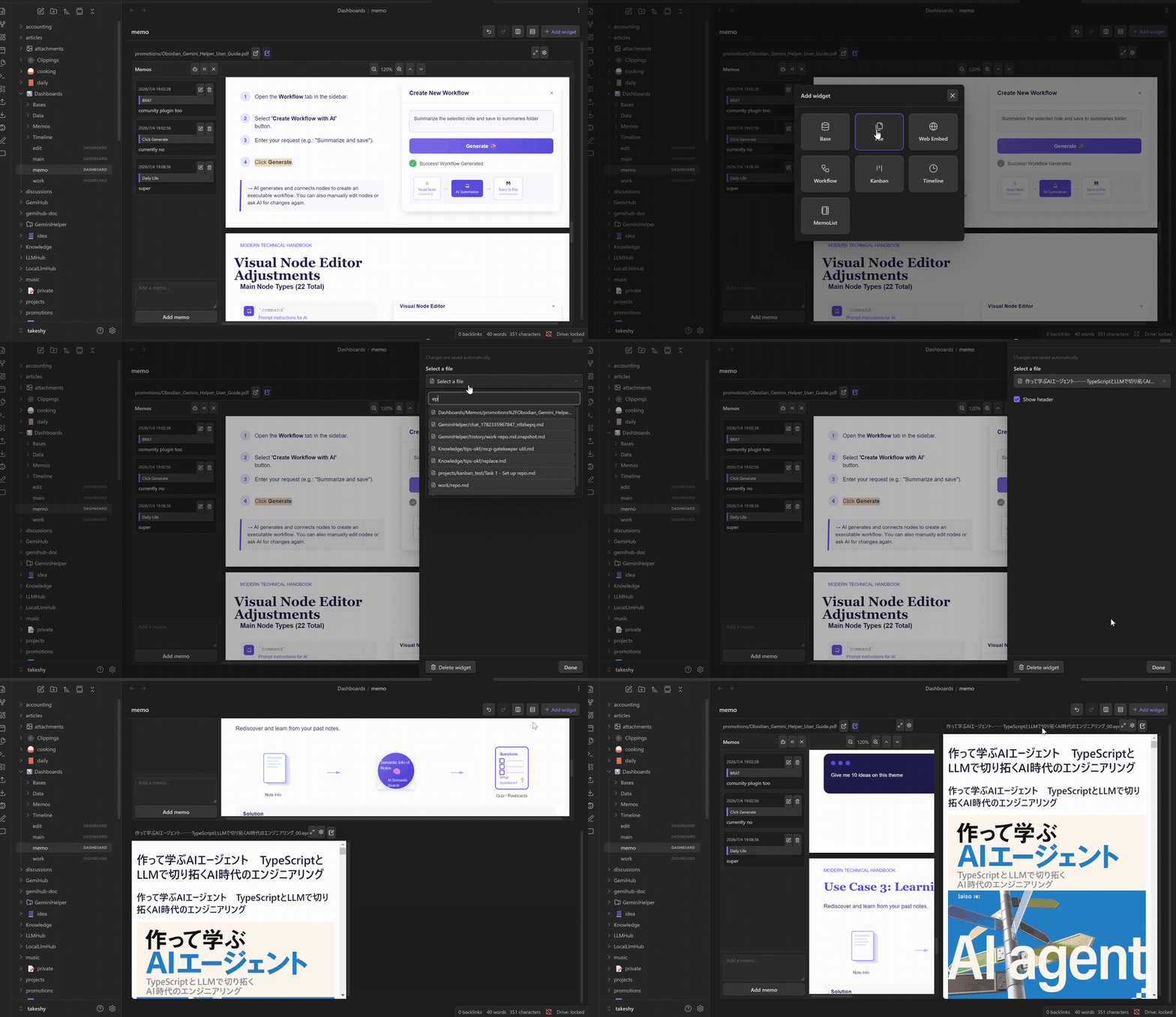
Each dashboard is stored as a readable YAML .dashboard file with a documented
schema. It can be inspected, versioned, searched, and backed up like other vault
files.
Widgets
| Widget | What it brings to your dashboard |
|---|---|
| Timeline | Your activity log: automatic entries from other widgets plus your own posts, with tags, wikilinks, pinned posts, filters, and image attachments. |
| Calendar | Events and activity from a Timeline, collected into a monthly view with day details. Rescheduling logs back to the Timeline. |
| Kanban | Notes grouped by a frontmatter status field. Tasks support due dates, checklists, descriptions, Vault attachments, and automatic completion dates. A connected LLM can create tasks from natural language. Dragging a card updates the source note and records the change. |
| Secret Manager | Password-protected .encrypted files: search, unlock, copy, edit in place, and per-secret metadata. |
| File | Markdown, text, HTML, images, PDF, EPUB, code, CSV, and more. Plain-text formats can be edited inline; PDF, EPUB, and Markdown support quote-linked memos. |
| MemoList | A searchable index of reading memos stored under the configured Base directory. |
| Base | Obsidian's native Bases tables, cards, lists, and kanban, with an editor for the first view. Native kanban requires Obsidian 1.14+. |
| Web Embed | Any embeddable HTTP or HTTPS page, with a quick link to open it in the browser. |
| Workflow | Run a connected Hub workflow and keep its Markdown or HTML output on the dashboard. |
To migrate an existing Kanban board to native Bases, add a Base widget and select a .kanban file under Create new base → From a Kanban board in its settings. This creates a new .base in <Base directory>/Bases, reusing the notes, filters, status property, column order, and display fields. The original board and notes are kept. Legacy inline dashboard boards are converted to .kanban files when the dashboard opens, and can then be copied. Check the new Base before removing the old Kanban widget.
Native kanban does not transfer column aliases, manual card order, body previews, task editing, or Timeline/start/completion date automation. Note bodies, checklists, attachments, and existing dates remain available in the notes. Unmatched status values become individual columns. The copy saves the current columns; add future status values through the native Group menu. Changing the grouping property in settings resets the previous column order and visibility.
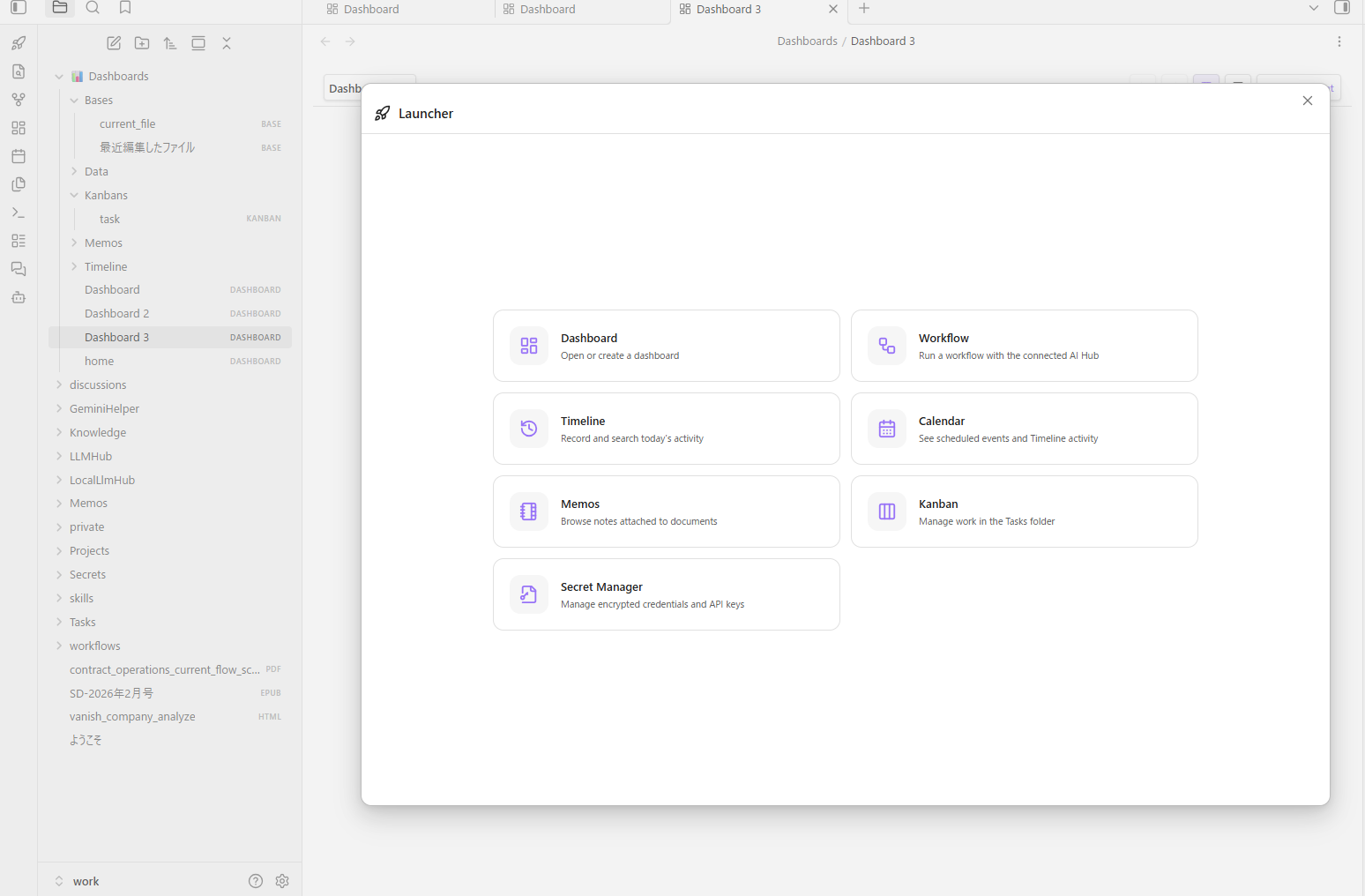
The launcher opens Dashboard, Workflow, Timeline, Calendar, MemoList, Kanban, and Secret Manager directly.
Get started
- Install and enable Dashboard Hub. It requires Obsidian 1.10.0 or later.
- Open the rocket launcher in the ribbon, or run Dashboard Hub: Create dashboard from the command palette.
- Choose Add widget, configure it, and drag or resize it into place.
The default Base directory is Dashboards and can be changed in the plugin
settings. New dashboards and supporting files use these locations:
Dashboards/
├── *.dashboard             # YAML dashboard definitions
├── Bases/                  # Obsidian .base files
├── Kanbans/                # Reusable .kanban definitions
├── Memos/                  # Reading memos
└── Timeline/<name>/        # Activity log and attachments, one file per day
Secret Manager uses .encrypted files under Secrets/ by default. Changing the
Base directory does not move existing files.
The interface is available in English, Japanese, Spanish, French, Chinese, Korean, Portuguese, Italian, and German.
Optional: add AI
AI features are optional. Install one of these compatible plugins from Obsidian's Community plugins: Gemini Helper, Local LLM Hub, or LLM Hub.
Connected plugins provide the models and can answer questions about selected text or reading memos, generate or edit a Base, rewrite Timeline posts, and create, edit, or run Workflows.
Dashboard Hub shares its Base directory and activity Timeline name with the connected plugin. Date-based questions can therefore read the requested day's Markdown file without scanning the full history.
Install from source
npm install
npm run build
Copy main.js, manifest.json, and styles.css into:
<your-vault>/.obsidian/plugins/dashboard-hub/
Reload Obsidian and enable Dashboard Hub under Community plugins.
Development
npm test     # vitest
npm run build
License
MIT