Search...Search plugins and themes...
⌘K
Sign in
  • Get started
  • Download
  • Pricing
  • Enterprise
  • Account
  • Obsidian
  • Overview
  • Sync
  • Publish
  • Canvas
  • Mobile
  • Web Clipper
  • CLI
  • Learn
  • Help
  • Developers
  • Changelog
  • About
  • Roadmap
  • Blog
  • Resources
  • System status
  • License overview
  • Terms of service
  • Privacy policy
  • Security
  • Community
  • Plugins
  • Themes
  • Discord
  • Forum / 中文论坛
  • Merch store
  • Brand guidelines
Follow us
DiscordTwitterBlueskyThreadsMastodonYouTubeGitHub
© 2026 Obsidian

Bases Board

flowing-abyssflowing-abyss6k downloads

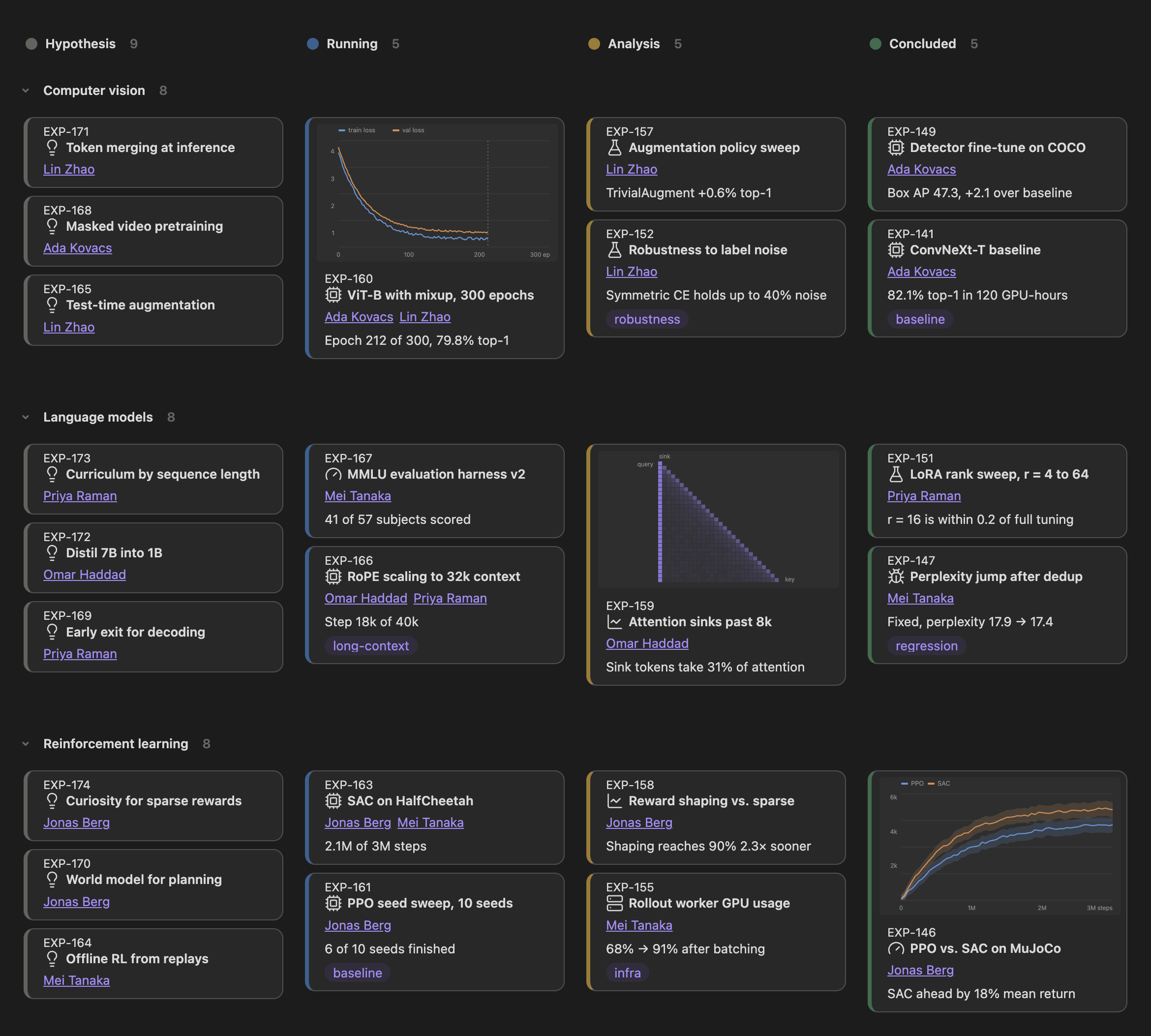
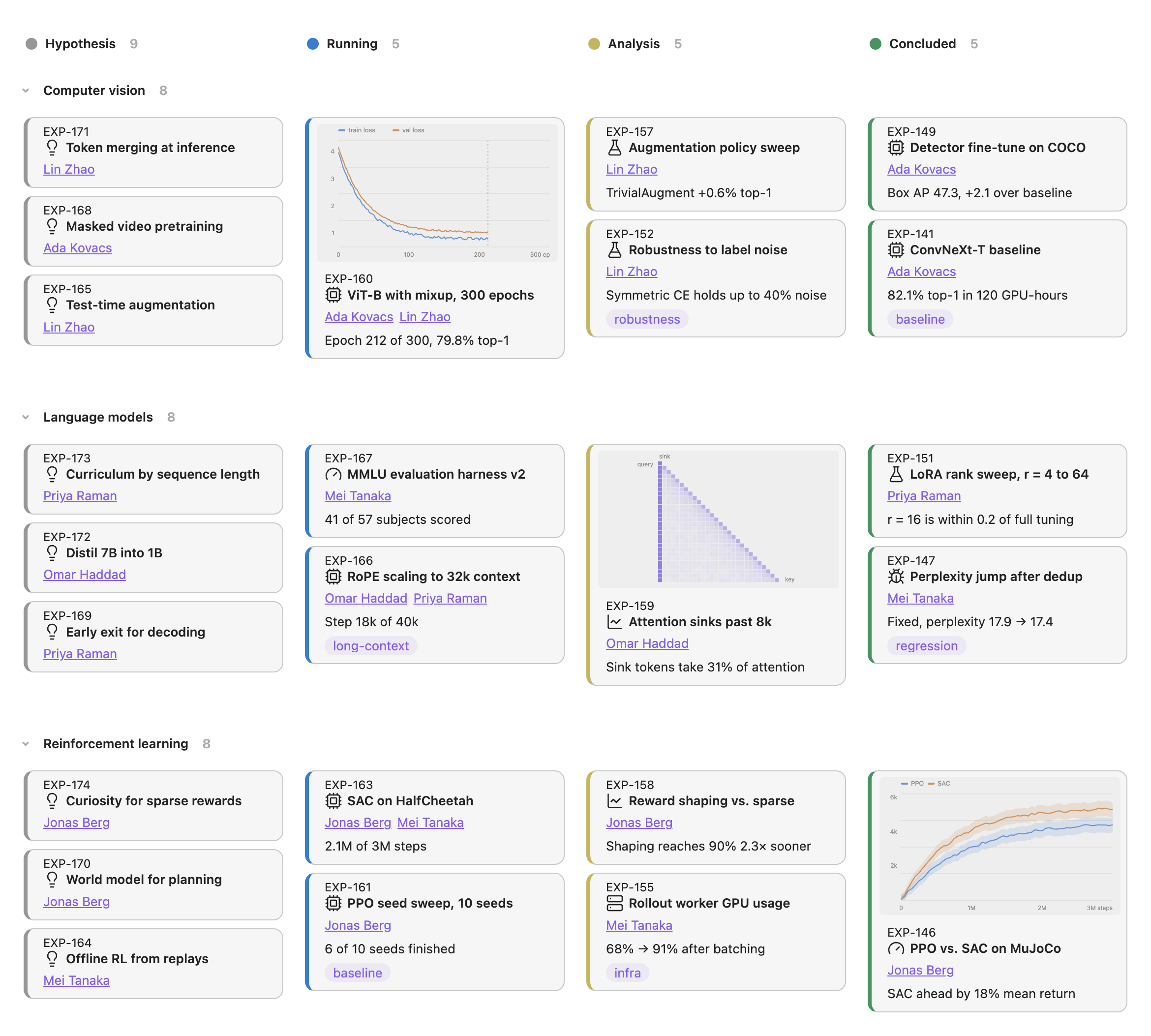
Interactive board view for bases, use as Kanban or Gallery, with grouping for rows and columns.

Add to Obsidian
  • Overview
  • Scorecard
  • Updates5

Bases Board adds Kanban and gallery views to Obsidian Bases. It groups notes into columns and rows, updates their properties when you move a card, and keeps layout and appearance options with each base.

Board layouts

  • Build a Kanban board by grouping notes into columns with a property.
  • Use gallery mode when you want a grid without column grouping.
  • Add a second property to split each column into rows.
  • Drag cards between columns and rows to update both properties.

Cards

  • Choose a small, medium or large card size.
  • Show an image from a note property at the top of each card.
  • Put a Lucide icon next to the title. Icon mappings use the value=icon-name format and do not change the stored value.
  • Show an ID above the title. Click it to copy the value or right-click it to edit the property.
  • Click a title to open its note in a new tab. The rest of the card remains available for dragging.

Columns and rows

  • Apply colors to headers, cells or cards.
  • Reorder columns and rows from their menus.
  • Hide values that do not belong on a board.
  • Keep configured columns visible when they have no cards by turning off hideEmptyGroups and listing them in groupOrder.
  • Give a column or row a display label without changing its property value. Label mappings use the value=Label format in groupLabels and subGroupLabels.

Drag and drop always writes the original property value, not its display label.

New notes

Each base can choose a folder and a template for new notes. The board assigns the current column and row values after creation. It can also open the note when it is ready.

Invalid folder and template paths produce an error instead of creating a note somewhere else.

Integrations

Templater commands run before the board assigns its properties, so the template keeps its frontmatter.

Supercharged Links styling works inside cards because the board preserves native Bases link markup and metadata attributes.

Configuration

Board options live in the Bases view config panel. Plugin settings store column colors and appearance defaults.

Run the Browse icons command from the command palette to search the registered Lucide icons. Clicking an icon copies its name.

Clipboard

Bases Board never reads the clipboard. It writes to the clipboard only after an explicit click. Clicking a card ID copies that ID. Clicking an icon in the icon browser copies the icon name.

Contributing

Issues and pull requests are welcome. See Contributing before you start.

License

MIT

HealthExcellent
ReviewPassed
About
Add Kanban and gallery views to Bases to group notes into columns and optional rows, and drag cards to update their properties while preserving layout per base. Customize card size, show images, icons and IDs, color headers and cells, set display labels without changing stored values, and create new notes with assigned column/row using templates.
BasesProject managementVisualization
Details
Current version
1.0.7
Last updated
4 hours ago
Created
5 months ago
Updates
5 releases
Downloads
6k
Compatible with
Obsidian 1.10.3+
Platforms
Desktop, Mobile
License
MIT
Report bugRequest featureReport plugin
Sponsor
Support
Author
flowing-abyssflowing-abyss
flowing-abyss.com
GitHubflowing-abyss
t.me
boosty.to
habr.com
  1. Community
  2. Plugins
  3. Bases
  4. Bases Board

Related plugins

Maps

Adds a map layout to bases so you can display notes as an interactive map view.

Kanban Bases View

A kanban-style drag-and-drop custom view for Bases.

Kanban

Create Markdown-backed Kanban boards.

TTRPG Tools - Timeline

Timeline-Renderer für Calendarium-Frontmatter (fc-date/fc-end). 200×315 Bild, Callout-Stil, native Popover, mobilfreundlich.

Life Tracker

Capture and visualize the data that matters in your life.

Bases Charts

Bases views for scatter, line, and bar charts.

Excalidraw

Visual PKM powerhouse. Create and edit Excalidraw drawings.

Advanced Canvas

Supercharge your canvas experience. Create presentations, flowcharts and more.

TaskNotes

Note-based task management with calendar, pomodoro and time-tracking integration.

Breadcrumbs

Visualise the hierarchy of your vault using a breadcrumb trail or matrix view.