Daily Games
 grzelo55 downloads
A front page for your daily games: open them, track what you've played today, paste results and keep streaks.
- Overview
- Scorecard
- Updates2
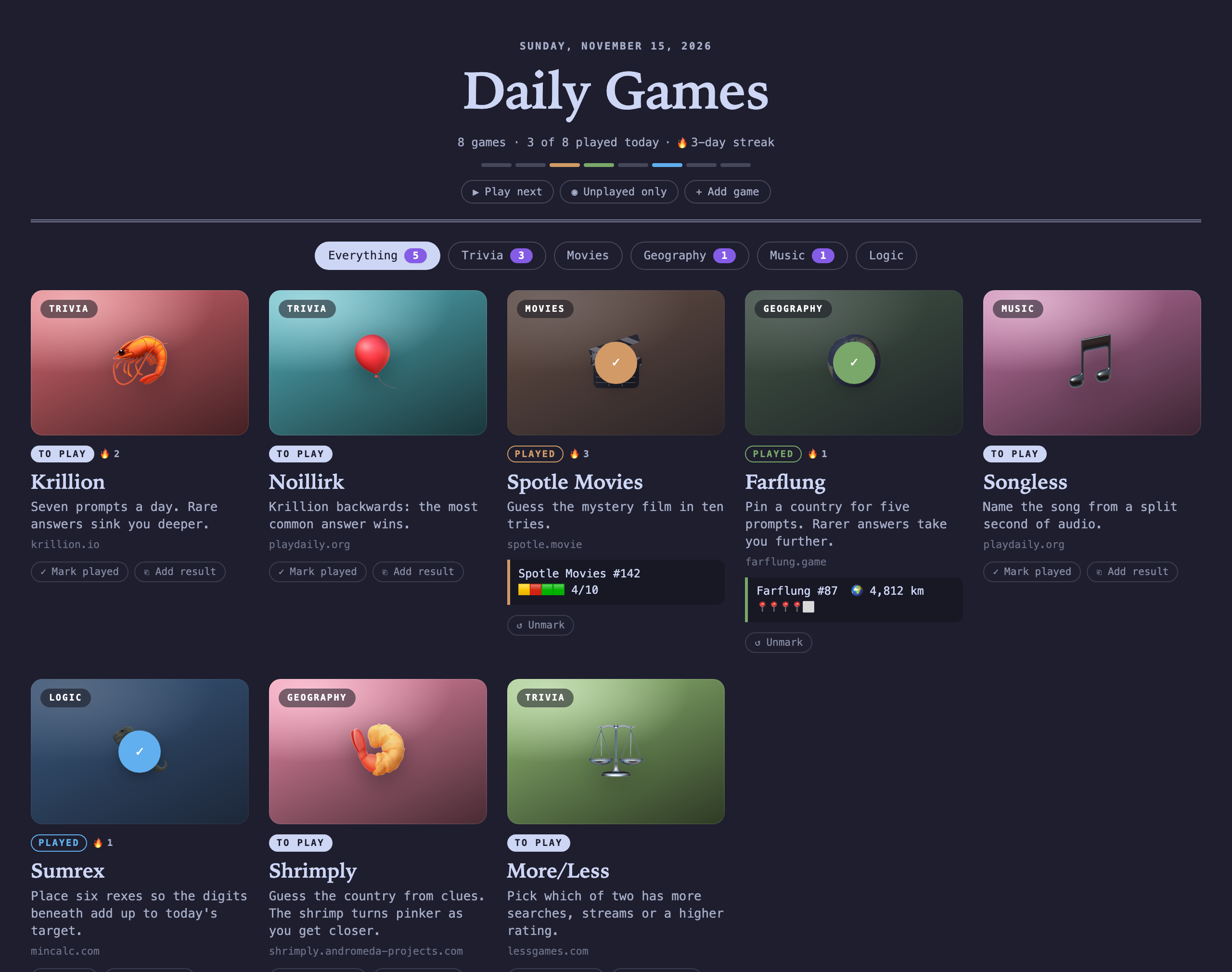
A front page in Obsidian for the daily puzzle and trivia games you play: a grid of cards that shows what's left today, keeps streaks, and saves your results to your daily note.
Features
- A board for your games. Each game is a card with a colour, an emoji or cover image, and a category. A header shows today's date, how many games you've played and your streak.
- Played today. Opening a game marks it played. Marks reset at midnight, or at a later hour if you play late. A progress bar fills in one coloured segment per game.
- Streaks. Each game counts the days in a row you've played it. The header counts the days in a row you've played anything.
- Results. Paste a game's share text (the 🟩🟨 grid). It shows on the card and is added to today's daily note under a heading of your choice.
- Filters. Filter by category, or show only games you haven't played. Play next opens the next unplayed game.
- Opens inside Obsidian. With the Web viewer core plugin on, games open in an Obsidian tab. Cmd/Ctrl-click opens them in your browser instead, and a setting swaps the two.
- Follows your theme. Colours, corners and fonts come from your theme, in light and dark mode.
Usage
Open the board from the dice icon in the ribbon, or with the Daily Games: Open board command.
To put the board in a note, such as a homepage or a daily note template, add a daily-games code block:
```daily-games
```
Options, one per line inside the block:
| Option | Effect |
|---|---|
compact: true |
A one-line header instead of the large masthead. |
category: Trivia |
Show only one category. |
Add, edit, reorder (drag) and remove games in Settings → Daily Games, or with Add game on the board. All settings show up in Obsidian's settings search.
Results in your daily note
When you save the first result for a game today, it's added to today's daily note as a callout:
## Daily games

> [!success] 🎬 Spotle Movies
> ```text
> Spotle Movies #142
> 🟨🟥🟩🟩 4/10
> ```
The result is written as plain text in a code block, so nothing pasted from a web page can turn into a link, an embed or a script in your note.
This needs the Daily notes core plugin. If today's note doesn't exist yet, it's created from your daily note template. You can turn this off or change the heading in settings.
Settings
| Setting | Default |
|---|---|
| Title | Daily Games |
| Open games in | Obsidian web viewer (falls back to the browser when Web viewer is off) |
| Mark played when opened | On |
| New day starts at | Midnight |
| Add results to the daily note | On |
| Daily note heading | ## Daily games |
Privacy and security
- The plugin makes no network requests of its own. Game pages load only when you open them, in Obsidian's Web viewer or your browser.
- Cover images, if you set any, load from the
https://links you give, without sending a referrer. - Play history and results stay in the plugin's data file in your vault.
- Only
http://andhttps://game links are accepted, so a link can't run code or open local files. Colours must be hex values. - The data file is validated every time it loads, including when it changes through sync, so a corrupt or tampered file falls back to defaults instead of breaking the plugin.
Installation
Requires Obsidian 1.13 or later (version 1.0.0 still installs on Obsidian 1.8 to 1.12).
From Obsidian: Settings → Community plugins → Browse, search for "Daily Games", then install and enable it.
Manually: download main.js, manifest.json and styles.css from the latest release into <your vault>/.obsidian/plugins/daily-games/, then enable the plugin in Settings → Community plugins.
Development
Uses pnpm (version in package.json's packageManager) and Node 22+.
pnpm install
pnpm dev           # rebuild on change
pnpm build         # type-check and production build
pnpm lint          # Obsidian's ESLint rules
pnpm test          # unit tests
pnpm install-plugin "/path/to/vault"   # copy the build into a vault
Dependency hardening lives in pnpm-workspace.yaml:
- Only versions published at least 7 days ago are installed.
- Git and tarball dependencies of dependencies are refused.
- Install scripts are blocked unless listed.
- Installs fail when a package's trust evidence gets weaker than in earlier versions.
Dependabot proposes updates weekly with the same 7-day cooldown.
Releasing
npm version patch   # bumps package.json, manifest.json and versions.json, and tags
git push --follow-tags
The release workflow audits, lints, tests and builds the tag, then publishes main.js, manifest.json and styles.css with a signed build provenance attestation. To check a downloaded file was built from this repository:
gh attestation verify main.js --repo Grzelox/obsidian-daily-games