Search...Search plugins and themes...
⌘K
Sign in
  • Get started
  • Download
  • Pricing
  • Enterprise
  • Account
  • Obsidian
  • Overview
  • Sync
  • Publish
  • Canvas
  • Mobile
  • Web Clipper
  • CLI
  • Learn
  • Help
  • Developers
  • Changelog
  • About
  • Roadmap
  • Blog
  • Resources
  • System status
  • License overview
  • Terms of service
  • Privacy policy
  • Security
  • Community
  • Plugins
  • Themes
  • Discord
  • Forum / 中文论坛
  • Merch store
  • Brand guidelines
Follow us
DiscordTwitterBlueskyThreadsMastodonYouTubeGitHub
© 2026 Obsidian

Confluence Import

kkei34kkei346k downloads

Import Confluence space into your vault.

Add to Obsidian
  • Overview
  • Scorecard
  • Updates8

This plugin imports Confluence space exported as HTML into Obsidian vault.

[!NOTE]

  • The plugin is currently WIP, so use it on your own risk
  • Works only on desktop (tested on Windows 10, Ubuntu 22, macOS Sonoma)
  • Under the hood the plugin uses confluence-to-markdown

Requirements

You must have pandoc command line tool installed.

[!NOTE] On macOS, the plugin assumes that Pandoc is located in /usr/local/bin, which is its default installation path when using brew install pandoc. You can use which pandoc in the terminal to check the location of pandoc.

How to use

  1. Export Confluence space as HTML
    • Confluence Server
      • Open space
      • Select Space Tools | Content Tools | Export
      • Select HTML as export format and click Next>>
      • In Export HTML Options choose Normal or Custom export and click Export
      • Download zip file
    • Confluence Cloud
      • Open space
      • Select Space Settings, in Manage space group select "Export space"
      • Select HTML as export format and click Next>>
      • In Export HTML Options choose Normal or Custom export and click Export
      • Download zip file
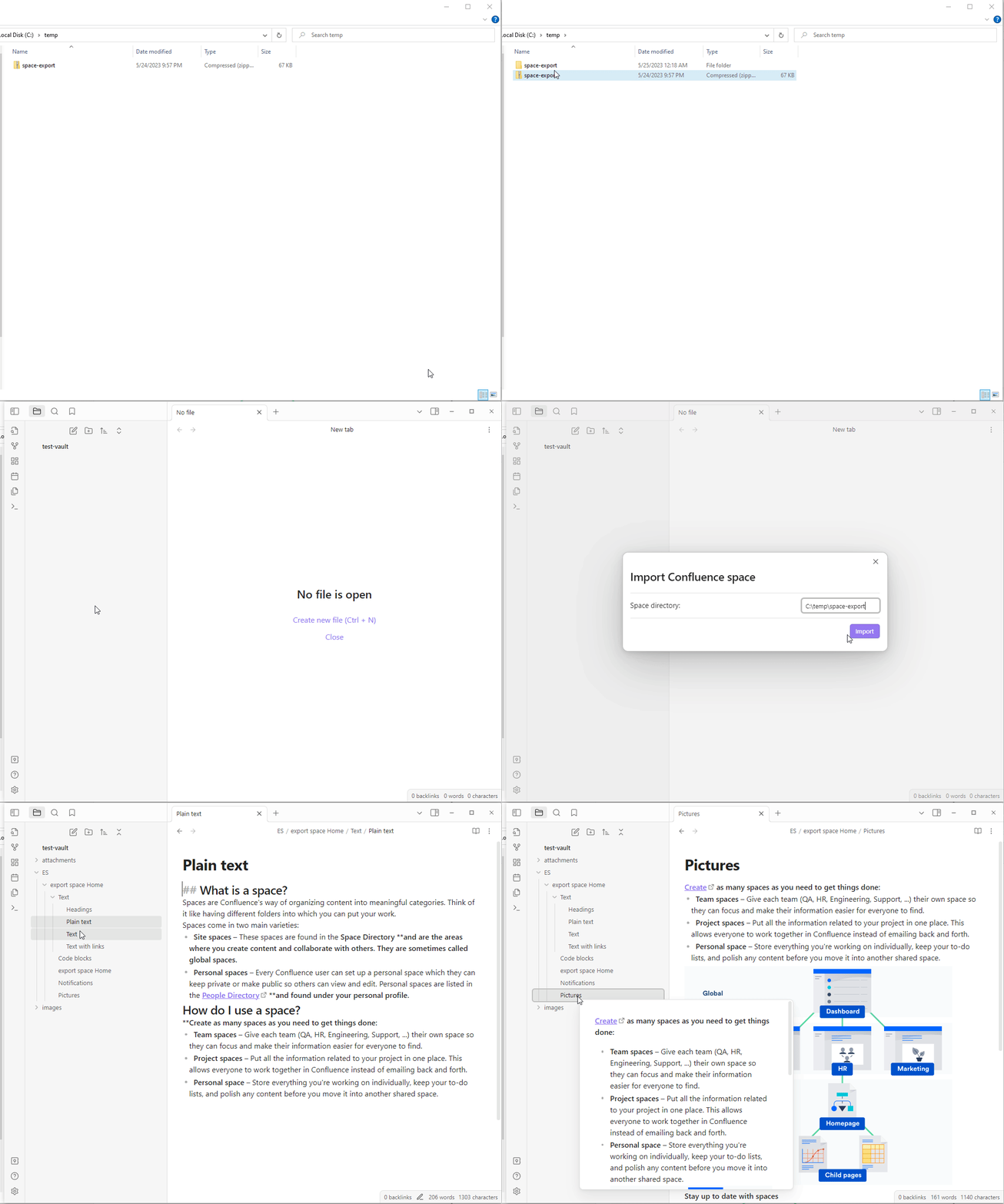
  2. Import Space into Obsidian
    • Extract zip file
    • In Obsidian command palette select Confluence Import: Import Confluence space command
    • In Space directory field of Import Confluence space dialog provide path to the confluence space folder, extracted from zip file and click Import

import-space

68%
HealthFair
ReviewSatisfactory
About
Import Confluence HTML exports into your Obsidian vault and convert pages to Markdown using Pandoc. Preserve space hierarchy and attachments while importing exported HTML folders into Obsidian (desktop only; Pandoc required).
ImportMarkdownAttachments
Details
Current version
0.2.6
Last updated
2 years ago
Created
3 years ago
Updates
8 releases
Downloads
6k
Compatible with
Obsidian 0.15.0+
Platforms
Desktop only
License
MIT
Report bugRequest featureReport plugin
Author
kkei34kkei34
github.com/KkEi34
GitHubkkei34
  1. Community
  2. Plugins
  3. Import
  4. Confluence Import

Related plugins

Importer

Import data from Notion, Evernote, Apple Notes, Microsoft OneNote, Google Keep, Bear, Roam, and HTML files.

Local Images Plus

A reincarnation of Local Images to download images in Markdown notes to local storage.

Consistent Attachments and Links

Move note attachments and update links automatically.

Docxer

Import Word files easily. Adds a preview mode for .docx files and the ability to convert them to markdown (.md) files.

Nexus AI Chat Importer

Import AI chat conversations from ChatGPT, Claude, and Le Chat exports into Obsidian as clean, readable Markdown files.

Social Archiver

Archive social media posts from various platforms.

Media DB

Query multiple APIs for movies, series, anime, games, music releases and wiki articles, and import them into your vault.

Epub Importer

Import EPUB files as Markdown.

Outliner

Work with your lists like in Workflowy or Roam Research.

Various Complements

Complete words similar to auto-completion in an IDE.