Collis
 Lak45 downloads
随手记录卡片笔记:不建文件、不起标题,Ctrl+Enter 记一张,多行排版原样保留,按月存进本地 Markdown。Quick capture inside your vault: one keystroke to save a card, plain Markdown stored locally.
- Overview
- Scorecard
- Updates12
Obsidian 速记卡片:不用建文件,Ctrl+Enter 记一张,纯 Markdown 存在你自己的库里。
中文 · English
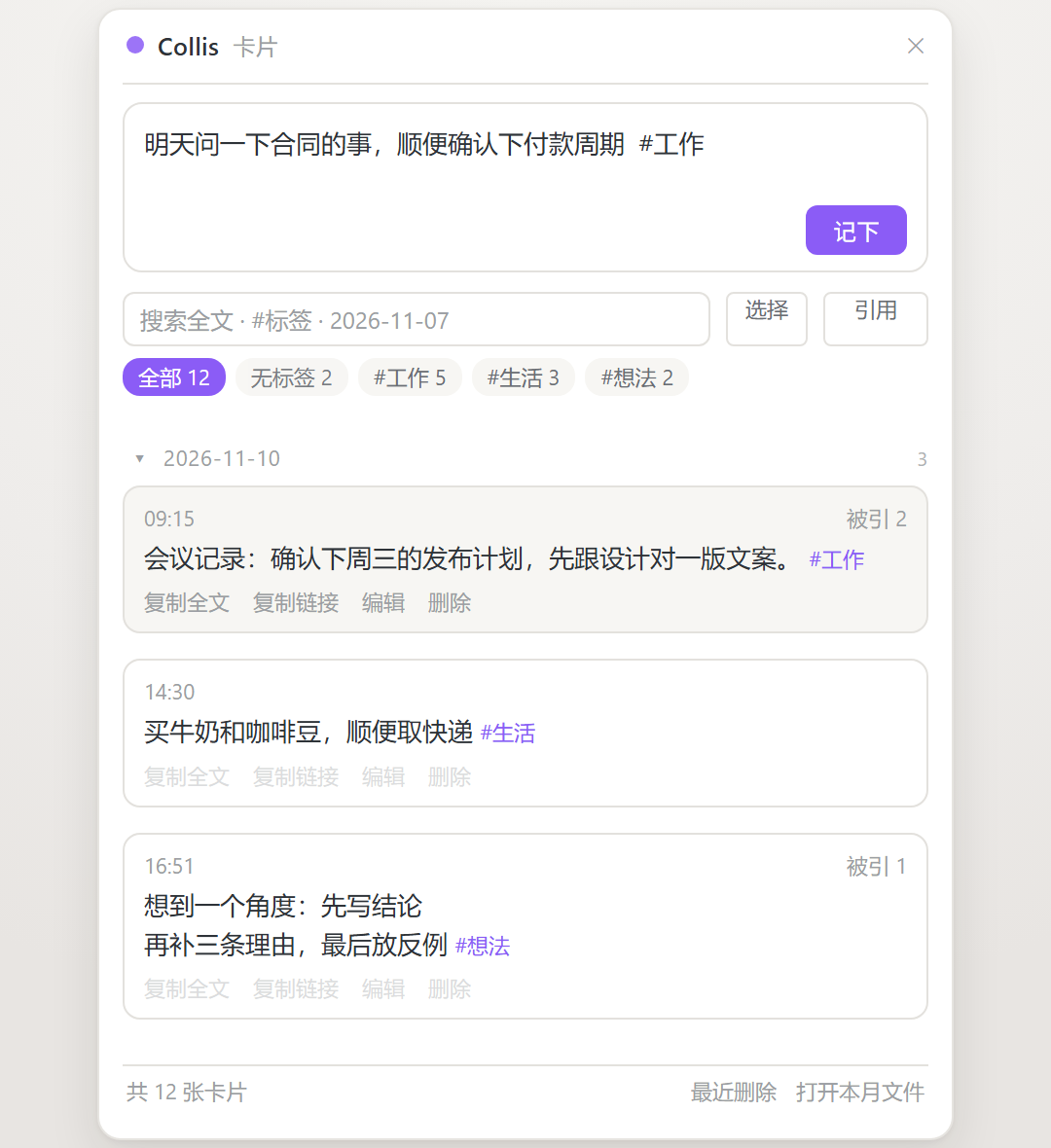
侧边栏输入框常驻;Ctrl+Enter 存下后成为一张带时间的卡片,右上角显示被几篇笔记引用。
它是什么
Collis 是 Obsidian 的速记卡片插件。侧边栏常驻一个输入框,也可以按 Ctrl/Cmd+J 在任何页面唤出悬浮输入框;写完按 Ctrl+Enter,内容作为一张带时间的卡片写进当月的 Markdown 文件。
记录一张卡片不需要新建文件、不需要起标题、不需要选文件夹,也不打标签就能先存下来。
卡片是标准的 Markdown 列表项,存在库内文件夹(默认 00-Inbox/速记/),每月一个 YYYY-MM.md。插件离线运行、不联网、不采集数据;停用或卸载插件后,笔记原样保留。
核心特点
| 特点 | 具体是什么 |
|---|---|
| 低摩擦记录 | 侧边栏常驻输入框,Ctrl/Cmd+J 全局唤出,两个键存下一张卡片 |
| 多行原样保留 | 换行写成缩进续行 + 硬换行,卡片视图与阅读视图都保持原分行 |
| 本地纯 Markdown | 按月一个文件,无私有格式、无自带云同步,卸载插件内容不动 |
| 全库检索 | 跨所有月份,按标签、日期、时间、短语、关键词筛选且可叠加 |
| 卡片可用于写作 | 一键复制 ![[文件#^id]] 嵌入笔记,卡片修改后嵌入处同步 |
| 被引用次数 | 显示被几篇笔记引用,可筛出已引用/未引用,删除前提示 |
| 误删可恢复 | 二次确认、9 秒撤销、最近删除 50 条;手写时间行不会被当成卡片 |
功能明细
记录
- 侧边栏输入框:常驻在卡片视图顶部,输入框随内容自动长高(最高 200px 后内部滚动)
- 悬浮输入框:
Ctrl/Cmd+J在任何页面唤出,Esc关闭,不打断当前正在读或写的笔记 - 两个键完成记录:
Enter换行,Ctrl+Enter保存,内容落在当天日期下 - 快捷键可改:
Ctrl/Cmd+J只是默认值(macOS 上是Cmd+J,由 Obsidian 按系统解析),在 设置 → 快捷键 里搜索「快速记一条」即可更换;即使改了,命令面板里也仍能调用 - 草稿不丢:关掉窗口、切走、保存失败,内容保留在插件数据文件里,下次打开自动填回,保留 7 天;开始编辑后提示自动收起
- 标签联想:输入
#弹出库内已有标签,按使用频率排序;Tab或 ↑↓ +Enter选中,直接按Enter仍是换行,不影响正常输入 - 常用标签快选:悬浮窗口中可直接点常用标签填入
标签
#标签是 Obsidian 原生标签,标签面板、全局搜索、tag:查询本来就能用#父/子嵌套标签:标签栏把子标签聚合到父标签下,点父标签一次筛出整组- 标签栏每个标签带卡片数量,「无标签」一键筛出还没打标签的卡片
- 标签栏可折叠,默认只显示前几组,尾部「更多 / 收起」,不挤压列表空间
搜索与筛选
不用回忆内容存放在哪,输入记得的部分即可:
| 你记得 | 就输入 |
|---|---|
| 标签 | #工作 |
| 哪一天 | 11-07、2026-11 |
| 几点写的 | 13:41 |
| 一句话 | "整句短语" |
| 几个词 | 空格分开,须同时命中 |
- 搜索覆盖所有月份文件,不只当月
- 关键词、标签、日期、引用状态可叠加,叠加条件会在搜索框下方明示
- 日期标题可折叠,折叠状态记在设置里,重启后保留
- 「引用」按钮在 全部 → 已引用 → 未引用 之间循环,配合被引用次数使用
编辑与删除
- 内联编辑:点「编辑」原地改,多行内容按行数自动展开,
Ctrl+Enter保存、Esc取消 - 删除:二次确认后删除整张卡片(含所有续行);被引用的卡片会先提示被几篇笔记引用
- 批量删除:进入选择模式勾选多条,跨月份的一次处理完
- 撤销:删除后 9 秒内可点提示条撤销;「最近删除」保留最近 50 条,可逐条恢复或清空
- 空标题清理:某天卡片删空后,
## 日期标题一并移除;在编辑器里手删同样生效,光标所在日期段暂不处理 - 严格识别卡片:默认开启,只有带块 ID(
^abc123)的条目才算卡片。正文里手写的- 12:30 开会只是普通文字,不会出现在列表里,也不会被删
复制与引用

复制链接得到 ![[2026-11#^a1b2c3]],粘进笔记即嵌入;原卡片修改后,嵌入处同步更新。
- 复制全文:卡片正文连换行、标签一并复制为纯文本,粘贴即见内容;不依赖块 ID,原卡片以后删掉,粘出去的文字也还在
- 复制链接:默认
[[2026-11#^a1b2c3]](点击跳转),可在设置里改为;卡片没有块 ID 时会自动补上 - 被引用次数:数字来自仓库里真实的
[[文件#^id]]/![[文件#^id]]链接;同一篇笔记引多次只算一篇,速记内部卡片互引不算,0 次不显示 - 网址可点:正文里的
https://…点击直接用浏览器打开,长网址原位折行;[[双链]]与 Markdown 语法不做解析,卡片内始终是纯文本
数据格式
## 2026-11-06

- 09:15 会议记录:确认下周三的发布计划 #工作 ^a1b2c3
- 14:30 买牛奶和咖啡豆 #生活 ^d4e5f6
- 16:51 第一行内容
  第二行内容 #示例 ^e7g8h9
- HH:mm 正文是卡片首行;换行写成缩进两空格的续行,行尾两个空格是 Markdown 硬换行^a1b2c3是块 ID,固定在 Obsidian 认得的末行,让这张卡片可被双链和嵌入;它同时也是插件区分「卡片」和「手写时间行」的依据#标签、#父/子都是原生标签- 每月一个文件,避免单文件无限膨胀;停用插件、换编辑器、迁移库都不受影响
不适用的场景
- 不联网:没有自己的云同步,多端同步请用你已有的文件同步方案
- 不做富文本编辑:卡片内部是纯文本,Markdown 和双链不在卡片里渲染
- 不替代长文编辑:卡片用于碎片记录,成文仍应写在笔记里
安装
- 插件市场:设置 → 第三方插件 → 浏览 → 搜索 Collis → 安装 → 启用
- 手动:从 最新 Release 下载
main.js、manifest.json、styles.css,放进<你的库>/.obsidian/plugins/collis/(文件夹必须叫collis),重启 Obsidian 后启用 - BRAT:命令面板执行
BRAT: Add a beta plugin for testing,输入R529/collis
设置项
| 设置 | 说明 |
|---|---|
| 卡片文件夹 | 卡片存放位置,默认 00-Inbox/速记,不存在会自动创建 |
| 常用标签 | 逗号分隔,只影响候选排序;卡片里不存在的标签不会出现 |
| 最多渲染条数 | 只影响列表渲染性能,不影响搜索范围 |
| 自动清理空日期标题 | 默认开启。编辑器里手删同样生效,光标所在日期段暂时不动 |
| 严格识别卡片 | 默认开启。只有带块 ID 的条目才算卡片 |
| 块引用使用嵌入形式 | 关闭时复制 [[文件#^id]](点击跳转),打开后复制  |
兼容性与隐私
Obsidian 1.4.0 及以上,桌面端与移动端均可使用;旧版单行卡片格式完全兼容,升级无需迁移。插件完全离线运行,不联网、不采集数据、不需要账号,除插件自己的文件夹和数据文件外不写入任何位置。
MIT License,详见 LICENSE。问题与建议:GitHub Issues。
Collis: quick cards for Obsidian
Jot a card with Ctrl+Enter — no file, no title, no folder. Plain Markdown, stored in your own vault.
What it is
Collis is a quick-capture card plugin for Obsidian. A permanent input sits in the sidebar; Ctrl/Cmd+J opens a floating input from any page. Ctrl+Enter saves what you typed as a timestamped card in this month's Markdown file. No new file, no title, no folder, and no tag required.
Cards are ordinary Markdown list items stored in a folder you choose (default 00-Inbox/速记), one YYYY-MM.md per month. The plugin runs fully offline and writes nothing outside your vault.
Highlights
| Highlight | What it is |
|---|---|
| Low-friction capture | Permanent sidebar input, Ctrl/Cmd+J from anywhere, Enter for a new line, Ctrl+Enter to save |
| Multi-line kept intact | Continuation lines are stored as indented lines with hard breaks, preserved in the card view and the reading view |
| Plain Markdown, no lock-in | One file per month, no private format, no own sync; any editor can open it, removing the plugin leaves your notes untouched |
| Search across everything | Every monthly file, filterable by tag, date, time, phrase or keyword, combinable |
| Cards usable in writing | Copy ![[2026-11#^a1b2c3]] into any note; edit the card and the embed follows |
| Citation count | Each card shows how many notes link to it; filter to cited or uncited cards; warned before deleting a cited one |
| Deletion is reversible | Confirmation, 9-second undo, last 50 deletions kept; only entries with a block ID count as cards |
Capture
Permanent sidebar input that grows with the text (scrolls past 200px). Ctrl/Cmd+J opens a floating input on any page (Cmd replaces Ctrl on macOS, resolved by Obsidian itself), Esc closes it. Enter for a new line, Ctrl+Enter to save under today's date. Unfinished text is kept for seven days and restored next time.
Type # for autocomplete over tags already in your vault, ordered by how often you use them; Tab or ↑↓ + Enter selects, a plain Enter still makes a new line.
Tags
Native #tag and nested #parent/child, children grouped under their parent. Tag bar shows counts, has an "untagged" filter, and collapses to save space.
Find
| You remember | You type |
|---|---|
| a tag | #work |
| a day | 11-07, 2026-11 |
| a time | 13:41 |
| a sentence | "a whole phrase" |
Space-separated words must all match. Days collapse, and the collapsed state persists. The "Refs" button cycles all → cited → uncited.
Edit and delete
Inline editing (Ctrl+Enter saves, Esc cancels), batch delete across months, 9-second undo, last 50 deletions kept, empty ## date headings cleaned up automatically. Strict card detection means a hand-typed - 12:30 standup is never treated as a card.
Copy and cite
Copy the card as plain text, or as [[file#^id]] / ![[file#^id]] (configurable). Citation counts come from real links in your vault; several links from one note count once, and links between cards of the same file are ignored. Bare https://… is clickable; wikilinks and Markdown stay plain text.
Data
## 2026-11-06

- 09:15 Meeting notes: confirm next Wednesday's release plan #work ^a1b2c3
- 14:30 Buy milk and coffee beans #life ^d4e5f6
^a1b2c3 is an Obsidian block ID kept on the card's last line. One file per month keeps any single file from growing without bound.
Install
Settings → Community plugins → Browse → Collis → Install → Enable. Manual: drop the three release files into <vault>/.obsidian/plugins/collis/. BRAT: R529/collis.
Settings
| Setting | What it does |
|---|---|
| Card folder | Defaults to 00-Inbox/速记, created if missing |
| Common tags | Affects suggestion order only |
| Max cards rendered | Rendering limit only; search still covers everything |
| Clean up empty date headings | On by default, including manual deletions |
| Strict card detection | On by default; only entries with a block ID count |
| Block reference style | Off: [[file#^id]]. On: ![[file#^id]] |
Requires Obsidian 1.4.0+, desktop and mobile, fully offline, MIT licensed.