Search...Search plugins and themes...
⌘K
Sign in
  • Get started
  • Download
  • Pricing
  • Enterprise
  • Account
  • Obsidian
  • Overview
  • Sync
  • Publish
  • Canvas
  • Mobile
  • Web Clipper
  • CLI
  • Learn
  • Help
  • Developers
  • Changelog
  • About
  • Roadmap
  • Blog
  • Resources
  • System status
  • License overview
  • Terms of service
  • Privacy policy
  • Security
  • Community
  • Plugins
  • Themes
  • Discord
  • Forum / 中文论坛
  • Merch store
  • Brand guidelines
Follow us
DiscordTwitterBlueskyThreadsMastodonYouTubeGitHub
© 2026 Obsidian

Christian Pure Verses and Prayers

Christian PureChristian Pure4 downloads

Insert today's Bible verse and prayer, a verse for how you feel, or a short prayer for an occasion, each with a link to the full article.

Add to Obsidian
Christian Pure Verses and Prayers screenshot
  • Overview
  • Scorecard
  • Updates2

Put a Bible verse or a prayer into your notes without leaving Obsidian.

Open the command palette and run one of four commands:

  • Insert today's verse: the day's verse from Christian Pure, with a short note on what it says and a link to the full article.
  • Insert today's prayer: the day's prayer, with its source.
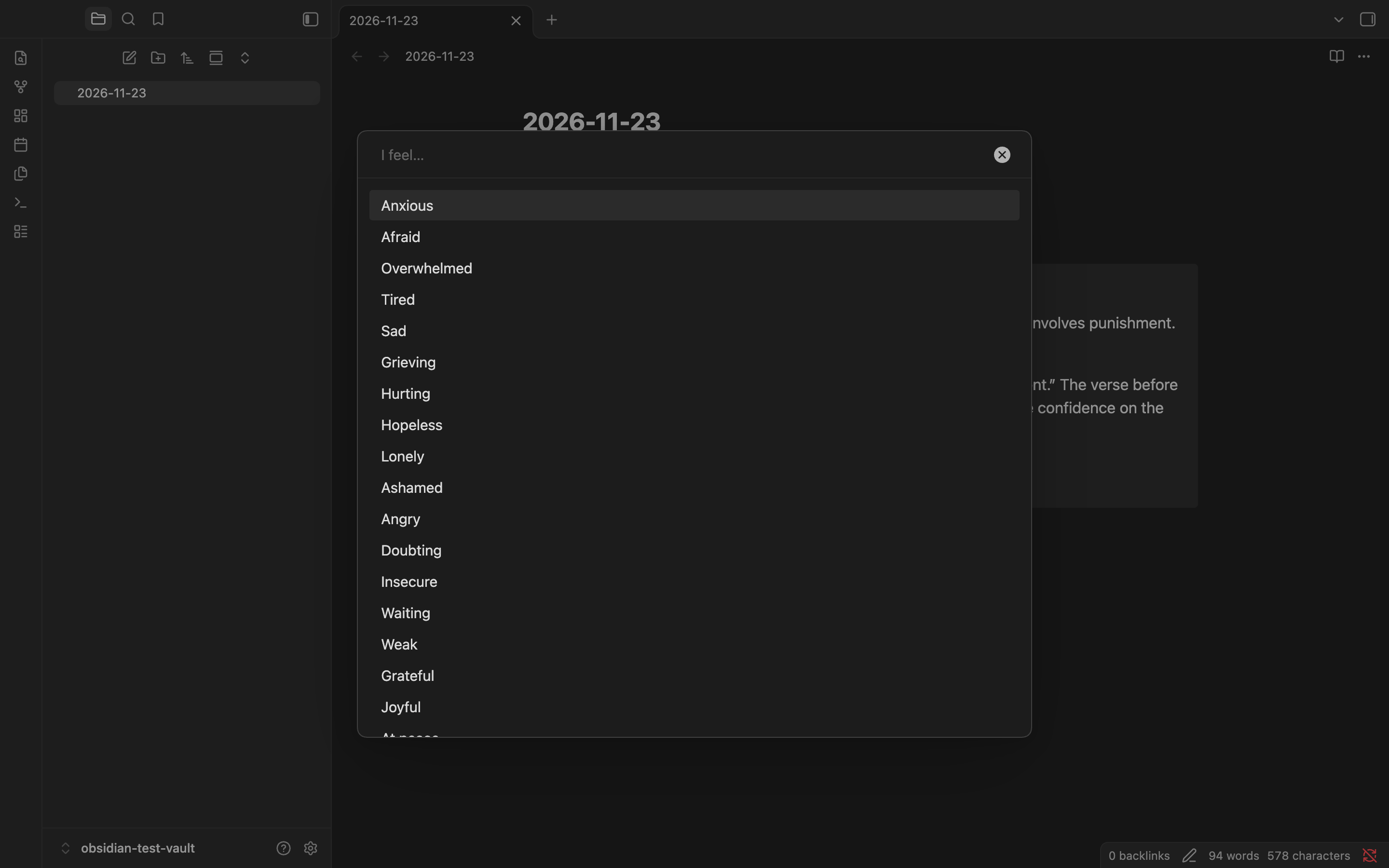
  • Insert a verse for how you feel: choose a feeling (anxious, tired, grieving, grateful and 14 more), then one of 178 verses.
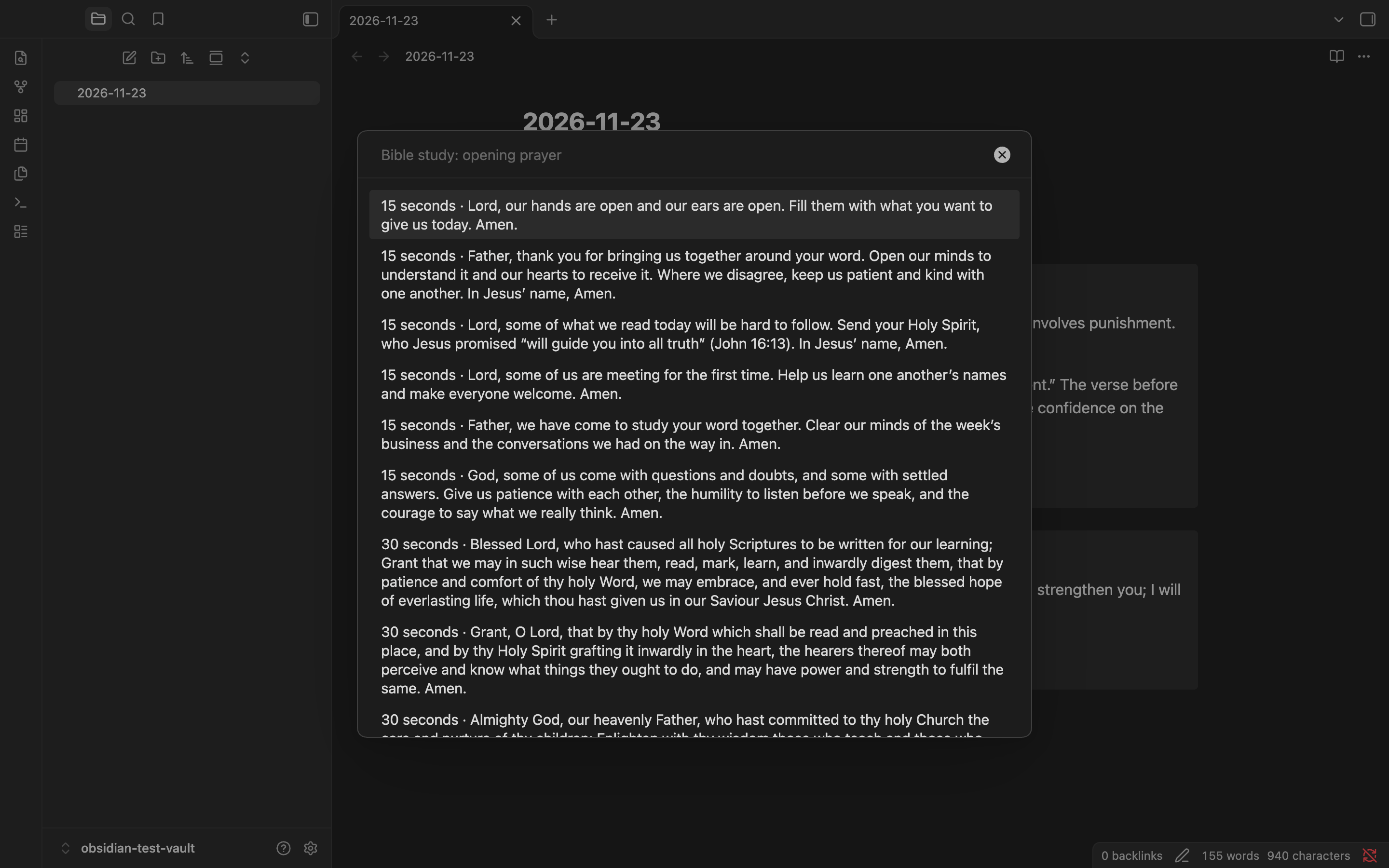
  • Insert a prayer for an occasion: short prayers to pray aloud before a meal, at the start or end of a Bible study, a church service, a meeting, school or sports, or a funeral. Each shows how long it takes to pray.

Verses are from the Berean Standard Bible. The text goes into your note as ordinary Markdown at the cursor.
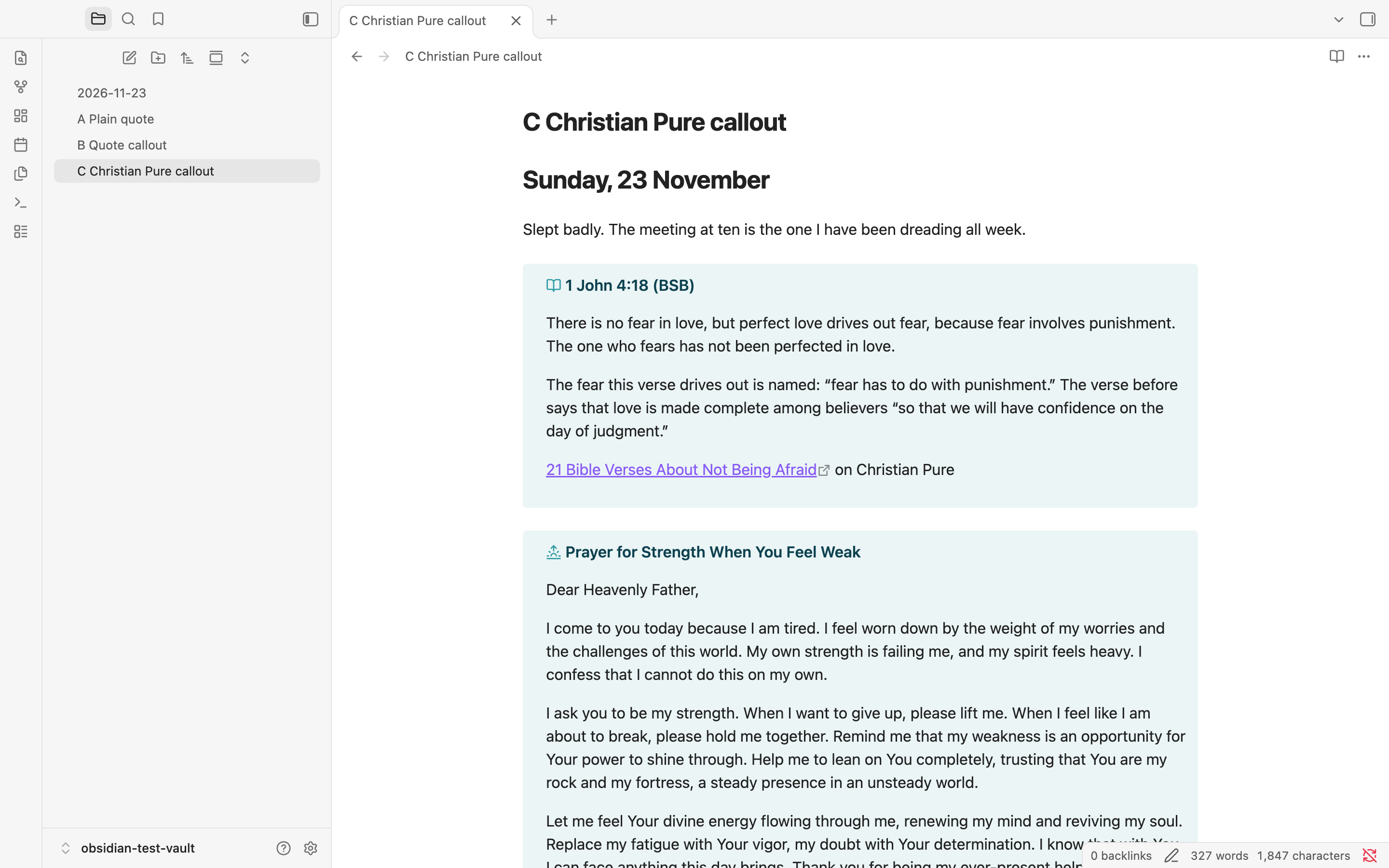
Today's verse and prayer in a journal note

Choosing a verse for how you feel

Choosing a prayer to open a Bible study

Network use

This plugin connects to christianpure.com to fetch the verse and prayer text when you run a command. It sends no account, note content or personal data, and it does not track you. Today's verse and prayer are kept for an hour so the site is not asked twice. Links in what it inserts carry utm_source=obsidian so Christian Pure can count visits that came from the plugin.

Settings

  • Look of inserted verses and prayers: the Christian Pure callout in peacock blue (the default), Obsidian's own quote callout, or a plain quote. Changing it affects new inserts only.
  • Add the short note under today's verse: on by default.

Install by hand

Copy main.js, manifest.json and styles.css from the latest release into .obsidian/plugins/christian-pure/ in your vault, then turn the plugin on under Settings › Community plugins.

Contact

[email protected]

HealthExcellent
ReviewSatisfactory
About
Put a Bible verse or a short prayer from Christian Pure into the note you are writing. There are four commands: - Insert today's verse, with a few lines on what it says. - Insert today's prayer. - Insert a verse for how you feel: choose from 18 feelings, such as anxious, tired or grateful, then from 178 verses. - Insert a prayer for an occasion: short prayers to say aloud before or after a meal, or at a Bible study, a church service, a meeting, a school or sports event, or a funeral. Everything goes in as ordinary Markdown, with the reference and a link to the full article. The verses are from the Berean Standard Bible. In settings you can choose a plain quote, Obsidian's quote callout, or the Christian Pure callout. The plugin asks christianpure.com for the words when you run a command, and nothing else. It sends nothing about you or your notes.
CommandsIntegrationsWriting
Details
Current version
0.1.1
Last updated
4 hours ago
Created
5 hours ago
Updates
2 releases
Downloads
4
Compatible with
Obsidian 1.4.0+
Platforms
Desktop, Mobile
License
MIT
Report bugRequest featureReport plugin
Author
Christian PureChristian Purechristianpure
GitHubchristianpure
  1. Community
  2. Plugins
  3. Commands
  4. Christian Pure Verses and Prayers

Related plugins

LanguageTool Integration

Advanced grammar and spell checking, powered by LanguageTool.

Actions URI

Add additional `x-callback-url` endpoints to the app for common actions — it's a clean, super-charged addition to Obsidian URI.

Open in Terminal

Open your vault in a new terminal window or launch Claude Code, Codex CLI, or Gemini CLI directly from a terminal.

Shell commands

Define system commands that you want to execute via command palette, hotkeys, URI links or automated events. E.g. open external applications or perform automated file modifications.

BRAT

Easily install a beta version of a plugin for testing.

Self-hosted LiveSync

Sync vaults securely to self-hosted servers or WEBRTC.

Quick Switcher++

Enhanced Quick Switcher, search open panels, and symbols.

Fast Note Sync

Real-time sync of your vaults across server, mobile, and web; shareable with anyone; supports REST and MCP integrations to build your personal AI knowledge base.

Custom Frames

Turn web apps into panes using iframes with custom styling. Also comes with presets for Google Keep, Todoist and more.

Local REST API with MCP

Unlock your automation needs by interacting with your notes over a secure REST API.