Search...Search plugins and themes...
⌘K
Sign in
  • Get started
  • Download
  • Pricing
  • Enterprise
  • Account
  • Obsidian
  • Overview
  • Sync
  • Publish
  • Canvas
  • Mobile
  • Web Clipper
  • CLI
  • Learn
  • Help
  • Developers
  • Changelog
  • About
  • Roadmap
  • Blog
  • Resources
  • System status
  • License overview
  • Terms of service
  • Privacy policy
  • Security
  • Community
  • Plugins
  • Themes
  • Discord
  • Forum / 中文论坛
  • Merch store
  • Brand guidelines
Follow us
DiscordTwitterBlueskyThreadsMastodonYouTubeGitHub
© 2026 Obsidian

Checklist Status Sets

DanDan109 downloads

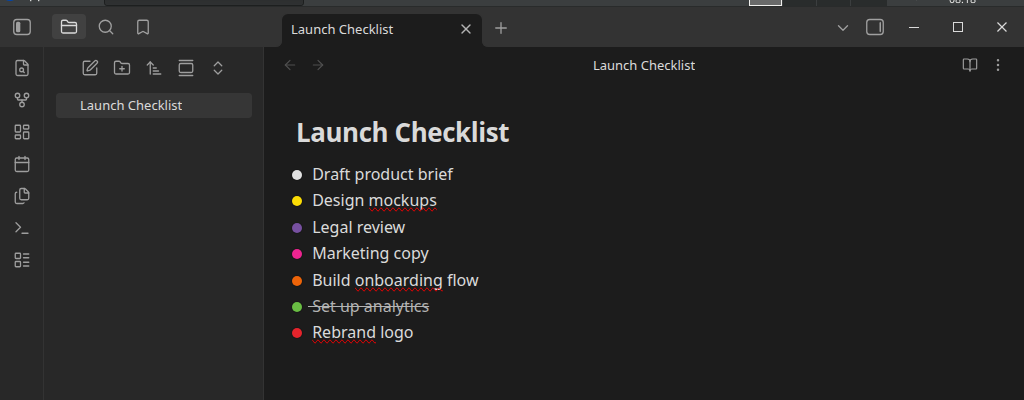
Apply Status Sets' reusable status sets to checklist items inside your notes — per file, block, or heading — with the same traffic-light icons, colors, and Glow used in the file tree.

Add to Obsidian
  • Overview
  • Scorecard
  • Updates7

📖 Full documentation

A companion plugin to Status Sets — applies the same reusable status sets to checklist items inside your notes, not just the file tree.
Screenshot

Requires Status Sets

This plugin reads status sets you define in Status Sets (file-folder-status-icons) — install and enable that first. Status sets themselves are never created, edited, or duplicated here; this plugin only reads them, live, via a small public API Status Sets exposes for this purpose.

Features

  • Three assignment scopes: an entire file, a specific block (with optional inherit-to-subtasks), or everything under a heading.
  • Traffic-light status icons replace the native checkbox glyph entirely, styled identically to Status Sets' file-tree dots — Glow included, if you have that on.
  • Left-click cycles a task to the next status; right-click opens the full manual picker — Status Sets' own popup, reused as-is.
  • Hide completed actually removes completed-status tasks from the rendered note, not just visually.
  • Works in both Live Preview and Reading view.
  • Nothing is written to frontmatter. A task's status is a single character inside its own checkbox brackets (- [ ] → - [I], etc.), chosen after testing live that this is the only format Obsidian's own task parser actually recognizes as a task — see the docs for why, and the tradeoffs involved.

Usage

  1. Define a status set in Status Sets first (Settings → Status Sets → New status set), if you haven't already.
  2. Settings → Checklist Status Sets → Assign a file or block → type a note's path, pick a status set, Assign.
  3. Open the note. Left-click a task's dot to cycle status; right-click for the full picker.
  4. For finer control, extend the path with ^ (pick a block) or # (pick a heading) instead of assigning the whole file.

Installation

From Obsidian

Settings → Community plugins → Browse → search "Checklist Status Sets" → Install → Enable.

Manually

Copy main.js, manifest.json, and styles.css from a release into <your-vault>/.obsidian/plugins/checklist-status-icons/, then enable the plugin from Community plugins.

Development

npm install
npm run dev     # watch build
npm run build   # typecheck + production build
npm run lint

Support

  • 🐛 Report a bug
  • 💡 Request a feature
  • ☕ Buy me a coffee

License

MIT

HealthExcellent
ReviewSatisfactory
About
Apply reusable Status Sets to checklist items inside notes, replacing native checkboxes with traffic-light status icons that match file-tree styling (Glow supported). Cycle task status with left-click, open the full picker on right-click, hide completed to remove tasks from view, and assign scopes to file, block, or heading.
TasksIcons
Details
Current version
0.2.4
Last updated
2 weeks ago
Created
2 weeks ago
Updates
7 releases
Downloads
109
Compatible with
Obsidian 1.4.16+
Platforms
Desktop only
License
MIT
Report bugRequest featureReport plugin
Author
DanDandanrfletcher
GitHubdanrfletcher
  1. Community
  2. Plugins
  3. Tasks
  4. Checklist Status Sets

Related plugins

TaskNotes

Note-based task management with calendar, pomodoro and time-tracking integration.

Tasks

Track tasks across your vault. Supports due dates, recurring tasks, done dates, sub-set of checklist items, and filtering. Maintained by Clare Macrae and Ilyas Landikov, created by Martin Schenck.

Day Planner

Turn tasks from daily notes, the Tasks plugin, and calendars into time blocks on an editable timeline, with built-in time tracker.

TickTickSync

Sync TickTick tasks.

Operon

Task and project management system that unifies inline tasks and file-based tasks in the same workflows with Tables, Filters, Calendars, Kanban boards, Gantt views, Canvas, and time tracking.

Link Favicons

See the favicon for a linked website.

Iconic

Customize your icons and their colors directly from the UI, including tabs, files & folders, bookmarks, tags, properties, and ribbon commands.

dotpm

Full-featured task and project management: stunning Gantt charts, Kanban boards, Table views, customizable fields, due date notifications, dependancies

Task Collector

Change task status and collect tasks within a document using hotkeys and context menus.

Base Board

Organize notes into Kanban boards using frontmatter properties. Drag and drop cards between columns powered by Bases.