Search...Search plugins and themes...
⌘K
Sign in
  • Get started
  • Download
  • Pricing
  • Enterprise
  • Account
  • Obsidian
  • Overview
  • Sync
  • Publish
  • Canvas
  • Mobile
  • Web Clipper
  • CLI
  • Learn
  • Help
  • Developers
  • Changelog
  • About
  • Roadmap
  • Blog
  • Resources
  • System status
  • License overview
  • Terms of service
  • Privacy policy
  • Security
  • Community
  • Plugins
  • Themes
  • Discord
  • Forum / 中文论坛
  • Merch store
  • Brand guidelines
Follow us
DiscordTwitterBlueskyThreadsMastodonYouTubeGitHub
© 2026 Obsidian

BibTeX Manager

akopdevakopdev4k downloads

Create a literature notes from a BibTeX entries.

Add to Obsidian
  • Overview
  • Scorecard
  • Updates14

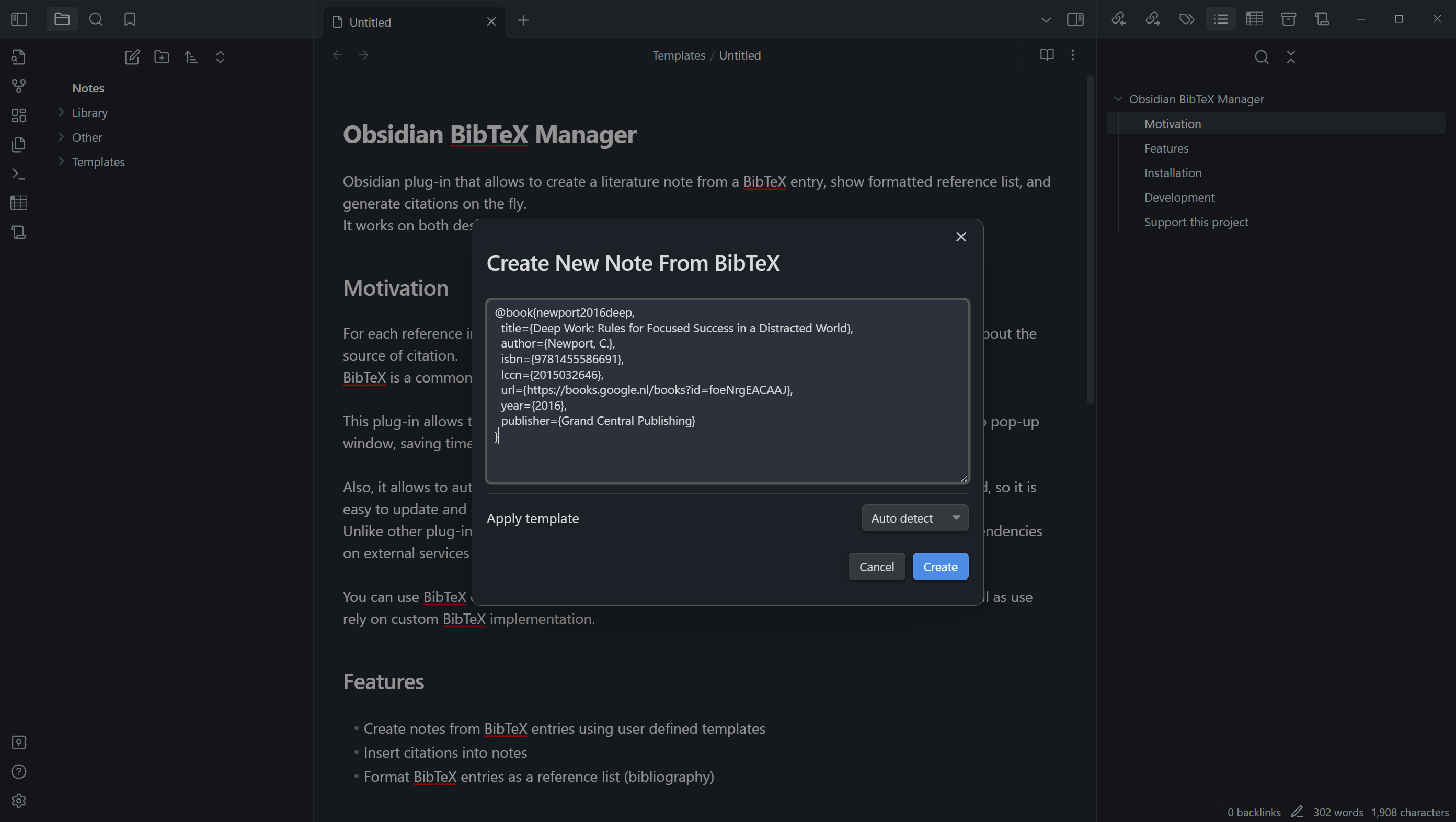
Create New Note in Obsidian BibteX Manager

Obsidian plug-in that simplifies the process of managing academic references by enabling the creation of literature notes from a BibTeX entry, displaying formatted reference lists, and generating citations instantly.

This plug-in operates seamlessly on both desktop and mobile platforms, and does not require external dependencies.

Motivation

For each reference in Obsidian I create a dedicated literature note that contains meta information about the source of citation. BibTeX is a common way to store references in academic writing, that is why I decided to create a plug-in that would allow me to easily create literature notes just by copy and pasting the BibTeX entry.

The plug-in also supports automatic formatting of reference lists within the note, while keeping the original BibTeX entry unmodified. I use this feature to keep source BibTeX file unmodified, while having a nicely formatted reference list in the note.

Unlike other plug-ins, I support mobile platform as a "first-class citizen", meaning there are no dependencies on external services or desktop-only features.

You can add BibTeX entries from Zotero, Mendeley, or any other popular reference managers, as well as rely on custom BibTeX implementation.

Features

  • Generate literature notes from BibTeX entries using customizable templates.
  • Automatically format your BibTeX entries as a reference list, creating a well-organized bibliography within your notes.
  • Insert citations directly into your notes.
  • Fetch BibTeX entries from remote sources (arXiv, Google Books, etc).

Installation

  1. Open Obsidian Settings.
  2. In the side menu, select Community plugins.
  3. Select Browse and put "Obsidian BibTeX Manager" into search box.
  4. Select Install.
  5. Go to plugin settings and setup path to custom templates.

Development

This plugin is in active development. If you have any feature requests or bug reports, please open an issue on the GitHub repository.

make help # Show available commands

Support this project

You can support this project by starring, sharing, and contributing to the codebase.

You can also support the author by buying him a coffee. Click sponsor button on the top of the page.

72%
HealthGood
ReviewCaution
About
Create literature notes from BibTeX entries using customizable templates. Display formatted reference lists, insert citations instantly, and fetch BibTeX from remote sources like arXiv and Google Books with a self-contained, mobile-friendly workflow.
ResearchImportTemplating
Details
Current version
1.1.0
Last updated
12 months ago
Created
2 years ago
Updates
14 releases
Downloads
4k
Compatible with
Obsidian 1.5.0+
Platforms
Desktop, Mobile
License
MIT
Report bugRequest featureReport plugin
Author
akopdevakopdev
github.com/akopdev
GitHubakopdev
  1. Community
  2. Plugins
  3. Research
  4. BibTeX Manager

Related plugins

Zotero Integration

Insert and import citations, bibliographies, notes, and PDF annotations from Zotero.

Weread

Sync Tencent Weread highlights and annotations.

ZotLit

Integrate with Zotero, create literature notes, and insert citations from a Zotero library.

Kindle Highlights

Sync your Kindle book highlights using your Amazon login or uploading your My Clippings file.

Citations

Automatically search and insert citations from a Zotero library.

Media DB

Query multiple APIs for movies, series, anime, games, music releases and wiki articles, and import them into your vault.

Kobo Highlights Importer

Import highlights from Kobo devices.

QuickAdd

Quickly add new notes or content to your vault.

Templater

Create and use dynamic templates.

Importer

Import data from Notion, Evernote, Apple Notes, Microsoft OneNote, Google Keep, Bear, Roam, and HTML files.