AI Curator
 钟思成37 downloads
Save anything. Read what matters. AI triages your clippings and bookmarks, tells you what's worth reading, and turns them into connected, actionable notes.
- Overview
- Scorecard
- Updates2
Save anything. Read what matters.
简体中文 · Install in Obsidian · Releases · Changelog
AI Curator is a free, open-source Obsidian plugin for people who save more than they can read. Point it at the folders where you save articles, X posts, and research as Markdown. It recommends what to read in full, skim, keep for reference, or skip, then saves the useful ideas in linked Markdown notes.
- Install. In Obsidian 1.11.4+, open Settings → Community plugins → Browse, search AI Curator, then select Install and Enable.
- Set up. Choose your source folders, connect and test your model, and start with the newest 10 saves or with new saves only. DeepSeek is the default and uses your own API key.
- Read. Open the ✦ ribbon or run AI Curator: Open reading inbox. Start in Worth your attention and use Toolbox to find reusable material later.
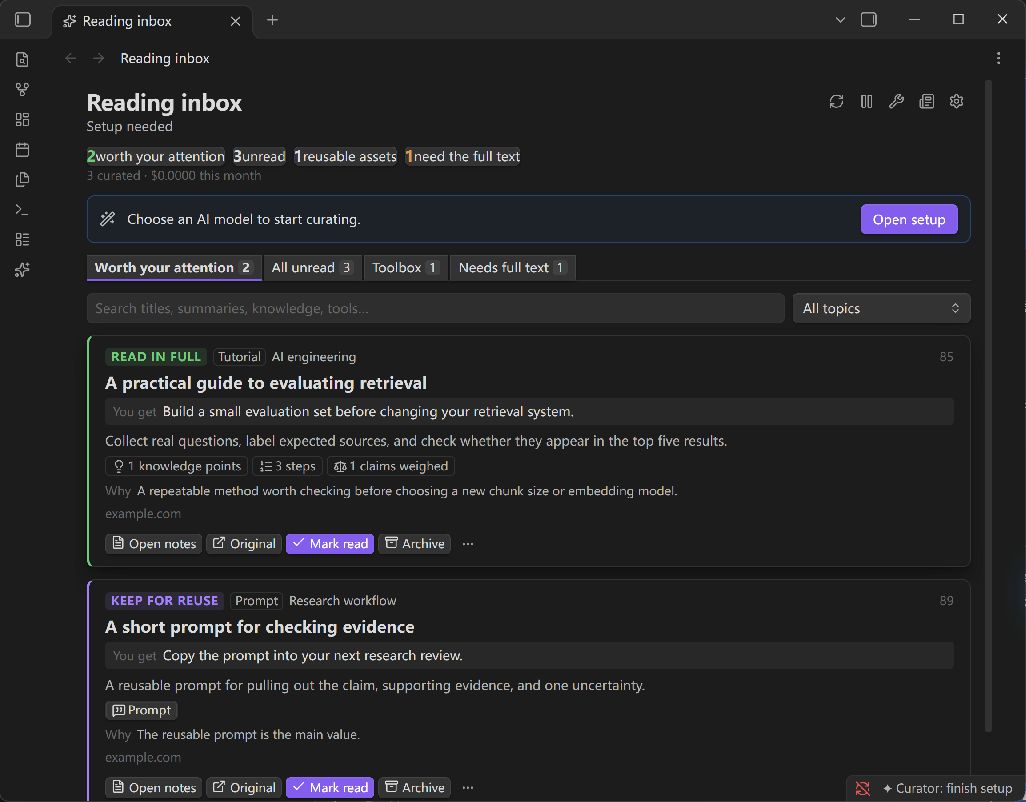
AI Curator 1.1.0 in Obsidian with synthetic demo data. Toolbox screenshot · Needs full text screenshot


From backlog to reading list
- Know why something is worth reading. See the reading payoff, the rationale, and supporting excerpts when available. Recommendations weigh material by its form, so a practical tutorial and a research article can earn their place for different reasons.
- Keep the useful parts. Curated notes capture key ideas, methods, caveats, and next steps. Toolbox brings together source-linked prompts, snippets, commands, tables, tools, and resources. Copy-ready excerpts are checked against the available text.
- Flag incomplete saves. When recovery still leaves a teaser, Needs full text keeps the verdict provisional. The plugin can try the original webpage. X expansion via FxTwitter and GitHub repository enrichment are separate opt-ins.
- Keep your notes. The plugin writes to a separate output folder. It preserves your originals, reading status, and personal notes below the marker when regenerating curated notes.
Sample curated notes show real model output on synthetic saves from the earlier release. The demo vault contains public sample inputs you can curate locally.
Upgrade and alternative installs
- Community plugins. In Settings → Community plugins, check for updates and select Update for AI Curator. The 1.1.0 upgrade rechecks saves that older deduplication could hide. Review the estimate before approving any paid re-curation.
- GitHub ZIP. Download the versioned
ai-curator-*.zipfrom Releases. Extract the includedai-curatorfolder into<vault>/.obsidian/plugins/, then reload Obsidian and enable the plugin. To upgrade manually, replace onlymain.js,manifest.json, andstyles.cssin the existing folder to keep its settings and index. - BRAT. In BRAT, run Add a beta plugin for testing, enter
MartinZhong2026/Obsidian-AI-Curator, and enable AI Curator.
Models, cost, and privacy
Use DeepSeek, Anthropic Claude, OpenAI, Gemini, OpenRouter, Ollama, LM Studio, or an OpenAI-compatible endpoint. The interface and output notes can use English or Simplified Chinese independently. Remote model endpoints require HTTPS. HTTP is accepted on loopback addresses.
The plugin is free. Hosted model providers may charge for requests. The default monthly estimate is US$3, with a 100-item daily limit. Enter prices for models without built-in estimates and check actual charges with your provider.
The selected model receives the Markdown, title, source metadata, topic and tag names, and any optional reader profile. Webpage recovery is on by default and contacts saved links when a note is a teaser. API keys live in Obsidian SecretStorage. AI Curator has no telemetry or account. For offline use, choose a local model and turn off Fetch full text, Expand X posts, and Enrich GitHub repository links. Privacy and network details
Obsidian must stay open to process the queue. PDF, image, and video contents are outside the Markdown workflow. Paywalls and login requirements can limit recovery, and AI verdicts and summaries can be wrong. Check the source for decisions that depend on accuracy.
Help and contribute
For stalled items, check Queue, the model connection, and your limits. Use Curate the current note to try one file outside your watched folders.
Report a bug or suggest an improvement · Contributing · MIT license