Search...Search plugins and themes...
⌘K
Sign in
  • Get started
  • Download
  • Pricing
  • Enterprise
  • Account
  • Obsidian
  • Overview
  • Sync
  • Publish
  • Canvas
  • Mobile
  • Web Clipper
  • CLI
  • Learn
  • Help
  • Developers
  • Changelog
  • About
  • Roadmap
  • Blog
  • Resources
  • System status
  • License overview
  • Terms of service
  • Privacy policy
  • Security
  • Community
  • Plugins
  • Themes
  • Discord
  • Forum / 中文论坛
  • Merch store
  • Brand guidelines
Follow us
DiscordTwitterBlueskyThreadsMastodonYouTubeGitHub
© 2026 Obsidian

WikiDocs

pahkeypahkey1k downloads

Fetch, edit, and upload WikiDocs books.

Add to Obsidian
  • Overview
  • Scorecard
  • Updates21

위키독스 옵시디언 플러그인은 위키독스 책과 블로그를 더 효율적으로 작성하고 편집할 수 있게 해주는 도구입니다. 이 플러그인을 통해 옵시디언에서 직접 위키독스 콘텐츠를 관리할 수 있습니다.

관련 링크

  • 옵시디언 공식 웹사이트
  • 위키독스 옵시디언 플러그인 소개 블로그

주요 기능과 장점

빠른 작업 속도

  • 로컬 PC 환경에서 동작하여 웹 환경보다 빠른 응답 속도
  • 오프라인에서도 작업 가능

편리한 문서 편집

  • 이미지 드래그 앤 드롭으로 쉽게 첨부
  • 폴더 내 문서 드래그 앤 드롭으로 목차 편집
  • 작성 완료 후 "위키독스 보내기" 기능으로 간편하게 업로드

강력한 생산성 도구

  • 옵시디언의 다양한 커뮤니티 플러그인 활용 가능
  • 강력한 검색 기능으로 문서 내 키워드 빠른 검색

위키독스 옵시디언 플러그인을 설치하면 옵시디언에서 직접 위키독스의 책과 블로그를 편집할 수 있습니다. 이 가이드에서는 플러그인 설치 방법과 초기 설정 방법을 안내합니다.

1. 플러그인 설치하기

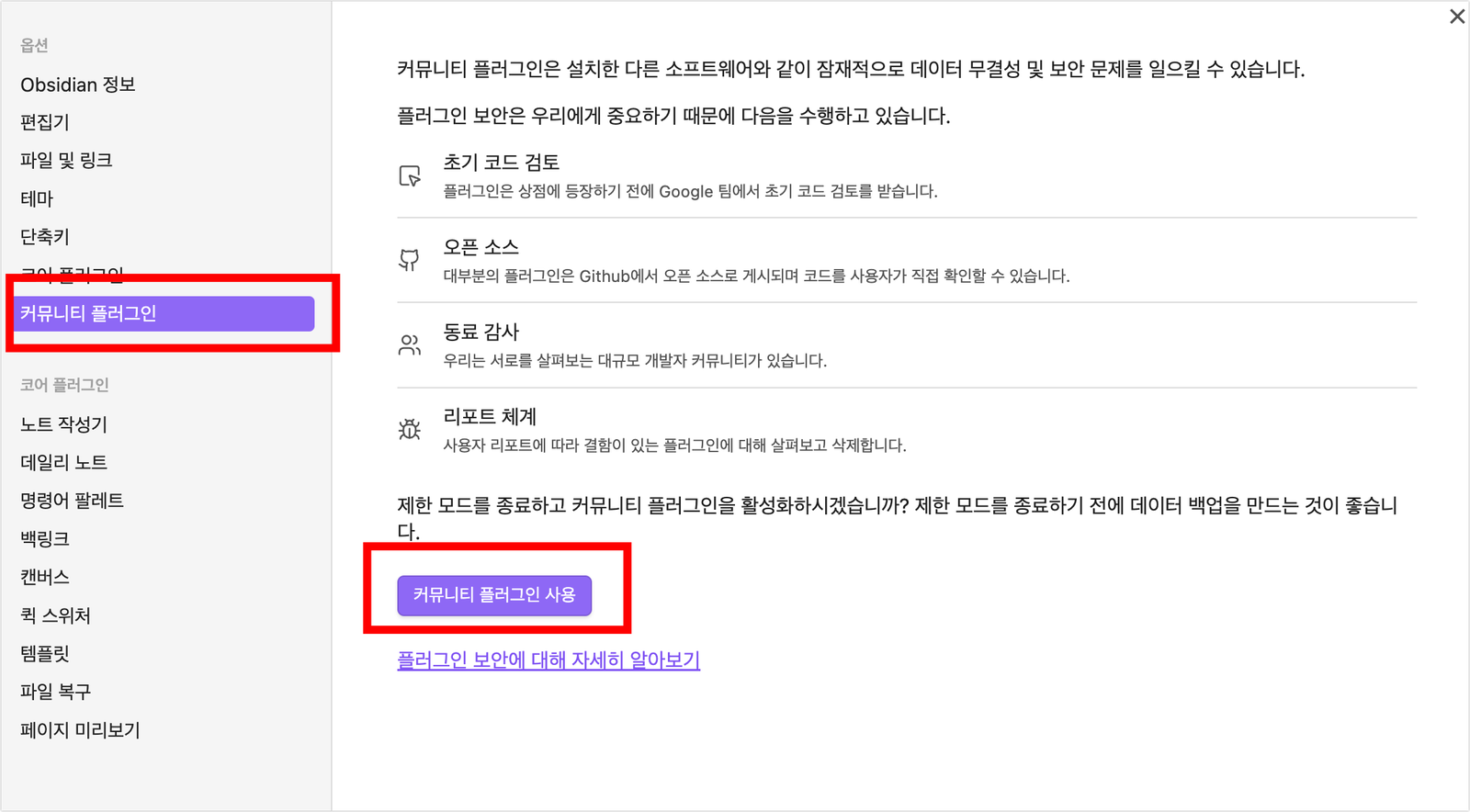
1.1 커뮤니티 플러그인 활성화

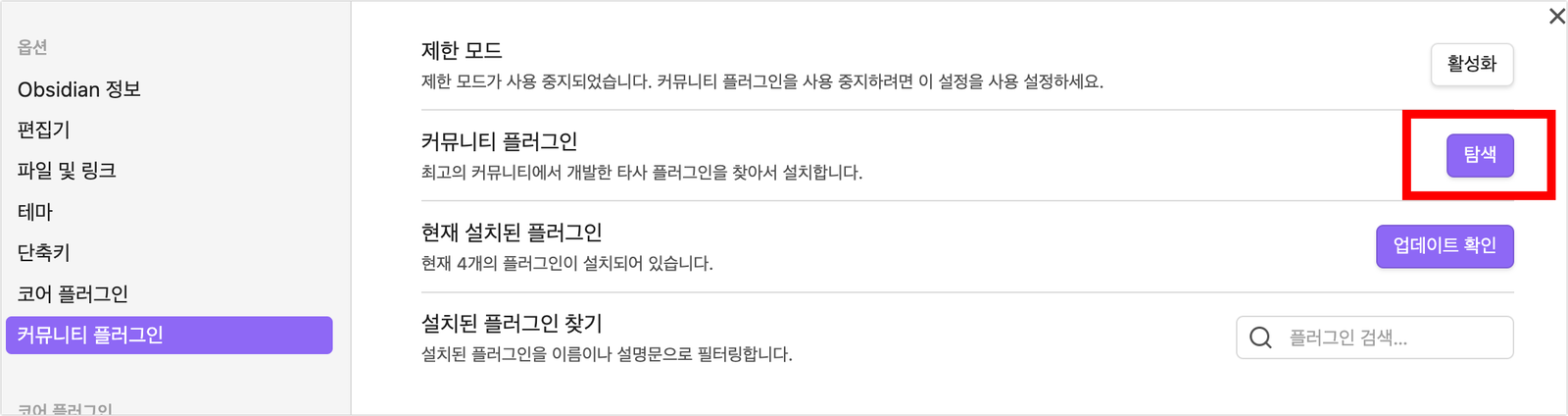
  1. 옵시디언 설정 화면에서 "커뮤니티 플러그인 사용"을 클릭하여 활성화합니다.
1.2 WikiDocs 플러그인 설치

  1. "탐색" 버튼을 클릭합니다.
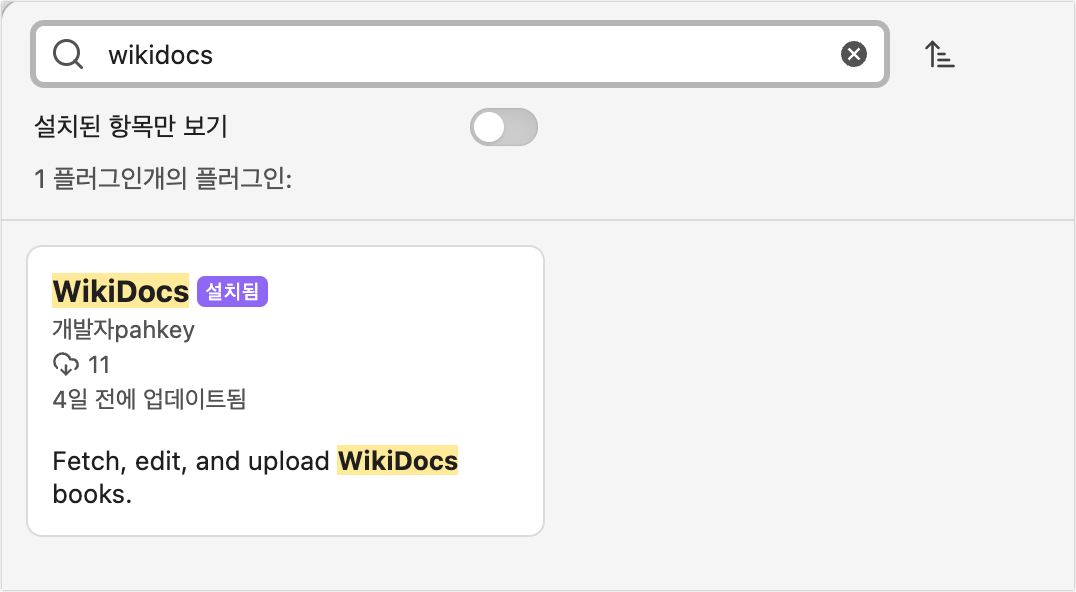
  2. 검색창에 "WikiDocs"를 입력합니다.
  3. 검색된 WikiDocs 플러그인을 선택하여 설치합니다.

1.3 플러그인 설정 화면 접근

설치 후 다음 두 가지 방법 중 하나로 설정 화면에 접근할 수 있습니다:

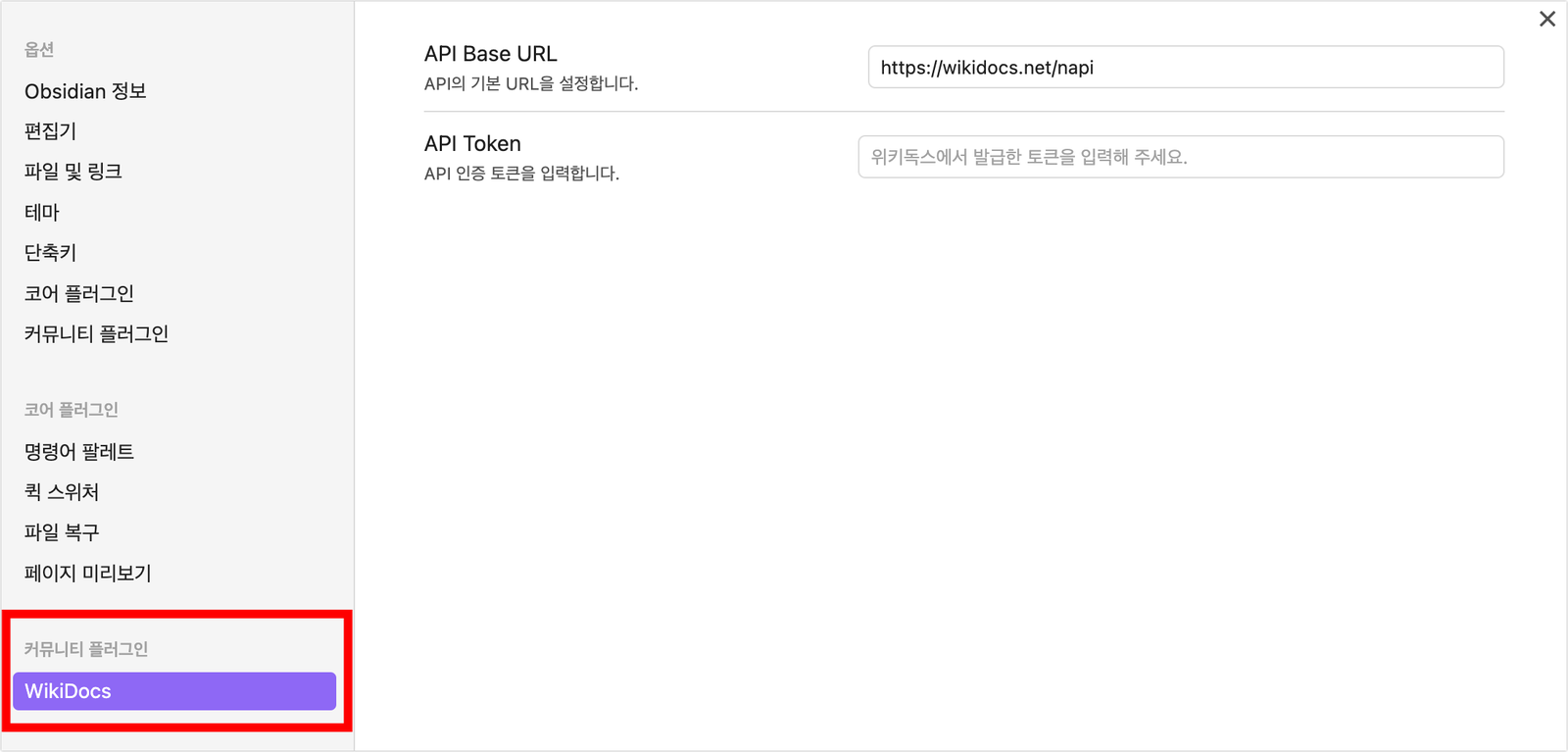
  • 설정 화면 좌측 하단의 WikiDocs 항목 클릭
  • 설치된 플러그인의 "옵션" 버튼 클릭

2. 플러그인 사용을 위한 준비

2.1 위키독스 API 토큰 발급받기

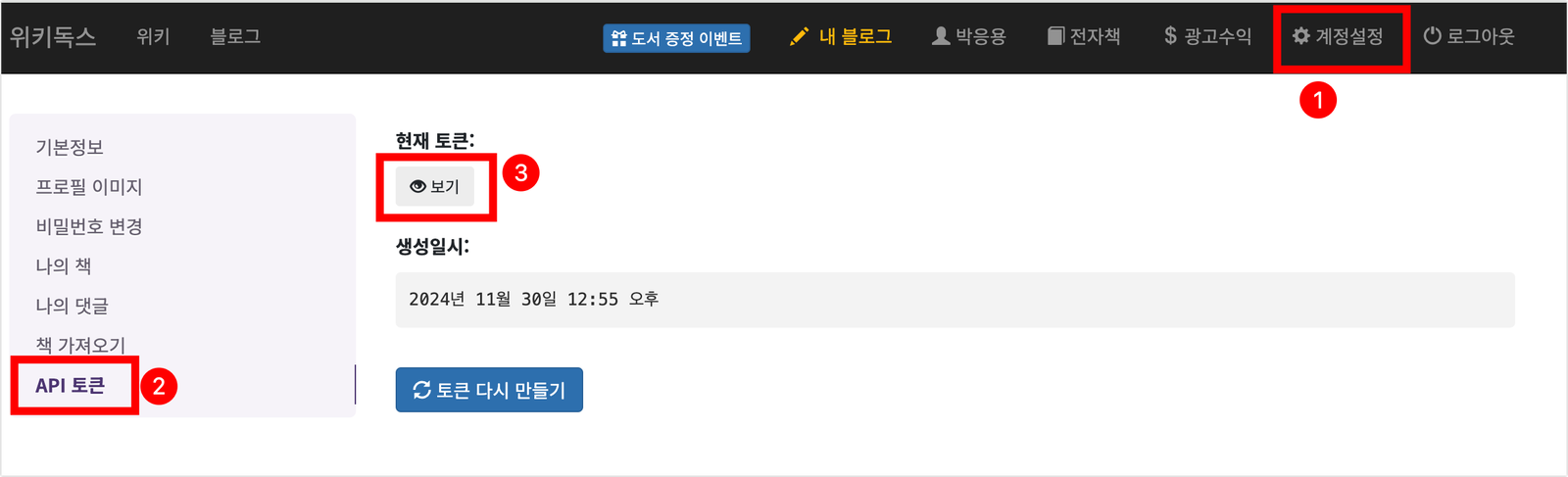
  1. 위키독스에 로그인합니다.
  2. [계정설정 > API 토큰] 메뉴로 이동합니다.
  3. "보기" 버튼을 클릭하여 API 토큰을 복사합니다.

2.2 플러그인 설정하기

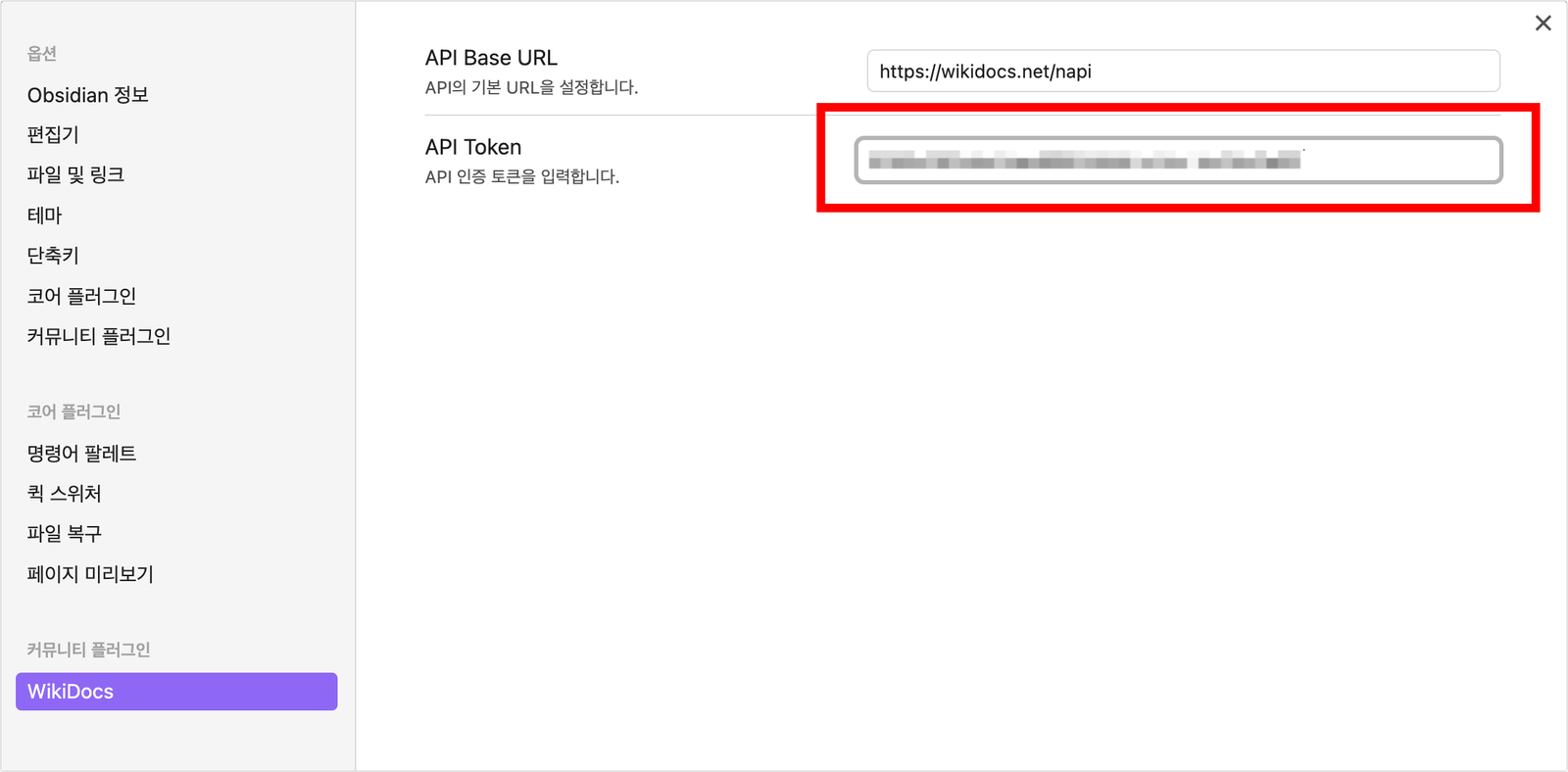
  1. 옵시디언 설정 화면에서 [커뮤니티 플러그인 > WikiDocs] 항목을 선택합니다.
  2. 다음 정보를 입력합니다:
    • API Base URL: https://wikidocs.net/napi
    • API Token: 복사한 API 토큰을 붙여넣습니다.

3. 설치 확인하기

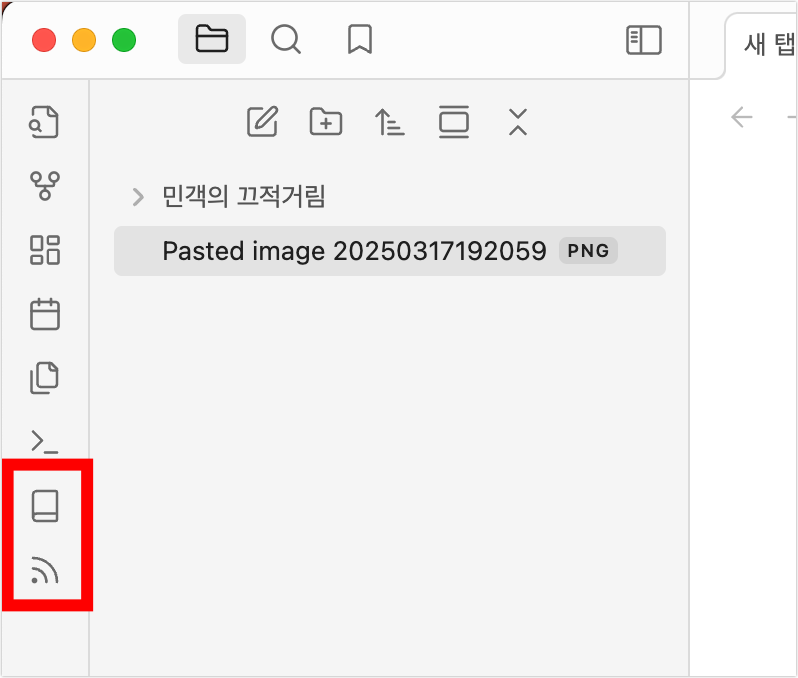
설치가 완료되면 옵시디언 좌측에 다음과 같은 아이콘들이 추가됩니다:

  • 책 모양 아이콘: 위키독스 책 관리
  • 블로그 아이콘: 위키독스 블로그 관리

이제 위키독스 플러그인을 사용할 준비가 완료되었습니다. 다음 단계로 넘어가시려면 책 작성하기 또는 블로그 작성하기 문서를 참고해 주세요.

HealthExcellent
ReviewCaution
About
편집하세요 위키독스 책과 블로그를 옵시디언에서 직접. 이미지·문서 드래그앤드롭으로 첨부하고 로컬·오프라인에서 빠르게 작성한 뒤 바로 위키독스로 업로드하세요. 빠른 검색과 커뮤니티 플러그인 연동으로 작업 흐름을 원활하게 만드세요.
IntegrationsPublishingAttachments
Details
Current version
1.1.6
Last updated
4 months ago
Created
2 years ago
Updates
21 releases
Downloads
1k
Compatible with
Obsidian 0.15.0+
Platforms
Desktop only
License
MIT
Report bugRequest featureReport plugin
Author
pahkeypahkey
wikidocs.net
GitHubpahkey
  1. Community
  2. Plugins
  3. Integrations
  4. WikiDocs

Related plugins

Share Note

Instantly share/publish a note, with the full theme and content exactly like you see in Obsidian. Data is shared encrypted by default, and only you and the person you send it to have the key.

Digital Garden

Publish your notes to a digital garden for others to enjoy.

Image auto upload

Upload images from your clipboard by PicGo.

GitHub

Share as Gist

Share a note as a GitHub.com Gist.

Quartz Syncer

Manage and publish your notes to Quartz, the fast, batteries-included static-site generator.

Imgur

Upload images from your clipboard to imgur.com and embeds uploaded image to your note.

BRAT

Easily install a beta version of a plugin for testing.

Local REST API with MCP

Unlock your automation needs by interacting with your notes over a secure REST API.

Fast Note Sync

Real-time sync of your vaults across server, mobile, and web; shareable with anyone; supports REST and MCP integrations to build your personal AI knowledge base.

Maps

Adds a map layout to bases so you can display notes as an interactive map view.