Search...Search plugins and themes...
⌘K
Sign in
  • Get started
  • Download
  • Pricing
  • Enterprise
  • Account
  • Obsidian
  • Overview
  • Sync
  • Publish
  • Canvas
  • Mobile
  • Web Clipper
  • CLI
  • Learn
  • Help
  • Developers
  • Changelog
  • About
  • Roadmap
  • Blog
  • Resources
  • System status
  • License overview
  • Terms of service
  • Privacy policy
  • Security
  • Community
  • Plugins
  • Themes
  • Discord
  • Forum / 中文论坛
  • Merch store
  • Brand guidelines
Follow us
DiscordTwitterBlueskyThreadsMastodonYouTubeGitHub
© 2026 Obsidian

White Noise

zhouhuazhouhua1k downloads

Play white noise to help you focus on your work.

Add to Obsidian
  • Overview
  • Scorecard
  • Updates4

中文版本

A white noise plugin for Obsidian designed to help users focus better and enter a calmer working state.

Features

  • White Noise: Includes dozens of sounds such as rain, coffee shop noise, and more
  • Volume Control: Independently control the white noise volume, which can coexist with your music
  • Timer Function: Built-in simple pomodoro timer that works in conjunction with white noise

Screenshot
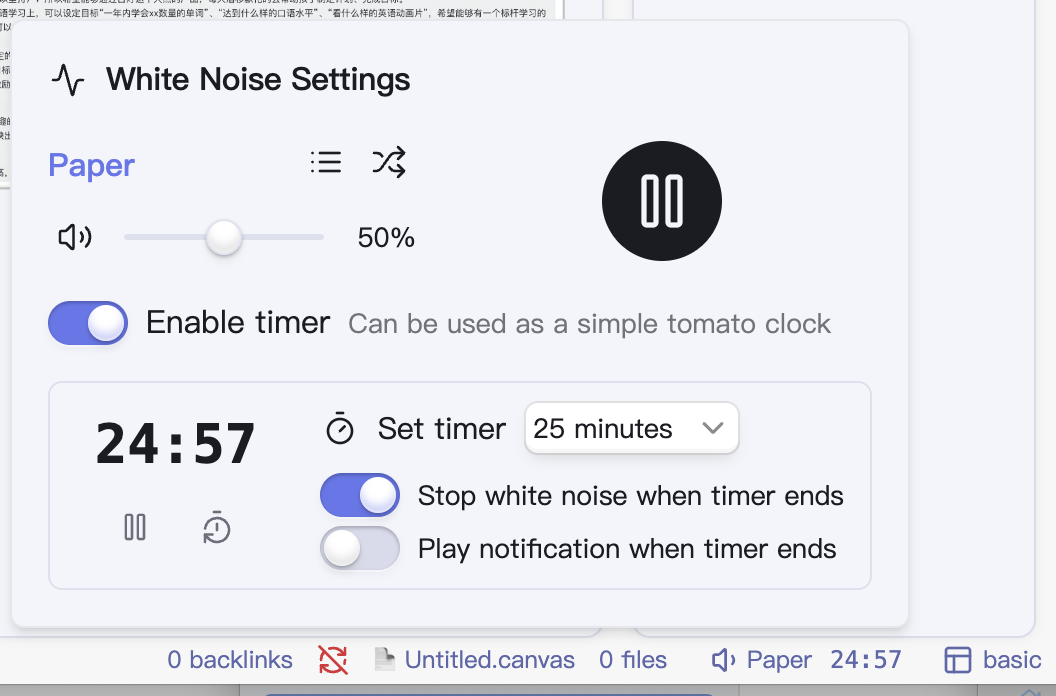
screenshot

Installation

  1. Open Obsidian and navigate to Settings
  2. Go to Community plugins and disable Safe mode
  3. Click on Browse and search for "White Noise"
  4. Click Install, then Enable the plugin

Credits

This plugin uses sound materials from the Moodist project. To better adapt to the Obsidian environment, some sound materials have been modified:

  • Removed some potentially anxiety-inducing sound effects (such as thunder)
  • Removed several oversized audio files to reduce the plugin size
  • Further compressed the audio, modified to variable bit rate, merged dual channels into joint stereo, and preserved only sounds between 40Hz ~ 15000Hz
  • Removed base noise audio files, replacing them with dynamically generated noise

Consider visiting the Moodist project to learn more.

HealthGood
ReviewRisks
About
Play dozens of ambient sounds like rain, coffee shop noise, and gentle static to mask distractions and promote focus. Control white-noise volume independently alongside your music, and run a built-in Pomodoro timer that pairs with the sounds.
TasksUtilities
Details
Current version
0.0.4
Last updated
Last year
Created
Last year
Updates
4 releases
Downloads
1k
Compatible with
Obsidian 1.8.0+
Platforms
Desktop only
License
MIT
Report bugRequest featureReport plugin
Author
zhouhuazhouhua
GitHubzhouhua
  1. Community
  2. Plugins
  3. Tasks
  4. White Noise

Related plugins

TaskNotes

Note-based task management with calendar, pomodoro and time-tracking integration.

Lazy Loader

Load plugins with a delay on startup, so that you can get your app startup down into the sub-second loading time.

Day Planner

Day planning from a task list in a Markdown note with enhanced time block functionality.

Tasks

Track tasks across your vault. Supports due dates, recurring tasks, done dates, sub-set of checklist items, and filtering. Maintained by Clare Macrae and Ilyas Landikov, created by Martin Schenck.

Project Manager

Full-featured project management: stunning Gantt charts, Kanban boards, Table views, customizable fields, due date notifications.

Reminder

Manage Markdown TODOs with reminder.

Checklist

Consolidate checklists across all files into a single view.

Day Planner OG

Day planning from a simple task list in a Markdown note (bare bones, preserves the features and behavior of the original plugin).

Todoist Sync

Materialize Todoist tasks within your notes.

Task Collector

Change task status and collect tasks within a document using hotkeys and context menus.