Search...Search plugins and themes...
⌘K
Sign in
  • Get started
  • Download
  • Pricing
  • Enterprise
  • Account
  • Obsidian
  • Overview
  • Sync
  • Publish
  • Canvas
  • Mobile
  • Web Clipper
  • CLI
  • Learn
  • Help
  • Developers
  • Changelog
  • About
  • Roadmap
  • Blog
  • Resources
  • System status
  • License overview
  • Terms of service
  • Privacy policy
  • Security
  • Community
  • Plugins
  • Themes
  • Discord
  • Forum / 中文论坛
  • Merch store
  • Brand guidelines
Follow us
DiscordTwitterBlueskyThreadsMastodonYouTubeGitHub
© 2026 Obsidian

Weekly Goal Tracker

gitgormangitgorman1k downloads

Keep track of weekly goals in the status bar

Add to Obsidian
  • Overview
  • Scorecard
  • Updates15

This is a plugin for Obsidian that allows you to add buttons to the status bar that allow you to track of different weekly/daily goals and update them with ease.

For example you could track a weekly exercise goal or a daily reading goal.
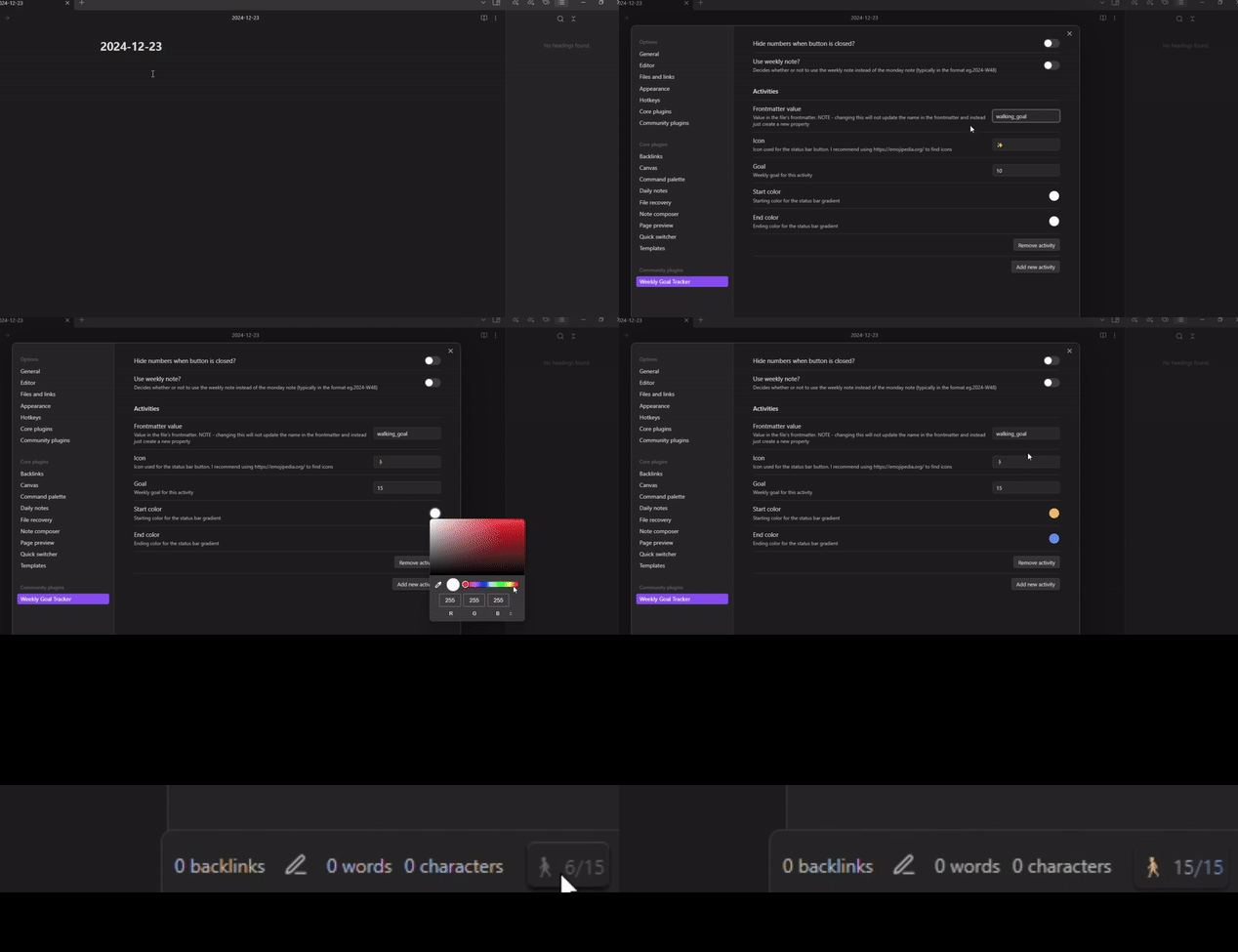
Buttons

When the button is closed, it displays an icon, the current value and the goal value

When the goal has been reached, the button displays in color

Controls

  1. Using left click, the button can opened to show a progress bar in color

  2. While the button is open, press right click to +1 to the goal.

  3. While the button is open, hold shift and press right click to -1 from the goal

Tasks

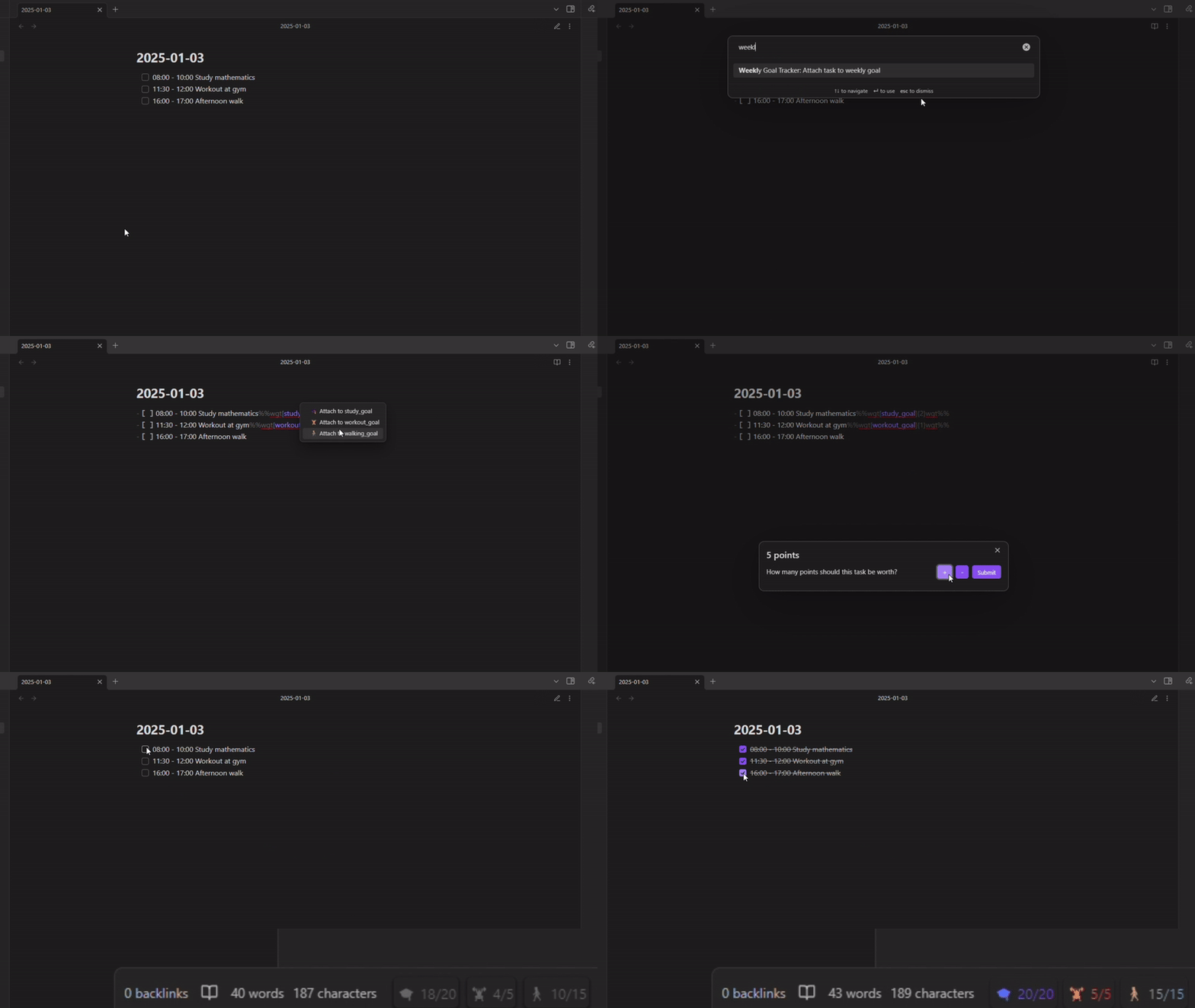
Tasks can be attached to goals so that they increase its progress when completed

In editor mode, use the 'Attach task to goal' command to bring up a menu allowing you to choose a goal and how many points the task is worth (optional)
General Settings

  • Hide numbers when button is closed? : Allows you to display the buttons with the icon only when it is closed
  • Allow tasks to be worth multiple points? : You will be given a prompt when attaching a task to a goal to input how many points it is worth
  • Monday note or weekly note for weekly goals? : Decides whether to use the monday note or the weekly note (typically in the format eg.2024-W48) to store the data for weekly goals. Daily goals are always stored in the current daily note

Activity Settings

  • Daily or weekly goal? : should this goal reset daily or weekly
  • Frontmatter value : the value in the frontmatter to read and write to
  • Icon : the icon displayed in the status bar button. I recommend using Emojipedia to find icons
  • Goal : the weekly goal for activity
  • Start color/end color : the gradient color for the status bar button, from left to right
  • ʌ/v : change the order in which buttons appear in the status bar

Bug Reports and Feature Requests

If you would like to report any bugs or request features, feel free to open an issue at https://github.com/GitGorman/weekly-goal-tracker/issues

71%
HealthGood
ReviewCaution
About
Track daily and weekly goals with status-bar buttons that show current and target values and open to a colored progress bar. Attach tasks to goals to award points on completion and update progress directly from the button with clicks to increment or decrement. Save progress to daily or weekly note frontmatter.
TasksStatus barDates
Details
Current version
1.5.1
Last updated
Last year
Created
2 years ago
Updates
15 releases
Downloads
1k
Compatible with
Obsidian 0.15.0+
Platforms
Desktop only
License
MIT
Report bugRequest featureReport plugin
Author
gitgormangitgorman
github.com/GitGorman
GitHubgitgorman
  1. Community
  2. Plugins
  3. Tasks
  4. Weekly Goal Tracker

Related plugins

Day Planner (OG)

Day planning from a simple task list in a Markdown note (bare bones, preserves the features and behavior of the original plugin).

Pomodoro Timer

Manage your daily focus using the Pomodoro Technique.

Day Planner

Day planning from a task list in a Markdown note with enhanced time block functionality.

Tasks

Track tasks across your vault. Supports due dates, recurring tasks, done dates, sub-set of checklist items, and filtering.

Reminder

Manage Markdown TODOs with reminder.

Rollover Daily Todos

Rollover any unchecked checkboxes from your last daily note into today's note.

TODO | Text-based GTD

Collect all outstanding TODOs from your vault and presents them in lists Today, Scheduled, Inbox and Someday/Maybe.

Completed Task Display

Controls for displaying or hiding completed tasks.

TaskNotes

Note-based task management with calendar, pomodoro and time-tracking integration.

Thino

Quickly capture memos and display them in the sidebar with a heatmap. (Closed source)