TODOseq
 Stephen Cross6k downloads
Lightweight keyword-based task tracker using Logseq style keywords.
- Overview
- Scorecard
- Updates58
Keyword-based task management for Obsidian. No checkboxes required.
TODOseq ("to-do-seek") scans your vault for plain lines that start with TODO, DOING, and DONE, then collects them into one Task List. Keep writing in ordinary notes — inspired by Emacs Org-mode and Logseq. Free and open source (MIT).
Install from Community Plugins · Documentation · Report an issue
Why TODOseq?
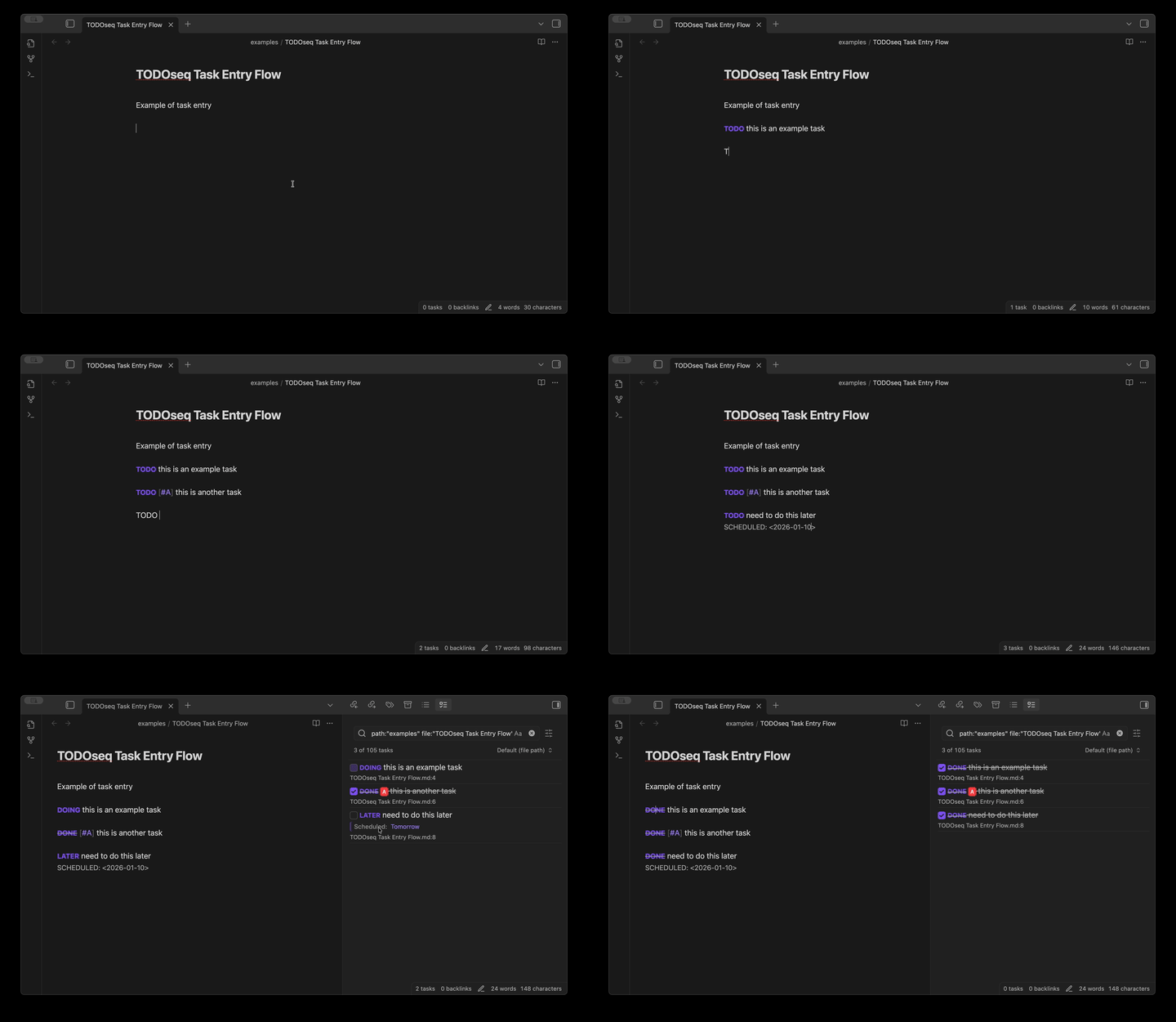
Most task managers force you into a separate system. TODOseq meets you where you already work — inside your Obsidian notes. Type TODO Write report anywhere, and it appears in the Task List. No second app, no checkbox ceremony.
- Plain keywords instead of
- [ ]checkbox syntax - Logseq / Org-mode compatible, including natural-language dates
- Vault-wide Task List: search, urgency, priorities, embedded lists
What you get
- Keywords
TODO/DOING/DONE/ … with[#A]priorities - Natural language dates converted to structured Org dates
- Unified Task List with filters, urgency sort, and advanced queries
- Works in Edit and Reading views; click a keyword or
Ctrl+Enter - Code-comment TODOs in 20+ languages
todoseqembedded lists in notestodoseq-dashboardaggregation cards in notes (counts by state, priority, tag, or date bucket with drill-through)- Subtasks, repeating tasks, optional CLOSED dates
- Auto-archive: promote aged DONE tasks to ARCHIVED, with preview and one-click undo
- Logseq-compatible format for dual-use vaults
More detail in the documentation.
Quick start
- Install: Settings → Community plugins → Browse → search TODOseq → Install → Enable
- Type a task in any note:
TODO [#A] Finish quarterly report #work tomorrow
DOING Review pull requests #coding
DONE Submit expense report
- Open the Task List — right sidebar, or Command Palette → “TODOseq: Show task list”
Documentation
Full guides: scross01.github.io/obsidian-todoseq
Start here:
- Introduction — approach and Logseq compatibility
- Task List — using the panel
- Task Entry — syntax and lifecycle
- Search — filters and advanced queries
- Auto-Archive — promote aged DONE tasks to ARCHIVED
Development
Requires Node.js 20+.
| Command | Purpose |
|---|---|
npm install |
Install dependencies |
npm run dev |
esbuild watch mode |
npm run build |
Typecheck + production bundle |
npm test |
Unit tests |
npm run lint / npm run format |
ESLint / Prettier |
npm run docs:dev |
VitePress docs dev server |
Integration tests, CDP debugging, and PR expectations: see CONTRIBUTING.md and AGENTS.md.
Contributing
Issues and pull requests are welcome. See CONTRIBUTING.md.
- Report issues or request features
- Star the repo if TODOseq is useful to you
License
MIT — see LICENSE.