
- Overview
- Scorecard
- Updates127
中文版本 | English Version


- This is a plugin for LifeOS, which assist in practicing the PARA method with periodic notes and usememos.
- It is recommended to download the LifeOS-example to experience it.
- For more tutorials, please go to LifeOS for Obsidian Official Site
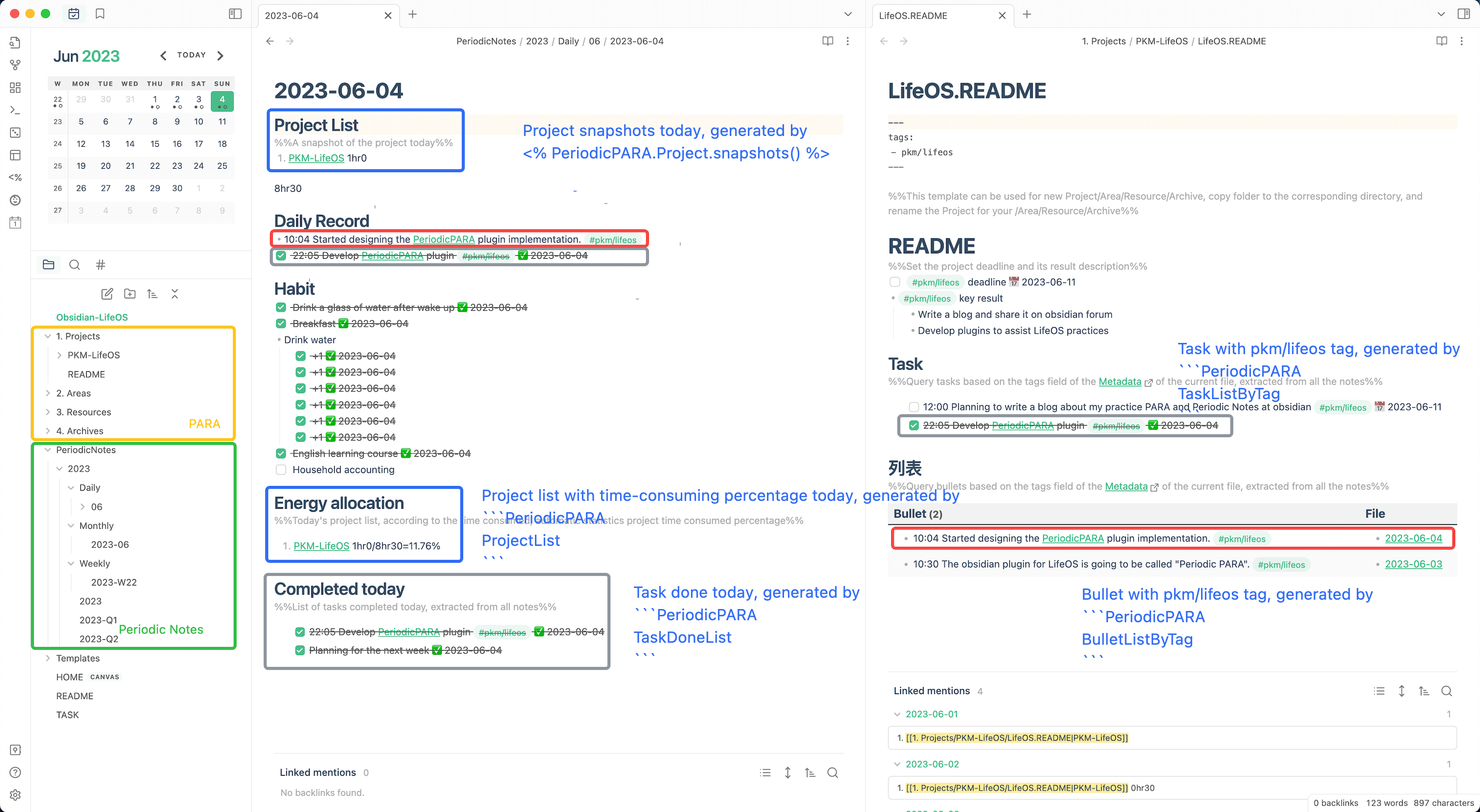
Features
- A first-run setup wizard can create a periodic-notes workspace with or without PARA in English, Simplified Chinese, or Traditional Chinese. The selected workspace profile is kept for future repairs, and existing files are never overwritten.
- Built-in starter templates cover daily, weekly, monthly, quarterly, yearly, Projects, Areas, Resources, and Archives notes.
- An optional example workflow and a five-minute completion guide help you make the first capture; the example can be removed safely while it remains unchanged.
- Use Quick record and Quick task from the command palette to capture directly into today's
Daily Recordsection. - Dataview remains the query engine and must be installed and enabled before LifeOS.
- LifeOS Basic: https://lifeos.vip/plugin/lifeos/life-os.html
- LifeOS Pro : https://lifeos.vip/plugin/lifeos/life-os-pro.html
- DeepAsk AI for Obsidian : https://lifeos.vip/plugin/deepask/deepask.html
- DeepAsk AI for Chrome : https://chromewebstore.google.com/detail/deepask-ai/abhoenehflglmgbohaibihggedfcpcep
- Multi-language UI: follows your current Obsidian language by default, and can be overridden from the plugin settings page.
Download
Support
Acknowledgements
Also, I relied on the code from these excellent plugins:
- PARA. Thanks to Tiago Forte for inventing such a great organizational method.
- PARA Starter Kit. Thanks to cotemaxime for creating such a great starter vault.
- obsidian-periodic-notes. Gave me the inspiration to develop this plugin.
- obsidian-dataview. The underlying plugin uses dataview's query interface.
- Templater. Provides decoupled template creation, allowing a very large number of plugins to create files with the help of it.
Donations
If this plugin do help you, please buy me a cup of coffee on buymeacoffee.
In addition, you can also support me in further developing a better LifeOS by purchasing the LifeOS Pro!
Or Alipay

Or WeChat

HealthExcellent
ReviewCaution
About
Practice the PARA method with periodic notes and usememos to organize projects, areas, resources, and archives. Create template-driven, queryable PARA notes using Templater and Dataview, and use a multilingual UI that follows Obsidian's language.Details
Current version
1.27.0
Last updated
3 weeks ago
Created
3 years ago
Updates
127 releases
Downloads
52k
Compatible with
Obsidian 0.15.0+
Platforms
Desktop, Mobile
License
MIT
Sponsor