Search...Search plugins and themes...
⌘K
Sign in
  • Get started
  • Download
  • Pricing
  • Enterprise
  • Account
  • Obsidian
  • Overview
  • Sync
  • Publish
  • Canvas
  • Mobile
  • Web Clipper
  • CLI
  • Learn
  • Help
  • Developers
  • Changelog
  • About
  • Roadmap
  • Blog
  • Resources
  • System status
  • License overview
  • Terms of service
  • Privacy policy
  • Security
  • Community
  • Plugins
  • Join the community
  • Discord
  • Forum / 中文论坛
  • Merch store
  • Brand guidelines
Follow us
DiscordTwitterBlueskyThreadsMastodonYouTubeGitHub
© 2026 Obsidian

Vocabulary Highlighter

eatgrasseatgrass5k downloads

Hightlight vocabulary based on the word frequency.

Add to Obsidian
  • Overview
  • Scorecard
  • Updates9

highlight English words according to the frequency

Introduction

Enhance your reading and learning experience in Obsidian with the Vocabulary Highlighter. This plugin highlights words based on their frequency, aiding in English language learning and content review. Perfect for students, writers, and English language enthusiasts.

Screenshots
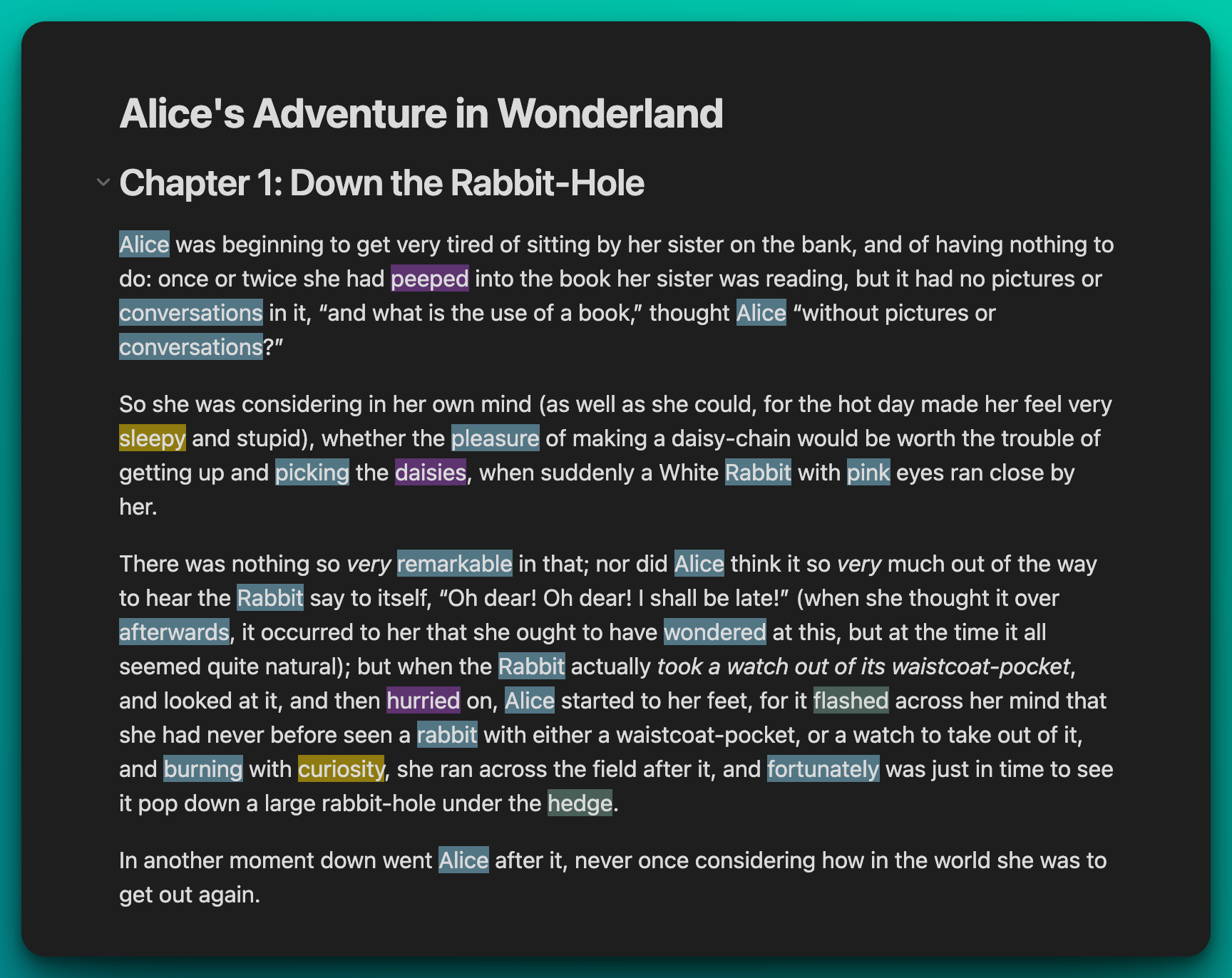
Highlight

Settings

  1. Navigate to the plugin's setting tab in Obsidian.
  2. Adjust the highlight threshold to control frequency sensitivity and select your preferred colors for different frequency ranges.
  3. Optionally disable certain highlight groups to tailor your focus.
  4. Reopen your files in Reading View to see the changes. Words will be highlighted based on your settings.
  5. Use the Toggle Vocabulary Highlight command to conveniently turn highlighting on or off as needed.

Commands

Toggle Vocabulary Highlight


72%
HealthGood
ReviewCaution
About
Highlight English words by frequency to focus reading and language study. Adjust frequency thresholds and colors to emphasize high- or low-frequency vocabulary, and toggle vocabulary highlighting on or off as needed.
AnnotationLanguagesReview
Details
Current version
1.0.8
Last updated
2 years ago
Created
3 years ago
Updates
9 releases
Downloads
5k
Compatible with
Obsidian 0.15.0+
License
MIT
Report bugRequest featureReport plugin
Sponsor
Buy Me a Coffee
Author
eatgrasseatgrass
github.com/eatgrass
GitHubeatgrass
  1. Community
  2. Plugins
  3. Annotation
  4. Vocabulary Highlighter

Related plugins

Zhongwen Block

Code blocks with features for Chinese learners.

Immersive Translate

A free-to-use translatation service for foreign language markdown file.

Markdown Furigana

Display furigana using Markdown syntax.

Admonition

Admonition block-styled content.

Kindle Highlights

Sync your Kindle book highlights using your Amazon login or uploading your My Clippings file.

Markmind

Mind map, outline and PDF annotation tool. (Closed source)

Dictionary

A multilingual dictionary that shows word definitions in the sidebar and popover synonyms.

Note Linker

Automatically find and create new links between notes.

Epub Importer

Import EPUB files as Markdown.

Note Definitions

Personal dictionary for your notes