Vaultman
 meibbo1k downloads
Workspace Settings. Composable navigation explorer. Widgets. Bulk data & metadata editor tool for Obsidian.
- Overview
- Scorecard
- Updates28
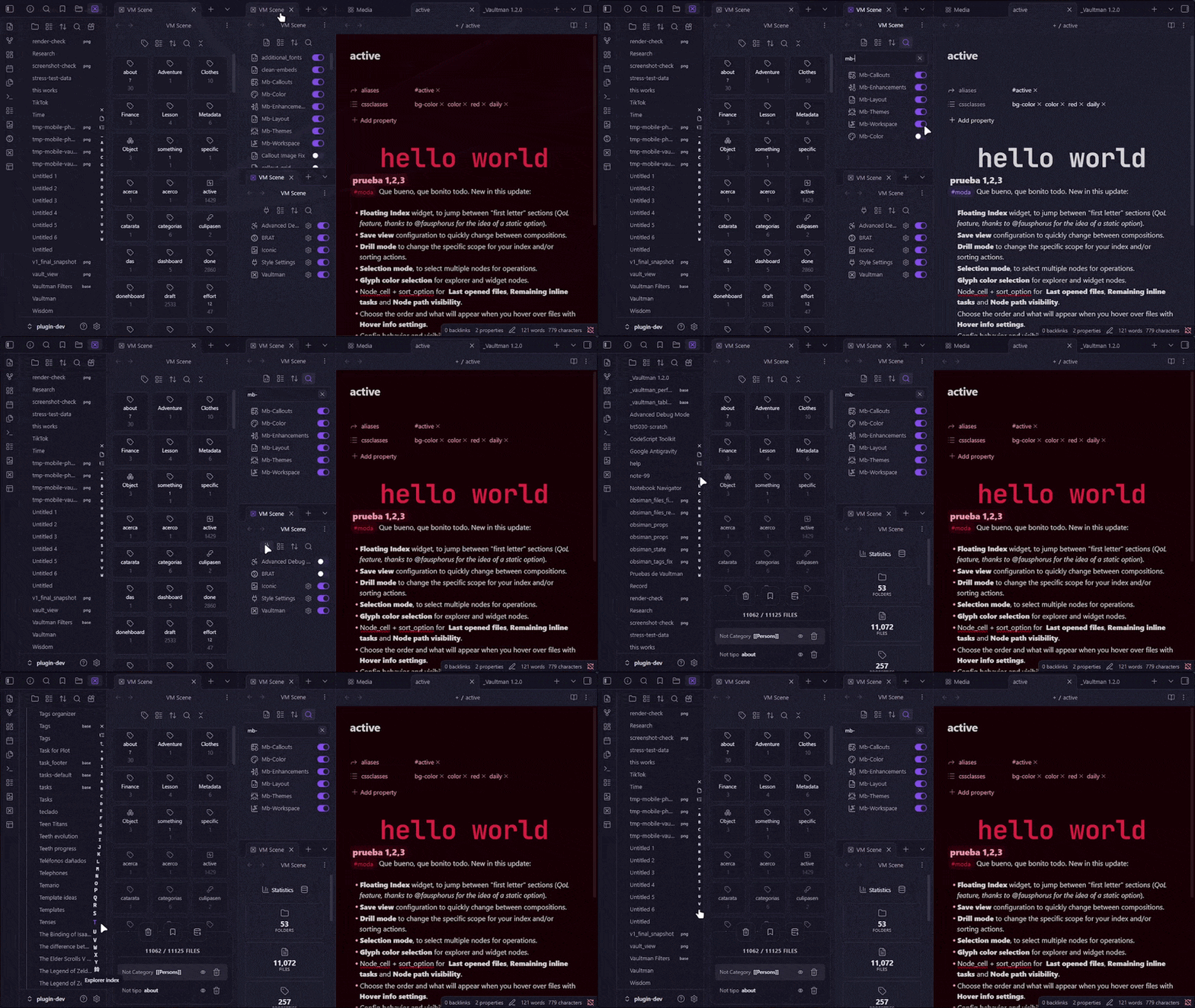
The Symbiont Manager, morphs and adapts your workspace to your needs.
This plugin aims to expand your Obsidian Core plugins, adding functionality and flexibility to the data and metadata explorers you already know.
Each explorer shows its data in a node/cells based structure. Where you can choose different layouts, show/hide details or sort and group data to visualize the same information from different dperspectives.
You can navigate, apply filters to your files, tags, properties or content and select what you want to change, queue batch operations and then apply everything at once.
Table of Contents
Installation
There are 3 different version streams to select from (stable, beta and alpha). Which you can install following these instructions:
Obsidian Community Plugins
Search: "Vaultman" in Community Plugins, press Install and Enable to start using it!
Or you can go and take a look into the community webpage to see its overall score and stats at the Obsidian Community Page.
Via BRAT
I'm also releasing experimental versions for those who want to check the project progress and for PC/Mobile testing.
- Install BRAT from the community plugins store
- In BRAT settings → Add Beta Plugin
- Enter
meibbo/vaultman - Select an specific version (recommended)
- Enable Vaultman in Settings → Community Plugins.
Beta versions are more prone to bugs and performance issues, and can break your vault. Use them at your own risk, and always make backups before updating or using them.
Statistics
What is this all about || Watch more detailed plugin info || Search for similar plugins
Features
The main interface lives in the sidebar, with a toolbar that lets you choose its content depending of what you want to edit or visualize.
You can make granular configurations to your experience from the extense number of options available on the plugin settings panel.
Compatibility and adapters with other plugins are being added to help you decide which functionality would you want to be expanded without duplicating your workflow.
Providers
All this data is extracted from Obsidian core-plugins and their API and have distinctive co-interaction within vm-systems.
Properties: Every property and value in your vault, built from the Obsidian frontmatter index to manage your notes metadata.
Files: Files and folders of your vault, affecting the amount of elements showed based on your active filters.
Tags: Gives you power to arrange your tags and set them in the frontmatter of your notes.
Text: Provides a scope option based on the content of your notes.
Snippets: Quickly activate/deactivate snippets from your vault.
Plugins: Quickly activate/deactivate or config your installed plugins.
Explorer panels
They are generic hierarchies that adapts to any data provider configured to show fetched data from different sources within Obsidian and converts them into node elements with cells that contains more details.
Such as icons, labels, content (WIP), operation badges, highlights, counters, etc.
|
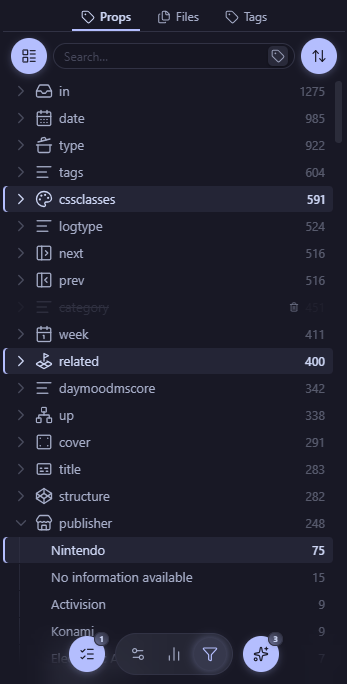
Sidebar LeafThis is the surface where the explorers live, from here you can scope the exact nodes you wanted to select for different kinds of operations.
|
|
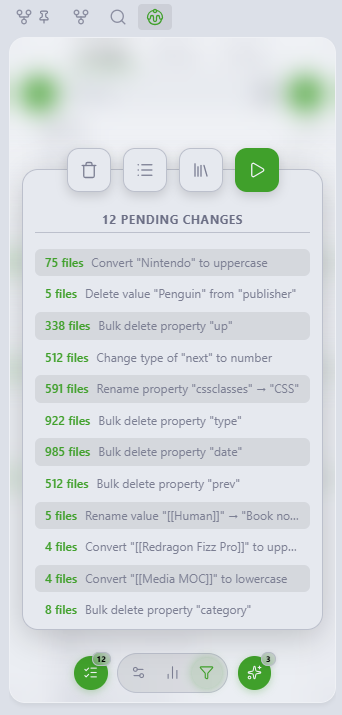
Queue listEvery operation of file edition for any group of nodes will be stored by default on the queued changes list. It helps to preview exactly what every action will change and apply everything at once.
|
|
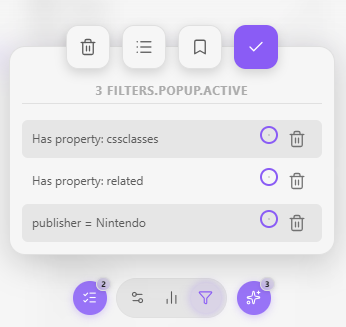
Filters listA node will be any of the options that are listed from the provider data of the selected tab (even snippets, plugins and layouts will have their own tabs!) Every selected node will apear in the Active filters island, where you can strategically add logical groups and/or/none (WIP), supress filters, clear all, or even select templates of filters to scope down the exact nodes you wanted to edit.
|
Widget panels
Modular panels designed to assist first hand your explorers navigation, order, layout and quick actions.
- Toolbar: Per-tab header, configurable actions and menus.
- Tabs menu: Change the explorer data provider: Files, Properties, Tags, Content, Snippets or Plugins. Or open
- View menu: how the nodes are arranged in the explorer.
- Sort menu: Order, groups and type filters.
- Searchbox: Quickly type a "match text" filter, change the kind of search to file/folder and create a new note or folder with that name.
- More tools: Scroll to current editor note, Expand-Collapse all nodes.
- Action Dock:
- Control Islands: Shows your explorer active filters and queued file operations.
- Floating Index: First-letter rail on explorer edge. Scrub fast through long lists.
Configuration

Style presets
- Minimal
- Experimental
View configs
Each view has its own configuration options that can be customized to the user's preference.
As engines we actually have: Tree, Table and Cards.
Every provider will have its own cell configuration and sort options to display its data.
Filter templates
Operation sets
(this section is under maintenance)
Project
Resume
This plugin has adapters for the following plugins:
- Bases
- Iconic
This project has the following workflow:
- Developed since March 2026.
- Manual system architecture, docs and QA.
- Assisted codign with AI agentic harness.
The following open-source tools were used:
- TypeScript, Svelte 5, ESBuild, ESLint, Stylelint, Prettier, Vite, Vitest.
- All third-party software retain their respective licenses.
Roadmap
- Increase explorers performances using memory snapshots and/or indexing
- Save configs & templates for automation and quick navigation
- Refactor codebase for more granularity settings
- Drag & Drop operations
- Add logic groups for filters for better scoping
- Sticky rows for tree views
- Keyboard and enhanced mouse/touch navigation support
- Add groups and manual sorting for all explorers
- Release official Node-Notes feature (every concept deserves its note)
Known Issues
It is available for public scrutine the current status and backlogs to already acknowledged bugs, issues and development direction.
For ideas and bug reports you can open issues until I find a better communication channel for feedback (like having a Discord thread in the Obsidian Members Group or anything else).
Development
I'll be working on the branches: Main, Dev and Sandbox (my favourite), any issue/suggestion/pull request is welcome!
This project has at least 65% of coverage with unit tests (still in sandbox branch), CI/CD, GitHub Actions, CodeQL and smoke tests.
The file operations (and other internal functions) has been tested in a 10k notes vault without issues, but performance has work to be done.
git clone https://github.com/Meibbo/VaultMan
cd VaultMan
pnpm build:plugin
Contribution
I haven't stablished yet a contribution discipline for this repository. Sorry, for now, pull requests won't be reviewed nor accepted unless previous communication and acceptance.
License
Apache V2 - Meibbo: Built for me, for you, and for better tools that lets us make more with less effort. I'm committed to this project so expect more frequent updates and features coming your way!.