Vault Telegram Bridge
 n23eos223 downloads
Capture messages from a Telegram bot in your vault. No server required.
- Overview
- Scorecard
- Updates11
Vault Telegram Bridge captures Telegram messages into an Obsidian note without a server, a VPS or Docker. Send your own bot a thought, a link, a photo, a voice note or a file, and it lands in the daily note or in a topic note routed by hashtag, under a heading you configure. Text keeps its Telegram formatting as Markdown, and attachments are saved into the vault's attachment folder and embedded with their caption. Delivered message IDs go into the note's frontmatter, so two devices syncing one vault never produce a duplicate entry. Delivery happens while Obsidian is open: the plugin polls Telegram every thirty seconds, on desktop and mobile, with no runtime dependencies.
⭐ Found this useful? Star the repo — that's how other people find it.
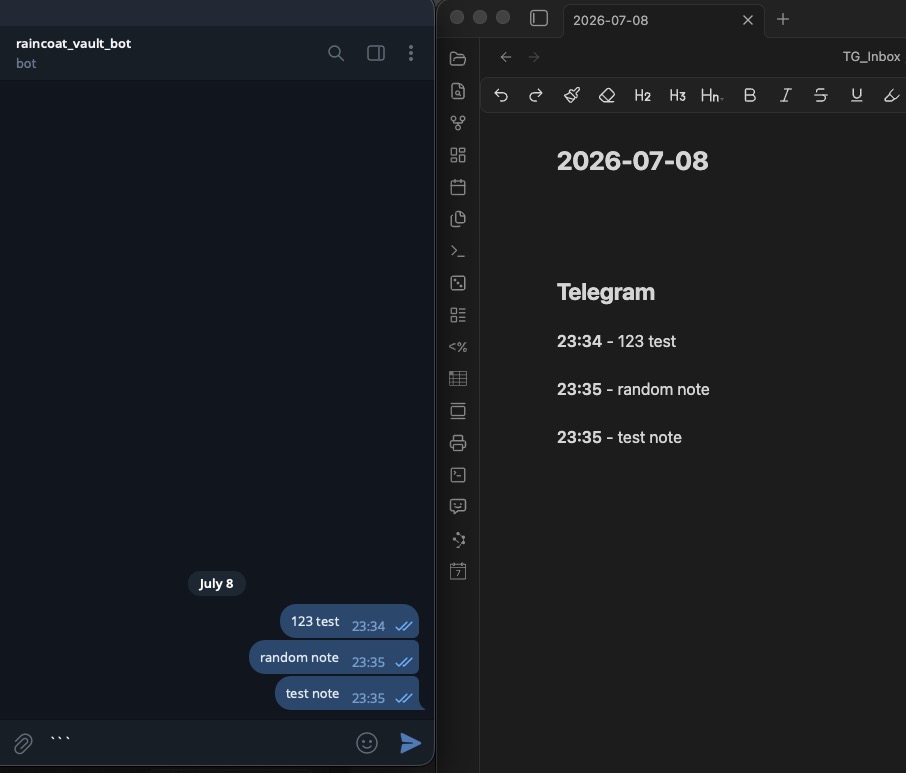
How it works
- Create a Telegram bot (thirty seconds) and paste its token into the plugin.
- Send the bot anything — a thought on a walk, a link, a photo, a voice note, a file. Add a hashtag such as
#ideato route it to a topic note. - Next time Obsidian is open, it lands in the right note, under a heading you choose.
Text keeps its Telegram formatting — bold, italic, links, code arrive as Markdown. Photos, voice notes and documents are saved into your vault's attachment folder and embedded in the entry, caption included.
The settings UI is available in English and Russian.
Folder, note name and heading are configurable — or flip one toggle and the plugin writes into the daily note the core Daily Notes plugin owns: its folder, its name format, its template. Delivered message IDs are recorded in the note's frontmatter (tg_ids) — hidden in Reading View, travelling with the note — so two devices syncing one vault never produce duplicates.
Capture is instant; delivery happens while Obsidian is open. The plugin polls Telegram every thirty seconds, and there is no background execution on mobile. If Obsidian is closed, your message waits.
Setup
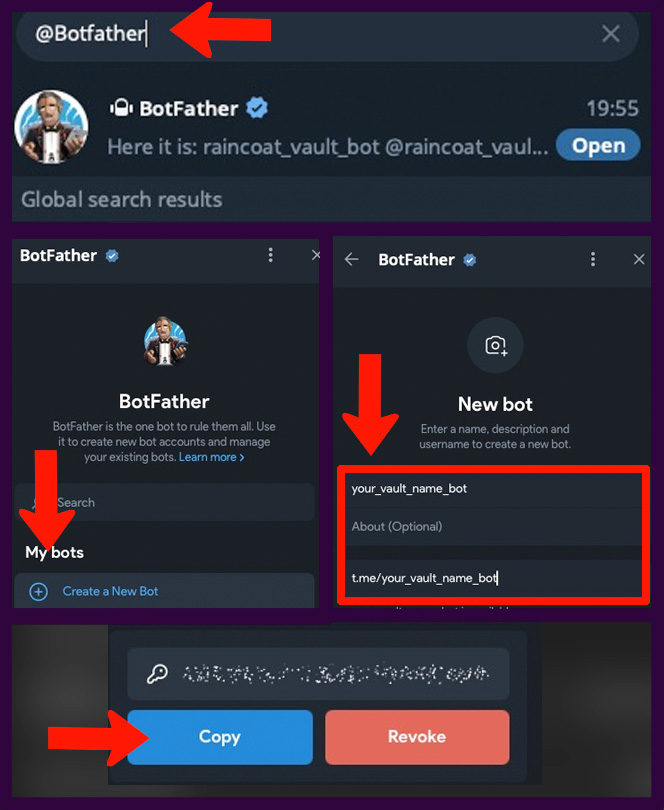
1. Create a bot. Message @BotFather in Telegram: /newbot, answer two prompts (a display name, then a username ending in bot), copy the token it gives you.
2. Connect the plugin. Obsidian → Settings → Vault Telegram Bridge → paste the token → Connect. The same screen sets where messages go (folder, note name, heading) and how each entry looks.
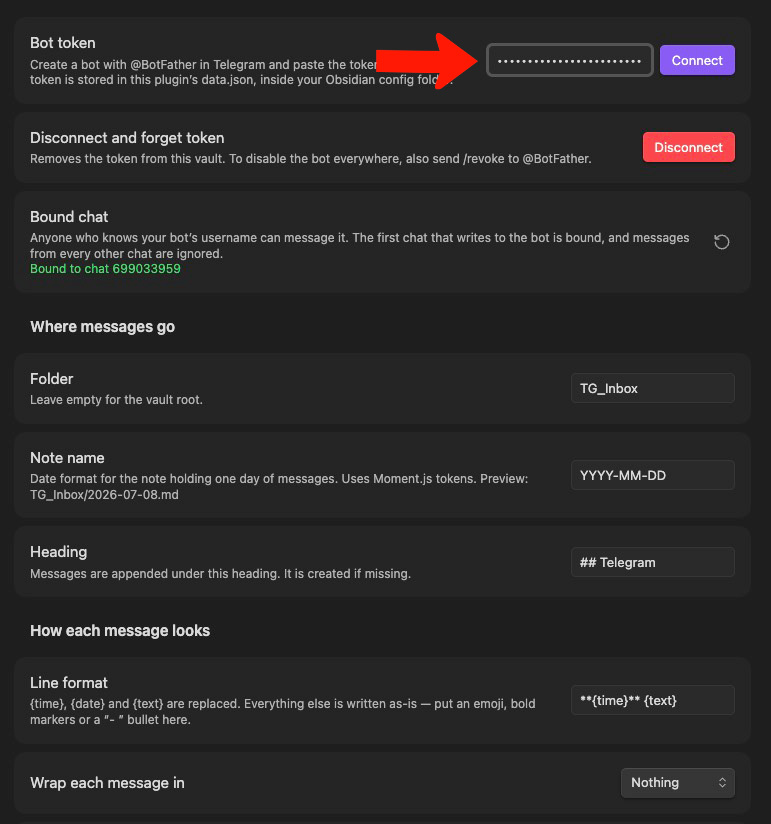
3. Send your new bot a message. That chat is now bound to the plugin; messages from any other chat are ignored.
Entry format
One line format setting decides everything: {time}, {date} and {text} are replaced, the rest is literal — emoji, bold markers, a - bullet all go in the same field. Entries are separated by a blank line.
✏️ **15:29** an idea on a walk

✏️ **15:30** a longer one
spilling onto a second line
Each entry can be wrapped in nothing, a fenced code block (Markdown is inert there), or a callout (boxed, formatting works):
> [!tip]
> ✏️ **15:29** an idea on a walk
Hashtag routing
Create ordered rules in Settings → Vault Telegram Bridge → Hashtag routes. A rule maps a Telegram hashtag to a vault-relative note path and, optionally, a different heading:
#idea → Inbox/Ideas.md → ## Ideas
#task → Projects/Tasks/YYYY-MM.md → ## Inbox
The first matching rule wins. Matching is case-insensitive and uses Telegram's hashtag metadata, so text that merely resembles a hashtag is not treated as a command. The matched routing tag is removed from the saved entry; other hashtags and formatting stay intact. Note paths support common multi-character Moment.js date tokens such as YYYY, MM, DD, HH, mm and ss. With no match, the message goes to the normal daily note.
Voice transcription
Optional transcription supports Telegram voice messages, audio files and round video notes. Enable it in Settings → Vault Telegram Bridge → Voice transcription, then enter:
- an OpenAI-compatible API base URL (the default is
https://api.openai.com/v1); - your API key;
- the provider's transcription model (the default is
whisper-1).
Two providers that work out of the box:
| Provider | Base URL | Model | Key |
|---|---|---|---|
| Groq (free tier) | https://api.groq.com/openai/v1 |
whisper-large-v3 |
console.groq.com/keys |
| OpenAI | https://api.openai.com/v1 |
whisper-1 |
platform.openai.com/api-keys |
The model must be a speech-to-text model — a chat model on the same endpoint is rejected by the provider. The Check the connection button under the settings sends a fraction of a second of silence and reports exactly what the provider said, so a wrong URL, key or model is caught before the first real voice note.
The audio file is downloaded from Telegram once, stored in the vault, then sent to {baseUrl}/audio/transcriptions. (Telegram serves voice notes as .oga; the upload is renamed to .ogg, which Whisper hosts accept — the file in your vault keeps its real name.) The transcript is written below the embed. If the transcription provider fails, the attachment is still saved and synchronization continues.
Network use
The plugin always uses https://api.telegram.org after you configure a bot token. It calls getMe to verify the token, getUpdates to fetch messages, and getFile plus Telegram's file endpoint when a message has an attachment.
If and only if you enable voice transcription, the plugin also sends voice/audio/video-note bytes to the OpenAI-compatible base URL you configure, using the API key you provide. The request path is /audio/transcriptions; the provider receives the media file and model name. Review that provider's privacy and retention policy before enabling the feature.
All network calls go through Obsidian's requestUrl. There is no telemetry, analytics, crash reporting, remote configuration, self-updating or server operated by this project. The shipped plugin has zero runtime dependencies.
Security
The plugin stores the bot token in plain text in data.json inside your Obsidian config folder. If transcription is enabled, its API key is stored in the same file. A stolen bot token gives an attacker control of the bot — reading messages sent to it, posting as it — and nothing else. Not your chats, not your contacts, not your account. Revoking takes thirty seconds: /revoke to @BotFather. (The plugin's Disconnect button removes the token from this vault but does not disable the bot elsewhere.) Revoke a compromised transcription key with its provider.
If you sync .obsidian/ through git, iCloud or Obsidian Sync, these secrets go with it. The plugin does not put a local passphrase in front of them. If your vault is public, add the plugin's data.json to .gitignore.
Bot usernames are guessable, so the plugin binds itself to the first chat that writes to it and silently ignores every other chat. The binding is visible and resettable in settings.
The plugin will never send messages, set reactions, read chats you did not point it at, collect telemetry, phone home, or update itself.
Known limits
- Messages expire after 24 hours. Telegram queues undelivered bot updates for one day. If Obsidian stays closed longer, the message survives only in the chat with your bot. Account mode (planned — Saved Messages sync, nothing expires) has no such limit.
- Files over 20 MB stay in Telegram. The bot API refuses to serve them; the entry gets a placeholder line instead of the file. Stickers, polls and locations are counted and skipped.
- One poller per bot. If desktop and phone are both open, one wins the poll and the other backs off; the note reaches it through your normal vault sync. Handled, not an error.
- Edits and deletions in Telegram don't touch the note. Deliberate: the note is yours.
Development
npm install
npm test          # unit tests, no Obsidian runtime needed
npm run typecheck # strict
npm run build     # typecheck + lint + bundle to main.js
The build fails if any code imports a Node or Electron API (the plugin must run on mobile), or if the product bundle imports GramJS (account-mode work; used only by the Phase 0 spike under spikes/).
Worth reading before changing anything: MANUAL-TEST-GUIDE — checks that need a human and a real phone.
Licence
MIT.
Support
If this project was useful to you, feel free to support further development: