URL Namer
 zfei8k downloads
Retrieve the HTML title of web pages to name external links.
- Overview
- Scorecard
- Updates3
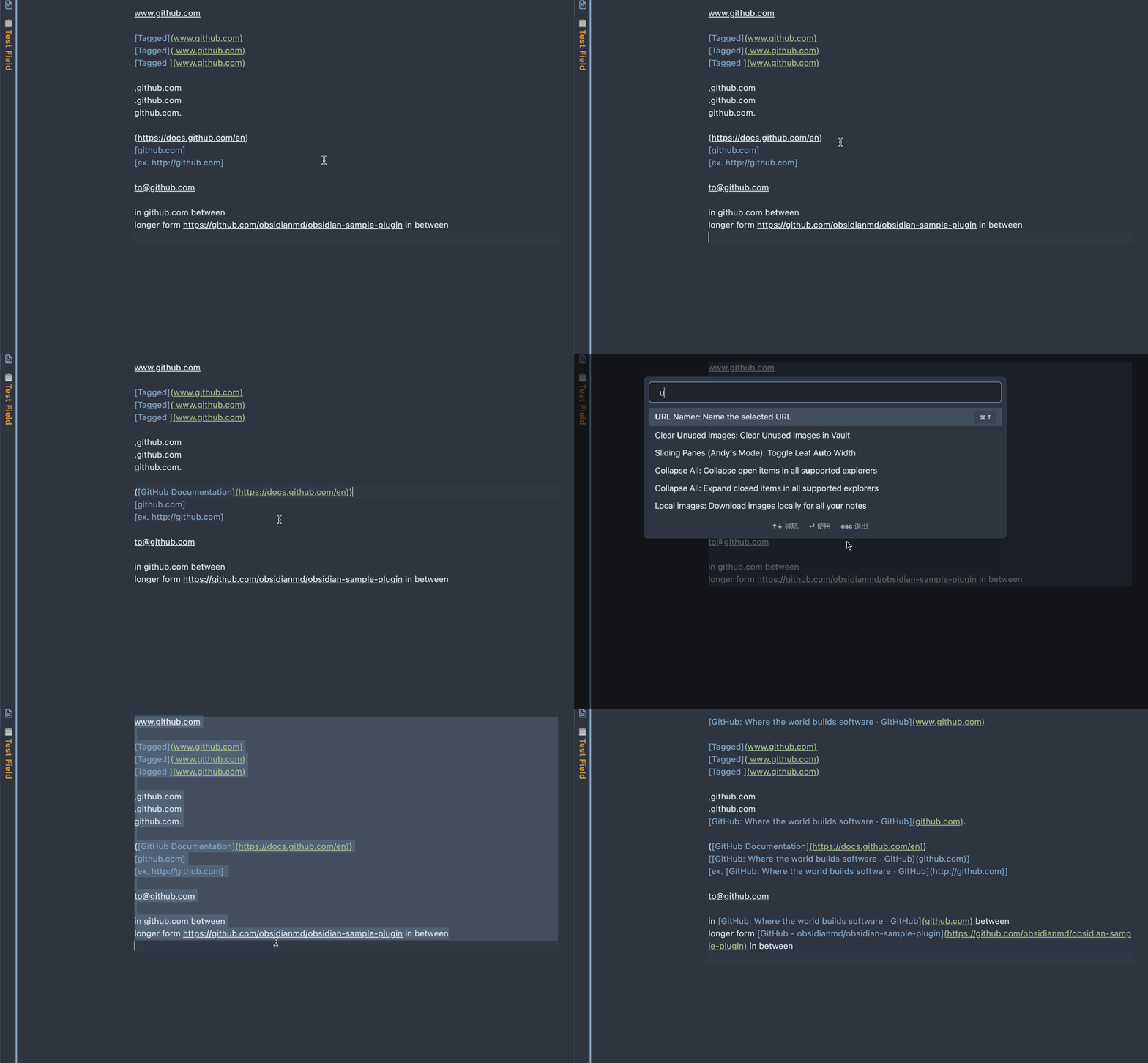
An Obsidian plugin that converts plain URLs in selected text into Markdown links using each page's title.
What's New in v1.1.0
Thanks to mvexel for contributing these improvements:
- Modernized TypeScript code
- Added option to auto-name URLs on paste (enable in Settings -> URL Namer)
- Added offline detection with graceful fallback
- Improved title extraction (supports
og:title,twitter:title) - Updated build tooling
Usage
- Select text that contains one or more plain URLs.
- Run the command
Name the URL links in the selected text.
Notes:
- Process a small batch of URLs at a time for best reliability.
- While the command is running, do not edit or reselect the text.
- URLs that are already inside Markdown links (for example
[label](https://example.com)) are skipped. - Optional: enable Settings -> URL Namer -> Auto-name links on paste to convert pasted plain-text URLs automatically.
- If Obsidian is offline, the plugin keeps links unchanged and shows a single notice.
Development
npm install: install dependencies.npm run dev: build in watch mode.npm run build: run TypeScript checks and create a production bundle (main.js).npm run lint: run ESLint.npm run smoke:title -- https://example.com: quickly test title extraction for a URL.
Installation
From source (manual)
- Build the plugin with
npm run build. - Create (or open) your vault plugin folder:
VaultFolder/.obsidian/plugins/url-namer/
Use Vault switcher -> Manage vaults to see the exact local vault path.
- Copy these files into that folder:
main.jsmanifest.jsonstyles.css(if present)
- In Obsidian, open Settings -> Community plugins, refresh, and enable URL Namer.
Customization
The URL-matching regex is currently hard-coded in main.ts as UrlTagger.rawUrlPattern.
Title extraction defaults to the HTML <title> tag. For sites that rely on custom metadata, site-specific parsing may be required (for example the existing WeChat og:title handling).
Known Limitations
- Some websites block requests or return non-HTML content.
- JavaScript-rendered pages may not expose a useful title in the initial response.
- The plugin currently has no user settings for regex or per-site parsing rules.
Future Development
- Move URL regex configuration into plugin settings.
- Add configurable site-specific title extraction rules.
HealthGood
ReviewSatisfactory
About
Convert plain URLs in selected text into Markdown links labeled with each page's title. Auto-name pasted URLs, skip already-linked URLs, extract titles from HTML, og:title and twitter:title, and fall back gracefully when offline.Details
Current version
1.1.1
Last updated
5 months ago
Created
4 years ago
Updates
3 releases
Downloads
8k
Compatible with
Obsidian 0.12.0+
Platforms
Desktop, Mobile