Search...Search plugins and themes...
⌘K
Sign in
  • Get started
  • Download
  • Pricing
  • Enterprise
  • Account
  • Obsidian
  • Overview
  • Sync
  • Publish
  • Canvas
  • Mobile
  • Web Clipper
  • CLI
  • Learn
  • Help
  • Developers
  • Changelog
  • About
  • Roadmap
  • Blog
  • Resources
  • System status
  • License overview
  • Terms of service
  • Privacy policy
  • Security
  • Community
  • Plugins
  • Themes
  • Discord
  • Forum / 中文论坛
  • Merch store
  • Brand guidelines
Follow us
DiscordTwitterBlueskyThreadsMastodonYouTubeGitHub
© 2026 Obsidian

Unseen Changes Dot

Miguel SousaMiguel Sousa108 downloads

Shows dots beside new and changed notes.

Add to Obsidian
  • Overview
  • Scorecard
  • Updates3

Unseen Changes Dot shows which notes are new and which existing notes changed since you last viewed them. It adds small markers to the Obsidian file explorer, parent folders, and background tabs without modifying note frontmatter.
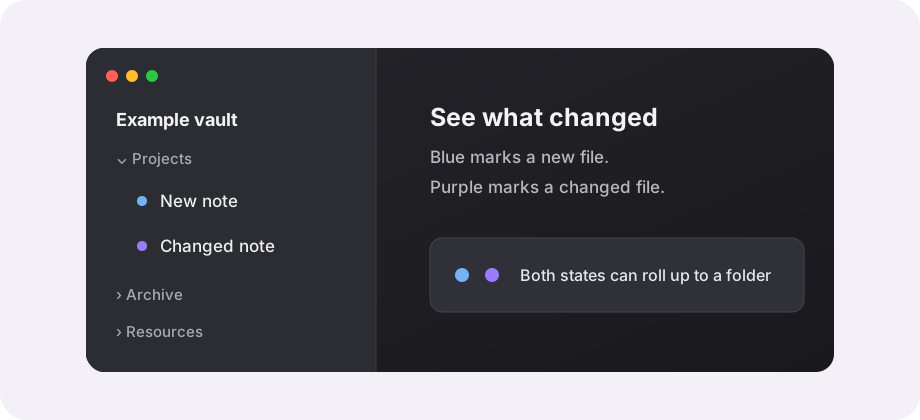
Illustration of new and changed note markers

Current packaged version: 1.0.31.

What the markers mean

Marker Meaning Default colour
New The file was created and has not been viewed yet. Light blue
Changed A previously viewed file changed while it was not active. Obsidian accent colour

Opening a note in the active tab marks its current version as seen. A new file keeps the stronger new state if it changes before you open it.

Folders inherit markers from unseen descendants. A folder can show both states when it contains both new and changed files.

Features

  • Tracks Markdown files by default.
  • Can track attachments when enabled.
  • Shows markers in the file explorer and on background tabs.
  • Lets you choose which states to show.
  • Supports circle, rounded, square, and diamond marker shapes.
  • Accepts CSS colours, including Obsidian theme variables.
  • Keeps tracking data out of note frontmatter.
  • Ignores plugin runtime files and task notes marked with task or tasks.
  • Prunes state for missing files and stale seen-pulse entries.

Storage and sync

The main state file is:

<vault-config-dir>/plugins/unseen-changes-dot/data.json

Per-file seen pulses are stored in:

<vault-config-dir>/plugins/unseen-changes-dot/seen-pulses/

If your sync service includes the vault configuration directory, data.json and seen-pulses/ can sync between devices. The plugin reconciles synced state against current file signatures.

Do not include runtime state in a release package:

data.json
seen-pulses/
.DS_Store

Settings

  • Shown states: show new, changed, or both.
  • Track attachments: off by default.
  • Sync polling interval: defaults to 5 seconds.
  • Fast startup baseline: on by default.
  • Unread/new shape and Changed shape: choose the marker shape.
  • Unread/new color and Changed color: set any valid CSS colour.

Credits and licence

Miguel Sousa maintains Unseen Changes Dot. The initial structure and file-explorer marker approach were based on Dennis Mojado's Unread Dot.

The project is available under the MIT License. See THIRD_PARTY_NOTICES.md for attribution details.

HealthExcellent
ReviewPassed
About
Show which notes are new or changed since you last viewed them with small markers in the file explorer, parent folders, and background tabs without modifying note frontmatter. Choose marker shape and colour, optionally include attachments, and store tracking data locally through Obsidian's plugin data API with no network telemetry.
FilesSidebarFolders
Details
Current version
1.0.31
Last updated
3 weeks ago
Created
Last month
Updates
3 releases
Downloads
108
Compatible with
Obsidian 1.4.4+
Platforms
Desktop, Mobile
License
MIT
Report bugRequest featureReport plugin
Author
Miguel SousaMiguel Sousamightycrumbs
GitHubmightycrumbs
  1. Community
  2. Plugins
  3. Files
  4. Unseen Changes Dot

Related plugins

Custom File Explorer sorting

Manual or automatic config-driven reordering and sorting of files and folders in File Explorer.

Flexplorer

Enhance the file explorer with custom sorting, pinning, and hiding.

File Explorer Note Count

See the number of notes in each folder within the file explorer.

File Tree Alternative

An alternative file tree view with separate folder and file panes.

Notebook Navigator

A better file browser and calendar inspired by Apple Notes, Bear, Evernote and Day One.

Recent Files

Display a list of recently opened files.

Reveal Active File Button

Add a button to the top of the File Explorer, to reveal the active file.

Hide Folders

Quickly toggle the visibility of specific folders in the file navigator based on configured names. Useful for hiding attachment folders.

Quick Explorer

Perform file explorer operations (and see your current file path) from the title bar, using the mouse or keyboard.

Novel word count

Display a word count, page count, creation date, or other statistics for each file, folder and vault in the File Explorer pane.