Unique ID Generator
 cojiso25 downloads
Generate unique IDs (base36, Sqids, NanoID, UUID, ULID, TypeID) from commands or from Templater and other scripts.
- Overview
- Scorecard
- Updates3
Generate unique IDs in Obsidian, from short 7-character IDs to 128-bit ones: base36, Sqids, NanoID, UUID v4/v7, ULID and TypeID.
- Insert an ID at the cursor or copy it to the clipboard with a command.
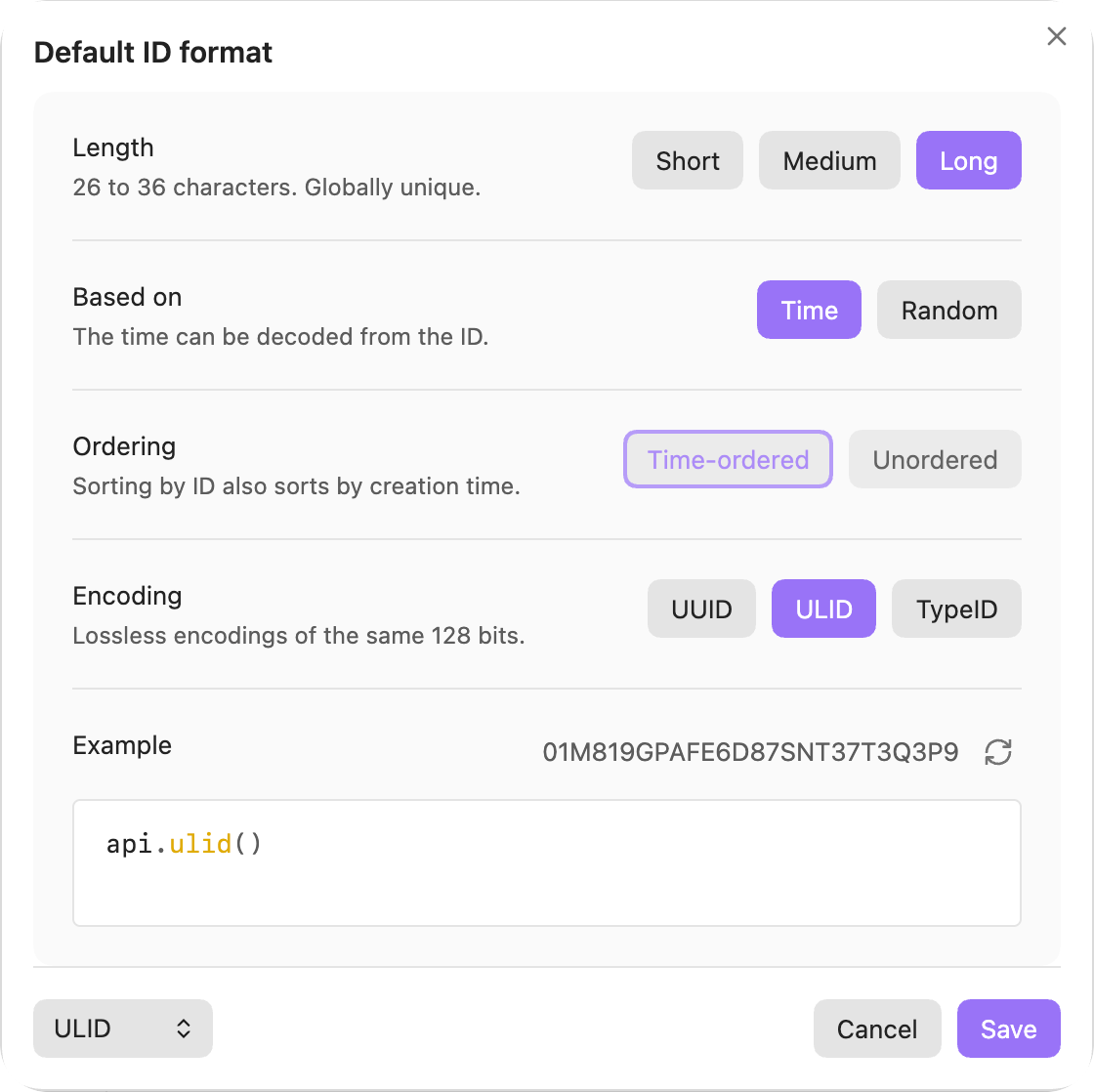
- Choose the default format with a guide that compares length, what the ID is based on, and ordering.
- Call any format from Templater or your own scripts, with its own options.
- Works on desktop and mobile, makes no network requests, and never reads the clipboard.
Commands
| Command | What it does |
|---|---|
| Copy ID to clipboard | Copies a new ID in the default format. |
| Insert ID | Inserts a new ID in the default format at the cursor, replacing any selection. |
No hotkeys are set by default. To assign them, search for Unique ID Generator in Settings → Hotkeys.
Settings
Default ID format sets the format that the commands and api.generate() use. The default is Sqids. The settings tab shows the call that gives the same result and an example ID.
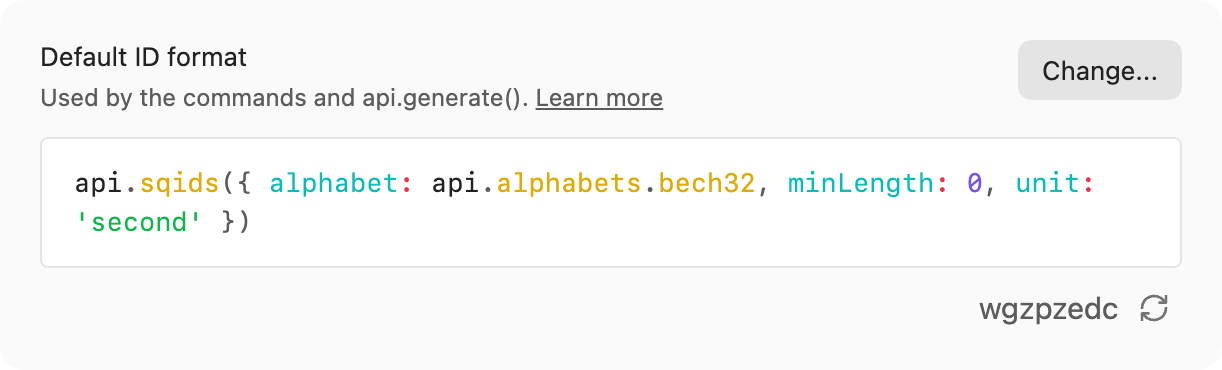
To choose another format, select Change...:
- Choose by length, what the ID is based on, and ordering. Formats compares them. For long time-based IDs, also choose the encoding: UUID, ULID or TypeID. For TypeID, enter the type prefix.
- Or pick a format by name from the list next to Save.
- The example ID and the equivalent call update as you choose. Select ↻ for another example.
Nothing is saved until you select Save.
Formats
| Format | Example | Characters | Based on | Ordering | Uniqueness |
|---|---|---|---|---|---|
| base36 | 0tow7fd |
7 | Time (seconds) | Time-ordered | Locally unique |
| Sqids | zfgagxzt |
8 | Time (seconds) | Unordered | Locally unique |
| NanoID | zurkwxrrs9erl2nz |
16 | Random | Unordered | Collision-resistant |
| UUID v7 | 01a20227-feae-72c1-8ab2-07e39fe40e97 |
36 | Time (milliseconds) | Time-ordered | Globally unique |
| ULID | 01M812FZNEEB0RNCGAPH7GY6ZD |
26 | Time (milliseconds) | Time-ordered | Globally unique |
| TypeID | task_01m812fzneeb0rncgaph7gy6zd |
26, or prefix + 27 | Time (milliseconds) | Time-ordered | Globally unique |
| UUID v4 | 32a1d463-7e1c-4403-a917-cc1d87a2f48f |
36 | Random | Unordered | Globally unique |
Ordering:
- Time-ordered IDs sort in the order they were created, so sorting notes or rows by ID also sorts them by creation time.
- Unordered IDs look unrelated even when made one after another.
Uniqueness:
- Locally unique IDs never repeat in the same vault on the device that makes them.
- Collision-resistant IDs are 16 random characters (80 bits), so a million of them repeat with a probability of about 4 × 10⁻¹³.
- Globally unique IDs are 128 bits and in practice never repeat anywhere.
base36 and Sqids IDs are made from the current second. When two are made in the same second, the plugin adds 1 to the later one, and the commands and all API functions share this counter. The counter is saved on the device for each vault, so it continues after the plugin is reloaded or Obsidian restarts. Another device keeps its own counter, so two devices that make one in the same second can produce the same ID. If you create IDs on several synced devices, use a collision-resistant or globally unique format.
UUID v7, ULID and TypeID hold the same 128 bits in different encodings: hexadecimal, uppercase Crockford base32, and lowercase Crockford base32 after a type prefix. You can convert one into another without losing anything.
[!NOTE] Time-based IDs reveal when they were made. base36, Sqids, UUID v7, ULID and TypeID can all be decoded back to the time they were created. Sqids only looks scrambled; it is not encryption. If the creation time must stay private, use NanoID or UUID v4. See Decoding the time.
Use in scripts
The API is on the plugin object:
app.plugins.plugins['unique-id-generator'].api
Templater
<%* const idgen = app.plugins.plugins['unique-id-generator'].api -%>
---
id: <% idgen.generate() %>
task: <% idgen.typeid({ prefix: 'task' }) %>
---
To add a prefix to any format, join it yourself:
<% 'TASK-' + idgen.generate() %>
API
generate() makes an ID in the default format. Each format also has its own function, which ignores the settings and takes options:
| Function | Options and defaults | Example |
|---|---|---|
generate() |
None | zfgagxzt |
base36(options) |
unit: 'second' |
0tow7fd |
sqids(options) |
alphabet: api.alphabets.bech32, minLength: 0, unit: 'second' |
zfgagxzt |
nanoid(options) |
alphabet: api.alphabets.bech32, size: 16 |
zurkwxrrs9erl2nz |
uuidv4() |
None | 32a1d463-7e1c-… |
uuidv7() |
None | 01a20227-feae-… |
ulid() |
None | 01M812FZNEEB0RNCGAPH7GY6ZD |
typeid(options) |
prefix: '' |
task_01m812fzneeb0rncgaph7gy6zd |
Every option can be left out. For example:
const api = app.plugins.plugins['unique-id-generator'].api
api.base36({ unit: 'millisecond' }) // e.g. 0mwrimawd
api.sqids({ alphabet: api.alphabets.crockford, minLength: 10 })
api.nanoid({ alphabet: '0123456789abcdef', size: 12 })
api.typeid({ prefix: 'user' })
Options:
unit:'second'or'millisecond', forbase36andsqids. base36 pads seconds to 7 digits and milliseconds to 9, so the IDs sort correctly until the year 4453 and 5188 respectively.alphabet: a string of 2 to 256 distinct characters, forsqidsandnanoid. Emoji and other characters outside the Basic Multilingual Plane are not allowed, and Sqids needs at least 3 ASCII characters.api.alphabetshas three:Name Characters Notes bech32qpzry9x8gf2tvdw0s3jn54khce6mua7lLowercase, without the look-alikes 1 b i ocrockford0123456789abcdefghjkmnpqrstvwxyzLowercase Crockford base32, without i l o urfc4648ABCDEFGHIJKLMNOPQRSTUVWXYZ234567RFC 4648 base32 minLength: the shortest IDsqidsmakes, from 0 to 255. With the default 0, IDs are as long as the number needs.size: the number of charactersnanoidmakes, from 1 to 1024.prefix: the TypeID type prefix, up to 63 lowercase letters and underscores, starting and ending with a letter. The function adds the separator_, and leaves it out when the prefix is empty.
To change the case of an ID, call toUpperCase() or toLowerCase() on it.
An unknown or misspelled option, an invalid value, or an argument to a function that takes none throws an error that names the function. Because of the last rule, pass a function to callbacks instead of the API function itself: to make several IDs at once, write Array.from({ length: 3 }, () => api.ulid()), not [1, 2, 3].map(api.ulid).
Decoding the time
| Format | How to get the time back |
|---|---|
| base36 | new Date(parseInt(id, 36) * 1000). Leave out * 1000 if you used unit: 'millisecond'. |
| Sqids | new Date(new Sqids({ alphabet }).decode(id)[0] * 1000) with any Sqids library, using the same alphabet. |
| UUID v7 | new Date(parseInt(id.replace(/-/g, '').slice(0, 12), 16)) |
| ULID | new Date(decodeTime(id)) with any ULID library. |
| TypeID | Remove the prefix and _, then decode the rest as a ULID. |
Because the plugin adds 1 for each extra ID made in the same second, the decoded time can be later than the real one by that many seconds.
Installation
Requires Obsidian 1.13.1 or later.
From the community directory: open Unique ID Generator, or search for it in Settings → Community plugins → Browse, then install and enable it. If restricted mode is on, turn it off first.
Manually:
- Download
main.js,manifest.jsonandstyles.cssfrom the latest release. - Put them in
.obsidian/plugins/unique-id-generator/in your vault. - Reload Obsidian and enable the plugin in Settings → Community plugins.
License
This plugin bundles the following libraries, all under the MIT license. Their copyright notices and the license text are included at the end of main.js.
The TypeID test data in test/fixtures/typeid comes from the TypeID specification under the Apache License 2.0.