Search...Search plugins and themes...
⌘K
Sign in
  • Get started
  • Download
  • Pricing
  • Enterprise
  • Account
  • Obsidian
  • Overview
  • Sync
  • Publish
  • Canvas
  • Mobile
  • Web Clipper
  • CLI
  • Learn
  • Help
  • Developers
  • Changelog
  • About
  • Roadmap
  • Blog
  • Resources
  • System status
  • License overview
  • Terms of service
  • Privacy policy
  • Security
  • Community
  • Plugins
  • Themes
  • Discord
  • Forum / 中文论坛
  • Merch store
  • Brand guidelines
Follow us
DiscordTwitterBlueskyThreadsMastodonYouTubeGitHub
© 2026 Obsidian

Two Column Explorer

TonyTony34 downloads

Show folders side by side with clear spacing, keeping expanded contents in their own column.

Add to Obsidian
  • Overview
  • Scorecard
  • Updates2

Shows Obsidian's files and folders in two columns. Expanded folders stay in their own column.
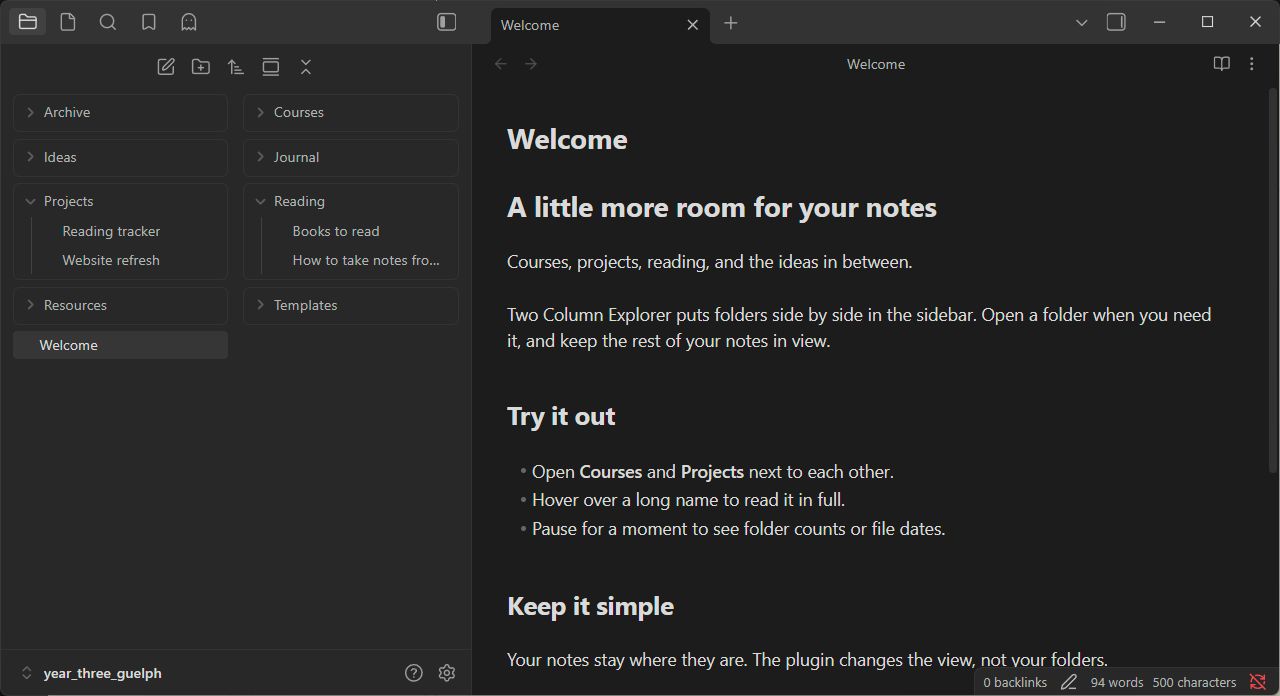
Two-column file explorer

Settings

  • Show full file and folder names on hover.
  • Show folder counts or file dates below the name after one second.
  • Put the hover label to the left, center, or right of your mouse.

Disable the plugin to return to the normal file explorer.

Install manually

  1. Download main.js, manifest.json, and styles.css from a release.
  2. Put them in <your vault>/.obsidian/plugins/two-column-explorer/.
  3. Restart Obsidian and enable Two Column Explorer in Settings → Community plugins.

Compatibility

Tested on Obsidian 1.13.7 for Windows with the default theme. Mobile and older versions haven't been tested. Large expanded folders may use more memory, and Obsidian updates may require fixes.

If something breaks, open an issue with your Obsidian version and a screenshot.

HealthExcellent
ReviewSatisfactory
About
Display your vault in a two-column file explorer with expanded folders kept in their own column. Show full file and folder names on hover and reveal folder counts or file dates below names after a short delay, with the hover label positioned left, center, or right.
FilesSidebarNavigation
Details
Current version
1.0.14
Last updated
Last week
Created
Last week
Updates
2 releases
Downloads
34
Compatible with
Obsidian 1.5.0+
Platforms
Desktop, Mobile
License
MIT
Report bugRequest featureReport plugin
Author
TonyTonytonytran
mytonytran.ca/
GitHubtonytran03
  1. Community
  2. Plugins
  3. Files
  4. Two Column Explorer

Related plugins

Notebook Navigator

A better file browser and calendar inspired by Apple Notes, Bear, Evernote and Day One.

Recent Files

Display a list of recently opened files.

Reveal Active File Button

Add a button to the top of the File Explorer, to reveal the active file.

Quick Explorer

Perform file explorer operations (and see your current file path) from the title bar, using the mouse or keyboard.

Flexplorer

Enhance the file explorer with custom sorting, pinning, and hiding.

Vertical Tabs

Offer an alternative view that displays open tabs vertically, allowing users to group and organize tabs for a better navigation experience.

Open Tab Settings

Adds options to customize how tabs are opened, including open in new tab by default, preventing duplicate tabs, and more.

Remember cursor position

Remember cursor and scroll position for each note.

Custom File Explorer sorting

Manual or automatic config-driven reordering and sorting of files and folders in File Explorer.

Novel word count

Display a word count, page count, creation date, or other statistics for each file, folder and vault in the File Explorer pane.