Search...Search plugins and themes...
⌘K
Sign in
  • Get started
  • Download
  • Pricing
  • Enterprise
  • Account
  • Obsidian
  • Overview
  • Sync
  • Publish
  • Canvas
  • Mobile
  • Web Clipper
  • CLI
  • Learn
  • Help
  • Developers
  • Changelog
  • About
  • Roadmap
  • Blog
  • Resources
  • System status
  • License overview
  • Terms of service
  • Privacy policy
  • Security
  • Community
  • Plugins
  • Themes
  • Discord
  • Forum / 中文论坛
  • Merch store
  • Brand guidelines
Follow us
DiscordTwitterBlueskyThreadsMastodonYouTubeGitHub
© 2026 Obsidian

TubeNote

Hugo SantosHugo Santos31 downloads

Adds a compact YouTube livestream controller above the vault name.

Add to Obsidian
TubeNote screenshot
TubeNote screenshot
  • Overview
  • Scorecard
  • Updates2

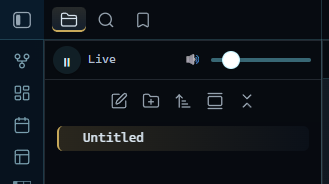
Adds a compact YouTube livestream controller above the vault name in Obsidian's sidebar, so you can listen to (or watch) a YouTube livestream without leaving your notes.

Features

  • A small play/pause control and volume slider docked above the file explorer's nav header.

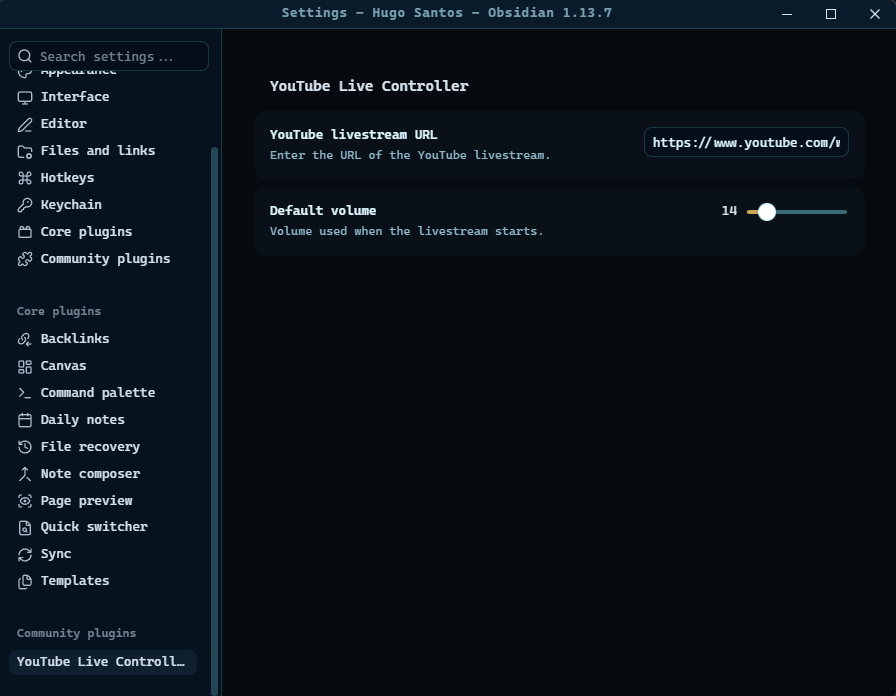
  • Configure the livestream URL and default volume from the plugin settings.

  • The player persists across layout changes and reloads with your last saved settings.
    text text

Usage

  1. Open Settings → TubeNote and paste the URL of the YouTube livestream (or any YouTube video) you want to control, e.g. https://www.youtube.com/watch?v=VIDEO_ID.
  2. Set your preferred default volume.
  3. Use the play/pause button and volume slider docked at the top of the sidebar to control playback.

Network use

This plugin loads the official YouTube IFrame Player API (https://www.youtube.com/iframe_api) from YouTube's servers, and embeds a YouTube video player for the livestream URL you provide. No other external service is contacted, and no data is sent anywhere by the plugin itself beyond what YouTube's own player requires to stream video/audio.

Installation

From Obsidian (once published)

  1. Open Settings → Community plugins → Browse.
  2. Search for "TubeNote" and select Install.
  3. Enable the plugin.

Manual installation

  1. Download main.js, manifest.json, and styles.css from the latest release.
  2. Copy them into <your-vault>/.obsidian/plugins/tubenote/.
  3. Reload Obsidian and enable TubeNote under Community plugins.

Support

Found a bug or have a feature request? Please open an issue in this repository.

I have converted coffee ☕ into this repository.
If you think it was worth it, consider helping me buy more coffee ☕: PayPal

License

Released under the MIT License.

HealthExcellent
ReviewPassed
About
Add a compact YouTube livestream controller above the vault name in Obsidian's sidebar to listen to or watch videos without leaving your notes. Control playback with a docked play/pause button and volume slider, set the livestream URL and default volume in settings, and keep the player persistent across layout changes and reloads.
AudioSidebarVideo
Details
Current version
1.0.1
Last updated
2 weeks ago
Created
2 weeks ago
Updates
2 releases
Downloads
31
Compatible with
Obsidian 1.0.0+
Platforms
Desktop, Mobile
License
MIT
Report bugRequest featureReport plugin
Author
Hugo SantosHugo Santoszektor
GitHubllzektorll
  1. Community
  2. Plugins
  3. Audio
  4. TubeNote

Related plugins

Media Extended

Integrate, manage video or audio directly in your notes, with enhanced playback and timestamp support. (Closed source)

YTranscript

Easily fetch transcription for any YouTube video.

Notebook Navigator

A better file browser and calendar inspired by Apple Notes, Bear, Evernote and Day One.

Tag Wrangler

Rename, merge, toggle, and search tags from the tag pane.

Vertical Tabs

Offer an alternative view that displays open tabs vertically, allowing users to group and organize tabs for a better navigation experience.

Recent Files

Display a list of recently opened files.

Longform

Helps you write and edit novels, screenplays, and other long projects.

Hide Folders

Quickly toggle the visibility of specific folders in the file navigator based on configured names. Useful for hiding attachment folders.

Reveal Active File Button

Add a button to the top of the File Explorer, to reveal the active file.

Checklist

Consolidate checklists across all files into a single view.