Translate
 Fevol75k downloads
Translate text and notes with Google Translate, DeepL, Azure, and more.
- Overview
- Scorecard
- Updates25

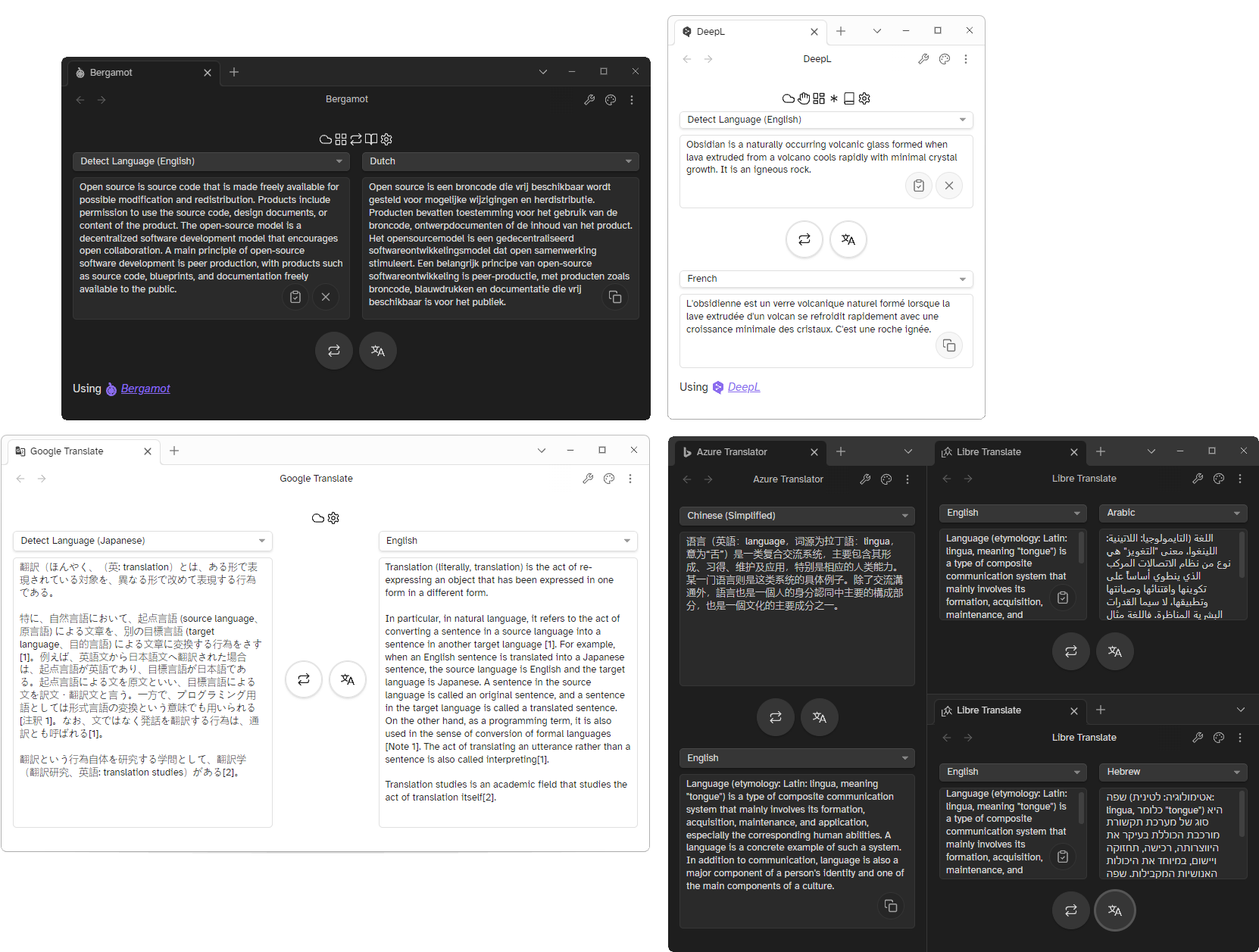
A plugin for Obsidian that adds several commands for translating text and files, and also comes with an easy-to-use and extensively customizable translation interface that integrates with ten different translation services.
📑 Table of Contents
- 📑 Table of Contents
- 🧰 Set-up
- 🔣 Translation Services
- 🎯 Features
- ⚠️ Disclaimers
- 💬 Discussion and Feedback
- 💎 Acknowledgements
- 🤝 Contributors
- ❤️ Support
🧰 Set-up
Install the plugin via the community plugins browser, or via BRAT if you want to help test out beta releases.
To set up your translation service, open up the plugin's settings. In the General settings tab, opened by default,
select the translation service you want to use in the Translation service dropdown menu.
Next, head over to the settings tab of the service you've selected, and enter your API key (if necessary), and click the validate button -- if the button turns green (indicating that you're properly connected to the service), you're good to go!
Now, you can open the Translation View and start translating, or make a selection in your note and translate it
with the Translate selection command!
It is heavily recommended that you read the documentation, it has tutorial videos for the most important features, and gives a detailed explanation of the available features.
For most services, you will have to sign-up for an account (with a credit card), check the table below to see which services require sign-up. This plugin does not provide any API keys.
Free alternatives
If you wish to use a service that does not require any sign-up, there are three free options available:
- Bergamot (Using pre-trained language models, option to use FastText for language detection, downloads provided within the plugin)
- Libre Translate (Using pre-trained language models, set up via Docker)
- Lingva Translate (Google Translate web-scraper, 3rd party service)
Libre and Lingva Translate both offer a server that can handle translation requests, but every of the above mentioned options can be entirely hosted on your own machine. Libre and Lingva translate can be hosted in a Docker container, whereas Bergamot works directly from Obsidian.
🔣 Translation Services
Services overview
| Translation Service | Supported | Free | Offline | Mobile | Languages |
|---|---|---|---|---|---|
 Google Translate Google Translate |
✅ | (0.5M characters/month) ¹ ² | 136 | ||
 Deepl Deepl |
✅ | (0.5M characters/month) ¹ | 29 | ||
 Yandex Translate Yandex Translate |
✅ | ❌ | 101 | ||
 Libre Translate Libre Translate |
✅ | ✅ | ✅ | 32 | |
 Azure Translator Azure Translator |
✅ | (2M characters/month) ¹ | 135 | ||
 Bergamot Bergamot |
✅ | ✅ | ✅ | ❌ | 14 |
 Fanyi QQ Fanyi QQ |
✅ [❓] | 18 | |||
 Fanyi Youdao Fanyi Youdao |
✅ | 112 | |||
 Fanyi Baidu Fanyi Baidu |
✅ | 201 | |||
 Lingva Translate Lingva Translate |
✅ | ✅ | 133 |
Icons displayed above are used in accordance with attribution requirements of each of the respective services.
Listed services are in no way associated with this plugin.
¹ Requires a valid credit card to sign up for a free API key
² Your credit card will be charged if you exceed the free limit
| Symbol | Description |
|---|---|
| ✅ | Supported |
| ❌ | Not supported |
| ❓ | Needs to be tested |
| ⭕ | Plans to add |
Notes
- Most services require an active internet connection to work. If you want to translate text offline, you can use the Bergamot translation engine by installing the binary and its models, or host Libre Translate on your computer/network using any operating system that supports Docker (incl. Android).
- Some services require a valid credit card to sign up for a free API key. Furthermore, the credit card will get charged if you go beyond the free character limit, make sure to keep your eyes on it!
- Make sure that you only enable automatic translation if you have a sufficiently high character cap on your API account, or the translation service is locally hosted (e.g. Bergamot or Libre Translate). This makes it easier to not blaze past your character limit.
🎯 Features
For more information, head over to the documentation.
If you want to use this plugin with extensions, make sure to take a look at the API.
Commands
- Translate current file: Translate current file
- Translate to new file: Translate active document to new file, title of document also gets translated
- Translate selection: Translate current selection in the editor
- Detect selection: Detect language of current selection in the editor
- Change provider: Change the selected translation service provider
- Open Translation View: Open the custom translation view
Context menus
In Editor:
- Translate: Translate current selection
- Detect language: Detect language of current selection
In Files:
- Translate: Translate current file to a new file
Translation View
- Highly customisable
- Change quick settings bar on top of the view
- Change layout
- Add quick actions
- Support for multiple views with different settings
- Automatic translation
Translator
- Glossary support, both offline and online
⚠️ Disclaimers
⚖️ Legal
Obsidian Translate is not officially associated with any of the aforementioned translation services, it only provides an user-facing UI to integrate with each of the services' APIs.
Asides from providing machine translation between two languages or detection, the respective services are not responsible for any modifications or alterations made to the source/translated text, unless explicitly stated in documentation or displayed in the UI.
👁️🗨️ Privacy
The plugin will only make requests to translation services on specific user inputs, such as translating text or downloading language models. The plugin will not send requests to any of the services on its own.
While the plugin does not collect any data, be aware that any text you translate will be sent to your selected translation service. Refer to each of the translation services' privacy policies provided below to see how they process this data:
- Google Translate
- DeepL
- Yandex Translate
- Microsoft Azure Translator (general statement)
- Fanyi Baidu
- Fanyi QQ
- Fanyi Youdao
As Bergamot and LibreTranslate are entirely self-hosted, their services do not have any privacy statements, your data stays on your computer.
LingvaTranslate does not offer a privacy statement.
🔑 Security
Please be aware that your API keys are stored in plain text by default,
and can be accessed by anyone that has access to your vault. If you wish to keep your API keys private,
you can enable the option to encrypt them with a password under General Settings, or choose to only store them on the
device itself (without storing them in the plugin data).
💬 Discussion and Feedback
Any feedback would very much be appreciated. Please use the GitHub issue tracker to report bugs, request features, or suggest improvements, or message me over on Discord (@Fevol#9470).
This plugin started off as a personal passion project. It ballooned into something much bigger than I had originally intended. I hope that this plugin will be useful to you, and I plan to keep improving on it in the future.
💎 Acknowledgements
This plugin makes use of full codefiles from the following projects:
Following projects were also referenced for writing functions, but adapted to fit the plugin's needs:
- Obsidian-Translator - Hashing algorithm for Fanyi-Youdao
- Obsidian Periodic Notes - Base Svelte components for Obsidian
This README is inspired by many other Obsidian plugins and this template, and makes use of shields.io for badges.
🤝 Contributors
@kometenstaub - Helping me out many times throughout the development of this plugin and testing
@sailkiteV - Teaching me in the arts of CSS wizardry and creating some of the animations
@TfTHacker - Providing incredibly helpful feedback and testing
❤️ Support
I personally don't feel entirely comfortable receiving money for these passion projects, so before you consider donating to me, consider some of these charities first:
- Local foodbanks and shelters
- Doctors Without Borders/Médecins Sans Frontières
- FOSS projects you use and love
If you still feel like donating to me, you can do so here: