Task Radar
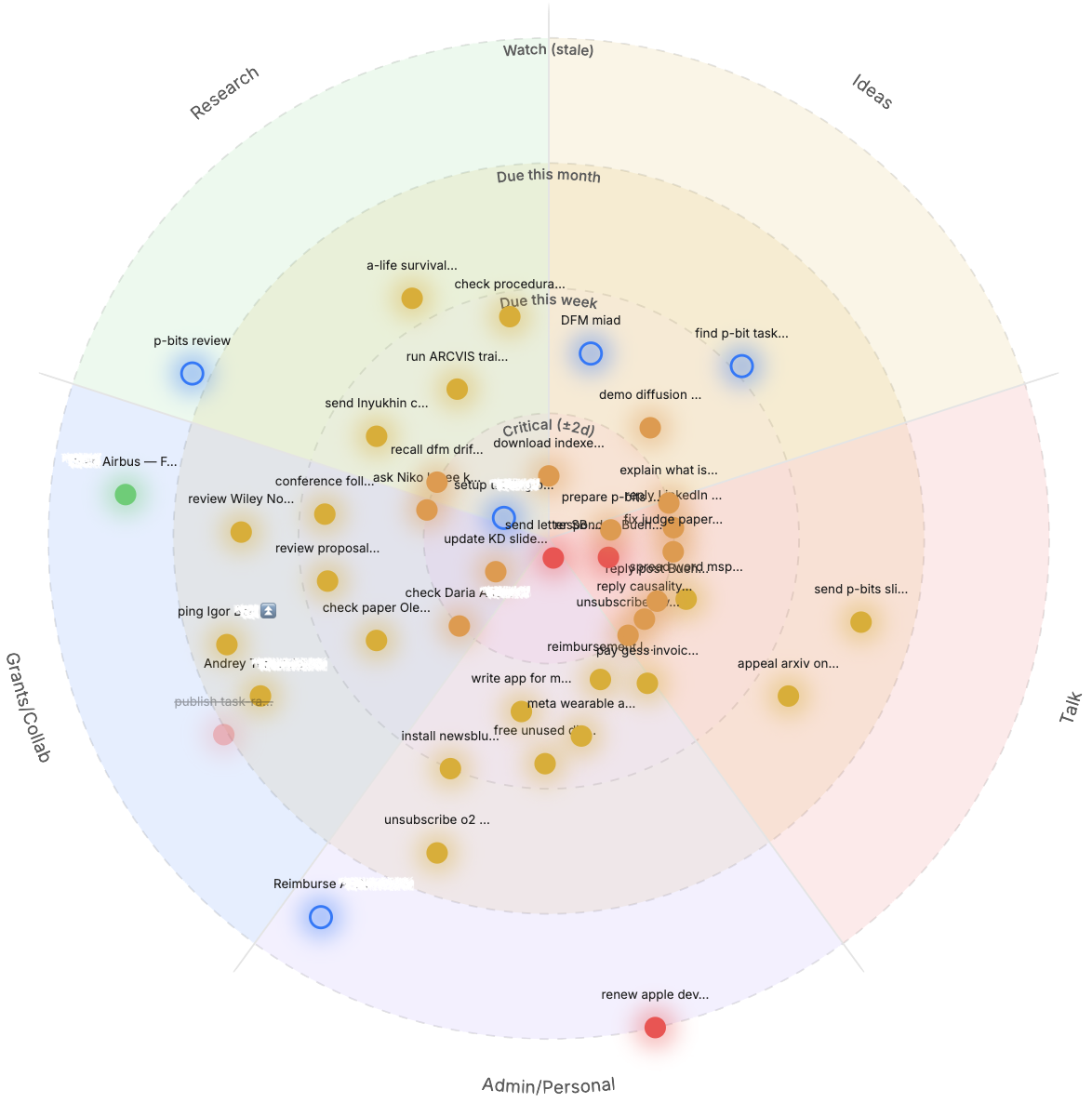
A radar for your tasks: a blip's distance from the center is driven by its due date. Postpone, complete, and reprioritize tasks from the radar.
- Overview
- Scorecard
- Updates4
A radar for your tasks — the closer to the center, the sooner it's due.
Task Radar turns your Obsidian Tasks into blips on a radar. A blip's distance from the center is driven by its due date: overdue and due-soon tasks sit near the core, and everything else drifts outward. The angle groups tasks by category. Postpone, complete, and reprioritize tasks straight from the radar — no need to open the note.
Task Radar is a fork of obsidian-radar by Luis Cipriani, specialized for date-driven task management. The general-purpose radar (notes and ideas, no dates) lives in that upstream project; this one adds everything task-specific. Licensed under MIT (see LICENSE).
How it works
- Due date is the single source of truth. The radius of each task-blip is computed from how many days until it's due. You never place a task by hand on the radial axis — you set its date and it moves.
- Rings are date buckets. Each priority ring has a "due within N days" threshold (e.g. Critical ±2d, Due this week, Due this month, Watch). A task lands in the ring its due date falls into.
- It stays live. As days pass, tasks drift toward the center on their own. Editing a
📅date in the note moves the blip; completing a task dims it. - Angle = category. Dragging a blip around changes its category; dragging it in or out rewrites its due date.
Features
- Postpone from the radar — right-click any task-blip:
- Postpone → next ring — pushes the due date to the next ring's window (e.g. Critical → +7 days).
- Postpone by 1 day / 1 week / 1 month.
- Set due date… — pick an exact date.
- Complete task — marks the line
- [x]with a✅completion date and dims the blip. - Open task — jump to the exact task line in its note.
- Drag to reschedule — drag a blip inward to make it more urgent (sooner due date) or outward to postpone; the
📅on the task line updates to match. - Bind existing blips — the Bind blips to tasks command links each note-blip to its task line by writing a stable
^block-id, then caches the due date and status. - Inherited radar goodness — configurable rings and category segments, per-blip / per-ring / per-category colors, pan, zoom, and drag-and-drop from the file explorer.
Task Radar reads and writes the emoji-signifier format used by the Tasks plugin (📅 due, ⏫/🔺 priority, ✅ done). Editing is plain markdown line surgery, so it composes with whatever else Tasks does with the line.
Requirements
- The Tasks community plugin, for the
📅due-date format Task Radar relies on.
Files
Radars are stored as .taskradar files — self-contained UTF-8 JSON holding the rings, category segments, blips, and display settings. Blips link to tasks by a ^block-id written on the task's line. This makes radars portable and easy to generate or maintain programmatically (e.g. from a nightly script — see docs/TASK-RADAR-PLAN.md for the data model).
Installing
From Community plugins (recommended)
- Open Settings → Community plugins → Browse.
- Search for Task Radar and click Install (plugin page).
- Click Enable.
Requires the Tasks plugin for the 📅 due-date format.
Via BRAT (beta builds)
BRAT installs releases ahead of the community browser — useful for testing unreleased changes.
- Install and enable BRAT from the community plugins browser.
- Open Settings → BRAT → Add Beta plugin.
- Enter
aura88-tech/task-radarand click Add Plugin. - Enable Task Radar in Settings → Community plugins.
Manual installation
- Download
main.js,manifest.json, andstyles.cssfrom the latest release. - Create a folder at
<your vault>/.obsidian/plugins/task-radar/. - Copy the three files into it.
- Enable Task Radar in Settings → Community plugins.
Contributing
Prerequisites: Node.js 18+ and npm.
git clone https://github.com/aura88-tech/task-radar.git
cd task-radar
npm install
npm run dev      # watch build
Symlink or copy the repo into a test vault at <your vault>/.obsidian/plugins/task-radar, enable it, and use Reload app without saving (or the Hot Reload plugin) after changes.
npm run build    # production build
npm run lint     # ESLint on src/
Credits
Built on obsidian-radar by Luis Cipriani — thank you for the radar rendering engine this stands on.