Tag Properties
 theluckystrike1 downloads
Browse custom list properties as clickable tags with note counts and Bases filters.
- Overview
- Scorecard
- Updates1
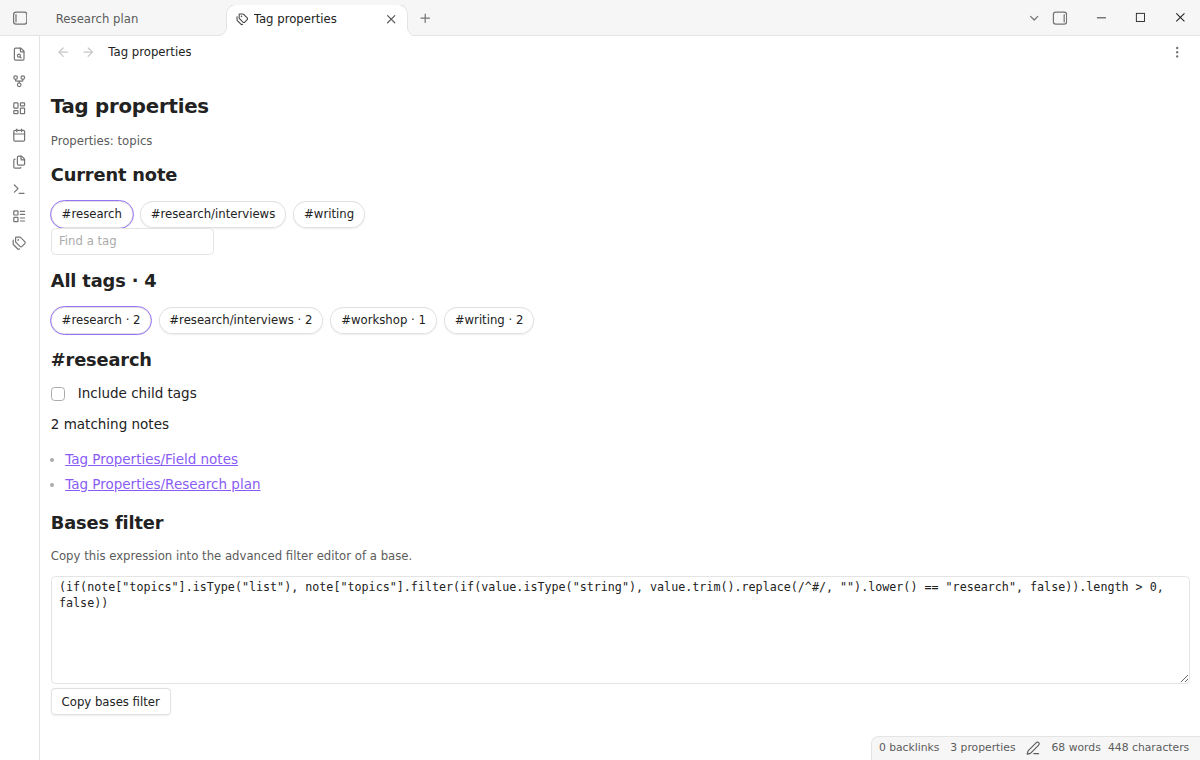
Tag Properties turns the values of a custom list property into clickable tags in a dedicated view. Keep topics, company or another list separate from the built-in tags property, then browse those values with note counts and matching note links.
The free tier covers one custom list property, including every tag, note count, child-tag option and Bases filter. Pro adds multiple properties and a combined view of custom and core tags. Pro costs $15 one time or $5 a month.
Features
Browse a custom list as tags
Choose a property name in the plugin settings. The default is topics. Open the view from the tags ribbon button or run “Open custom tags” from the command palette. Each valid list value becomes a button. Select one to see the notes that use it. Select a note link to open that note, or hold Ctrl or Command while clicking to open another tab.
The count beside each tag is the number of distinct notes. A repeated value in one list counts once. research, Research and #research share one count. The Current note section offers the chosen tags from your active Markdown note, so you can move from a note to related material without typing a query. The view updates after metadata changes, file renames and deletions.
Include child tags when you need them
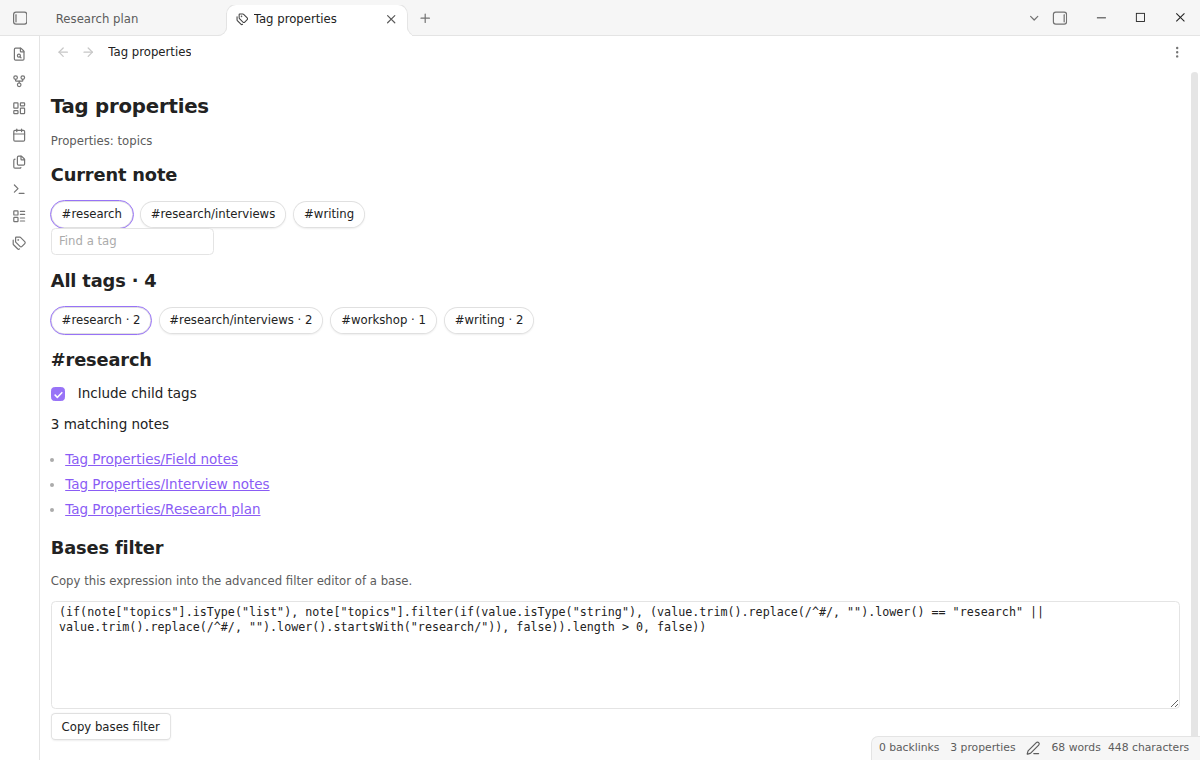
Tags can use paths such as research/interviews. A selection normally matches the exact tag. Turn on “Include child tags” to include the selected path and everything below it. Selecting work can then include work/review, but does not include workshop. Notes with both a parent and a child appear once in the result list.
Type part of a tag in “Find a tag” to narrow the buttons. This changes the visible tag list while keeping the selected tag and its results available. Clear the field to see every tag again.
Reuse the selection in Bases
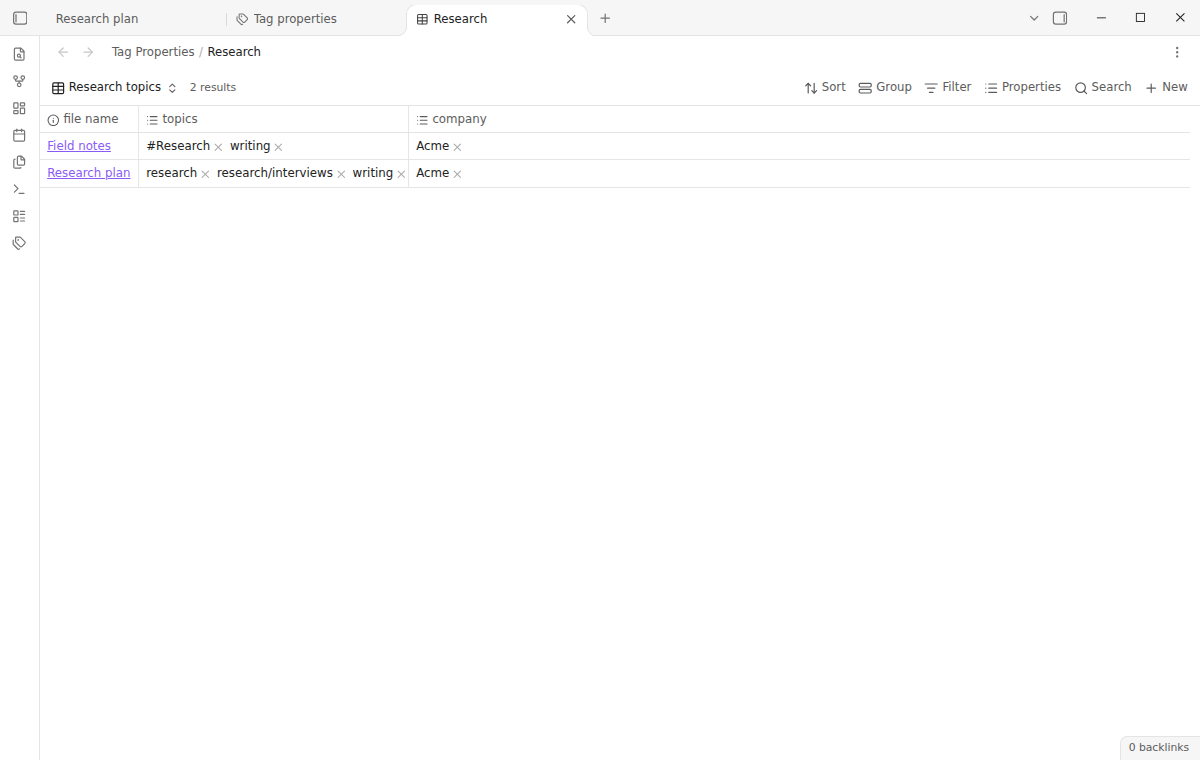
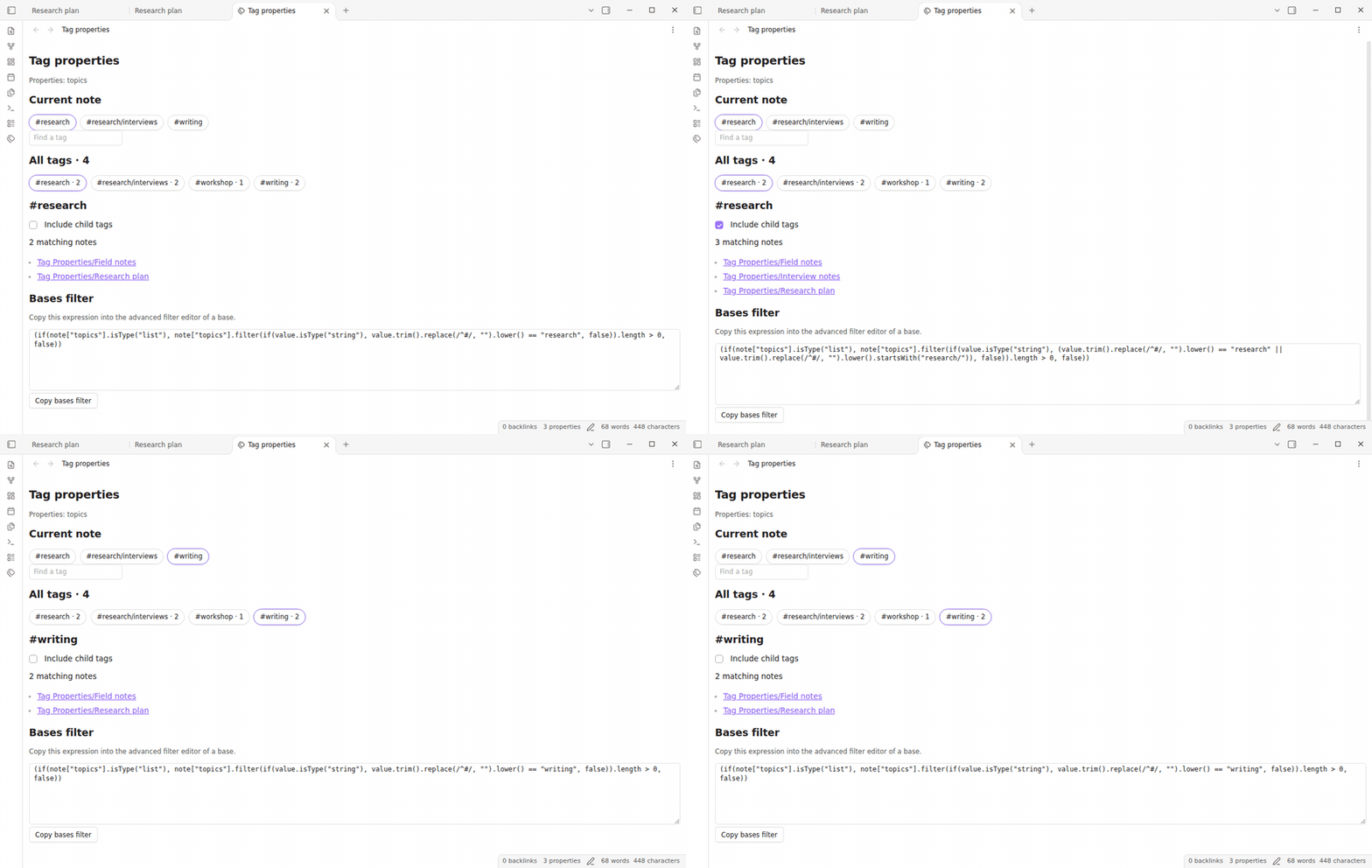
Each selection produces a native Bases filter. Select “Copy bases filter”, open a base's advanced filter editor, and paste the expression. It handles hash prefixes, letter case, outside whitespace and child tags using the same rules as the plugin view. Property names are quoted, so a space or a quote in a name does not break the expression.
The expression checks for a list before it examines values, and checks each item's type before treating it as text. Missing properties and malformed values do not count as matches. You can use the expression alongside your other filters and keep your existing table, cards or list layout. The plugin does not write to the base file. A copied filter stays in the base if you disable Tag Properties.
Combine properties with Pro
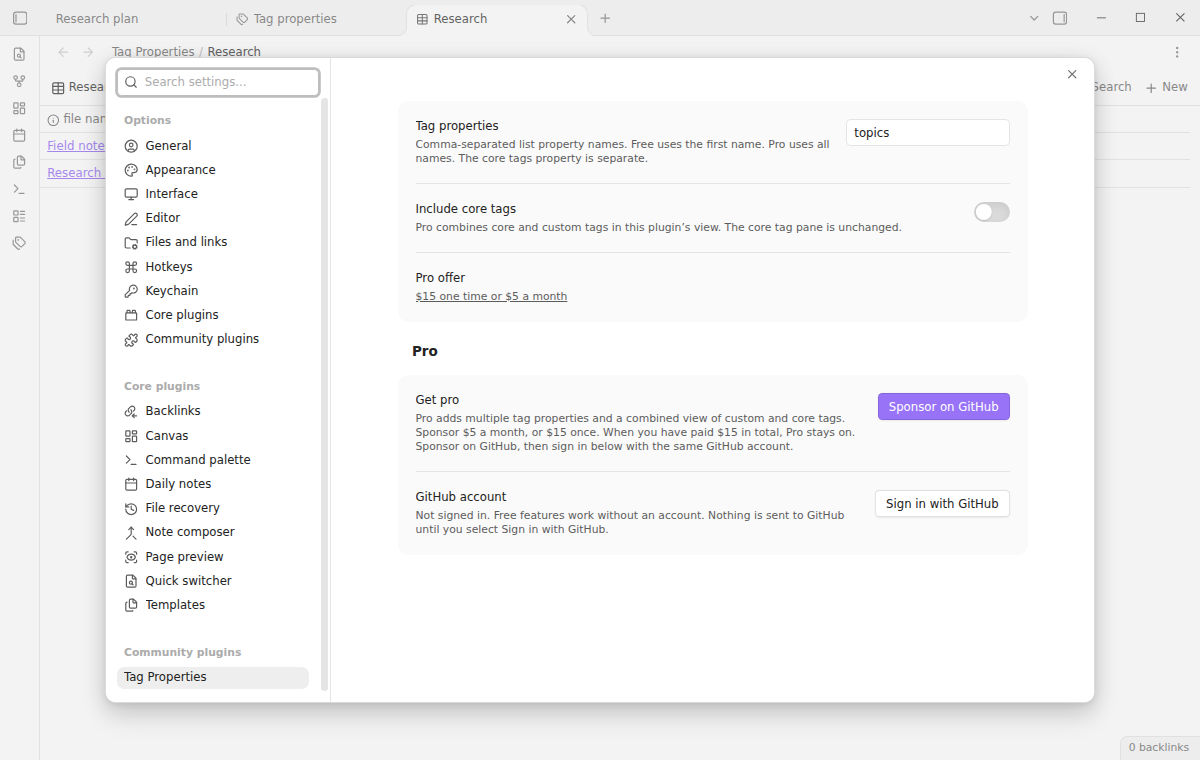
Enter several property names to browse topics, companies and other lists together with Pro. A note that uses the same tag in several selected properties still contributes one count. Turn on “Include core tags” to add built-in tags and body hashtags to this plugin's view too. Core and custom occurrences in one note share one result.
Free mode uses the first configured property. If Pro becomes inactive, your full configuration stays saved and the first property continues to work. Your notes and lists are never changed. Pro does not impose a new storage format.
Install
Tag Properties needs Obsidian 1.13.4 or newer and supports desktop and mobile. Once it is listed, open Settings, Community plugins, Browse, search for “Tag Properties”, and select Install and Enable.
For a manual installation, copy main.js, manifest.json and styles.css from a release into <vault>/.obsidian/plugins/tag-properties/. Reload community plugins and enable it. No account is needed to use the free tier.
Usage
- Add a List property named
topicsto a note. - Add values such as
research,writingandresearch/interviews. - Run “Tag Properties: Open custom tags”.
- Select a tag, then open a matching note or copy the Bases filter.
In YAML, the property can look like this:
topics:
  - research
  - "#writing"
  - research/interviews
Quote values that start with a hash when you edit YAML directly. An unquoted hash starts a YAML comment. A plain text property containing research is not a list and is ignored. Change its property type to List if you want it indexed.
Settings
| Setting | Default | Effect |
|---|---|---|
| Tag properties | topics |
Comma-separated property names. Free uses the first; Pro uses all. |
| Include core tags | Off | Pro adds core tags to this plugin's combined view. |
| GitHub account | Signed out | Optional sign-in to check Pro access. |
Property names must match your YAML keys. Empty entries, duplicate names and the built-in tags name are ignored. Use the separate core-tag switch for that source. Change settings at any time; browsing does not migrate or rewrite notes.
FAQ
Does this add a new core property type?
It provides a separate tag view using public APIs. The built-in Properties editor keeps its List control, and Obsidian's core tag pane, search index and graph are unchanged. Custom tags are clickable in the Tag Properties view. Use the generated expression for Bases filtering.
Which values are valid?
A tag can contain Unicode letters, combining marks, numbers, underscore characters, hyphens and slashes between nonempty parts. It must contain a letter, underscore or hyphen. Blank entries, numeric-only tags, spaces inside a tag, links, objects and other non-string items are skipped. A single leading hash and outside whitespace are removed for comparison. Case is folded; accents and Unicode composition remain significant.
Can I rename tags across my vault?
This version only reads your properties. Edit values through the normal Properties editor. It does not provide a bulk rename command or silently duplicate custom values under tags.
Payment, account and network
The core features are free. Pro features need a GitHub Sponsors sponsorship of theluckystrike: $5 a month or more, or $15 once. A total payment of $15 meets the payment requirement for Pro without further payment. Sign-in and the checks below still apply. Your notes stay readable and editable with or without Pro.
GitHub handles the payment. Sponsor at https://github.com/sponsors/theluckystrike. You need no account for the free features. Pro needs the GitHub account that sponsors.
Until you select "Sign in with GitHub" in the settings, Tag Properties makes no network requests. Sign in uses the GitHub device flow. Tag Properties sends its public client ID and the scope read:user to https://github.com/login/device/code and shows you a code. While you enter the code at https://github.com/login/device, it asks https://github.com/login/oauth/access_token every few seconds to check the sign-in status. The scope permits profile reads only. GitHub needs this access to show the sponsorship tier. It grants no repository scope and no write access.
After sign in, Tag Properties sends one query to https://api.github.com/graphql. It checks if the signed-in account sponsors theluckystrike. It asks for the tier and the total payment to theluckystrike. The plugin reuses a successful check for 7 days. Failed checks can retry after 6 hours. Select Refresh to request an earlier check. It sends no note content, file names or other vault data, and it has no telemetry.
After a successful check, Pro can work offline for up to 14 days. Sign out or a negative sponsorship answer turns Pro off. The plugin stores the GitHub token through the secret storage API of Obsidian. It does not put the token in its saved settings or its local sponsorship data. The local storage of this device keeps your GitHub login, the tier and the time of the last check. Sign out clears the token. You can also revoke the access in your GitHub settings, under Applications.
Support
Report bugs in this repository's issue tracker with your app version, property name and a small sample list that reproduces the problem. Remove private note content before sharing it. Include the generated expression if the problem concerns Bases.
Find the other tools and support information at NoteMods. Source code is available under the MIT license. To build a standalone export, run npm ci, npm run build, npm run lint and npm test.