Syntax Palette
 Frank84 downloads
Syntax coloring for Markdown fenced code, with 15 theme families and optional backgrounds, line numbers, and editor wrapping.
- Overview
- Scorecard
- Updates3
Syntax Palette
Make code blocks look the way you like.
Choose a syntax color palette for Markdown code blocks without changing the rest of your Obsidian theme. Your notes, app colors, and other parts of Obsidian keep their usual look.
See it in Obsidian
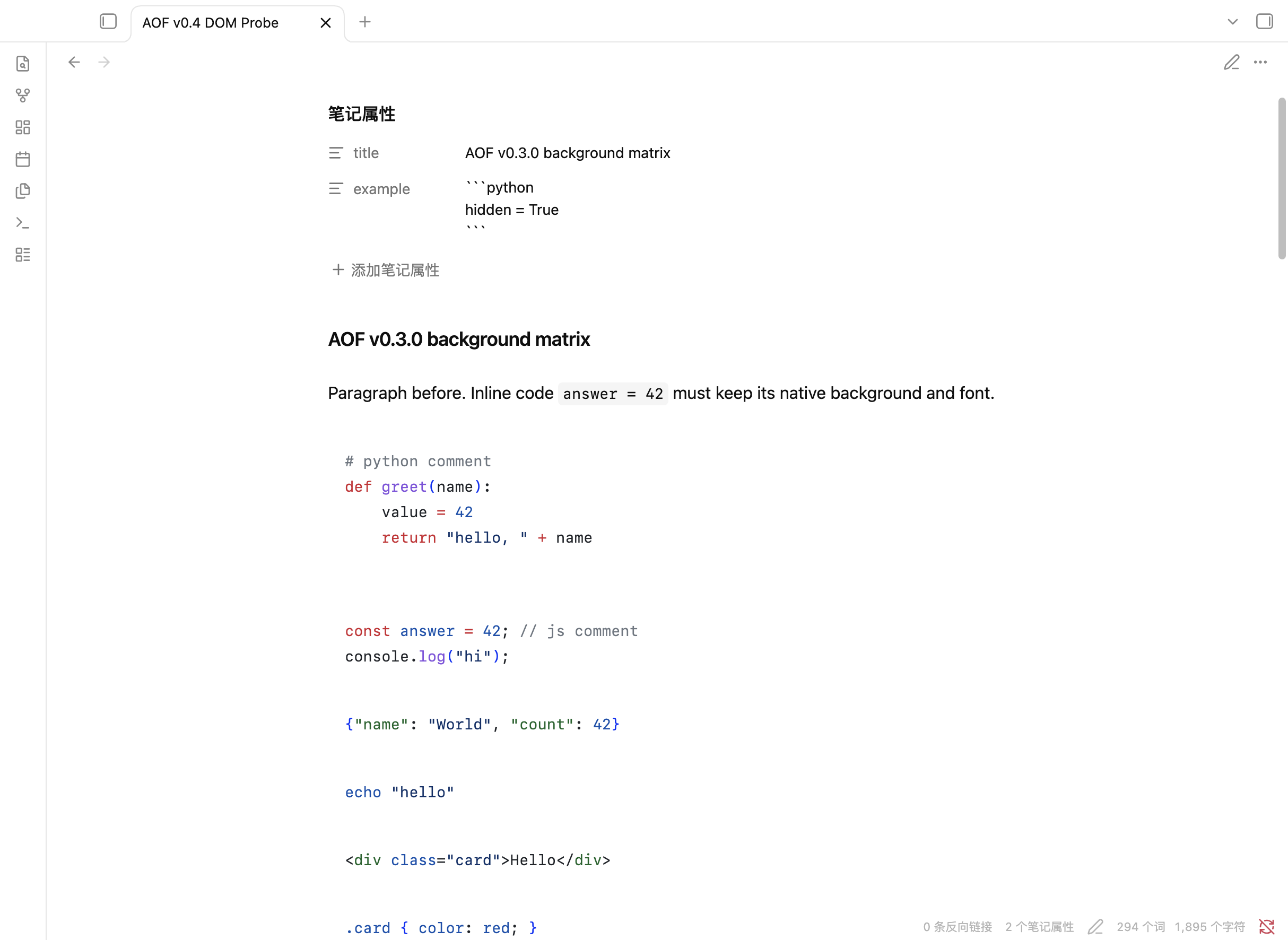
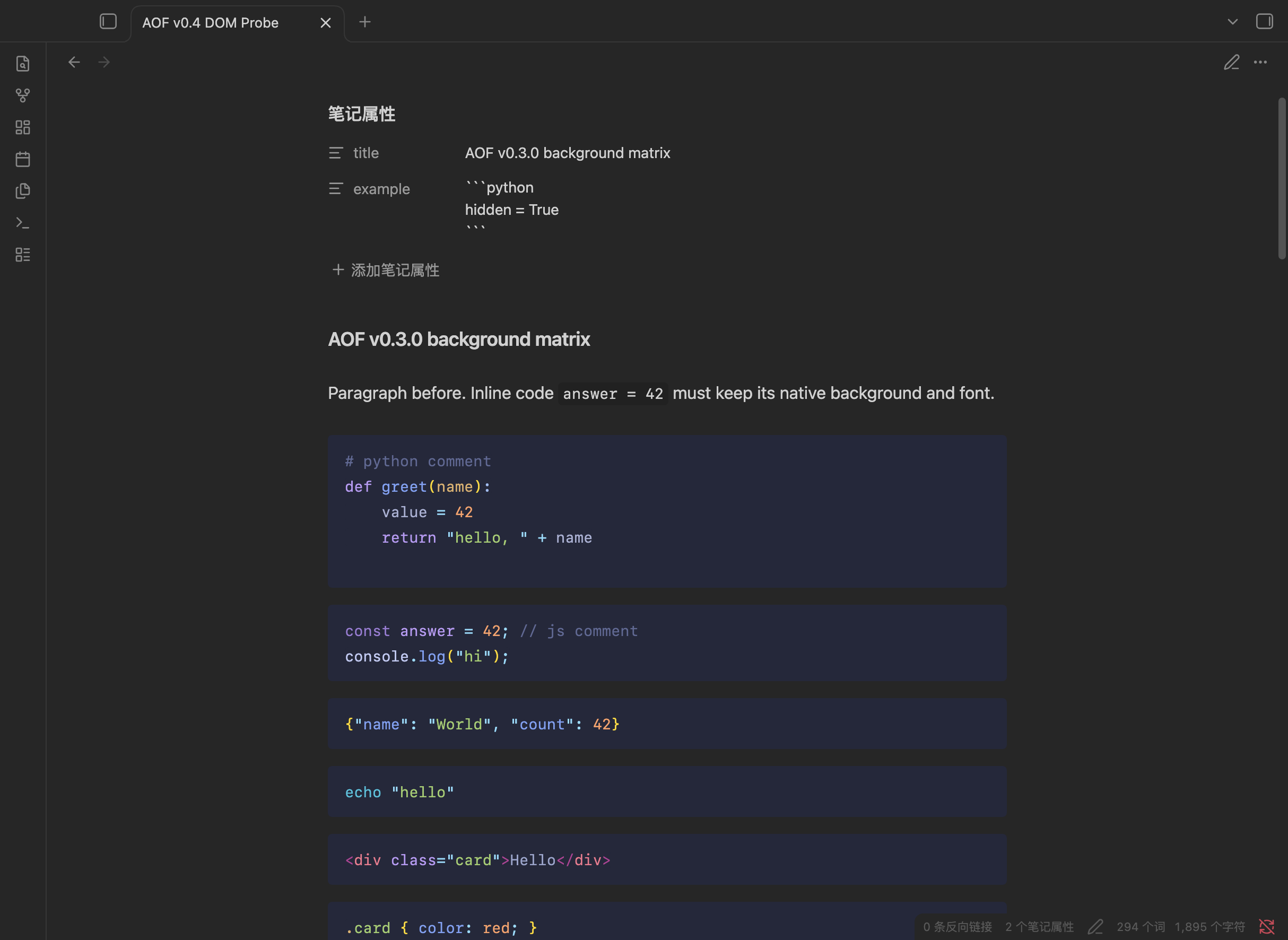
Light and dark appearances with different code palettes.
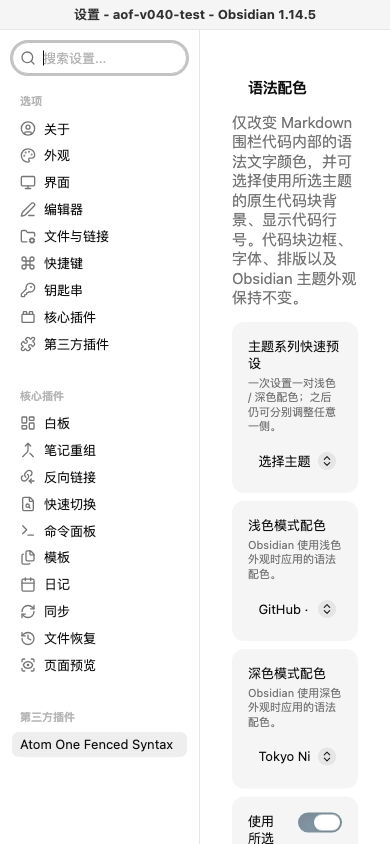
The settings page lets you choose palettes and optional code-block features.
These are genuine screenshots from an isolated Obsidian test vault, captured with the v0.5.2 development build before the plugin was renamed from Atom One Fenced Syntax. The settings screenshot still shows that earlier name; the code colors and controls shown are real.
What changes — and what stays the same
Obsidian's theme controls the whole app. Syntax Palette gives Markdown fenced code blocks their own color choices, so you can keep your favorite Obsidian theme and choose code colors that suit you.
The palette applies inside fenced code blocks. It does not recolor regular text or inline code, and it never edits your Markdown content. An optional setting can also change the fenced block's background.
Choose a palette
Pick from 39 color variants across 15 theme families, including GitHub, Atom One, Catppuccin, Tokyo Night, Ayu, Dracula, Nord, and more. Choose a light palette and a dark palette separately, so each follows the matching Obsidian appearance.
You can also:
- Turn code-block backgrounds on or off. They are off by default.
- Show line numbers, with each code block starting at 1. They are off by default and are not copied into your notes.
- Choose whether long lines wrap in the editor (off by default). With wrapping off, each code block scrolls horizontally on its own; the rest of the note stays put.
- Keep Obsidian's normal wrapping for regular text. The code-wrapping option only affects fenced code in the editor.
Syntax coloring is available for common languages including Python, JavaScript and TypeScript, JSON, Bash, HTML, and CSS. Unsupported or untagged code blocks keep Obsidian's own syntax colors.
How to use it
Once Syntax Palette is installed:
- Open Settings → Community plugins → Syntax Palette.
- Choose a palette for Light mode and another for Dark mode. You can use a family preset first, then adjust either choice separately.
- Turn on code-block backgrounds or line numbers if you want them.
- Set editor code wrapping to match how you like to read long lines.
Changes apply immediately and are saved for your next Obsidian session.
Availability and installation
Check the GitHub releases and Obsidian Community plugins for the current publication status. This source build's experimental mobile support has not yet been validated on mobile devices.
To install a published release manually, download main.js, manifest.json, and styles.css from the GitHub release. Put all three files in your vault's .obsidian/plugins/syntax-palette/ folder, reload Obsidian, and enable Syntax Palette under Settings → Community plugins. These three files contain everything the plugin needs; no additional WASM file is required.
For a local source build, use those same three files from plugin/syntax-palette/. See the installation notes.
Compatibility and known limits
- Mobile installation is enabled for iOS, iPadOS, and Android as an experimental target. Real-device testing is still needed, especially for touch scrolling, selection, keyboard input, and rotation.
- macOS has been tested with Obsidian 1.14.5. Windows and Linux are target platforms but have not yet been tested on those systems.
- Pop-out windows are not supported.
- The 39 built-in palettes cannot be extended with custom theme files.
- When editor wrapping is off, long code lines use horizontal scrolling inside each fenced block.
- On a narrow screen, enabling editor code wrapping can make long lines easier to edit.
For developers
The plugin source is in plugin-src/; bundled theme data, source details, and third-party license texts are in sources/. The build embeds the Oniguruma WASM payload into main.js, so the Community Plugins file set does not need a separate runtime asset. Full third-party notices ship in both main.js and THIRD-PARTY-NOTICES.txt. See theme provenance for theme credits and licensing, and development guide for the development and testing notes.
To build from source:
npm ci
npm run verify
npm run build
npm run package
npm run verify-build
License
Public author: Frank. This project credit does not establish copyright ownership of historical code or third-party resources.
Syntax Palette's own project code is offered under the Apache License 2.0. Bundled themes, grammar files, parser-derived code, and runtime components keep their original licenses; see THIRD-PARTY-NOTICES.txt for the notices and full license texts. The theme snapshots and their exact versions are documented in THEME-PROVENANCE.md.
Before contributing, please open an issue to discuss the change. See LICENSE-AUDIT.md and RELEASE-AUDIT.md for the current owner-review items.