Sync Vault
 abcamus14k downloads
Free your Obsidian vault from disk limits: zero-space VFS keeps files in the cloud with near-zero local storage and streams 4K video on demand. Encrypted sync across devices, MCP AI engine, P2P collab
- Overview
- Scorecard
- Updates87
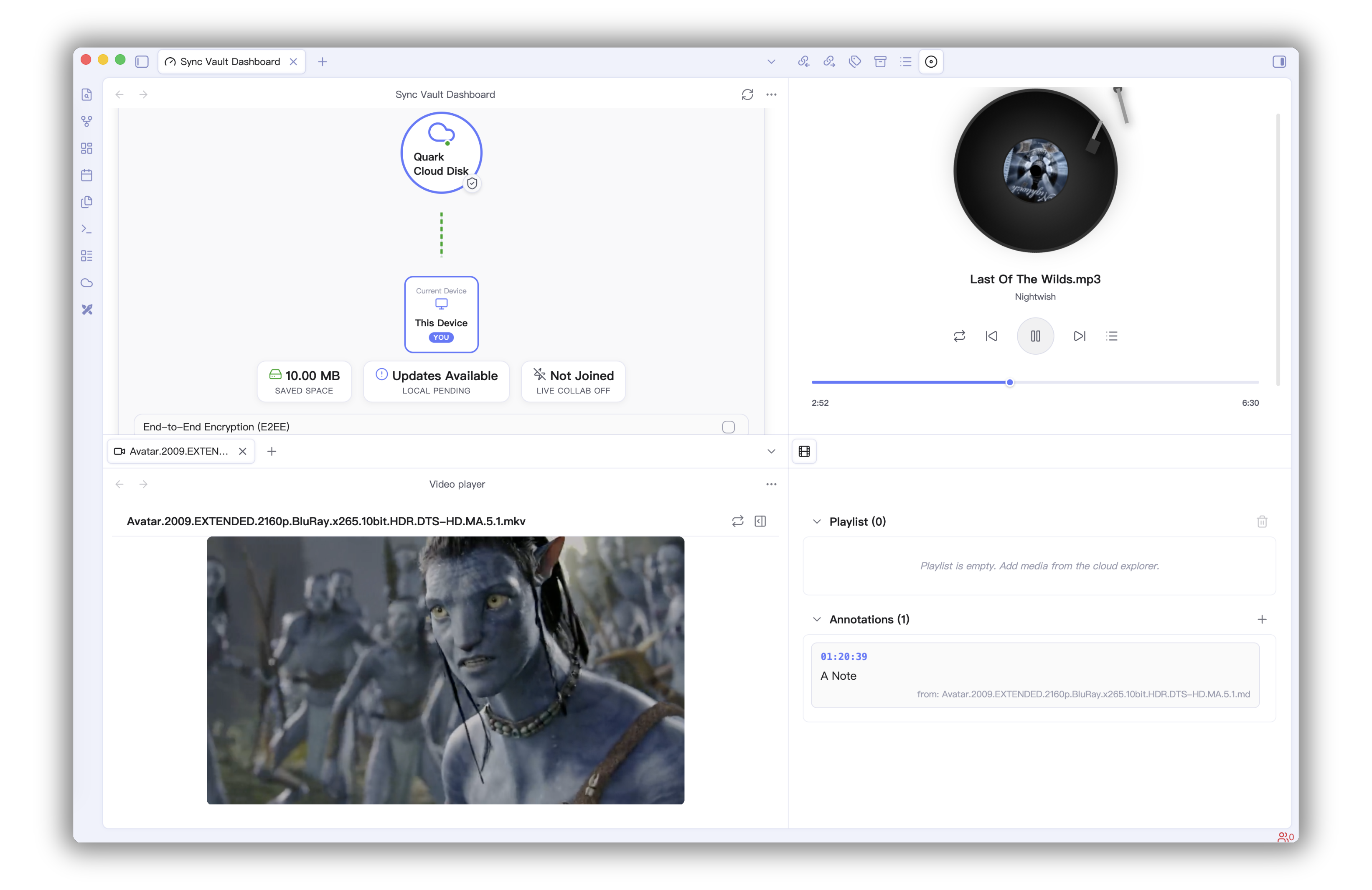
The missing bridge between your 10 TB cloud drive and your AI brain. Access, sync, and link everything—images, PDFs, audio, video—across devices without filling up local storage.
Key Features
🔗 Link Notes and Cloud Resources
Generate links based on file ID and path, integrated into Obsidian notes after rendering.
[]()format to link cloud resources.![]()format to embed cloud resources.
🤖 MCP Server
Built-in Model Context Protocol (MCP) Server, allowing LLMs / AI Agents to directly access and operate on files in your Cloud Storage.
- Compatible with MCP-supported clients such as Claude Code and Cursor.
- Provides real-time context access via SSE (Server-Sent Events).
🛠️ MCP Tool Capabilities
| Tool Name | Description | Note |
|---|---|---|
get_cloud_account_info |
Get cloud account and storage capacity info | |
list_cloud_files |
List files and folders at a specified cloud path | |
read_cloud_file |
Read cloud file content (supports streaming) | |
create_cloud_file |
Create a new file or folder in the cloud | |
delete_cloud_file |
Delete a cloud file or folder | |
move_cloud_file |
Move a cloud file or folder | |
rename_cloud_file |
Rename a cloud file or folder | |
download_cloud_file |
Download a cloud file to local storage | |
upload_cloud_file |
Upload a local file to the cloud | |
semantic_search |
Global search based on semantics | Baidu Netdisk only |
sharelink_set |
Set/Create a sharing link | Baidu Netdisk only |
upload_by_url |
Upload via offline URL task | Baidu Netdisk only |
💻 CLI Commands (1.13.0)
Sync Vault provides Obsidian CLI commands for automation scripts and AI Agent workflows:
| Command | Purpose | Common Parameters |
|---|---|---|
sync-vault:help |
Show CLI command help | help=true |
sync-vault:list |
List cloud directory files (pagination/filter/recursive) | path cloud limit offset type minSize modifiedAfter recursive |
sync-vault:search |
Search cloud files (with pagination/type filter) | query cloud limit offset path type |
sync-vault:read |
Read cloud file content | path cloud maxLength |
sync-vault:info |
Get account and storage status | cloud |
sync-vault:doctor |
Diagnose Sync Vault health status | cloud |
Common examples:
obsidian sync-vault:list path=/ cloud=aliyun limit=100 offset=0
obsidian sync-vault:search query=obsidian cloud=quark type=markdown
obsidian sync-vault:read path=/Notes/Welcome.md cloud=onedrive maxLength=8192
obsidian sync-vault:info cloud=aliyun
obsidian sync-vault:doctor cloud=aliyun
Tip: all sub-commands support
help=trueto show command-specific usage.
✨ Backup
- Easily upload data to various cloud drives.
- Freely switch cloud vaults and backup data to multiple directories.
🔄 Multi-device Auto Sync
Baidu Netdisk Bi-directional Sync Demo
- Supports bi-directional and one-way sync, automatically identifies file deletion & move operations.
- Automatic merge of content conflicts.
- File deletion is recoverable.
- Ignore large files, ignore files by name using regular expressions.
- Sync third-party plugins and themes.
- End-to-end encryption for Markdown files.
🤝 Collaborative Editing
Distributed collaborative editing, Demo.
📱 Cloud Service Features
| No. | Cloud Service | Supported Features |
|---|---|---|
| 1 | Baidu Netdisk | Backup, Sync, Online Image Preview, Online PDF Reading, Video Playback, Audio Playback, Cloud Link |
| 2 | OneDrive | Backup, Sync, Online Image Preview, Online PDF Reading, Audio Playback, Video Playback, Cloud Link |
| 3 | Aliyun Drive | Backup, Sync, Online Image Preview, Online PDF Reading, Audio Playback, Video Playback, Cloud Link |
| 4 | 115 Drive | Online Image Preview, Online PDF Reading, Audio Playback, Video Playback, Cloud Link |
| 5 | Quark Drive | Backup, Sync, Online Image Preview, Online PDF Reading, Cloud Link |
| 6 | Tencent COS | Backup, Sync |
| 7 | Nutstore | Backup, Sync |
| 8 | InfiniCloud | Backup, Sync |
| 9 | 123 Pan | Backup, Sync |
⚙️ Installation and Usage
Install from Plugin Market
Search for sync vault ce in the plugin market, or click here to install quickly.
Get Started
- Click the ☁️ icon in the sidebar to open the dashboard, then find the "Beginner Guide" button in the Quick Actions card.
- Click the Beginner Guide button and follow the prompts to complete cloud drive login and sync mode settings.
Configure MCP (SSE)
Claude Code CLI
Add the following code in .claude/mcp.json (Note: change 3000 to the actual port):
{
  "mcpServers": {
    "sync-vault-mcp": {
      "type": "sse",
      "url": "http://127.0.0.1:3000/sse"
    }
  }
}
Claude Desktop
Since Claude Desktop only supports STDIO method to connect MCP Server, you can choose a bridge to connect Sync Vault MCP. Here you can choose sse-bridge.
npm install -g @mcpwizard/sse-bridge- In Claude Desktop [Settings] - [Developer], click the edit configuration button, copy and paste the following code.
{
  "mcpServers": {
    "sync-vault-mcp": {
      "command": "npx",
      "args": [
        "@mcpwizard/sse-bridge",
        "http://127.0.0.1:3000/sse"
      ]
    }
  }
}
Cursor/Trae
In Cursor/Trae's MCP settings, choose to manually add MCP Server (Sync Vault MCP defaults to http://127.0.0.1:3000/sse).
{
  "mcpServers": {
    "sync-vault-mcp": {
      "type": "sse",
      "url": "http://127.0.0.1:3000/sse"
    }
  }
}
🗺️ Roadmap
- 🌐 More Cloud Services
- 🏠 Collaborative Editing
- 🎨 Better User Experience
- ⎔ Zotero Support
- 🤖 AI Infrastructure