PML Syntax Highlighting
 Mouiz LANIKPEKOUN146 downloads
Syntax highlighting for AVEVA PML/PML2 code: ```pml blocks in notes, and raw .pml, .pmlobj, .pmlfnc, .pmlfrm, .pmlmac, .pmlcmd files opened directly.
- Overview
- Scorecard
- Updates8
Colors AVEVA PML (Programmable Macro Language, PML1 and PML2) code: ```pml fenced blocks in notes (Reading mode and Live Preview), and raw .pml, .pmlobj, .pmlfnc, .pmlfrm, .pmlmac, .pmlcmd files opened directly. Also folds PML blocks.
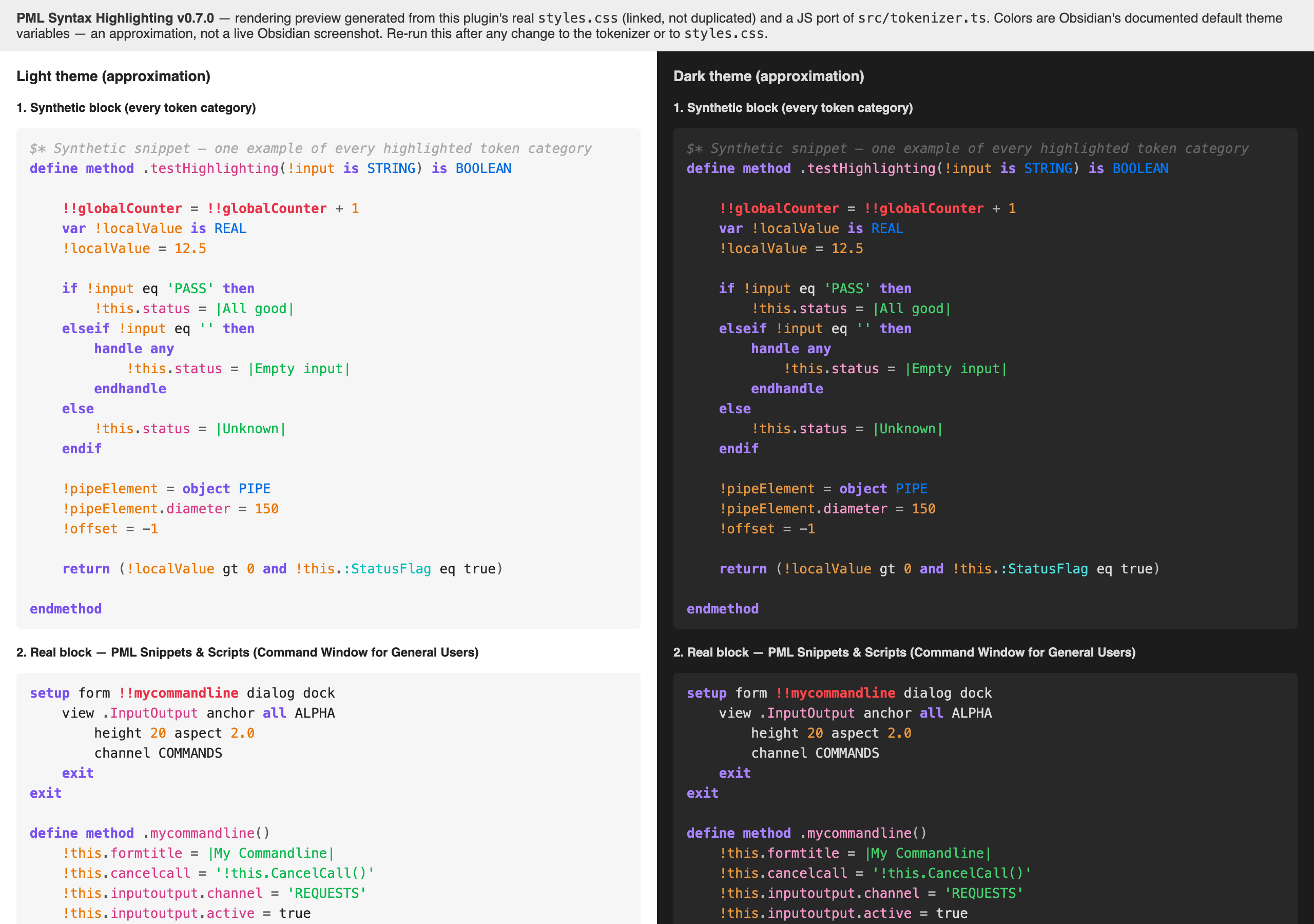
Generated by preview.html from the plugin's real styles.css and a JS port of src/tokenizer.ts. Colors are Obsidian's documented default theme variables, so this is a faithful approximation rather than a live screenshot of one particular theme.
Coverage
- Comments (
$* ...) - Strings (
'...',|...|) - Local variables (
!var) and global variables (!!var) - UDA/attribute references (
:attribute) - Keywords (
define,method,endmethod,if/then/endif,do/enddo,handle any/endhandle, …) - Built-in types (
STRING,ARRAY,REAL,DBREF, …), plus user-defined extra type words (module-specific DB elements) - Numbers
- Method and member names after a
.(!obj.method(),!!ce.owner.name,define method .foo()) - Raw
.pml-family files open in their own editable view (line numbers, undo/redo, same highlighting) - Code folding for
if/endif,do/enddo,define method|function|object/end...,setup form/endsetup,handle/endhandle, in both fenced blocks and raw files - Settings tab: toggle Reading mode / Live Preview / raw-file highlighting / folding independently, per-category color overrides
Not a language server: no autocompletion, no error diagnostics, no cross-file symbol resolution. Visual coloring plus light editing aids (folding, an editable raw-file view).
Install
From Obsidian: Settings → Community plugins → Browse → search "PML Syntax Highlighting" → Install → Enable.
Manual install: download main.js, manifest.json and styles.css from the latest release, copy them into <vault>/.obsidian/plugins/syd-pml-highlight/, then enable "PML Syntax Highlighting" in Obsidian's Community Plugins settings. To build the files yourself, see Dev below.
Requires Obsidian 1.13.0 or later.
Dev
npm install --legacy-peer-deps
npm run build   # writes main.js; with manifest.json and styles.css, that is the whole plugin
npm run dev     # esbuild watch mode
--legacy-peer-deps is required: the obsidian devDependency's own peer dependency on @codemirror/state is newer than the version this repo pins directly, and plain npm install refuses to resolve that conflict (ERESOLVE). It's harmless here — Obsidian provides the real CodeMirror modules at runtime (see esbuild.config.mjs's external list); these devDependencies only exist for TypeScript's type-checking.
Rendering preview
preview.html renders the shipped styles.css against a JS port of the tokenizer, using Obsidian's documented default theme colors (light + dark), without needing Obsidian open. Useful to catch coloring issues before a real in-app check.
npm run preview # serves the repo at http://localhost:4321/preview.html
Open the URL, and (optionally) screenshot both panels. The tokenizer in preview.html is a manual port of tokenizePmlLine/KEYWORDS/TYPES/TOKEN_RE in src/tokenizer.ts — if you change any of those, update preview.html to match, and add new coverage to its BLOCKS array. A new token class also needs its theme variable declared in preview.html's own :root blocks, which only define the colors currently in use: without it the token renders in the default text color and the preview silently understates the change. This is a close approximation of Obsidian's real rendering, not a substitute for actually checking inside Obsidian.
Feedback, license and affiliation
Bugs and requests: GitHub issues. MIT license.
This is an independent personal project, not affiliated with, endorsed by or sponsored by AVEVA. AVEVA is named only to say which language the plugin colors.