
- Overview
- Scorecard
- Updates14
Note: This is an unofficial way to sync and back up your notes. Obsidian Sync is the official supported option.
Demo
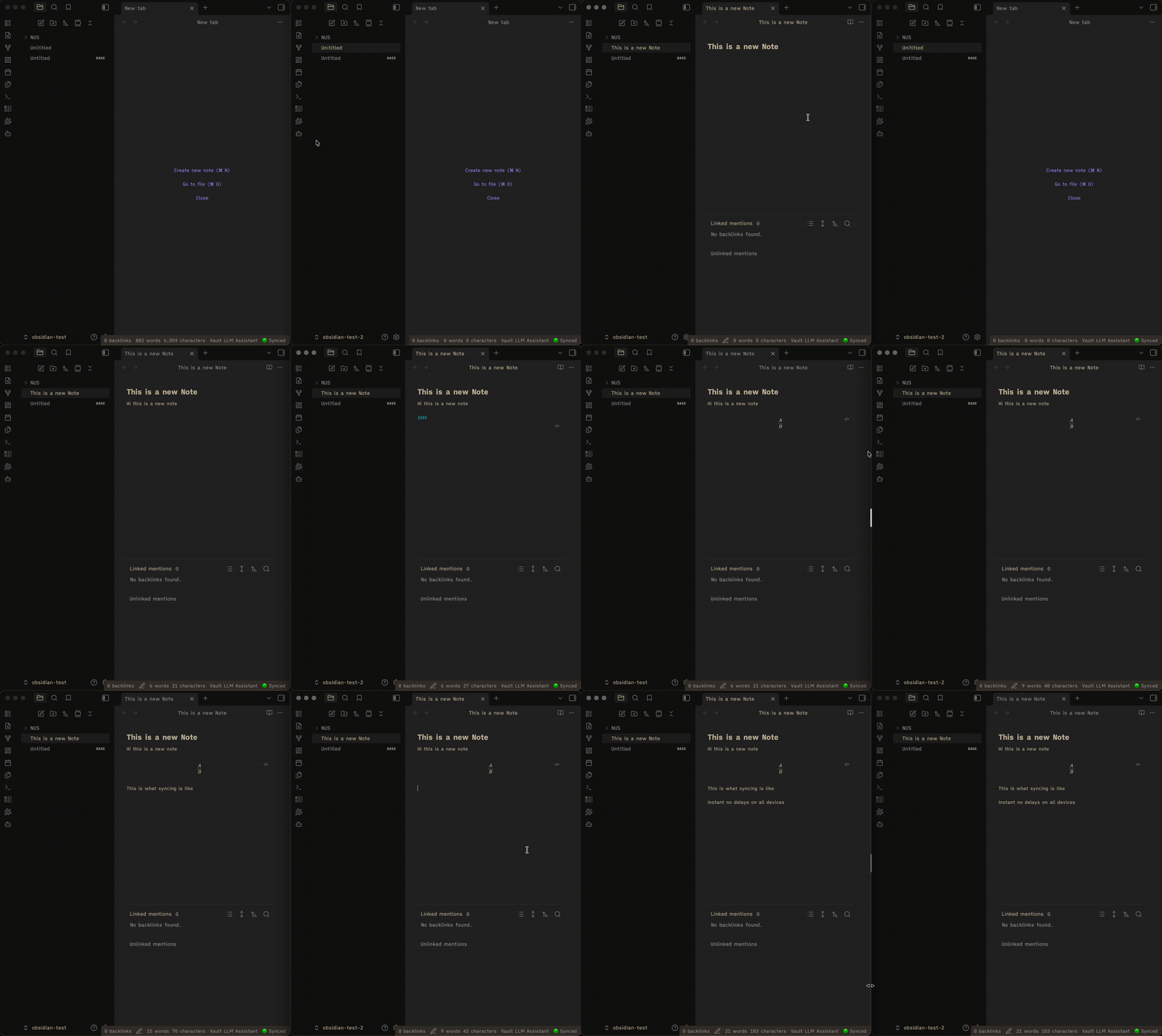
If the video is blurry, you can download it here.
Features
- Real-time collaborative editing - Two devices sharing the same account can edit the same note at the same time. Yjs CRDTs handle merging automatically; updates broadcast instantly as you type with no duplication.
- Real-time sync - Changes propagate across all your devices via Supabase Realtime
- Conflict resolution - Newer files always win (based on modification time)
- Binary file support - Images, PDFs, and other attachments sync via Supabase Storage
- Frontmatter parsing - Properties and tags from markdown frontmatter are stored in dedicated columns for SQL querying
- Selective sync - Exclude specific folders from syncing
- Settings sync - The
.obsidian/folder syncs automatically to share themes, snippets, and plugin settings across devices - Platform-specific config - Choose which config files sync only to mobile or only to desktop (e.g. keep separate themes or plugin lists per platform)
- Self-hosted support - Works with any Supabase-compatible instance, not just supabase.com
- Mobile compatible - Works on both desktop and mobile Obsidian
- One-click setup - Automated database and storage configuration
- Offline-first - Local changes are queued and synced when you reconnect
Quick Start
1. Create a Supabase Project
- Go to supabase.com and create a free account
- Create a new project
- Copy your Project URL and anon/public key from Settings → API
2. Install the Plugin
The plugin is pending review in the community plugin store. Install it via BRAT (recommended) or manually in the meantime.
Install via BRAT (Recommended)
BRAT lets you install and auto-update beta plugins directly from GitHub.
- Install the BRAT plugin from the Obsidian Community Plugins store
- Open Settings → BRAT → Add Beta Plugin
- Paste the repo URL:
https://github.com/brianstm/obsidian-supabase-jump - Click Add Plugin - BRAT will install it and keep it up to date automatically
Manual Installation
- Download
main.jsandmanifest.jsonfrom the latest release - Create a folder:
<vault>/.obsidian/plugins/supabase-jump/ - Copy the files into that folder
- Reload Obsidian and enable the plugin in Settings → Community plugins
3. Configure the Plugin
- Open Settings → SupaBase Jump
- In the Initial setup section:
- Generate a Personal Access Token at supabase.com/dashboard/account/tokens
- Paste it into the Personal access token field
- Click Run full setup - this creates the database table, storage bucket, and enables Realtime
- Fill in your credentials:
- Project URL - Your Supabase project URL (e.g.
https://xxxxx.supabase.co) - Anon/public key - Your anon/public key
- Email - Your Supabase account email
- Password - Your Supabase account password
- Project URL - Your Supabase project URL (e.g.
- Click Connect
That's it! Your vault will start syncing automatically.
Usage
Automatic Sync
Once connected, the plugin automatically:
- Pushes local changes to Supabase (debounced by 1 second)
- Pulls remote changes from other devices in real time
- Syncs on startup (if Sync on startup is enabled)
- Syncs periodically based on your Sync interval setting
Real-Time Collaborative Editing
When two devices open the same markdown note, they join an ephemeral Supabase Realtime channel for that file. Edits are merged using Yjs CRDTs. Changes appear on the other device instantly as you type, with no full-document replacement or text duplication. The Yjs state is kept only in memory; once you close the note the channel is released and normal mtime-based conflict resolution takes over.
Platform-Specific Config Paths
In Settings → Platform-specific config paths, toggle which Obsidian config files should sync only to the current platform (mobile or desktop):
| Toggle | Path | Example use |
|---|---|---|
| Appearance | appearance.json |
Different theme on mobile |
| Themes folder | themes/ |
Mobile-only themes |
| CSS Snippets | snippets/ |
Mobile/desktop-only CSS |
| All plugins | plugins/ |
Desktop-only plugin data |
| Installed plugins list | community-plugins.json |
Different plugins per platform |
| Custom hotkeys | hotkeys.json |
Different shortcuts on mobile |
| Workspace layout | workspace.json |
Different pane layout |
Use the Custom paths field to add any other paths not listed above.
When a file matches a platform-specific path, it is tagged in the database (platform = 'mobile' or platform = 'desktop'). Pull operations skip rows tagged for a different platform.
Manual Sync
Use the Actions section in settings:
- Sync now - Full two-way sync (push + pull)
- Fetch now - Pull remote changes without pushing local files
Or use the command palette:
SupaBase Jump: Force sync nowSupaBase Jump: Fetch from databaseSupaBase Jump: Show sync status
Exclude Folders
To exclude folders from syncing, add them to Excluded folders (comma-separated) in settings.
Example: Templates, archive/old
By default no folders are excluded. If you want to prevent vault settings from syncing entirely, add .obsidian to your excluded list (or use the platform-specific config paths feature for finer control).
Self-Hosted Supabase
The plugin works with any Supabase-compatible URL. Enter your self-hosted instance URL in the Project URL field. Note that the one-click setup uses the Supabase cloud management API, so for self-hosted instances you will need to run the SQL manually using the guide in the settings panel.
How It Works
Architecture
- Text files (
.md,.txt, etc.) - Content stored directly in thevault_filesPostgreSQL table - Binary files (images, PDFs, etc.) - Uploaded to Supabase Storage; metadata in
vault_files - Database sync - Supabase Realtime broadcasts row changes to all connected clients for file-level sync
- Live editing sync - A per-file Supabase Broadcast channel carries Yjs CRDT updates for same-note co-editing
- Conflict resolution - Higher
mtime(modification time) wins for file-level sync; Yjs handles in-session edits automatically
Database Schema
The plugin creates a vault_files table with:
| Column | Type | Description |
|---|---|---|
id |
text (PK) | {vaultId}::{filePath} (slashes → __SLASH__) |
vault_id |
text | Unique ID for your vault |
path |
text | File path relative to vault root |
content |
text | File content (text files only) |
storage_path |
text | Supabase Storage key (binary files only) |
frontmatter |
jsonb | All YAML frontmatter properties |
tags |
text[] | Tags extracted from the tags: frontmatter field |
platform |
text | 'all', 'mobile', or 'desktop' |
mtime, ctime, size |
bigint | File metadata |
deleted |
boolean | Soft-delete flag |
user_id |
uuid | Used by RLS to scope rows to each user |
Querying Frontmatter from Supabase
Once notes are synced you can query them directly from the Supabase SQL editor or any Postgres client:
-- All notes tagged "book"
SELECT path, frontmatter->>'title', tags
FROM vault_files
WHERE 'book' = ANY(tags) AND deleted = false;

-- Notes where status is not "done"
SELECT path, frontmatter->>'status'
FROM vault_files
WHERE frontmatter->>'status' != 'done' AND deleted = false;

-- Notes by a specific author, sorted by date
SELECT path, frontmatter->>'date'
FROM vault_files
WHERE frontmatter->>'author' = 'Alice'
ORDER BY frontmatter->>'date' DESC;

-- Count notes per tag
SELECT tag, COUNT(*)
FROM vault_files, unnest(tags) AS tag
WHERE deleted = false
GROUP BY tag ORDER BY count DESC;

-- Desktop-only config files
SELECT path FROM vault_files
WHERE platform = 'desktop' AND deleted = false;
Storage Bucket
Binary files are stored in a private vault-attachments bucket with:
- RLS policies ensuring users can only access their own files
- Base64url-encoded keys to handle special characters in filenames
- Original file extensions preserved for MIME type inference
Troubleshooting
"Setup failed at step 1/2/3"
- Step 1 (Database) - Check your Personal Access Token is valid and has the required permissions
- Step 2 (Storage bucket) - If auto-creation fails, manually create a bucket named
vault-attachments(Private) in Supabase → Storage - Step 3 (RLS policy) - Ensure your Supabase project has the
storageschema enabled
"Email not confirmed"
If you see this error after connecting:
- Check your email inbox for a confirmation link from Supabase
- Click the link to confirm your account
- Click Connect again in the plugin settings
Or disable email confirmation:
- Go to Supabase → Authentication → Providers → Email
- Uncheck "Confirm email"
Files not syncing
- Check the status bar (bottom-right) - it should show 🟢 Synced
- Open the browser console (Ctrl+Shift+I / Cmd+Option+I) and look for errors
- Verify your Vault ID is set in settings
- Check that the file path is not in your Excluded folders list
- Try Sync now manually from settings
Real-time editing not working
- Ensure both devices are connected (🟢 Synced in the status bar)
- Make sure both devices have the same file open
- Check the browser console for channel subscription errors
- The CRDT channel only activates for
.mdfiles in a MarkdownView
"Invalid key" errors
The plugin automatically handles special characters in filenames by base64url-encoding storage keys. If you still see this error:
- Ensure you are running the latest version of the plugin
- Check the browser console for the full error message
- Report the issue on GitHub with the filename
Development
Building from Source
git clone https://github.com/brianstm/obsidian-supabase-jump.git
cd obsidian-supabase-jump
npm install
npm run dev
npm run build
Project Structure
src/
├── main.ts            # Plugin entry point and lifecycle management
├── settings.ts        # Settings interface and UI
├── supabase.ts        # Supabase client and authentication
├── sync.ts            # File sync logic and Realtime listeners
├── realtime-crdt.ts   # Yjs CRDT manager for real-time co-editing
└── frontmatter.ts     # YAML frontmatter parser
Privacy & Security
- Your vault data is stored in your own Supabase project - not on third-party servers
- All database access uses Row Level Security (RLS) - you can only read and write your own files
- The CRDT broadcast channel is ephemeral - no Yjs state is persisted to the database
- Passwords are hashed by Supabase Auth - the plugin never stores plaintext passwords
- No telemetry or analytics - the plugin is fully open source
License
MIT - see LICENSE
Support
- Issues & Feature Requests - GitHub Issues
Acknowledgments
Built with:
- Obsidian Plugin API
- Supabase
- Supabase JS Client
- Yjs - CRDT library for real-time collaborative editing